https://github.com/nayandas69/linkinbio-nextjs
Beautiful link-in-bio portfolio with Next.js, Tailwind CSS, and Framer Motion. Dark/light mode, responsive design, YouTube integration.
https://github.com/nayandas69/linkinbio-nextjs
framer-motion link-in-bio modern-ui nextjs seo-optimization web-development
Last synced: 10 months ago
JSON representation
Beautiful link-in-bio portfolio with Next.js, Tailwind CSS, and Framer Motion. Dark/light mode, responsive design, YouTube integration.
- Host: GitHub
- URL: https://github.com/nayandas69/linkinbio-nextjs
- Owner: nayandas69
- License: mit
- Created: 2025-07-30T20:19:38.000Z (11 months ago)
- Default Branch: main
- Last Pushed: 2025-08-06T19:42:53.000Z (11 months ago)
- Last Synced: 2025-08-06T21:13:31.134Z (11 months ago)
- Topics: framer-motion, link-in-bio, modern-ui, nextjs, seo-optimization, web-development
- Language: TypeScript
- Homepage: https://linkinbio-nextjs-ashen.vercel.app
- Size: 3.18 MB
- Stars: 8
- Watchers: 2
- Forks: 3
- Open Issues: 0
-
Metadata Files:
- Readme: README.md
- Contributing: .github/CONTRIBUTING.md
- License: LICENSE
Awesome Lists containing this project
README
# Link in Bio - Modern Portfolio
A stunning, modern link-in-bio portfolio built with **Next.js 14**, featuring glassmorphism design, smooth animations, and responsive layout. Perfect for content creators, developers, and professionals who want to showcase their social presence and latest content.
## Pre-view
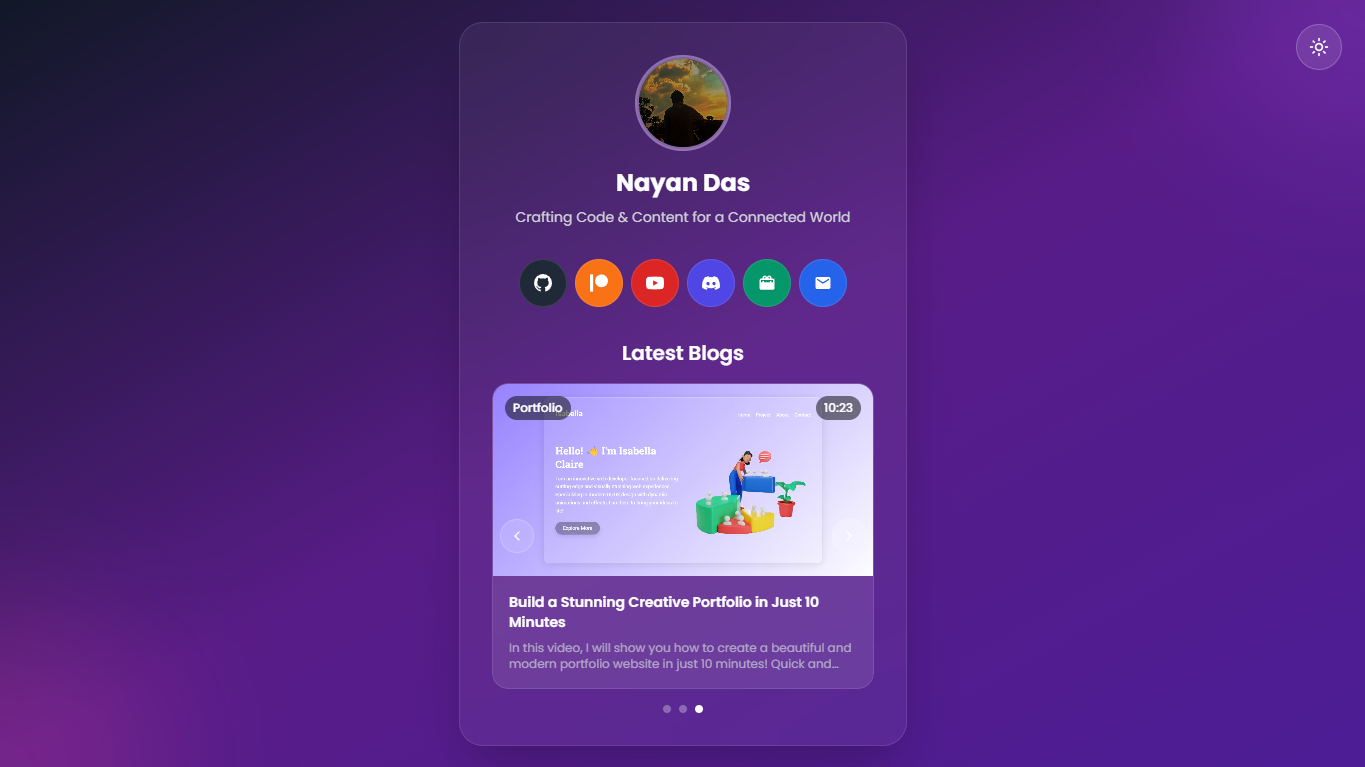
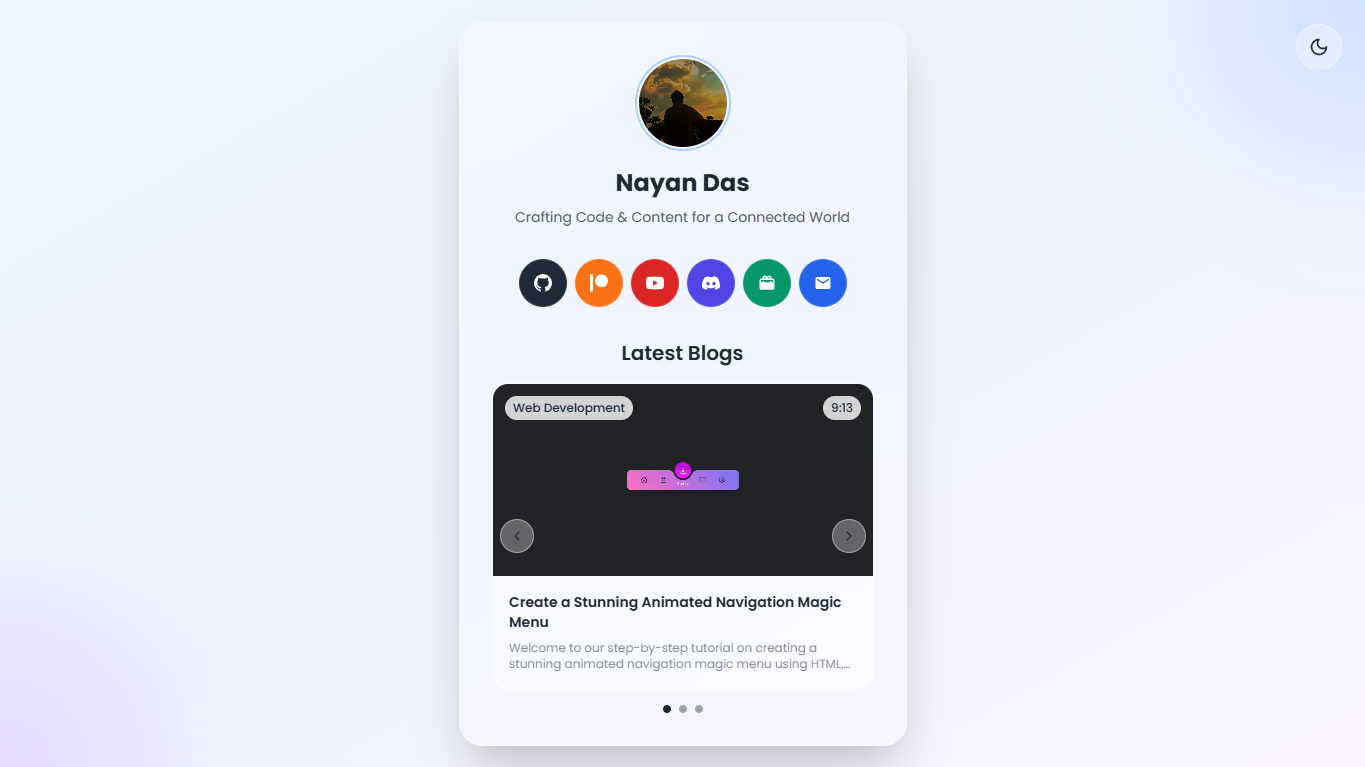




## License and Usage
> [!IMPORTANT]
> This project is licensed under the [MIT License](https://raw.githubusercontent.com/nayandas69/linkinbio-nextjs/refs/heads/main/LICENSE). You are free to use, modify, and distribute this code for personal and commercial purposes.
> [!CAUTION]
> Do not remove the author credit comments from the source code files. These credits should remain intact when using or modifying the project.
### Usage Terms
- ✅ Free to use and modify
- ✅ Commercial use allowed
- ✅ Distribution allowed
- ❌ Do not remove author credits from code
- ❌ Do not claim original authorship
## Author
**Nayan Das**
- GitHub: [@nayandas69](https://github.com/nayandas69)
- YouTube: [@dasnayan69](https://youtube.com/@dasnayan69)
- Email: nayanchandradas@hotmail.com
## Features
### **Modern Design**
- **Glassmorphism UI** with backdrop blur effects
- **Dark/Light mode** toggle with system preference detection
- **Smooth animations** powered by Framer Motion
- **Responsive design** optimized for all devices
- **Gradient backgrounds** with animated elements
### **Social Integration**
- **6 Active social platforms** in a single row layout
- **18+ Extended social icons** available (Facebook, Instagram, X, LinkedIn, TikTok, WhatsApp, Telegram, Snapchat, Bluesky, Mastodon, Tumblr, Messenger)
- **Custom SVG icons** with platform-specific colors
- **Easy activation** - simply uncomment desired social platforms
- **Hover tooltips** with smooth animations
- **Direct links** to all your social profiles
- **Accessibility support** with proper ARIA labels
### **Blog Carousel**
- **Auto-playing carousel** with manual navigation
- **YouTube video integration** with modal popup
- **Touch gestures** for mobile navigation
- **Category and duration badges**
- **Smooth transitions** between slides
### **Analytics & Performance**
- **Vercel Analytics** integration for visitor tracking
- **Vercel Speed Insights** for performance monitoring
- **Real-time performance metrics**
- **Core Web Vitals** tracking
- **Zero configuration** analytics setup
### **Environment Configuration**
- **Environment variables** support with `.env.local`
- **Google Search Console** verification setup
- **Secure configuration** management
- **Development/Production** environment separation
- **Example configuration** file included
### **Performance**
- **Next.js 14** with App Router
- **Image optimization** with Next.js Image component
- **Font optimization** with Google Fonts
- **SEO optimized** with proper metadata
- **TypeScript** for type safety
## Quick Start
### Prerequisites
- **Node.js** 18.0 or higher
- **npm** 8.0 or higher
### Installation
1. **Clone the repository**
```bash
git clone https://github.com/nayandas69/linkinbio-nextjs.git
cd linkinbio-nextjs
```
2. **Install dependencies**
```bash
npm install
```
3. **Set up environment variables**
```bash
# Copy the example environment file
cp .env.example .env.local
# Edit .env.local with your actual values
# Add your Google Search Console verification code
```
4. **Add your images**
Place your images in the `public/images/` folder:
- `profile.jpg` - Your profile picture
- `favicon.jpg` - Website favicon
- `blog1.png`, `blog2.png`, `blog3.png` - Blog thumbnails
5. **Start development server**
```bash
npm run dev
```
6. **Open your browser**
Navigate to [http://localhost:3000](http://localhost:3000)
## Tech Stack
| Technology | Version | Purpose |
|------------|---------|---------|
| **Next.js** | 14.0+ | React framework with App Router |
| **React** | 18.0+ | UI library |
| **TypeScript** | 5.0+ | Type safety |
| **Tailwind CSS** | 3.3+ | Utility-first CSS framework |
| **Framer Motion** | 10.16+ | Animation library |
| **Lucide React** | 0.294+ | Icon library |
| **Vercel Analytics** | Latest | Visitor tracking |
| **Vercel Speed Insights** | Latest | Performance monitoring |
## Environment Variables
Create a `.env.local` file in your project root:
```bash
# Google Search Console Verification Code
# Get this from Google Search Console -> Settings -> Ownership verification
GOOGLE_VERIFICATION_CODE=your-google-verification-code-here
# Optional: Additional configuration
# NEXT_PUBLIC_SITE_URL=https://yourdomain.com
# NEXT_PUBLIC_AUTHOR_NAME=Your Name
```
### Getting Google Verification Code:
1. Go to [Google Search Console](https://search.google.com/search-console)
2. Add your website property
3. Go to **Settings** → **Ownership verification**
4. Choose **HTML tag** method
5. Copy the `content` value from the meta tag
6. Add it to your `.env.local` file
## Customization
### **Personal Information**
Edit `app/page.tsx` to update:
- Name and bio text
- Social media links and URLs
- Blog post data and YouTube video IDs
### **Social Links**
Update the `socialLinks` array in `app/page.tsx`:
```typescript
const socialLinks = [
{
name: "GitHub",
url: "https://github.com/yourusername",
icon: GitHubIcon,
bgColor: "bg-gray-800",
},
// Add more platforms...
]
```
### **Extended Social Icons**
To activate additional social platforms:
1. **Uncomment desired icons** in `components/social-icons.tsx`:
```typescript
// Remove /* */ around the icons you want to use
export const InstagramIcon: React.FC = ({ size = 24, className = "" }) => (
// Icon SVG code
)
```
2. **Uncomment imports** in `app/page.tsx`:
```typescript
import {
InstagramIcon,
FacebookIcon,
// Add other icons you uncommented
} from "@/components/social-icons"
```
3. **Use extended social links array** by replacing `socialLinks` with `extendedSocialLinks`
### **Available Extended Icons:**
- Facebook, Instagram, X (Twitter), LinkedIn
- TikTok, WhatsApp, Telegram, Snapchat
- Bluesky, Mastodon, Tumblr, Messenger
### **Blog Posts**
Update the `blogData` array with your content:
```typescript
const blogData = [
{
id: 1,
title: "Your Blog Post Title",
description: "Your blog post description...",
videoId: "YouTube_VIDEO_ID",
thumbnail: "/images/your-thumbnail.png",
category: "Your Category",
duration: "10:30",
},
// Add more posts...
]
```
### **Styling**
- **Colors**: Modify `tailwind.config.ts` for custom color schemes
- **Animations**: Adjust Framer Motion settings in components
- **Layout**: Update responsive breakpoints and spacing
## Responsive Design
The application is fully responsive with optimized layouts for:
- **Desktop** (1024px+): Full layout with all features
- **Tablet** (768px-1023px): Adapted spacing and sizing
- **Mobile** (320px-767px): Touch-optimized interface
## Dark Mode
Automatic dark mode support with:
- **System preference detection**
- **Manual toggle** with persistent storage
- **Smooth transitions** between themes
- **Optimized colors** for both modes
## Scripts
| Command | Description |
|---------|-------------|
| `npm run dev` | Start development server |
| `npm run build` | Build for production |
| `npm run start` | Start production server |
| `npm run lint` | Run ESLint |
| `npm run type-check` | Run TypeScript checks |
## Deployment
### **Vercel (Recommended)**
1. Push your code to GitHub
2. Connect your repository to [Vercel](https://vercel.com)
3. Add environment variables in Vercel dashboard
4. Deploy automatically with zero configuration
5. **Analytics and Speed Insights** are automatically enabled
### **Other Platforms**
- **Netlify**: Build command: `npm run build`, Publish directory: `.next`
- **Railway**: Supports Next.js out of the box
- **DigitalOcean**: Use App Platform with Node.js
## Performance
- **Lighthouse Score**: 95+ across all metrics
- **Core Web Vitals**: Optimized for excellent user experience
- **Image Optimization**: Automatic WebP/AVIF conversion
- **Code Splitting**: Automatic with Next.js App Router
- **Real-time Monitoring**: Vercel Speed Insights integration
## Contributing
1. **Fork** the repository
2. **Create** a feature branch (`git checkout -b feature/amazing-feature`)
3. **Commit** your changes (`git commit -m 'Add amazing feature'`)
4. **Push** to the branch (`git push origin feature/amazing-feature`)
5. **Open** a Pull Request
## Acknowledgments
- **Next.js Team** for the amazing framework
- **Vercel** for hosting and deployment
- **Tailwind CSS** for the utility-first approach
- **Framer Motion** for smooth animations
- **Lucide** for beautiful icons
---
⭐ **Star this repository** if you found it helpful!
🐛 **Found a bug/suggestion?** [Open an issue](https://github.com/nayandas69/linkinbio-nextjs/issues)