https://github.com/nclsndr/hermes
Developer tool designed to help teams to collaborate in the use of third party services — HTTP tunneling
https://github.com/nclsndr/hermes
dev-team developer-tools http-tunnel localtunnel ngrok node react
Last synced: about 1 year ago
JSON representation
Developer tool designed to help teams to collaborate in the use of third party services — HTTP tunneling
- Host: GitHub
- URL: https://github.com/nclsndr/hermes
- Owner: nclsndr
- License: mit
- Created: 2018-06-20T16:49:34.000Z (almost 8 years ago)
- Default Branch: master
- Last Pushed: 2018-07-06T20:36:50.000Z (almost 8 years ago)
- Last Synced: 2024-05-29T19:03:12.028Z (about 2 years ago)
- Topics: dev-team, developer-tools, http-tunnel, localtunnel, ngrok, node, react
- Language: JavaScript
- Homepage:
- Size: 8.76 MB
- Stars: 16
- Watchers: 3
- Forks: 3
- Open Issues: 1
-
Metadata Files:
- Readme: README.md
- Contributing: CONTRIBUTING.md
- License: LICENSE.md
Awesome Lists containing this project
README
# Hermes
##### Listen to the outside world 🌍 from your bedroom 🛌 — 📡 HTTP request forwarding with no hassle
Hermes is a dev tool designed to help teams to collaborate in the use of third party services that emit HTTP requests and need to be forwarded to your team's local machines. It provides a multi-users alternative to [ngrok](https://github.com/nclsndr/hermes#why-not-use-ngrok) or localtunnel.
[](https://lernajs.io/)
## Motivation
You are working on your local machine on a piece of code that need to listen from an online service — providing HTTP requests (e.g. webhooks, chatBot service...). Basically, your computer is connected to your personal network (behind your NAT), so your localhost is invisible from the outside world...
The solution is well known: you need a HTTP/SSH tunneling system that forwards the requests to your computer. It's perfect when you're alone! **But now, you are working as a team** and each developer is running his own instance of the code locally and he would like to receive the payloads also. By design tunneling systems are limited to communicate with one user at a time.
**Here comes Hermes** and provides two modules:
- The *bridge* is running on any of your servers online and listen to any *provider* requests
- The *adaptor* is running on each local machine and replicate all the requests to the *local server*
When the response is emitted from the *local server*, it brings the response back to the *provider* following the same logic.

## Execution modes
### 1 to 1 communication
This is the most basic case. It applies for a single developer working on his machine receiving a request from a *provider*

### Concurrent
Concurrency mode allows **concurrent calls among clients** (aka Adaptors). By default, the first response received from any client (*adaptor*) will be used as the final response for the *provider*. This feature is particularly useful for teams of developers working in parallel when the provider do not require a client-specific response.

### Exclusive
Exclusive mode permits to temporally **choose a single adaptor** as responsible for building the response sent to the *provider*.

# Setup
### Requirements
- NodeJS >= 8.10.0
---
### 🌍 Bridge: Server side
You need to procure any kind of server able to allow specific port access (different from 80 and 443) — you'll need 3 available ports.
> All the code snippets provided below are gathered into this [example directory](https://github.com/nclsndr/hermes/tree/master/examples/basic-bridge)
#### 1. Create a new project
```
$ mkdir basic-bridge && cd basic-bridge
$ npm init
```
#### 2. Install hermes-bridge
```
$ npm install hermes-bridge dotenv
```
*We encourage you to use [dotenv](https://www.npmjs.com/package/dotenv) package in order to protect your sensitive data from being published online. NB: .env should be listed into your `.gitignore`*
#### 3. Create the configuration
```javascript
// index.js
const createBridgeServer = require('hermes-bridge')
// Response used when no adaptors are connected (some providers like Facebook, accept 2xx status code only)
const responseFallback = {
statusCode: 500,
headers: { 'content-type': 'application/json; charset=utf-8' },
body: JSON.stringify({ error: 'No local server provided' })
}
createBridgeServer({
httpHost: 'localhost', // default '127.0.0.1'
httpPort: 8000, // port on which the Bridge will listen
socketHost: 'localhost', // default httpHost || '127.0.0.1'
socketPort: 9000, // this port will be reused for the adaptor configuration
dashboard: { // for you to control your adaptors in real time
host: 'localhost', // default '127.0.0.1'
port: 8001, // port to access the dashboard
adminAuth: { // credentials to connect onto the dashboard
username: 'admin',
password: dotEnv.parsed.ADMIN_AUTH_PASSWORD, // Change it into your .env file!
jwtSecret: dotEnv.parsed.ADMIN_AUTH_JWT_SECRET // Change it also into your .env file!
}
},
loggerLevel: 'verbose', // 'info',
defaultResponse: responseFallback // by default, hermes provide the fallback described above
})
```
**Notes:** If you plan to not use any internal routing system (Apache, Nginx...), you should set `httpHost`, `socketHost`, `dashboard.host` to `'0.0.0.0'` to expose your Bridge and Dashboard to the world.
#### 4. 🚀 Launch it!
```
$ node index.js
```
**Notes**
- For a basic DNS resolution you can use our [NGINX configuration file](https://github.com/nclsndr/hermes/blob/master/examples/basic-bridge/classic.nginx)
- Some providers require to use HTTPS, we recommend to use [Let's Encrypt](https://letsencrypt.org/) with [Cerbot](https://certbot.eff.org/)
- For SSL usage, you can use our [SSL NGINX configuration file](https://github.com/nclsndr/hermes/blob/master/examples/basic-bridge/ssl.nginx) — this example supposed you use letsencrypt & certbot
- DNS resolution for the socket endpoint is possible but not as easy as it seems. We recommend to use the IP for configuring the adaptor. *BTW Contribution is more than welcome if you think it's an essential feature* 🤗
- To run node as a daemon we recommend the use of [forever](https://github.com/foreverjs/forever) or [PM2](http://pm2.keymetrics.io/)
- Unfortunately for [Heroku](https://www.heroku.com/) users, as far as the service doesn't allow multi-port exposure, hermes-bridge will not be compatible.
#### 5. Dashboard: register your Adaptor(s)
Navigate to the URL (or IP:port) you set up for your Hermes *dashboard*. You should have something like:

Then login with your admin credentials *(the ones you choose into the bridge config file)*
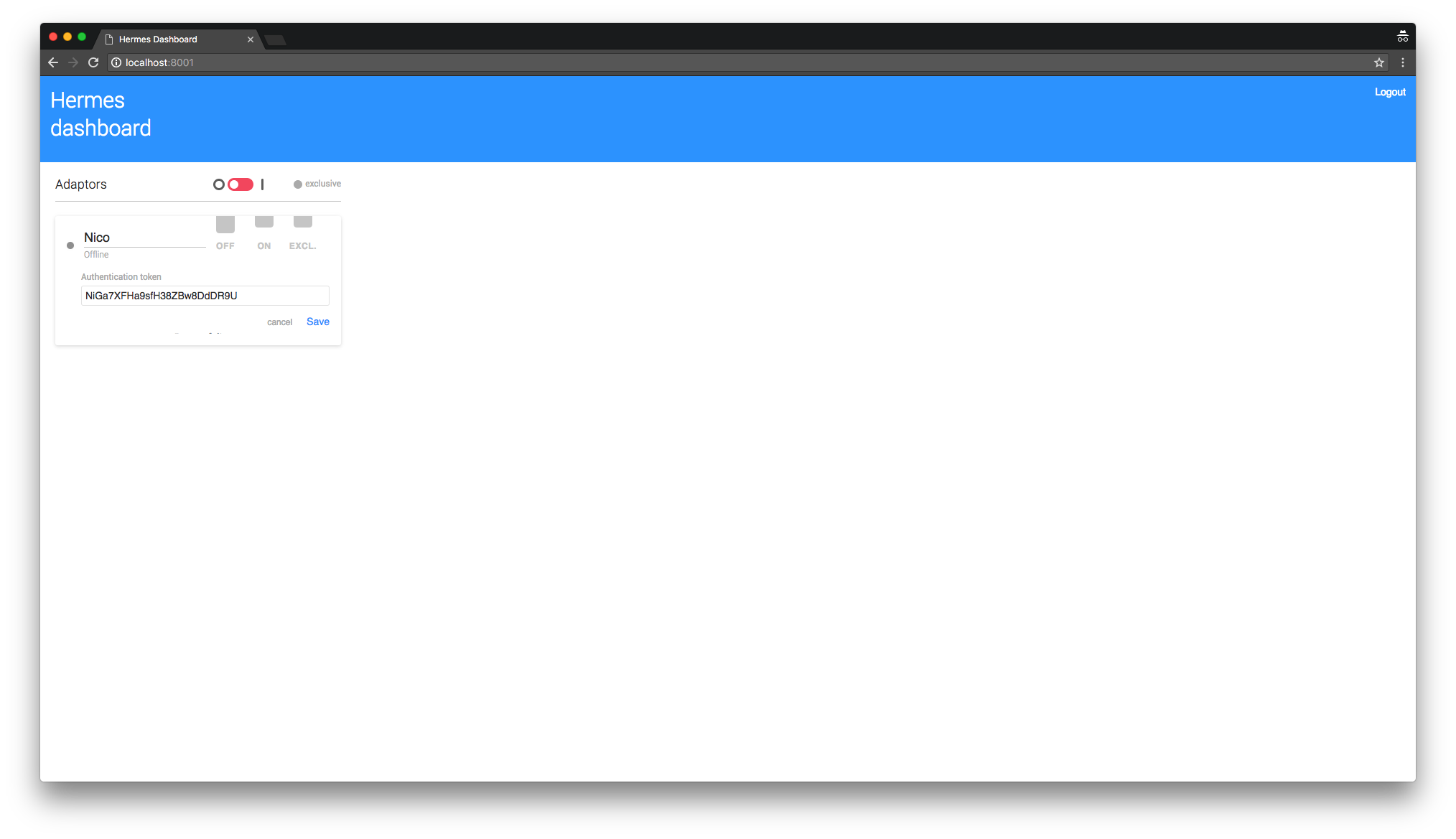
You can now add a new *adaptor* with the auth token of your choice — you will reuse it soon — the best is an alphanumeric string without spaces.
**🎉 Server side setup is done: congrats! 🎉**
---
### 🛌 Adaptor: Your (local) development environment
The adaptor can be set in any dev environment that support NodeJS 8+.
> All the information provided here are gathered into this [example directory](https://github.com/nclsndr/hermes/tree/master/examples/basic-adaptor)
#### 1. Install hermes-adaptor
Navigate to your project directory, then
```
$ npm install -D hermes-adaptor
```
#### 2. Create configuration
Create a `hermes.js` file.
```javascript
const adaptor = require('hermes-adaptor')
adaptor.init({
bridgeHost: 'YOUR_SERVER_IP',
bridgeSocketPort: 9000, // the port you chose previously
localServerProtocol: 'http',
localServerHost: 'localhost',
localServerPort: 8888,
maxAttempts: 10, // number of attempts to reconnect in case of network errors
attemptDelay: 200,
auth: {
token: 'gHmFyUkCSpGRXiWFxvLMpGYbMXvcsi', // Put here the token you choose in the dashboard
},
verbose: true // logger output level
})
```
#### 3. 🚀 Launch it!
```
$ node hermes.js
```
You need to launch your local server too if you want the all system to do his job!
**Notes**
- We recommend to use [concurrently](https://www.npmjs.com/package/concurrently) in order to start your dev-server in parallel with the adaptor
- For testing your setup, you can try a `curl http://YOUR_SERVER_IP:YOUR_HTTP_PORT`, then you should receive the request on your adaptor console (verbose = true).
Here you should have something like:
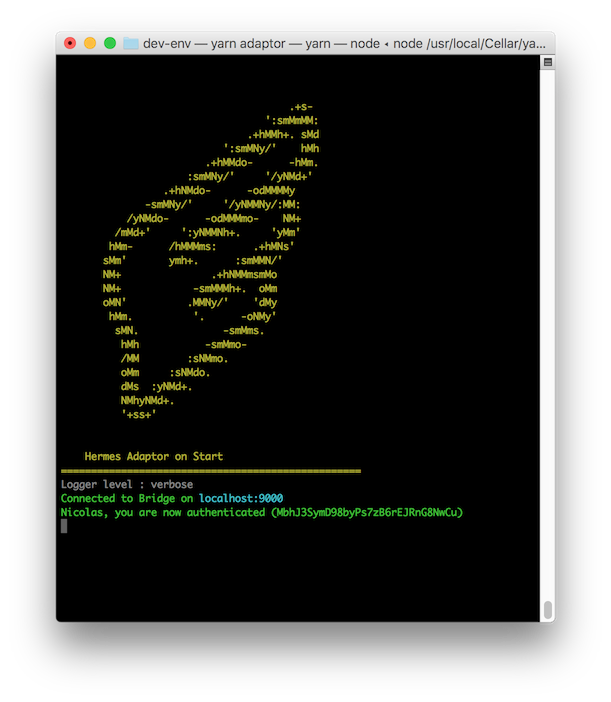
**🎉 Nice! you can now start using Hermes for your development 🎉**
---
## 🖥 Dashboard
### Adaptor listening modes

**Concurrency:** All the online adaptors receive the requests — *the first adaptor that respond back will be transmit to the provider*
**Deny:** None of the online adaptors receive the requests — *this feature particularly adapted to test a network failure case to observe the provider behavior*
**Exclusive:** Only one adaptor is receiving the requests — *this feature is particularly adapted for testing a specific response toward the provider*
## 🔭 Preview
### Single adaptor
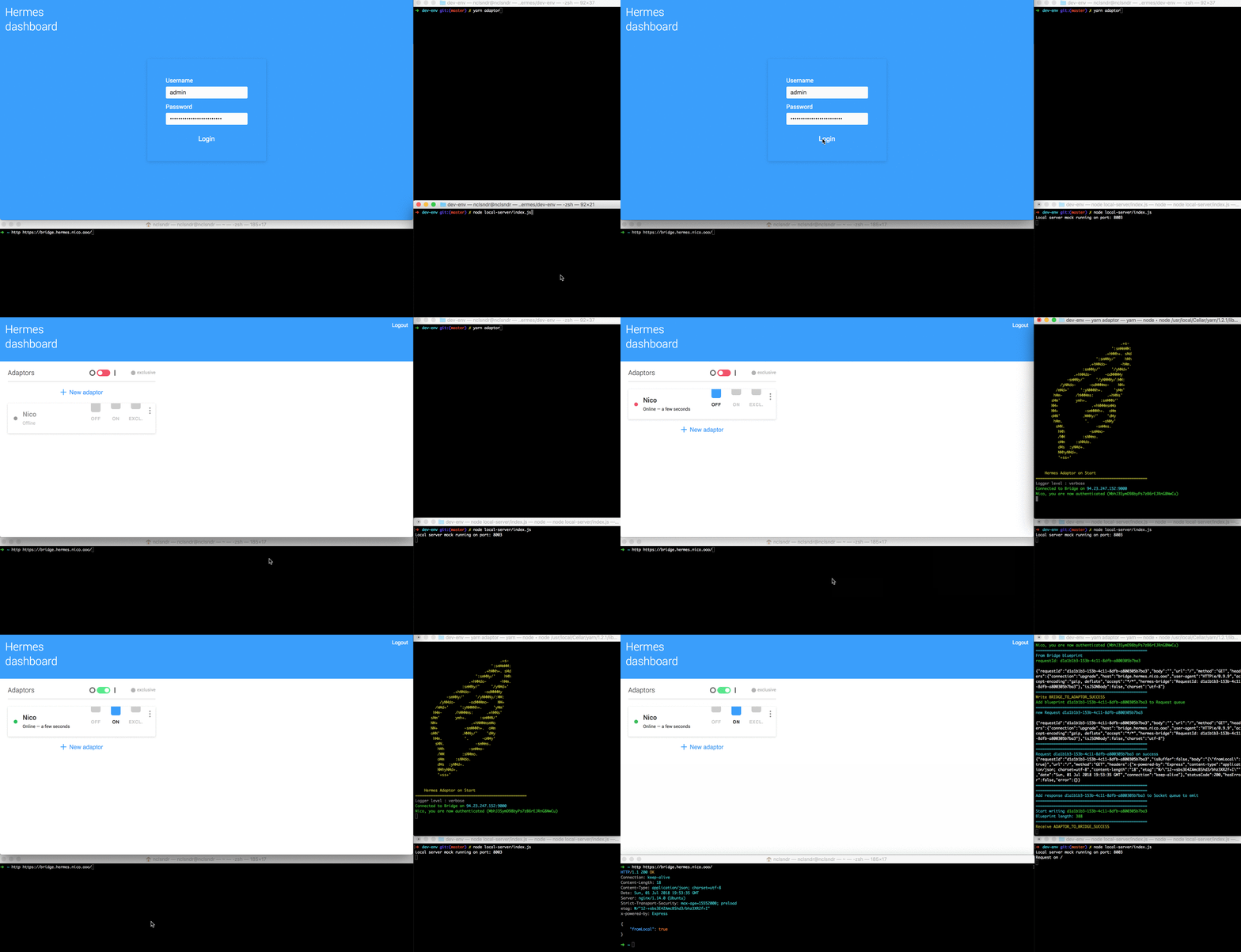
### Provider > Bridge > Adaptor > Local server > Adaptor > Bridge > Provider

## Why not use [ngrok](https://ngrok.com/)?
Ngrok is a great product to start developing alone or as a small team. It solves most of the problem you encounter by developing locally with remote providers. It also provides a reliable and secured SSH forwarding.
The philosophy behind Hermes is a bit different.
Here, we are interested to work as a team, each guy is developing locally chatbots and real time front-ends. But, one day the team get larger, and you miss some features, *like being able to select on a UI the client that should receive the next request...* — So we decide to give a try by developing Hermes.
Here a small features comparison to help you choose which tool suits you best.
| Features | ngrok | hermes |
|:--|:--|:--|
| HTTP tunnel | ✅ | ✅ |
| SSH tunnel | ✅ | ❌ |
| IP Whitelisting | ✅ | ❌ |
| Custom sub-domain | ✅ | ✅ |
| Custom domain | ❌ | ✅ |
| Command Line Interface | ✅ | ❌ (not priority) |
| Authentication | ✅ | ✅ |
| Web based real time dashboard | ❌ | ✅ |
| Concurrent clients | ❌ | ✅ |
| Concurrency management among clients | ❌ | ✅ |
| Concurrency management (clients + servers) | ❌ | ⏳ (Plan for 2.0) |
| Server to server management | ❌ | ⏳ (Plan for 2.0) |
| Retry strategy for failed requests | ❌ | ⏳ (Plan for 2.0) |
| Request replay | ✅ | ⏳ (Plan for 3.0) |
| Open-source | ❌ | ✅ |
# Contributing
## Dev environment
- NodeJS 8+
- ReactJS w/ styled-components
- Jest
- Lerna
## Guidelines
- We do not use Babel, why because we believe Node is now mature enough, and who REALLY needs `import/export` in 2018.
- We try to use as less as possible package for the `bridge` and `adaptor` packages in order to keep focus on performance and limitate the dependency tree.
- We use the same eslint configuration for all the repository, it is opinionated, but we are good with that.
## Roadmap
#### Adaptor
- [x] *Adaptor* is able to restart on error
- [x] *Adaptor* send fixed token to *bridge*
- [x] *Adaptor* warn all users that a new *adaptor* connects
#### Bridge
- [x] *Bridge* validates the *adaptor* token
- [x] *Bridge* prevents any *adaptor* that do not provide an auth token to receive data
- [x] *Bridge* is able to emit a fallback response if no *adaptor* is connected
#### Dashboard
- [x] *Dashboard* provides auth
- [x] *Dashboard* provides *adaptor* management in real time
- [ ] *Dashboard* provides console debug in real time
- [ ] *Dashboard* provides provider(s) requests management
#### Test-env
- [ ] Provide an integration test suite
#### Test-env - Provider
- [x] Provide multiple types of requests (string, JSON, files, buffer, methods...)
## License
This project is distributed under the [MIT License](https://github.com/nclsndr/hermes/blob/master/LICENSE).