https://github.com/nebrius/simple-analytics
Simple node.js based real-time site analytics server
https://github.com/nebrius/simple-analytics
Last synced: 10 months ago
JSON representation
Simple node.js based real-time site analytics server
- Host: GitHub
- URL: https://github.com/nebrius/simple-analytics
- Owner: nebrius
- License: mit
- Created: 2014-10-07T06:16:55.000Z (almost 12 years ago)
- Default Branch: master
- Last Pushed: 2014-10-07T06:18:48.000Z (almost 12 years ago)
- Last Synced: 2025-08-09T16:06:54.061Z (12 months ago)
- Language: JavaScript
- Size: 281 KB
- Stars: 7
- Watchers: 1
- Forks: 2
- Open Issues: 0
-
Metadata Files:
- Readme: README.md
- License: LICENSE
Awesome Lists containing this project
README
Simple Analytics Server
=======================
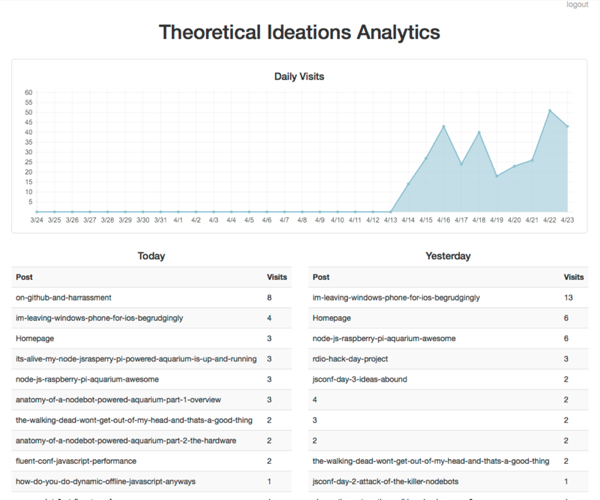
Simple node.js based real-time site analytics server. It is not really intended to be powerful, configurable, or scalable. Instead, it's really just to serve as a stop-gap until [Ghost Blog](https://ghost.org/) gets its dashboard released.
To install:
```
npm install -g simple-analytics
```
Once this is done, create a configuration file and put it at ```/etc/simple-analytics/simple-analytics.conf```. You can use [simple-analytics.example.conf](https://github.com/bryan-m-hughes/simple-analytics/blob/master/simple-analytics.example.conf) as a starting point.
The configuration file has five options:
* siteName: The name of your website. This value gets put into the analytics page in a few places
* rootUrlPath: The root url path for the analytics page (used for redirecting)
* dataFile: Path to the JSON file that stores the page visit information.
* port: The server's listen port
* logFile: The file to log to
* auth: The file that stores the admin login information
Note: make sure that the analytics server has write access to ```dataFile``` and ```logFile```. ```auth``` can, and should be, read-only.
After your configuration file is all set up, you will need to create the authentication information. Run:
```[sudo] simple-analytics -a```
This will create the salted and hashed (via pbkdf2) authentication file at ```/etc/simple-analytics/auth```. You can optionally specify a path specifying where to store the authentication information. You can change your password at any time by re-running this command.
Once this is done, to start the server run:
```
simple-analytics
```
This will use the default ```/etc/simple-analytics/simple-analytics.conf``` configuration file.
You can specify an optional configuration file using the -p flag (this is required on Windows):
```
simple-analytics -p path/to/configuration/file.json
```
To have this service run at startup, use one of the mechanism described for [Ghost Blog deploy](http://docs.ghost.org/installation/deploy/).
Simple Analytics is designed to be run locally only, meaning you will need to setup a proxy in front of it. If you want analytics to be available at ```http://example.com/analytics``` and are using nginx:
```
location /analytics/ {
proxy_set_header X-Forwarded-For $proxy_add_x_forwarded_for;
proxy_set_header Host $http_host;
proxy_set_header X-Forwarded-Proto $scheme;
proxy_pass http://localhost:6529/;
proxy_set_header Host $host;
proxy_buffering off;
}
```
Once you have the analytics server up and running, add the following snippet of code to the pages you want to track, making sure to replace ```https://example.com/analytics``` with your analytics server url:
```
var xhr = new XMLHttpRequest(),
postid = window.location.pathname.split('/');
postid = postid[postid.length - 2];
if (!postid || /^[0-9]*$/.test(postid)) {
postid = 'Homepage';
}
xhr.open('POST',
'https://example.com/api/posts/' + postid +
'/visits' + (document.referrer ? '?referrer=' + document.referrer : ''));
xhr.send();
```
You may need to tweak the line containing ```(postid[postid.length - 2] || 'Homepage')``` to match the naming/url scheme of your website.
License
=======
The MIT License (MIT)
Copyright (c) 2013-2014 Bryan Hughes bryan@theoreticalideations.com (https://theoreticalideations.com)
Permission is hereby granted, free of charge, to any person obtaining a copy
of this software and associated documentation files (the "Software"), to deal
in the Software without restriction, including without limitation the rights
to use, copy, modify, merge, publish, distribute, sublicense, and/or sell
copies of the Software, and to permit persons to whom the Software is
furnished to do so, subject to the following conditions:
The above copyright notice and this permission notice shall be included in
all copies or substantial portions of the Software.
THE SOFTWARE IS PROVIDED "AS IS", WITHOUT WARRANTY OF ANY KIND, EXPRESS OR
IMPLIED, INCLUDING BUT NOT LIMITED TO THE WARRANTIES OF MERCHANTABILITY,
FITNESS FOR A PARTICULAR PURPOSE AND NONINFRINGEMENT. IN NO EVENT SHALL THE
AUTHORS OR COPYRIGHT HOLDERS BE LIABLE FOR ANY CLAIM, DAMAGES OR OTHER
LIABILITY, WHETHER IN AN ACTION OF CONTRACT, TORT OR OTHERWISE, ARISING FROM,
OUT OF OR IN CONNECTION WITH THE SOFTWARE OR THE USE OR OTHER DEALINGS IN
THE SOFTWARE.