https://github.com/neozenith/estilo-xoria256
Revamp of Xoria256 Vim colour scheme to use Estilo to maintain palette and lightline support
https://github.com/neozenith/estilo-xoria256
color-scheme lightline pastel vim
Last synced: 12 months ago
JSON representation
Revamp of Xoria256 Vim colour scheme to use Estilo to maintain palette and lightline support
- Host: GitHub
- URL: https://github.com/neozenith/estilo-xoria256
- Owner: neozenith
- Created: 2018-03-12T18:59:41.000Z (over 8 years ago)
- Default Branch: master
- Last Pushed: 2024-03-11T23:51:25.000Z (over 2 years ago)
- Last Synced: 2025-04-11T18:55:57.818Z (about 1 year ago)
- Topics: color-scheme, lightline, pastel, vim
- Language: Vim Script
- Homepage:
- Size: 451 KB
- Stars: 3
- Watchers: 3
- Forks: 1
- Open Issues: 1
-
Metadata Files:
- Readme: README.md
Awesome Lists containing this project
README
# Xoria256

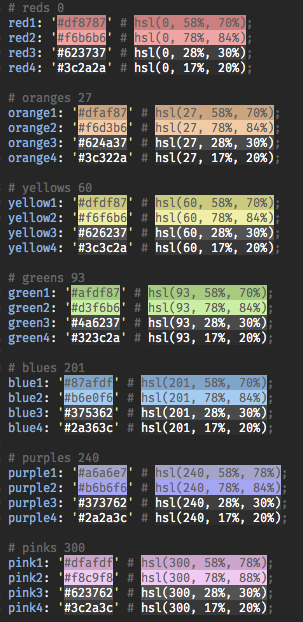
I'm in love with pastel colorschemes for development so they
capture enough contrast to easily convey information yet are gentle on my eyes
whether in a full lit office or 4am on a train into work.
[Xoria256](https://github.com/vim-scripts/xoria256.vim) was originally authored by
Dmitriy Y. Zotikov (xio) .
Yet it wasn't up to date with the symbols I needed for Javascript and NodeJS
development and that is where [Tender](https://github.com/jacoborus/tender.vim)
colorscheme and the [Estilo](https://github.com/jacoborus/estilo) tooling
by [`jacoborus`](https://github.com/jacoborus) to facilitate maintaining Vim
colorschemes come to the rescue and give you this generation of the Xoria256 colorscheme.
## Work In Progress
I am still working through matching the original xoria256 palette to the
symbols. For now I just replaced similar hues in `tender` with the xoria256 palette.
Hence there are no sample screenshots just yet.
Also I have baked in my brain the Powerline theme defaults for Lightline so
Normal Mode status bar is green and Insert Mode status bar is blue.
## Usage
```
call plug#begin()
Plug 'neozenith/estilo-xoria256'
...
call plug#end()
syntax on
colorscheme xoria256
let g:lightline.colorscheme = 'xoria256'
```
## Maintenance
The Estilo project files are:
- `estilo.yml`
- `estilo/palette`
- `estilo/syntax`
- `estilo/...`
The Vim output files are in:
- `colors/`
- `autoload/`
```
# NOTE: Estilo Globs files in the estilo/ directories so keep them clean.
rm -rfv ./**/.DS_Store
npm install
npm start
```
## Useful
Add the following to your `.vimrc` to inspect what syntax element a word is
defined as.
```
" Show syntax highlighting groups for word under cursor
function! SynStack()
if !exists("*synstack")
return
endif
echo map(synstack(line('.'), col('.')), 'synIDattr(v:val, "name")')
endfunc
" Map leader function to call Syntax Inspector
nmap si :call SynStack()
```