https://github.com/nerdy-pro/flutter_number_editing_controller
https://github.com/nerdy-pro/flutter_number_editing_controller
dart flutter pubdev
Last synced: 4 months ago
JSON representation
- Host: GitHub
- URL: https://github.com/nerdy-pro/flutter_number_editing_controller
- Owner: nerdy-pro
- License: bsd-3-clause
- Created: 2023-05-14T21:28:18.000Z (about 3 years ago)
- Default Branch: main
- Last Pushed: 2025-06-07T14:58:00.000Z (about 1 year ago)
- Last Synced: 2025-06-07T15:30:56.088Z (about 1 year ago)
- Topics: dart, flutter, pubdev
- Language: Dart
- Homepage: https://pub.dev/packages/number_editing_controller
- Size: 418 KB
- Stars: 3
- Watchers: 1
- Forks: 5
- Open Issues: 1
-
Metadata Files:
- Readme: README.md
- Changelog: CHANGELOG.md
- License: LICENSE
Awesome Lists containing this project
README
# number_editing_controller
[](https://pub.dev/packages/number_editing_controller)
[](https://github.com/nerdy-pro/flutter_number_editing_controller/blob/main/LICENSE)
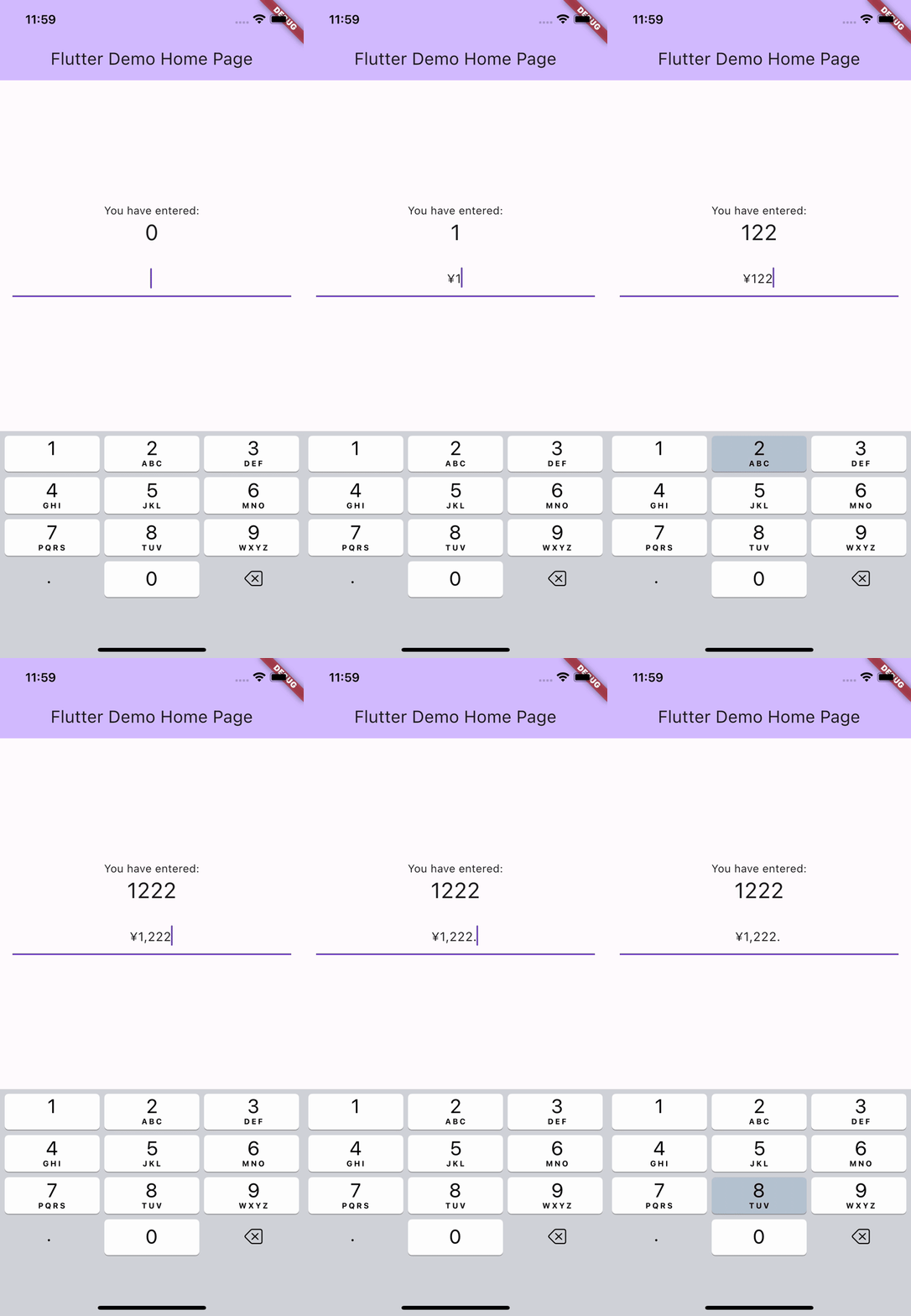
A Flutter `TextEditingController` that automatically formats numbers, decimals, and currencies as the user types. Built with full locale support.
Developed by [nerdy.pro](https://nerdy.pro).
## Features
- **As-you-type formatting** for integers, decimals, and currency amounts
- **Locale-aware** grouping and decimal separators (e.g. `1,234.56` in English, `1.234,56` in German)
- **Currency support** with automatic symbol placement based on locale
- **Extracts the numeric value** via `controller.number`
- **Negative number support** with optional `allowNegative` flag
- **Custom separators** for decimal and grouping characters
## Getting started
Install the package:
```shell
flutter pub add number_editing_controller
```
## Usage
Create a controller and assign it to a `TextField`:
```dart
final controller = NumberEditingTextController.currency(currencyName: 'USD');
TextField(
controller: controller,
keyboardType: TextInputType.numberWithOptions(decimal: true, signed: true),
)
```
Read the numeric value at any time:
```dart
final value = controller.number; // e.g. 1234.56
```
### Integer input
```dart
final controller = NumberEditingTextController.integer();
```
### Decimal input
```dart
final controller = NumberEditingTextController.decimal();
```
### Currency input
```dart
final controller = NumberEditingTextController.currency(currencyName: 'EUR');
```
### Configuration options
All constructors accept the following parameters:
| Parameter | Description |
|-----------|-------------|
| `locale` | Locale for number formatting (e.g. `'en'`, `'de'`, `'ja'`). Defaults to the current locale. |
| `allowNegative` | Whether to allow negative numbers. Defaults to `true`. |
| `groupSeparator` | Custom digit grouping symbol (e.g. `','`, `'.'`, `' '`). |
| `value` | Initial numeric value. |
The `currency()` constructor also accepts:
| Parameter | Description |
|-----------|-------------|
| `currencyName` | ISO 4217 currency code (e.g. `'USD'`, `'EUR'`, `'JPY'`). |
| `currencySymbol` | Custom currency symbol (e.g. `'$'`, `'€'`, `'₺'`). |
| `decimalSeparator` | Custom decimal separator symbol. |
The `decimal()` constructor also accepts:
| Parameter | Description |
|-----------|-------------|
| `minimalFractionDigits` | Minimum number of decimal digits to display. |
| `maximumFractionDigits` | Maximum number of decimal digits allowed. |
| `decimalSeparator` | Custom decimal separator symbol. |
### Examples
```dart
// US Dollar with locale
final usd = NumberEditingTextController.currency(
currencyName: 'USD',
locale: 'en',
);
// Euro in German locale
final eur = NumberEditingTextController.currency(
currencyName: 'EUR',
locale: 'de',
);
// Positive-only integer
final positive = NumberEditingTextController.integer(
allowNegative: false,
);
// Decimal with precision control
final precise = NumberEditingTextController.decimal(
minimalFractionDigits: 2,
maximumFractionDigits: 4,
locale: 'en',
);
```
A working example app is available in the [example](https://github.com/nerdy-pro/flutter_number_editing_controller/tree/main/example) directory.
### Disposing the controller
Like any `TextEditingController`, dispose of it when it is no longer needed:
```dart
@override
void dispose() {
controller.dispose();
super.dispose();
}
```