https://github.com/nerzh/everscale-client-swift
Swift Binding for Everscale, Venom SDK. Library for interacting with Everscale, Venom blockchain.
https://github.com/nerzh/everscale-client-swift
everscale everscale-client everscale-sdk ios linux macos swift ton-client venom-blockchain venom-sdk venom-tools
Last synced: 8 months ago
JSON representation
Swift Binding for Everscale, Venom SDK. Library for interacting with Everscale, Venom blockchain.
- Host: GitHub
- URL: https://github.com/nerzh/everscale-client-swift
- Owner: nerzh
- License: gpl-3.0
- Created: 2020-10-19T22:35:06.000Z (over 5 years ago)
- Default Branch: master
- Last Pushed: 2025-03-02T15:33:45.000Z (over 1 year ago)
- Last Synced: 2025-10-18T17:05:57.208Z (8 months ago)
- Topics: everscale, everscale-client, everscale-sdk, ios, linux, macos, swift, ton-client, venom-blockchain, venom-sdk, venom-tools
- Language: Swift
- Homepage:
- Size: 9.63 MB
- Stars: 18
- Watchers: 2
- Forks: 6
- Open Issues: 0
-
Metadata Files:
- Readme: README.md
- License: LICENSE
Awesome Lists containing this project
README
# Swift Client for TVM SDK (everscale, venom, gosh)
[](https://swift.org/package-manager/)
[](https://github.com/tonlabs/ever-sdk)
Swift is a strongly typed language that has long been used not only for iOS development. Apple is actively promoting it to new platforms and today it can be used for almost any task. Thanks to this, this implementation provides the work of TVM (toncoin, everscale, venom, gosh) SDK on many platforms at once, including the native one for mobile phones. Let me remind you that swift can also be built for android.
| OS | Result |
| ----------- | ----------- |
| MacOS | ✅ |
| Linux | ✅ |
| iOS | ✅ |
| Windows | Soon |
## Get api keys and TVM endpoints:
You need to get an API-KEY here [https://dashboard.evercloud.dev](https://dashboard.evercloud.dev)
## Usage
All requests are async
```swift
import EverscaleClientSwift
var config: TSDKClientConfig = .init()
config.network = TSDKNetworkConfig(endpoints: ["https://net.ton.dev"])
let client: TSDKClientModule = .init(config: config)
// Crypto
client.crypto.factorize(TSDKParamsOfFactorize(composite: "17ED48941A08F981")) { (response) in
print(response.result?.factors)
}
// Boc
let payload: TSDKParamsOfParse = .init(boc: "te6ccgEBAQEAWAAAq2n+AAAAAAAAAAAAAAAAAAAAAAAAAAAAAAAAAAAAAAAAAAE/zMzMzMzMzMzMzMzMzMzMzMzMzMzMzMzMzMzMzMzMzMzSsG8DgAAAAAjuOu9NAL7BxYpA")
client.boc.parse_message(payload) { (response) in
if let result = response.result, let parsed: [String: Any] = result.parsed.toDictionary() {
print(parsed["id"])
print(parsed["src"])
print(parsed["dst"])
}
}
```
## Errors
```swift
client.crypto.factorize(TSDKParamsOfFactorize(composite: "17ED48941A08F981")) { (response) in
if let error = response.error {
print(error.data.toJSON())
print(error.code)
}
}
```
## Setup TONSDK For Linux and MacOS
### Install sdk with bash script
0. This download SDK to current dirrectory, compile it and add library symlinks to your system
```sh
cd everscale-client-swift
```
1. For install or update the SDK version simply by running these command
```sh
bash scripts/install_tonsdk.sh
```
### Manual install sdk ( if you have any problem with script install_tonsdk.sh )
SPOILER: Manual installation
0. Install Rust to your OS
1. git clone https://github.com/tonlabs/ever-sdk
2. cd ./SDK
3. cargo update
4. cargo build --release
5. copy or create symlink of dynamic library
__macOS :__
**./SDK/target/release/libton_client.dylib**
to
**/usr/local/lib/libton_client.dylib**
__Linux :__
**./SDK/target/release/libton_client.so**
to
**/usr/lib/libton_client.so**
6. Create pkgConfig file :
__macOS :__
**/usr/local/lib/pkgconfig/libton_client.pc**
```bash
prefix=/usr/local
exec_prefix=${prefix}
includedir=${prefix}/include
libdir=${exec_prefix}/lib
Name: ton_client
Description: ton_client
Version: 1.0.0
Cflags: -I${includedir}
Libs: -L${libdir} -lton_client
```
__Linux:__
**/usr/lib/pkgconfig/libton_client.pc**
```bash
prefix=/usr
exec_prefix=${prefix}
includedir=${prefix}/include
libdir=${exec_prefix}/lib
Name: ton_client
Description: ton_client
Version: 1.0.0
Cflags: -I${includedir}
Libs: -L${libdir} -lton_client
```
7. Copy or create symlink of file
**/SDK/ton_client/client/tonclient.h**
to
__MacOS:__
**/usr/local/include/tonclient.h**
__Linux:__
**/usr/include/tonclient.h**
## Setup TONSDK For iOS
0. Install Rust
```bash
curl --proto '=https' --tlsv1.2 -sSf https://sh.rustup.rs | sh || true && \
source ~/.profile
```
1. Install "cargo lipo"
```bash
rustup target add aarch64-apple-ios x86_64-apple-ios || true && \
cargo install cargo-lipo
```
2. Build SDK for iOS
**Go to your project folder and:**
```bash
git clone https://github.com/tonlabs/SDK.git || true && \
cd ./SDK
```
```bash
git pull --ff-only || true && \
cargo update || true && \
cargo lipo --release
```
⚠️ Wait installation
3. In xcode __File > Add files to "Name Your Project"__ navigate to ./SDK/ton_client/tonclient.h
4. Create bridge. In xcode __File > New > File__, select Header File, set name for example **Tonclient-Bridging-Header.h**
and add
__#include __
__#import "tonclient.h"__
like this:
```C
#ifndef Tonclient_Bridging_Header_h
#define Tonclient_Bridging_Header_h
#include
#import "tonclient.h"
#endif
```
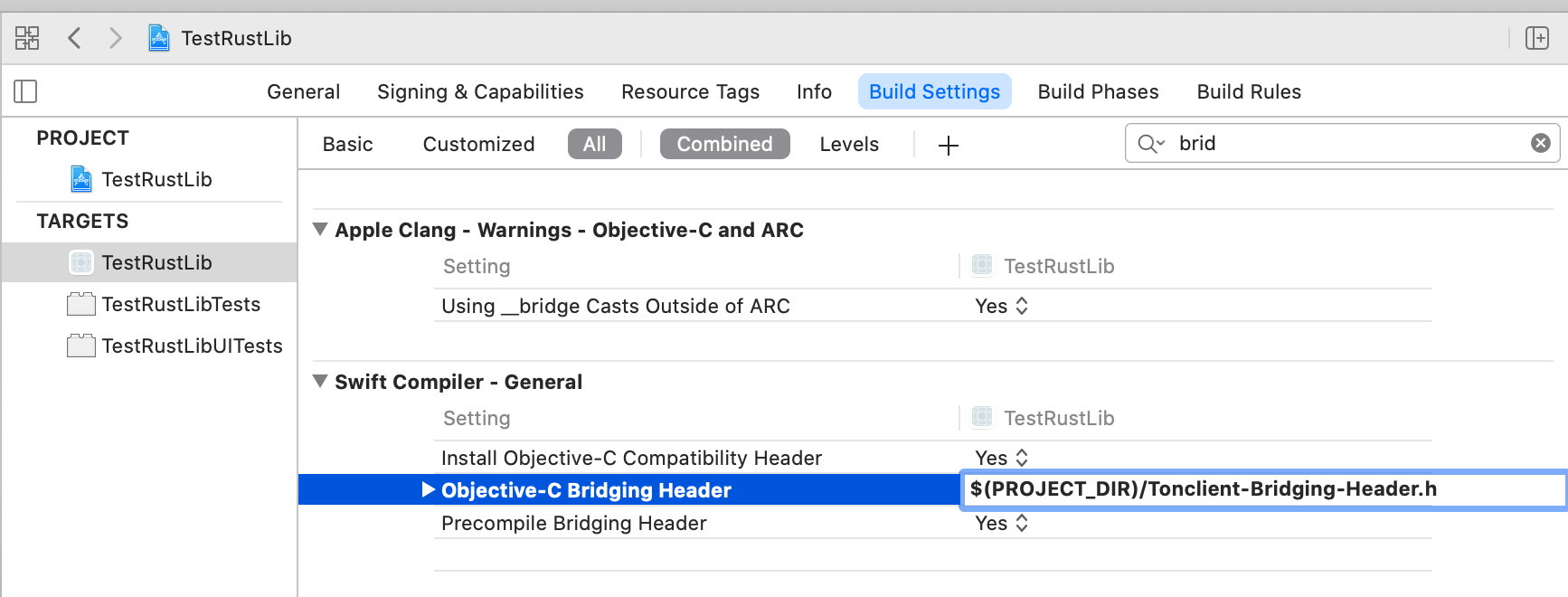
5. Add path to Tonclient-Bridging-Header.h **$(PROJECT_DIR)/Tonclient-Bridging-Header.h**
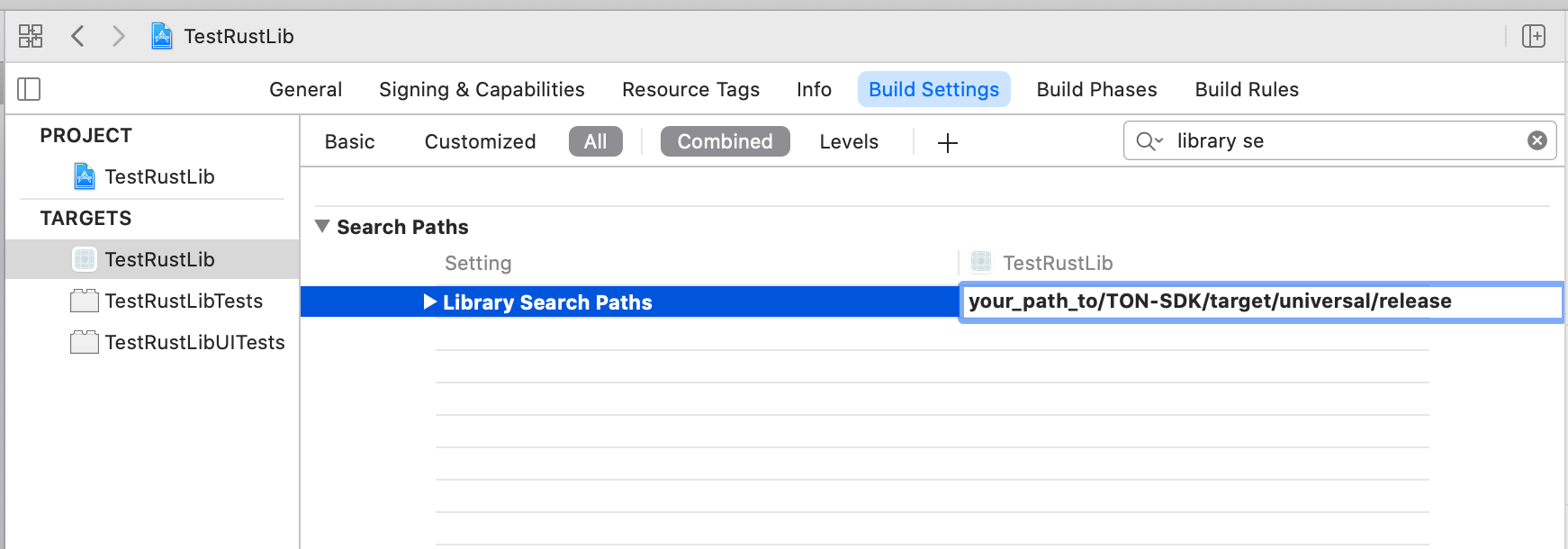
6. Add path to search for libraries ( path to directory withlibton_client.a ) **$(PROJECT_DIR)/SDK/target/universal/release**
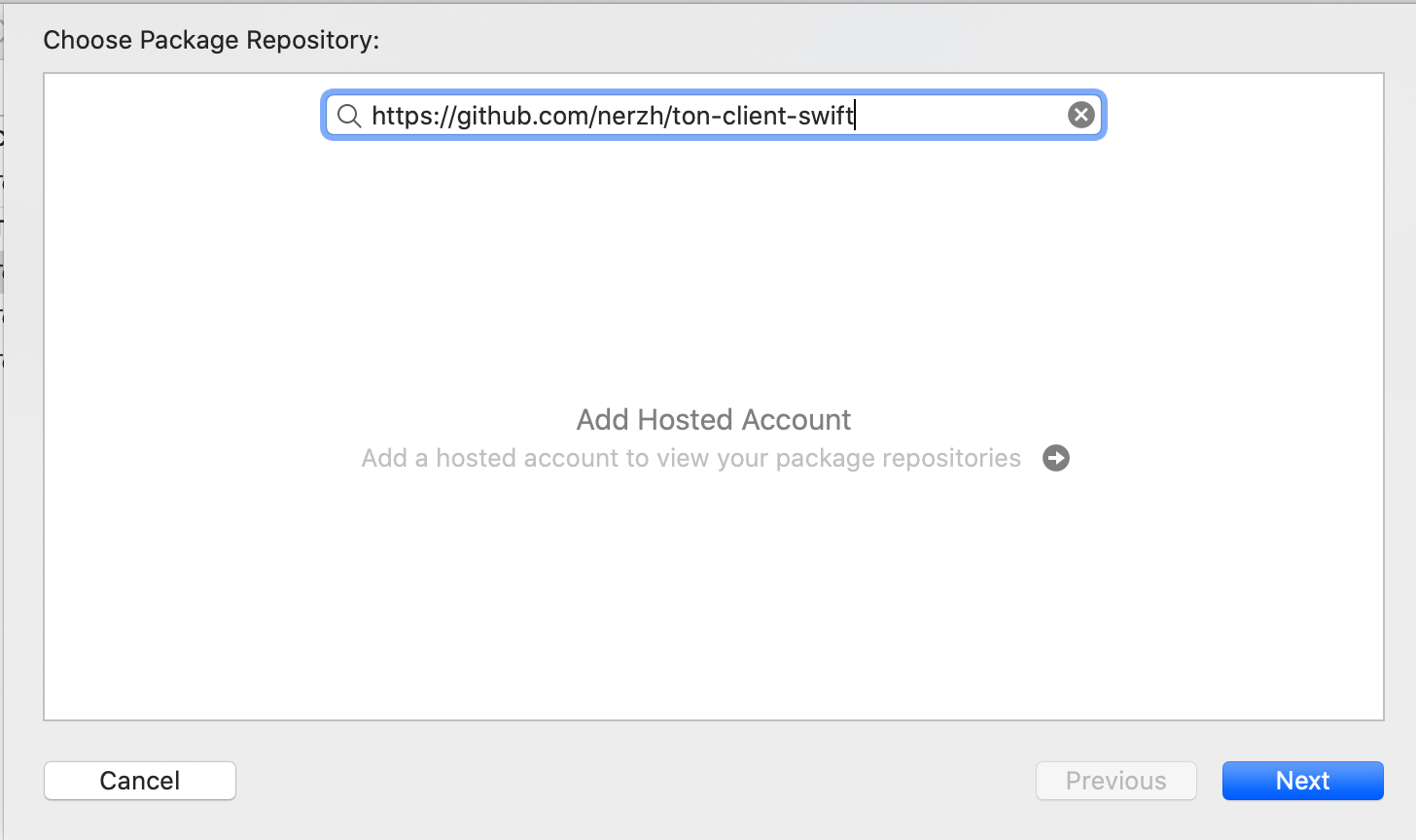
7. __File > Swift Packages > Add Package Dependency__ **https://github.com/nerzh/ton-client-swift**
8. Build project ...
## Tests
### If you use Xcode for Test
Please, set custom working directory to project folder for your xcode scheme. This is necessary for the relative path "./" to this library folders.
You may change it with the xcode edit scheme menu __Product > Scheme > Edit Scheme__ menu __Run__ submenu __Options__ enable checkbox "Use custom directory" and add custom working directory.
Or if above variant not available, then inside file path_to_this_library/.swiftpm/xcode/xcshareddata/xcschemes/TonClientSwift.xcscheme
set to tag __"LaunchAction"__ absolute path to this library with options:
**useCustomWorkingDirectory = "YES"**
**customWorkingDirectory = "/path_to_this_library"**
### Tests
1. inside root directory of everscale-client-swift create **.env.debug** file with
NET TON DEV
```
server_address=https://net.ton.dev
giver_address=0:653b9a6452c7a982c6dc92b2da9eba832ade1c467699ebb3b43dca6d77b780dd
giver_abi_name=Giver
giver_function=grant
```
**Optional:** Install locale NodeSE for tests if you needed:
- launch docker
- docker run -d --name local-node -p 80:80 tonlabs/local-node
nodeSE will start on localhost:80
```
server_address=http://localhost:80
giver_abi_name=GiverNodeSE_v2
giver_amount=10000000000
```
2. Run Tests
__MacOS:__
Run Tests inside Xcode
__Linux:__
swift test --generate-linuxmain
swift test --enable-test-discovery
### Update SDK
```bash
cd everscale-client-swift
```
```bash
bash api_generate.sh
```