https://github.com/net-benchmark/dns-benchmark-tool
Fast, comprehensive DNS performance testing with DNSSEC validation, DoH/DoT support, and enterprise features
https://github.com/net-benchmark/dns-benchmark-tool
automation benchmark cli-tool cross-platform developer-tools dns dnssec doc doh dot internet-infrastructure latency latency-test network-per networking open-source privacy python sysadmin workflow-hygiene
Last synced: 3 months ago
JSON representation
Fast, comprehensive DNS performance testing with DNSSEC validation, DoH/DoT support, and enterprise features
- Host: GitHub
- URL: https://github.com/net-benchmark/dns-benchmark-tool
- Owner: net-benchmark
- License: other
- Created: 2025-11-08T23:16:24.000Z (9 months ago)
- Default Branch: main
- Last Pushed: 2026-05-03T21:18:38.000Z (3 months ago)
- Last Synced: 2026-05-08T22:42:11.615Z (3 months ago)
- Topics: automation, benchmark, cli-tool, cross-platform, developer-tools, dns, dnssec, doc, doh, dot, internet-infrastructure, latency, latency-test, network-per, networking, open-source, privacy, python, sysadmin, workflow-hygiene
- Language: Python
- Homepage: https://www.buildtools.net/
- Size: 49.9 MB
- Stars: 360
- Watchers: 1
- Forks: 11
- Open Issues: 0
-
Metadata Files:
- Readme: README-pypi.md
- Changelog: CHANGELOG.md
- Contributing: CONTRIBUTING.md
- License: LICENSE
- Security: SECURITY.md
Awesome Lists containing this project
README
> ⚠️ **deprecated.** this package is no longer maintained.
> migrate to: `pip install net-benchmark`
> https://github.com/net-benchmark/net-benchmark
---
# DNS Benchmark Tool
**Fast, comprehensive DNS performance testing**
Part of [BuildTools](https://buildtools.net) - Network Performance Suite
```bash
pip install dns-benchmark-tool
dns-benchmark benchmark --use-defaults --formats csv,excel
```
---
> 🎉 **1,400+ downloads · 600+ active users**
> 🚀 **The web dashboard is now live!** [Try BuildTools free →](https://buildtools.net)
---
Real Time Tracking
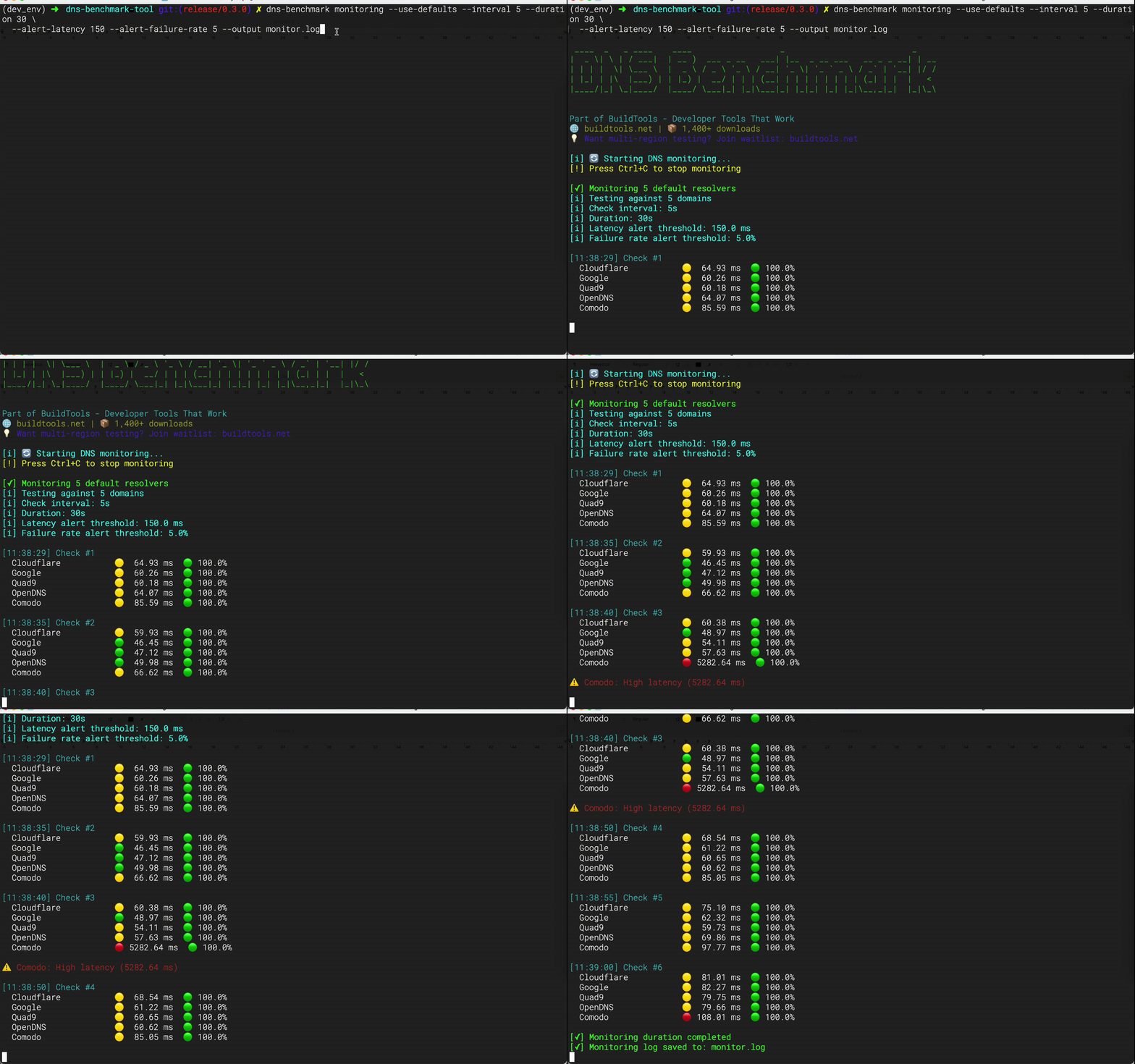
Watch DNS queries in motion
Real Time Tracking — Web UI
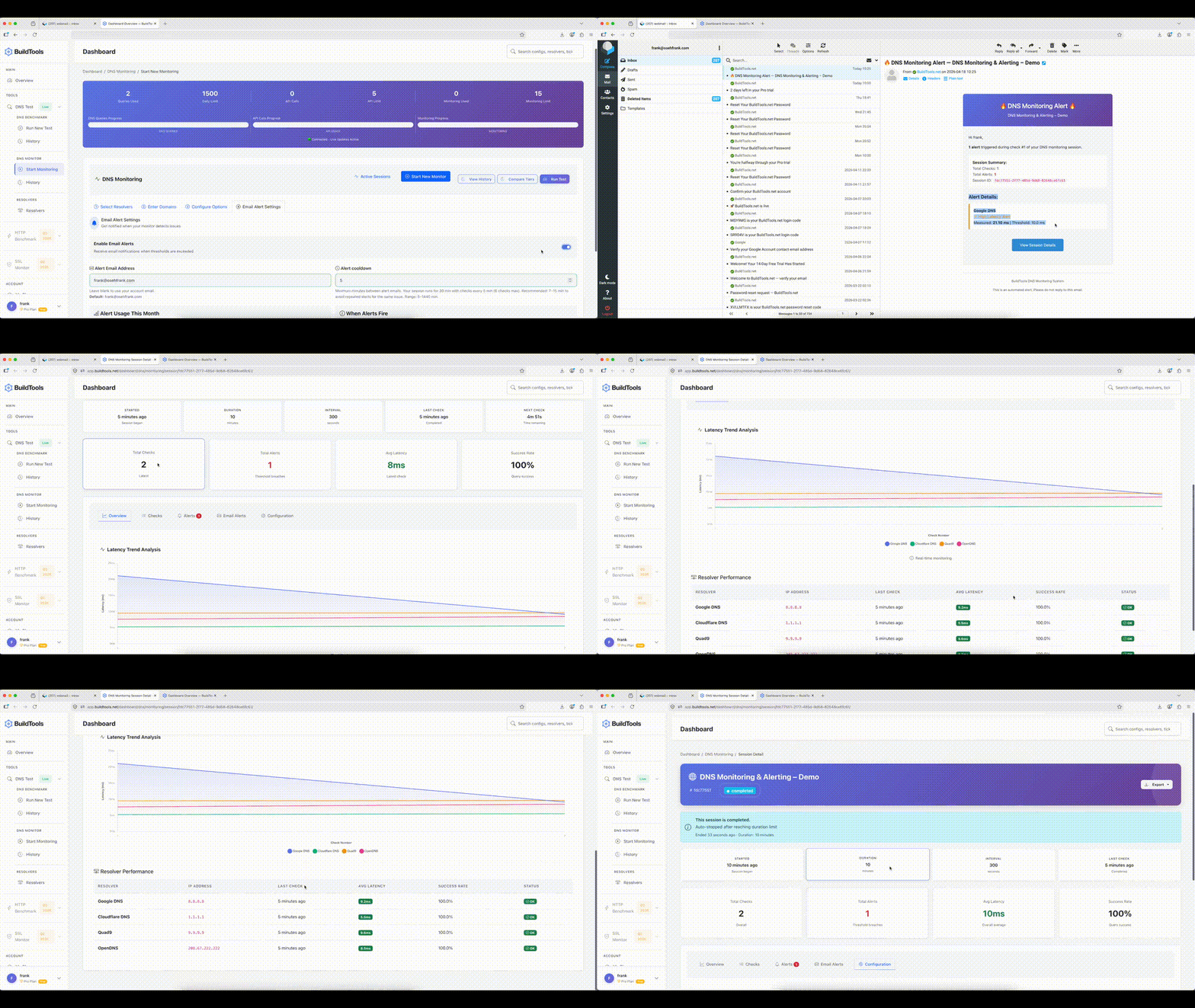
Monitor DNS queries live with email alerts
## 🎉 What's New in 
We've added **three powerful CLI commands** and full support for **DoH, DoT, and DNSSEC**:
- 🚀 **top** — quick ranking of resolvers by speed and reliability
- 📊 **compare** — side-by-side benchmarking with detailed statistics and export options
- 🔄 **monitoring** — continuous performance tracking with alerts and logging
- 🔒 **DoH / DoT / DNSSEC** — encrypted DNS benchmarking with real latency tradeoff data
```bash
# Quick resolver ranking
dns-benchmark top
# Compare resolvers side-by-side
dns-benchmark compare Cloudflare Google Quad9 --show-details
# Run monitoring for 1 hour with alerts
dns-benchmark monitoring --use-defaults --interval 30 --duration 3600 \
--alert-latency 150 --alert-failure-rate 5 --output monitor.log
# Encrypted DNS
dns-benchmark benchmark \
--resolvers "Cloudflare,Google" \
--domains "bing.com,google.com" \
--doh \
--doh-url "https://cloudflare-dns.com/dns-query,https://dns.google/dns-query" \
--iterations 1 \
--formats csv \
--output ./doh_results_explicit_urls
dns-benchmark benchmark \
--resolvers "Cloudflare,Quad9" \
--domains "cloudflare.com,quad9.net" \
--dot
```
[](https://github.com/frankovo/dns-benchmark-tool/actions/workflows/test.yml)
[](https://github.com/frankovo/dns-benchmark-tool/actions/workflows/testpypi.yml)
[](https://github.com/frankovo/dns-benchmark-tool/actions/workflows/pypi.yml)
[](https://pypi.org/project/dns-benchmark-tool/)
[](https://pypi.org/project/dns-benchmark-tool/)


[](https://pypi.org/project/dns-benchmark-tool/)
[](https://github.com/frankovo/dns-benchmark-tool/stargazers)
[](https://github.com/frankovo/dns-benchmark-tool/network/members)
[](https://github.com/frankovo/dns-benchmark-tool/issues)
[](https://github.com/frankovo/dns-benchmark-tool/commits/main)
[](https://github.com/frankovo/dns-benchmark-tool/blob/main/RELEASE.md)
## ⚡ Commands at a Glance
| Command | What it does | Quick example |
|---|---|---|
| `benchmark` | Full DNS benchmark with exports | `dns-benchmark benchmark --use-defaults` |
| `top` | Rank all resolvers by speed | `dns-benchmark top --limit 5` |
| `compare` | Side-by-side resolver comparison | `dns-benchmark compare Cloudflare Google Quad9` |
| `monitoring` | Continuous monitoring with alerts | `dns-benchmark monitoring --use-defaults` |
---
## Why DNS Benchmarking?
DNS resolution can add 300ms+ to every request. This tool helps you find the fastest resolver for YOUR location.
**The Problem:**
- DNS adds hidden latency to every request
- Fastest resolver depends on your location
- Security varies wildly (DNSSEC, DoH, DoT)
- Most developers never test their DNS
**The Solution:**
- Test multiple DNS resolvers side-by-side
- Get statistical analysis (P95, P99, jitter, consistency)
- Validate DNSSEC security
- Compare privacy options (DoH, DoT)
---
## Key Features
### 🚀 Performance
✅ Async queries let you test 100+ resolvers simultaneously.
✅ Multi‑iteration runs (`--iterations 3`) provide more accurate results.
✅ Statistical analysis includes P95, P99, jitter, and consistency scores.
✅ Smart caching reuses results with `--use-cache`.
✅ Warmup options (`--warmup` or `--warmup-fast`) ensure accurate tests.
## 🔒 Security & Encrypted DNS
Three protocols are fully supported — each adds privacy at a latency cost.
| Protocol | Flag | Typical overhead | When to use |
|---|---|---|---|
| Plain UDP | *(default)* | baseline | Latency benchmarking |
| DNS-over-HTTPS | `--doh` | +50–200ms | Privacy, firewall bypass |
| DNS-over-TLS | `--dot` | +200–500ms cold, ~50ms warm | Encrypted transport |
| DNSSEC | `--dnssec-validate` | +30–100ms | Validating resolver integrity |
> ⚠️ **Tradeoffs**
> - DoH and DoT add TLS handshake overhead on first query per resolver. Use `--warmup-fast` to absorb this before measuring.
> - `--dnssec-validate` requests RRSIG records and enforces the AD flag. Only ~33% of common domains are DNSSEC-signed — expect `DNSSEC_FAILED` results on unsigned domains. Latency numbers with and without this flag are **not directly comparable**.
> - Results on mobile/hotspot will show 2–5× higher variance than wired ethernet. Use `--iterations 5` and compare median latency, not average.
```bash
# DoH benchmark — resolvers in db have URLs auto-resolved
dns-benchmark benchmark \
--resolvers "Cloudflare,Google" \
--domains "cloudflare.com,google.com" \
--doh --warmup-fast
# DoH with explicit URLs — must match resolver count 1:1, order matters
dns-benchmark benchmark \
--resolvers "Cloudflare,Google" \
--domains "bing.com,google.com" \
--doh \
--doh-url "https://cloudflare-dns.com/dns-query,https://dns.google/dns-query" \
--formats csv \
--output ./doh_results
# DoT with DNSSEC on signed domains
dns-benchmark benchmark \
--resolvers "Cloudflare,Quad9" \
--domains "cloudflare.com,quad9.net" \
--dot \
--dnssec-validate
# Rank top resolvers over DoH
dns-benchmark top --doh --limit 5
# Rank top resolvers over DoT by reliability
dns-benchmark top --dot --metric reliability --limit 5
# Compare resolvers over DoH
dns-benchmark compare Cloudflare Google --doh --iterations 3
# Monitor with DoT and latency alerts
dns-benchmark monitoring --use-defaults --dot \
--interval 60 --alert-latency 300
# DoH + DNSSEC enforced + export
dns-benchmark benchmark --use-defaults --doh --dnssec-validate --formats csv,excel
# DoT + DNSSEC + multiple iterations
dns-benchmark benchmark \
--resolvers "Cloudflare,Quad9,Google" \
--domains "cloudflare.com,quad9.net,google.com" \
--dot \
--dnssec-validate \
--iterations 5 \
--formats excel
# DoH monitoring with explicit URLs
dns-benchmark monitoring \
--resolvers "Cloudflare,Google" \
--doh \
--doh-url "https://cloudflare-dns.com/dns-query,https://dns.google/dns-query" \
--interval 30 --duration 7200
```
**Early failure examples** — these fail immediately before any query runs:
```bash
# --doh and --dot are mutually exclusive
dns-benchmark benchmark --use-defaults --doh --dot
# ERROR: --doh and --dot are mutually exclusive.
# --doh-url count must match --resolvers count
dns-benchmark benchmark --resolvers "Cloudflare,Google" --doh \
--doh-url "https://cloudflare-dns.com/dns-query"
# ERROR: --doh-url has 1 URL(s) but --resolvers has 2 resolver(s). Counts must match.
# Custom IP with --doh requires --doh-url
dns-benchmark benchmark --resolvers "192.168.1.1" --doh
# ERROR: --doh requires a DoH URL for: 192.168.1.1. Use --doh-url to supply them explicitly.
```
---
## Installation
```bash
pip install dns-benchmark-tool
#Verify Installation
dns-benchmark --version
dns-benchmark --help
```
## 📄 Optional PDF Export
By default, the tool supports **CSV** and **Excel** exports.
PDF export requires the extra dependency **weasyprint**, which is not installed automatically to avoid runtime issues on some platforms.
### Install with PDF support
```bash
pip install dns-benchmark-tool[pdf]
```
### Usage
Once installed, you can request PDF output via the CLI:
```bash
dns-benchmark --use-defaults --formats pdf --output ./results
```
If `weasyprint` is not installed and you request PDF output, the CLI will show:
```bash
[-] Error during benchmark: PDF export requires 'weasyprint'. Install with: pip install dns-benchmark-tool[pdf]
```
---
## ⚠️ WeasyPrint Setup (for PDF export)
The DNS Benchmark Tool uses **WeasyPrint** to generate PDF reports.
If you want PDF export, you need extra system libraries in addition to the Python package.
### 🛠 Linux (Debian/Ubuntu)
```bash
sudo apt install python3-pip libpango-1.0-0 libpangoft2-1.0-0 \
libharfbuzz-subset0 libjpeg-dev libopenjp2-7-dev libffi-dev
```
---
### 🛠 macOS (Homebrew)
```bash
brew install pango cairo libffi gdk-pixbuf jpeg openjpeg harfbuzz
```
---
### 🛠 Windows
Install GTK+ libraries using one of these methods:
- **MSYS2**: [Download MSYS2](https://www.msys2.org/), then run:
```bash
pacman -S mingw-w64-x86_64-gtk3 mingw-w64-x86_64-libffi
```
- **GTK+ 64‑bit Installer**: [Download GTK+ Runtime](https://github.com/tschoonj/GTK-for-Windows-Runtime-Environment-Installer/releases) and run the installer.
Restart your terminal after installation.
---
### ✅ Verify Installation
After installing the system libraries, install the Python extra:
```bash
pip install dns-benchmark-tool[pdf]
```
Then run:
```bash
dns-benchmark --use-defaults --formats pdf --output ./results
```
## Quick usage
```bash
# Run first benchmark
dns-benchmark benchmark --use-defaults
# Custom resolvers and domains
dns-benchmark benchmark --resolvers data/resolvers.json --domains data/domains.txt
# Results saved to ./benchmark_results/
```
---
## 📖 Usage Examples
### Basic Usage
```bash
# Basic test with progress bars
dns-benchmark benchmark --use-defaults --formats csv,excel
# Basic test without progress bars
dns-benchmark benchmark --use-defaults --formats csv,excel --quiet
# Test with custom resolvers and domains
dns-benchmark benchmark --resolvers data/resolvers.json --domains data/domains.txt
# Quick test with only CSV output
dns-benchmark benchmark --use-defaults --formats csv
```
### Advanced Usage
```bash
# Export a machine-readable bundle
dns-benchmark benchmark --use-defaults --json --output ./results
# Test specific record types
dns-benchmark benchmark --use-defaults --formats csv,excel --record-types A,AAAA,MX
# Custom output location and formats
dns-benchmark benchmark \
--use-defaults \
--output ./my-results \
--formats csv,excel,pdf,json
# Include detailed statistics
dns-benchmark benchmark \
--use-defaults \
--record-type-stats \
--error-breakdown
# High concurrency with retries
dns-benchmark benchmark \
--use-defaults \
--max-concurrent 200 \
--timeout 3.0 \
--retries 3
# Website migration planning
dns-benchmark benchmark \
--resolvers data/global_resolvers.json \
--domains data/migration_domains.txt \
--formats excel,pdf \
--output ./migration_analysis
# DNS provider selection
dns-benchmark benchmark \
--resolvers data/provider_candidates.json \
--domains data/business_domains.txt \
--formats csv,excel \
--output ./provider_selection
# Network troubleshooting
dns-benchmark benchmark \
--resolvers "192.168.1.1,1.1.1.1,8.8.8.8" \
--domains "problematic-domain.com,working-domain.com" \
--timeout 10 \
--retries 3 \
--formats csv \
--output ./troubleshooting
# Security assessment
dns-benchmark benchmark \
--resolvers data/security_resolvers.json \
--domains data/security_test_domains.txt \
--formats pdf \
--output ./security_assessment
# Performance monitoring
dns-benchmark benchmark \
--use-defaults \
--formats csv \
--quiet \
--output /var/log/dns_benchmark/$(date +%Y%m%d_%H%M%S)
```
### Utilities
```bash
# List default resolvers and domains
dns-benchmark list-defaults
# Browse available resolvers
dns-benchmark list-resolvers
dns-benchmark list-resolvers --category privacy
dns-benchmark list-resolvers --format csv
# Browse test domains
dns-benchmark list-domains
dns-benchmark list-domains --category tech
# Generate sample config
dns-benchmark generate-config --output my-config.yaml
dns-benchmark generate-config --category security --output security.yaml
```
---
## Real-World Use Cases
**For Developers & DevOps/SRE:**
```bash
# Optimize API performance
dns-benchmark benchmark \
--domains api.myapp.com,cdn.myapp.com \
--record-types A,AAAA \
--iterations 10
# CI/CD integration test
dns-benchmark benchmark \
--resolvers data/ci_resolvers.json \
--domains data/ci_domains.txt \
--timeout 2 \
--formats csv \
--quiet
```
**For Enterprise IT:**
```bash
# Corporate network assessment
dns-benchmark benchmark \
--resolvers data/enterprise_resolvers.json \
--domains data/corporate_domains.txt \
--record-types A,AAAA,MX,TXT,SRV \
--timeout 10 \
--max-concurrent 25 \
--retries 2 \
--formats csv,excel,pdf \
--output ./enterprise_dns_audit
# Multi-location testing
dns-benchmark benchmark \
--resolvers data/global_resolvers.json \
--domains data/international_domains.txt \
--formats excel \
--output ./global_performance
```
**For Network Admins:**
```bash
# Monthly health check (crontab)
0 0 1 * * dns-benchmark benchmark \
--use-defaults \
--formats pdf,csv \
--output /var/reports/dns/
```
## Performance Tips
| Mode | Flags | Purpose |
|------|-------|---------|
| **Quick** | `--iterations 1 --warmup-fast --timeout 1` | Fast feedback |
| **Thorough** | `--iterations 3 --use-cache --warmup` | Accurate results |
| **CI/CD** | `--quiet --formats csv --timeout 2` | Automated testing |
| **Large Scale** | `--max-concurrent 200 --quiet` | 100+ resolvers |
---
## ⚡ CLI Commands
The DNS Benchmark Tool now includes three specialized commands for different workflows:
### 🚀 Top
Quickly rank resolvers by speed and reliability.
```bash
# Rank resolvers quickly
dns-benchmark top
# Use custom domain list
dns-benchmark top -d domains.txt
# Export results to JSON
dns-benchmark top -o results.json
```
---
### 📊 Compare
Benchmark resolvers side‑by‑side with detailed statistics.
```bash
# Compare Cloudflare, Google, and Quad9
dns-benchmark compare Cloudflare Google Quad9
# Compare by IP addresses
dns-benchmark compare 1.1.1.1 8.8.8.8 9.9.9.9
# Show detailed per-domain breakdown
dns-benchmark compare Cloudflare Google --show-details
# Export results to CSV
dns-benchmark compare Cloudflare Google -o results.csv
```
---
### 🔄 Monitoring
Continuously monitor resolver performance with alerts.
```bash
# Monitor default resolvers continuously (every 60s)
dns-benchmark monitoring --use-defaults
# Monitor with custom resolvers and domains
dns-benchmark monitoring -r resolvers.json -d domains.txt
# Run monitoring for 1 hour with alerts
dns-benchmark monitoring --use-defaults --interval 30 --duration 3600 \
--alert-latency 150 --alert-failure-rate 5 --output monitor.log
```
---
### 🌟 Command Showcase
| Command | Purpose | Typical Use Case | Key Options | Output |
|--------------|---------|------------------|-------------|--------|
| **top** | Quick ranking of resolvers by speed and reliability | Fast check to see which resolver is best right now | `--domains`, `--record-types`, `--output` | Sorted list of resolvers with latency & success rate |
| **compare** | Side‑by‑side comparison of specific resolvers | Detailed benchmarking across chosen resolvers/domains | `--domains`, `--record-types`, `--iterations`, `--output`, `--show-details` | Table of resolvers with latency, success rate, per‑domain breakdown |
| **monitoring** | Continuous monitoring with alerts | Real‑time tracking of resolver performance over time | `--interval`, `--duration`, `--alert-latency`, `--alert-failure-rate`, `--output`, `--use-defaults` | Live status indicators, alerts, optional log file |
---
## 🌐 BuildTools Web Dashboard — Now Live
**CLI stays free forever.** The web dashboard is now available at [buildtools.net](https://buildtools.net)
### What's live now (Free + Pro)
- 📊 **DNS Benchmark** — Visual results, history, powered by this CLI engine
- 🔔 **DNS Monitoring** — Real-time alerts when your records change
- 🆓 **Free tier** — Get started immediately, no credit card required
- 💼 **Pro at €14/mo** — Extended retention and priority support
### Coming Q2 2026
- ⚡ **HTTP Benchmark** — Measure API response times and CDN performance
- 🔒 **SSL Monitor** — Certificate expiry alerts before issues occur
### Coming Q3 2026
- 🌍 **Multi-region testing** — Test from multiple locations simultaneously
[→ Sign up free at buildtools.net](https://buildtools.net)
---
## 🤝 Contributing
We love contributions! Here's how you can help:
### Ways to Contribute
- 🐛 **Report bugs** - [Open an issue](https://github.com/frankovo/dns-benchmark-tool/issues)
- 💡 **Suggest features** - [Start a discussion](https://github.com/frankovo/dns-benchmark-tool/discussions)
- 📝 **Improve docs** - README, examples, tutorials
- 🔧 **Submit PRs** - Bug fixes, features, tests
- ⭐ **Star the repo** - Help others discover the tool
- 📢 **Spread the word** - Tweet, blog, share
### Code Guidelines
- Follow PEP 8 style guide
- Add tests for new features
- Update documentation
- Keep PRs focused and atomic
---
## 🔗 Links & Support
### Official
- **Website**: [buildtools.net](https://buildtools.net)
- **PyPI**: [dns-benchmark-tool](https://pypi.org/project/dns-benchmark-tool/)
- **GitHub**: [frankovo/dns-benchmark-tool](https://github.com/frankovo/dns-benchmark-tool)
### Community
- **Documentation:** Full usage guide, advanced examples, and screenshots are available on [GitHub](https://github.com/frankovo/dns-benchmark-tool)
- **Discussions**: [GitHub Discussions](https://github.com/frankovo/dns-benchmark-tool/discussions)
- **Issues**: [Bug Reports](https://github.com/frankovo/dns-benchmark-tool/issues)
---
## License
MIT License - see [LICENSE](https://github.com/frankovo/dns-benchmark-tool/blob/main/LICENSE) file for details.
---
**Built with ❤️ by [@frankovo](https://github.com/frankovo)**
Part of [BuildTools](https://buildtools.net) - Network Performance Suite
[⭐ Star on GitHub](https://github.com/frankovo/dns-benchmark-tool) • [📦 Install from PyPI](https://pypi.org/project/dns-benchmark-tool/)