https://github.com/netcell/phaser-inspector
Phaser Inspector Plugin allows you to inspect Phaser game.
https://github.com/netcell/phaser-inspector
Last synced: about 1 year ago
JSON representation
Phaser Inspector Plugin allows you to inspect Phaser game.
- Host: GitHub
- URL: https://github.com/netcell/phaser-inspector
- Owner: netcell
- Created: 2015-09-09T03:09:46.000Z (almost 11 years ago)
- Default Branch: master
- Last Pushed: 2018-03-17T13:11:42.000Z (over 8 years ago)
- Last Synced: 2025-06-25T19:40:45.442Z (about 1 year ago)
- Language: JavaScript
- Homepage: http://netcell.github.io/phaser-inspector/
- Size: 2.17 MB
- Stars: 75
- Watchers: 6
- Forks: 5
- Open Issues: 1
-
Metadata Files:
- Readme: README.md
Awesome Lists containing this project
- awesome-phaser - Inspector - Phaser Inspector Plugin allows you to inspect Phaser game. (Uncategorized / Uncategorized)
README
# Phaser Inspector Plugin
**[UPDATE] Phaser Inspector Plugin would be redesign and restructure soon to reborn as a better plugin.**
**[UPDATE] Phaser Inspector Plugin now support RenderTexture on WebGL.**
**Phaser Inspector Plugin** allows you to inspect your (or someone else) [Phaser](http://phaser.io) game.
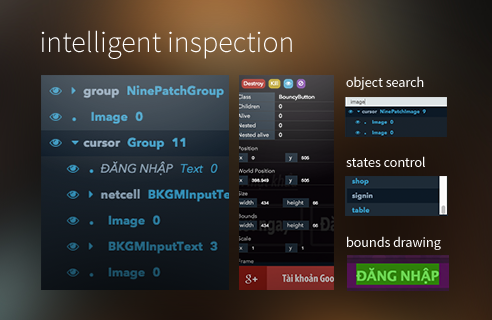
The plugin is written using [Angular.js](https://angularjs.org/) and ES6, compiled with [Babel](babeljs.io) and [Browserify](http://browserify.org/), tested on Phaser 2.1.3 and Phaser 2.4.3 running on Google Chrome Version 45.0.2454.85 (64-bit) on OSX Yosemite.
**Working features:**
- Display objects **tree** inspection.
- Display object **class** guessing.
- Display object **name** guessing (by looking for `this./name/` in parents).
- **Text** as name for Phaser.Text.
- Display objects **non-case-sensitive search** by name and class.
- Display object **destroy/kill/hide**.
- **Properties** inspection and editting.
- **Texture display** for sprite/image
- **Bounds** drawing
- **States** list and state change
- **Floating**, **resizable** and **draggable** panel
- Panel **remember** position on page reload
- **Close/minimize** panel
- **Play/Pause** button
**Upcoming features:**
- **Transparent/Clickthrough** panel
- Sprite/Image **load Texture**
- **Optimize** when displaying too many display objects on the tree
Feel free to follow me on twitter [@netcell](https://twitter.com/netcell) and check out [my blog](http://netcell.github.io)!
## Demo
Check the `example` folder (please run `bower install` before that, and serve the folder on a server/localhost) or try that example rightaway on [this codepen](http://codepen.io/netcell/full/gapZWG/).
## Download
The source is available for download from [latest release](https://github.com/netcell/phaser-inspector/releases) or by cloning the repository or download the files in `build` folder. Alternatively, you can install via:
- ~~[bower](http://bower.io/): `bower install --save phaser-inspector`~~
## Usage
**NOTE:** I have only tested this plugin on Google Chrome so I am not sure how this would perform on other browsers. Also since this plugin is for debugging your game, you should not expect to use it on your mobile devices, meaning remove it (or conditionally not loading it) when deploying to mobile devices.
Simply download the `phaser-inspector.js` or `phaser-inspector.min.js` script from [latest release](https://github.com/netcell/phaser-inspector/releases) and include it on your page after including Phaser:
```html
```
In the `create` method in your boot state:
```javascript
game.plugins.add(Phaser.Plugin.Inspector);
```
Alternatively, when running a game in the browser, you can inject the plugin in the developer console as follow:
```javascript
var script = document.createElement('script'); script.src = "http://netcell.github.io/phaser-inspector/build/phaser-inspector.js"; document.getElementsByTagName('head')[0].appendChild(script); function phaserInspectorInject(){ if (Phaser.Plugin.Inspector) Phaser.GAMES[0].plugins.add(Phaser.Plugin.Inspector); else setTimeout(phaserInspectorInject); } setTimeout(phaserInspectorInject);
```
Check the example in `example` folder to see it in action :)
### License ###
This content is released under the (http://opensource.org/licenses/MIT) MIT License.