https://github.com/netgfx/Phasetips
A tooltips plugin for Phaser.io game framework
https://github.com/netgfx/Phasetips
Last synced: 8 months ago
JSON representation
A tooltips plugin for Phaser.io game framework
- Host: GitHub
- URL: https://github.com/netgfx/Phasetips
- Owner: netgfx
- License: mit
- Created: 2015-10-10T10:25:32.000Z (almost 11 years ago)
- Default Branch: master
- Last Pushed: 2021-08-29T17:48:44.000Z (almost 5 years ago)
- Last Synced: 2025-08-17T04:33:36.965Z (11 months ago)
- Language: JavaScript
- Size: 2.32 MB
- Stars: 43
- Watchers: 3
- Forks: 10
- Open Issues: 0
-
Metadata Files:
- Readme: README.md
- License: LICENSE
Awesome Lists containing this project
- awesome-phaser - Phase tips - A tooltips plugin for Phaser.io game framework (Uncategorized / Uncategorized)
README
# PhaseTips
A tooltips UI component for Phaser.io Javascript library
### A new V3 Version is here: https://github.com/netgfx/Phaser-tooltip
---
Initialize the tooltip anywhere in your game
```
var myTooltip = new Phasetips(gameInstance, options);
```
pass necesery options like: `context` (the object that launches the tooltip)
```
new Phasetips(gameInstance, {
targetObject: myObj,
context: "Hello tooltip",
strokeColor: 0xff0000
});
```
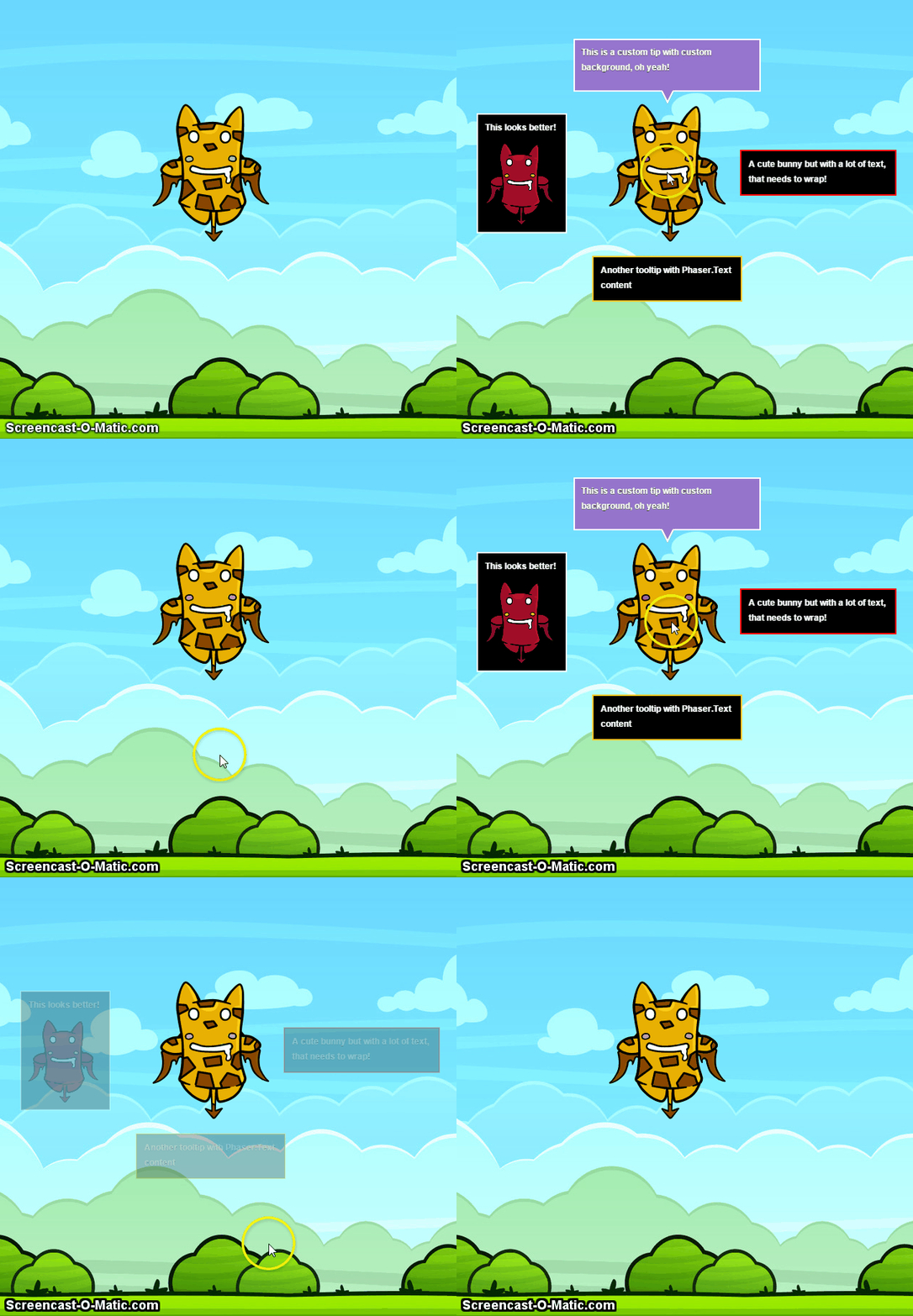
View example: Complete example
Game Instance
The game instance that we want the tooltips to appear to, such as "game"
General Options:
-
context: The information inside the tooltip, can be String, Number, Sprite, Phaser.Text, Phaser.BitmapText, Phaser.Group, Phaser.Image -
width: The width of the tooltip (default: auto) -
height: The height of the tooltip (default: auto) -
x: The x position of the tooltip (default: auto based on position) -
y: The y position of the tooltip (default: auto based on position) -
position: The position of the tooltip based on the targetObject (default: top, options: top, bottom, left, right) -
targetObject: The actual object in which the tooltip will appear on hover (default: Game) -
enableCursor: Enables the hand-cursor over the target object when hovered (default: false) -
disableInputEvents: If disableInputEvents option is set to true, the tooltip will not add will not add input events. Use simulateOnHoverOver, simulateOnHoverOut, hideTooltip or showTooltip API functions to manually control the visibility. (Default: false)
Animation Options:
-
animation: The animation effect (default: fade, options:fade, grow, none) -
animationSpeedShow: The duration of the animation effect showing the tooltip (default: 300) -
animationSpeedHide: The duration of the animation effect hiding the tooltip (default: 200) -
animationDelay: The animation delay before showing the tooltip (default: 0)
Alignment Options:
-
padding: The padding that the context keeps from the tooltip bounds (default: 20) -
positionOffset: The position offset that the tooltip keeps from the targetObject (default: 20) -
fixedToCamera: Pins the tooltip on the camera and moves with it (x,y are now camera offset) (default: false)
Appearance Options:
-
backgroundColor: The color of the background (default: 0x000000) -
roundedCornersRadius: Radius of the rectangle corners. Set to 1 to use a regular rectangle. (default: 1) -
strokeColor: The color of tooltip stroke (default: 0xffffff) -
strokeWeight: The line weight of the tooltip stroke (default: 2) -
customBackground: If the tooltip will use a custom background (default: false) -
initialOn: If the tooltip will visible when it first appears
Font Options:
It is also possible to define individual text style options.
-
font: The style and size of the font. This is overridden if you set any of the following font options. (default: '') -
fontSize: The size of the font. Accepts either string or number. eg. 12 or '12px' (default: 12) -
fontFill: A canvas fillstyle that will be used on the text eg 'red', '#00FF00'. (default: '#FFFFFF') -
fontStroke: A canvas stroke style that will be used on the text stroke eg 'blue', '#FCFF00'. (default: '#232323') -
fontStrokeThickness: A number that represents the thickness of the stroke. Set 0 for no stroke. (default: 1) -
fontWordWrap: Indicates if word wrap should be used. (default: true) -
fontWordWrapWidth: The width in pixels at which text will wrap. (default: 200)
Text Style Options:
Set an object with respective properties to define all at once.
-
textStyle: Declares styles for the simple text element. Individual font options above are overridden if the textStyle option is set. Default:
```
{
font: '',
fontSize: 12,
fill: "#ffffff",
stroke: "#1e1e1e",
strokeThickness: 1,
wordWrap: true,
wordWrapWidth: 200,
lineSpacing: -2
}
```
Callback Options:
-
onHoverCallback: Calls a function when hover occurs (default: fn) -
onOutCallback: Calls a function when hover ends (default: fn)
API Functions
-
printOptions: Prints the options specified in the constructor on the console -
updatePosition: Change the x, y of the tooltip -
destroy: Destroys the tooltip and all its children -
hideTooltip: Hide the tooltip -
showTooltip: Show the tooltip -
simulateOnHoverOver: Simulates onHoverOver -
simulateOnHoverOut: Simulates onHoverOut
Buy me a coffee or tea!

>The TODO list is diminising!
>Please let me know if you come across some bug or have something to contribute