https://github.com/netlah/docker-crushftp
Dockerize CrushFTP 10 server on Alpine Linux 3.19 and OpenJDK 17
https://github.com/netlah/docker-crushftp
crushftp crushftp10 docker ftp server sftp webdav
Last synced: over 1 year ago
JSON representation
Dockerize CrushFTP 10 server on Alpine Linux 3.19 and OpenJDK 17
- Host: GitHub
- URL: https://github.com/netlah/docker-crushftp
- Owner: NetLah
- License: mit
- Created: 2021-08-27T09:12:00.000Z (almost 5 years ago)
- Default Branch: main
- Last Pushed: 2024-06-27T08:35:22.000Z (about 2 years ago)
- Last Synced: 2025-03-25T16:55:36.582Z (over 1 year ago)
- Topics: crushftp, crushftp10, docker, ftp, server, sftp, webdav
- Language: PowerShell
- Homepage: https://hub.docker.com/r/netlah/crushftp
- Size: 68.4 KB
- Stars: 7
- Watchers: 1
- Forks: 3
- Open Issues: 3
-
Metadata Files:
- Readme: README.md
- License: LICENSE
Awesome Lists containing this project
README
# CrushFTP 10
CrushFTP 10 Server provides FTP, Implicit FTPS, SFTP, HTTP, or HTTPS
## Docker Specifications
- Base: Alpine 3.19 Linux, OpenJDK 17, `eclipse-temurin:17-jre-alpine`
- CrushFTP 10 (v10.8.0) (required commercial license [pricing](https://www.crushftp.com/pricing.html))
- Dockerfile: https://github.com/NetLah/docker-crushftp
This container [hub.docker.com/r/netlah/crushftp](https://hub.docker.com/r/netlah/crushftp) is distributed under the [MIT Licence](LICENSE).
## Configuration
### Volumes
- Configuration and binary volume: `/var/opt/crushftp`
- Volume ftproot can be mounted additional like `/ftproot`
### Ports
- FTP: 21
- Passive FTP Ports: 20000-20100
- SFTP: 2222
- HTTPS/WebDAV: 443
- HTTP/WebDAV: 8080
- HTTP Alt/WebDAV: 9090
### Environments
- Admin user of CrushFTP `ADMIN_USER`, default `crushadmin`
- Password for admin user `ADMIN_PASSWORD`, default is random one time
- Health check HTTP protocol `WEB_PROTOCOL` http/https, default `http`
- Health check HTTP port `WEB_PORT`, default `8080`
## Installation
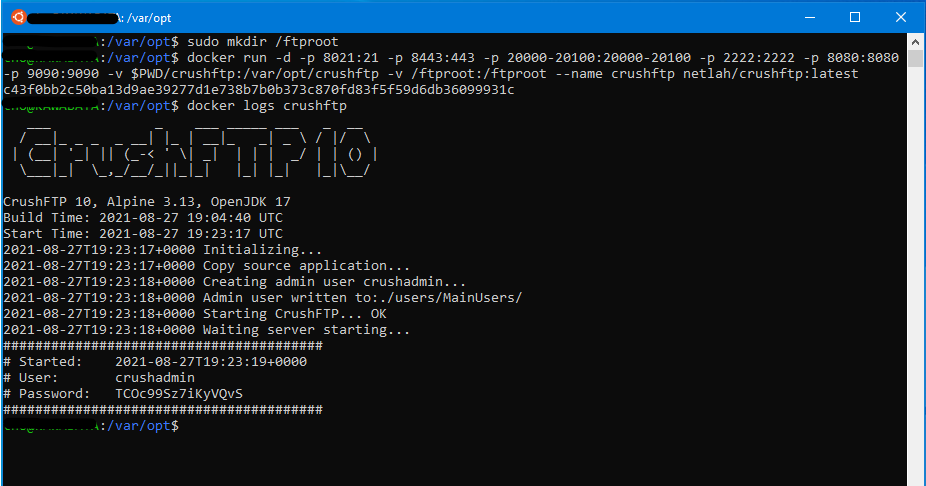
Run container and mount volume `/var/opt/crushftp` to the host in order to keep CrushFTP's configuration and binary persistent. Access browser to `http://localhost:8080` with the admin user to complete the setup.
```
docker run -p 21:21 -p 443:443 -p 20000-20100:20000-20100 -p 2222:2222 -p 8080:8080 -p 9090:9090 -v :/var/opt/crushftp netlah/crushftp:latest
```
To view the random admin password or the log, use `docker logs`
```
docker logs
```
## References
- Visit the [CrushFTP 10 Wiki](https://www.crushftp.com/crush10wiki/)
- Docker sample [CrushFTP 10 Docker sample](https://www.crushftp.com/crush10wiki/Wiki.jsp?page=Docker)
- A [CrushFTP 10 Dockerization](https://github.com/MarkusMcNugen/docker-CrushFTP)
- Prebuilt OpenJDK by [Adoptium](https://adoptium.net/), project [Eclipse Temurin](https://adoptium.net/temurin/)
- Java docker [eclipse-temurin](https://hub.docker.com/_/eclipse-temurin)