https://github.com/nexiustailer/ultimate-creator
Advanced map editor
https://github.com/nexiustailer/ultimate-creator
amx creator editor filterscript fs maker map mapedit mapper mapping pawn pawno pwn sa-mp samp studio
Last synced: 6 months ago
JSON representation
Advanced map editor
- Host: GitHub
- URL: https://github.com/nexiustailer/ultimate-creator
- Owner: NexiusTailer
- License: agpl-3.0
- Created: 2016-09-27T14:07:50.000Z (almost 10 years ago)
- Default Branch: master
- Last Pushed: 2025-08-14T16:24:19.000Z (12 months ago)
- Last Synced: 2025-08-14T18:27:58.925Z (12 months ago)
- Topics: amx, creator, editor, filterscript, fs, maker, map, mapedit, mapper, mapping, pawn, pawno, pwn, sa-mp, samp, studio
- Language: Pawn
- Homepage: https://pawn.wiki/index.php?/topic/44289-ultimate-creator/
- Size: 1010 KB
- Stars: 28
- Watchers: 2
- Forks: 6
- Open Issues: 1
-
Metadata Files:
- Readme: README.md
- Funding: .github/FUNDING.yml
- License: LICENSE
Awesome Lists containing this project
README
# [Ultimate Creator - Advanced map editor](https://pawn.wiki/index.php?/topic/44289-ultimate-creator/)
It is an advanced object, vehicle, actor editor (full list below), which can work right in the game!
Editing: Objects, Vehicles, Actors, Pickups, Checkpoints, Map icons, Gangzones, 3D texts.
## Features:
* **Editing from the game**
To do this, you just need to connect the filterscript
* **Different ways of interaction**
You can use dialogs, hotkeys and commands for the same things
* **Mapping for several players**
Ability to mapping for several persons in the same time
* **New editor from scratch**
Editor written entirely from scratch, 0.3e editor is not used
* **Advanced vehicle (since v1.1.0) and actor (since v1.3.3) configuration**
Ability to tune all created vehicles and set animations for any created actors
* **Editing attached objects and 3D texts (since v1.2.0)**
Ability to edit attached objects and 3D texts to vehicles, players and other objects
* **Duplicate search (since v1.4.2)**
The function of searching for duplicate elements created on the same coordinates
* **Copying default objects**
You can copy default map objects by simply clicking on them
* **Deleting default objects (since v1.3.0)**
You can also delete default map objects by simply clicking on them
* **Change textures and material text of objects**
You can change textures, color and material text of any created object
## How to use:
1. To begin, you must have an RCon rights (optional).
2. Once you get them, type /edit command.
3. Now you are in flymode: use the keys W, A, S, D to move, and move the mouse to look around.
4. You can open the main menu by pressing the Enter key.
5. Next, select items depending on what do you want to do.
All your maps will be saved in "scriptfiles" folder with the extension that you specified in its name (if you didn't specify an extension, the map will be saved in .txt format)
*Some keyboard shortcuts that will be useful:*

LAlt `(KEY_WALK)` - Slow moving/movement
LShift `(KEY_JUMP)` - Acceleration of moving/movement
LShift `(KEY_JUMP)` + LAlt `(KEY_WALK)` - Objects mapping considering surface incline
LMB `(KEY_FIRE)` - Select an object/vehicle/actor...
* W, A, S, D - Movement of selected object/vehicle/actor...
* LShift `(KEY_JUMP)` + LAlt `(KEY_WALK)` + W, A, S, D - Movement along the Z-axis of selected object/vehicle/actor...
* LCtrl `(KEY_FIRE)` + W, A, S, D - Changing the rotation angle of selected object/vehicle/actor...
* LCtrl `(KEY_FIRE)` + LShift `(KEY_JUMP)` + LAlt `(KEY_WALK)` + W, A, S, D - Changing the rotation angle along the X-axis of selected object/vehicle/actor...
RMB `(KEY_HANDBRAKE)` - Moving an object/vehicle/actor... by mouse
Space `(KEY_SPRINT)` - Remove selection/movement of an object/vehicle/actor...
C `(KEY_CROUCH)` + LMB `(KEY_FIRE)` - Copy an object/vehicle/actor...
* LShift `(KEY_JUMP)` + LAlt `(KEY_WALK)` + C `(KEY_CROUCH)` + LMB `(KEY_FIRE)` - Copy attached object/3D text
\ `(KEY_ACTION)` + LMB `(KEY_FIRE)` - Delete an object/vehicle/actor...
## Available commands:
Click to expand the list
**Map management:**
`/newmap` - create new map
`/loadmap` - load existing map
`/loadover` - load map over the current one
`/renamemap` - change name of the current map
`/savemap` - save the current map
`/delmap` - delete map
**Objects:**
`/newobj` - create object
`/delobj` - delete selected object
`/cobj` - copy selected object
`/caobj` - copy selected attached object
`/selobj` *[object ID]* - select object by ID
`/gotoobj` - teleport to selected object
`/getobj` - teleport selected object to yourself
`/stickobj` - stick selected object to surface
`/inclineobj` - stick selected object to surface with incline
`/objtext` - text editor on selected object
`/oplattach` *[player ID]* - attach selected object to player
`/oobjattach` *[object ID]* - attach selected object to object
`/ovehattach` *[vehicle ID]* - attach selected object to vehicle
`/objx` - `/objy` - `/objz` - set position of selected object
`/objrx` - `/objry` - `/objrz` - set rotation angles of selected object
`/objrreset` - reset rotation angles of selected object
**Textures:**
`/txdset` *[layer ID]* *[texture ID]* - set material of selected object
`/txdreset` *[layer ID]* - reset material of selected object
`/txdcolor` *[layer ID]* *[hex code]* - set color of selected object
`/txdcreset` *[layer ID]* - reset color of selected object
`/tcopy` *[layer ID]* - copy text/texture of selected object
`/tpaste` *[layer ID]* - paste text/texture on selected object
`/treset` *[layer ID]* - reset text/texture of selected object
`/tcopyall` - copy text and textures of selected object from all layers
`/tpasteall` - paste text and textures on all layers of selected object
`/tresetall` - reset text and textures of selected object from all layers
`/tclear` - clear text and textures clipboard
**Vehicles:**
`/newveh` - create vehicle
`/delveh` - delete selected vehicle
`/cveh` - copy selected vehicle
`/selveh` *[vehicle ID]* - select vehicle by ID
`/gotoveh` - teleport to selected vehicle
`/getveh` - teleport selected vehicle to yourself
`/stickveh` - stick selected vehicle to surface
`/vehrepair` - repair selected vehicle
`/vehx` - `/vehy` - `/vehz` - set position of selected vehicle
`/vehrz` - set rotation angle of selected vehicle
`/vehrtime` - set respawn time of selected vehicle
`/vehcolor` - set colors of selected vehicle
**Tuning:**
`/compadd` - add component on selected vehicle
`/complist` - viewing and deleting components on selected vehicle
`/compremoveall` - remove all components from selected vehicle
`/paintjob` - set paintjob (for certain vehicles)
`/pjobremove` - remove paintjob from selected vehicle
**Actors:**
`/newact` - create actor
`/delact` - delete selected actor
`/cact` - copy selected actor
`/selact` *[actor ID]* - select actor by ID
`/gotoact` - teleport to selected actor
`/getact` - teleport selected actor to yourself
`/stickact` - stick selected actor to surface
`/actanim` - set animation to selected actor
`/actclear` - reset the animation to selected actor
`/actx` - `/acty` - `/actz` - set position of selected actor
`/actrz` - set rotation angle of selected actor
**Pickups:**
`/newpick` - create pickup
`/delpick` - delete selected pickup
`/cpick` - copy selected pickup
`/selpick` *[pickup ID]* - select pickup by ID
`/gotopick` - teleport to selected pickup
`/getpick` - teleport selected pickup to yourself
`/stickpick` - stick selected pickup to surface
`/picktype` - set type of selected pickup
`/pickx` - `/picky` - `/pickz` - set position of selected pickup
`/pickvw` - set virtual world of selected pickup
**Checkpoints:**
`/newcp` - create checkpoint
`/delcp` - delete checkpoint
`/selcp` - select checkpoint
`/gotocp` - teleport to checkpoint
`/getcp` - teleport checkpoint to yourself
`/cpx` - `/cpy` - set position of checkpoint
`/cpsize` - set size of checkpoint
**Race checkpoints:**
`/newrcp` - create race checkpoint
`/delrcp` - delete race checkpoint
`/selrcp` - select race checkpoint
`/gotorcp` - teleport to race checkpoint
`/getrcp` - teleport race checkpoint to yourself
`/rcptype` - set type of race checkpoint
`/rcpx` - `/rcpy` - `/rcpz` - set position of race checkpoint
`/rcpnextx` - `/rcpnexty` - `/rcpnextz` - arrow pointer's position of race checkpoint
`/rcpsize` - set size of race checkpoint
**Map icons:**
`/newicon` - create map icon
`/delicon` - delete selected map icon
`/cicon` - copy selected map icon
`/selicon` *[map icon ID]* - select map icon by ID
`/gotoicon` - teleport to selected map icon
`/geticon` - teleport selected map icon to yourself
`/iconx` - `/icony` - `/iconz` - set position of selected map icon
`/iconcolor` - set color of selected map icon
`/iconstyle` - set style of selected map icon
**Gangzones:**
`/newzone` - create gangzone
`/delzone` - delete selected gangzone
`/czone` - copy selected gangzone
`/selzone` *[gangzone ID]* - select gangzone by ID (size changing)
`/holdzone` *[gangzone ID]* - select gangzone by ID (movement)
`/gotozone` - teleport to selected gangzone
`/getzone` - teleport selected gangzone to yourself
`/zoneminx` - `/zoneminy` - `/zonemaxx` - `/zonemaxy` - set position of selected gangzone
`/zonecolor` - set color of selected gangzone
**3D texts:**
`/newlab` - create 3D text
`/dellab` - delete selected 3D text
`/clab` - copy selected 3D text
`/calab` - copy selected attached 3D text
`/sellab` *[label ID]* - select 3D text by ID
`/gotolab` - teleport to selected 3D text
`/getlab` - teleport selected 3D text to yourself
`/sticklab` - stick selected 3D text to surface
`/labtext` - set text to selected 3D text
`/labcolor` - set color of selected 3D text
`/lplattach` *[player ID]* - attach selected 3D text to player
`/lvehattach` *[vehicle ID]* - attach selected 3D text to vehicle
`/labx` - `/laby` - `/labz` - set position of selected 3D text
`/labdd` - set draw distance of selected 3D text
`/labvw` - set virtual world of selected 3D text
`/lablos` - set visibility through walls of selected 3D text
**Moving around the map:**
`/setpos` - teleport to the coordinates
`/setint` - interior setting by ID
`/setvw` - virtual world setting by ID
`/maptp` - teleport to the last map marker
`/gotoint` - teleport to default interiors
**Default objects:**
`/copyobjects` - copy default objects mode
`/remobjects` - delete default objects mode
**Editor settings:**
`/camspeed` - change camera speed
`/camspeedslow` - change camera speed (Alt)
`/camspeedfast` - change camera speed (Shift)
`/camdist` - change camera distance
`/movedist` - change movement distance
`/movedistshort` - change movement distance (Alt)
`/movedistlong` - change movement distance (Shift)
`/movedistgz` - change gangzone movement distance
`/movedistgzshort` - change gangzone movement distance (Alt)
`/movedistgzlong` - change gangzone movement distance (Shift)
`/movedisti` - change map icon movement distance
`/movedistishort` - change map icon movement distance (Alt)
`/movedistilong` - change map icon movement distance (Shift)
`/rotspeed` - change rotation speed
`/rotspeedslow` - change rotation speed (Alt)
`/rotspeedfast` - change rotation speed (Shift)
`/showgui` - show interface
`/hidegui` - hide interface
**Map settings:**
`/setweather` - set weather
`/settime` - set time
`/setgravity` - set gravity
**ATTENTION!** Some features works only with [ColAndreas](https://github.com/Pottus/ColAndreas) plugin!
## Installation:
1. Download "Plug&Play" archive from the [Releases](https://github.com/NexiusTailer/Ultimate-Creator/releases) section
2. Unzip it to any path convenient for you
3. Open the "start.bat" and press "Play" in the appeared window
## Pictures:
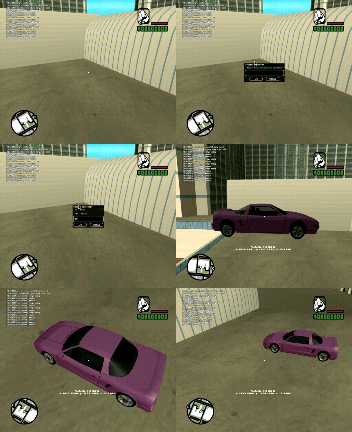   
## Videos:
[MTA Map Editor in SAMP](https://youtube.com/watch?v=4GCBDS3r-fc) (in Russian with English subtitles)
[Ultimate Creator v1.4.2 demo](https://youtube.com/watch?v=CGYh62aCGHc&list=PLBBuSTiHoK4wQO11RNnVOcl4DIVcay-68)
## Related works:
Using these scripts you can also extend the functionality and simplify the process of creating your projects
[aview by SoNikMells](https://sampforum.blast.hk/showthread.php?tid=587916)
[Gammix's Textdraw Editor](https://github.com/Agneese-Saini/SA-MP/blob/master/filterscripts/TDEditor.pwn)
[Nickk's TextDraw Editor](https://github.com/Nickk888SAMP/TextDraw-Editor)
[Map Mover 2.1](https://github.com/adri1samp/MAP-MOVER)
## Thanks:
Batka1337, Vitalik_Gonsor, TheHero, Apec, Magic_York, f0Re3t - help with testing
Vip_Uzer, DANGER_Hidden, continue - some advices
Crayder - some help with ColAndreas
El-SpaceX - Portuguese (Brazilian) translation
Lasho4 - Georgian translation
Special thanks to the huge number of authors whose ideas/developments were included in this script.
I will be glad to hear any ideas and suggestions.