https://github.com/ngx-rock/vscode-angular-auto-import
Automatically suggests and inserts missing Angular component imports based on selectors used in templates.
https://github.com/ngx-rock/vscode-angular-auto-import
Last synced: 5 months ago
JSON representation
Automatically suggests and inserts missing Angular component imports based on selectors used in templates.
- Host: GitHub
- URL: https://github.com/ngx-rock/vscode-angular-auto-import
- Owner: ngx-rock
- License: mit
- Created: 2025-05-24T21:57:00.000Z (about 1 year ago)
- Default Branch: main
- Last Pushed: 2025-10-18T20:50:54.000Z (9 months ago)
- Last Synced: 2025-10-24T08:51:58.368Z (9 months ago)
- Language: TypeScript
- Homepage: https://marketplace.visualstudio.com/items?itemName=baryshevrs.angular-auto-import
- Size: 2.5 MB
- Stars: 2
- Watchers: 0
- Forks: 0
- Open Issues: 2
-
Metadata Files:
- Readme: README.md
- Changelog: CHANGELOG.md
- License: LICENSE
Awesome Lists containing this project
- fucking-awesome-angular - vscode-angular-auto-import - Automatically suggests and inserts missing Angular component imports based on selectors used in templates. (Development Utilities / IDE Extensions)
- awesome-angular - vscode-angular-auto-import - Automatically suggests and inserts missing Angular component imports based on selectors used in templates. (Development Utilities / IDE Extensions)
README
# Angular Auto-Import for VS Code
[](https://marketplace.visualstudio.com/items?itemName=baryshevrs.angular-auto-import)
[](https://marketplace.visualstudio.com/items?itemName=baryshevrs.angular-auto-import)
[](https://marketplace.visualstudio.com/items?itemName=baryshevrs.angular-auto-import)
**Stop manually importing Angular components, directives, and pipes.** Let Angular Auto-Import handle it for you with intelligent Quick Fixes and bulk import capabilities.
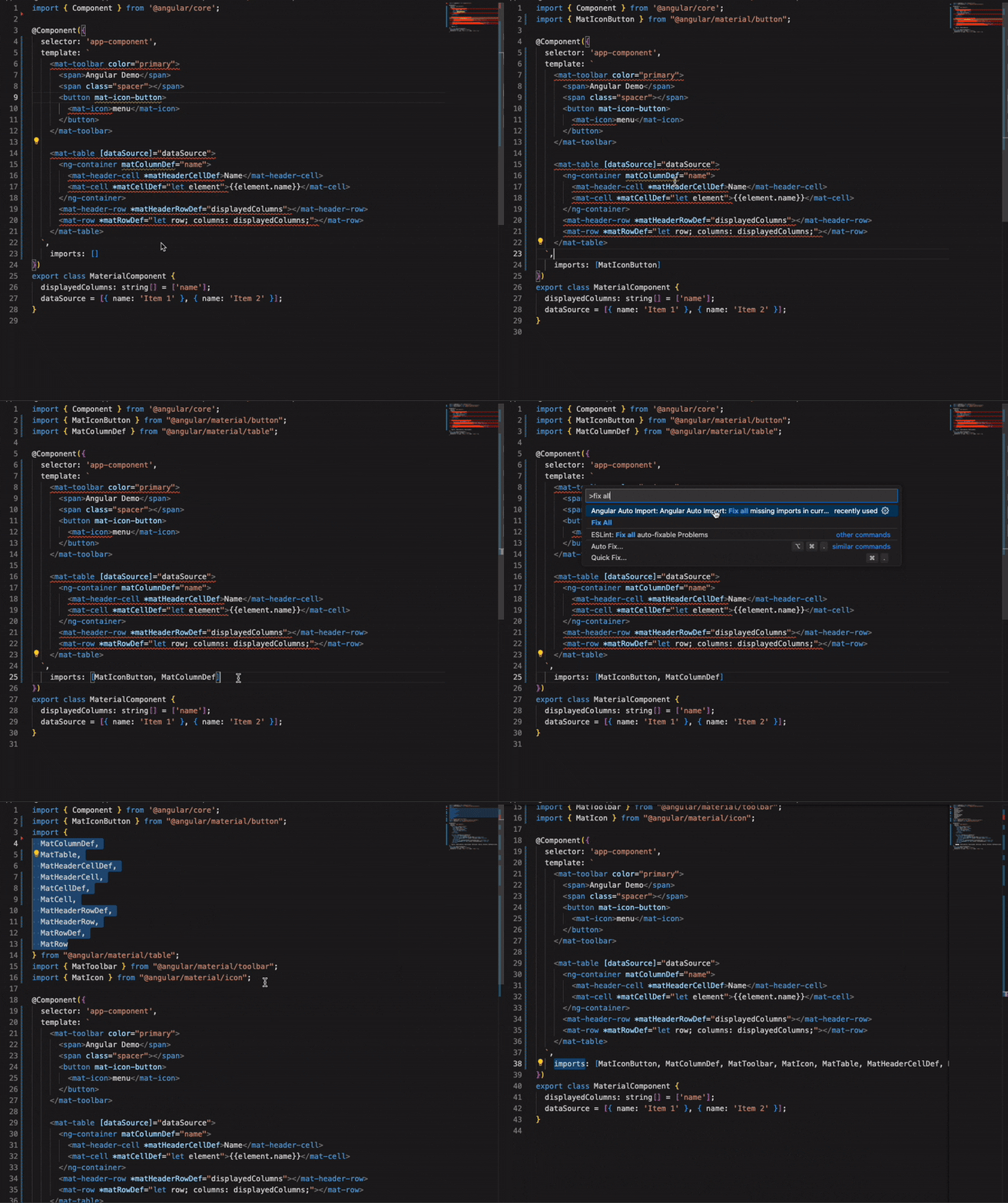
## Why Angular Auto-Import?
Angular Auto-Import transforms how you work with Angular templates by eliminating the tedious task of manually importing components, directives, and pipes. Just use the element in your template, and let the extension handle the rest.
### Key Highlights
- **Fix All Missing Imports** - Import all missing Angular elements in your file with one command
- **Go to Definition** - Navigate to any unimported element's source with a single click (Material Design, Angular CDK, any npm package)
- **Intelligent Quick Fixes** - Get instant import suggestions with enhanced accuracy and performance
- **Works with External Libraries** - Auto-import from any Angular library in your node_modules
- **Monorepo Ready** - Seamless support for Nx and multi-project workspaces
## Features
### 🚀 Fix All Missing Imports
The most powerful feature - fix **all** missing imports in your file with a single command. No more going through each element one by one.
**How to use:**
1. Open the Command Palette (`Ctrl+Shift+P` / `Cmd+Shift+P`)
2. Run `Angular Auto Import: Fix all missing imports in current file`
3. All missing components, directives, and pipes are automatically imported
Perfect for:
- Cleaning up newly created templates
- Fixing imports after moving components between files
- Bulk importing elements from external libraries
### ⚡ Enhanced Quick Fixes
Get intelligent, context-aware import suggestions with improved accuracy and performance.
**Key improvements:**
- **Faster detection** - Instant diagnostics for missing imports
- **Smarter suggestions** - Prioritizes local components over library imports
- **Better accuracy** - Correctly resolves standalone vs module-based components
- **Path alias support** - Uses your `tsconfig.json` path mappings (`@app/*`, `@shared/*`)
**How to use:**
1. Hover over any underlined Angular element
2. Click the lightbulb or press `Ctrl+.` / `Cmd+.`
3. Select the appropriate import from the suggestions
### 🔍 Go to Definition for Unimported Elements
Navigate directly to the source of any unimported Angular component, directive, or pipe with a single click. This is especially powerful for external libraries like Angular Material.
**Key features:**
- **Works for external libraries** - Click on Material Design components, Angular CDK, and any other npm package to jump to their source
- **Accurate navigation** - Navigates to the actual component declaration, not just the entry point (e.g., `button.component.ts` instead of `public-api.ts`)
- **Multi-project support** - Works seamlessly across monorepos and projects with re-exported components
- **No import required** - Explore library source without importing first
**How to use:**
1. Hover over any unimported Angular element in your template
2. `Ctrl+Click` (or `Cmd+Click` on Mac) or press `F12`
3. Jump directly to the component's source file
**Example:**
```html
Click Me
```
### Additional Features
- **💡 Smart Completions** - IntelliSense for Angular elements as you type in templates
- **📦 External Library Support** - Auto-import from any Angular package in node_modules
- **🏢 Monorepo Support** - Works seamlessly with Nx and multi-project workspaces
- **🎯 Standalone Component Support** - Full support for both standalone and NgModule-based architecture
- **🔧 Configurable Diagnostics** - Control severity levels and diagnostic modes
## Quick Start
1. **Install** the extension from the [VS Code Marketplace](https://marketplace.visualstudio.com/items?itemName=baryshevrs.angular-auto-import)
2. **Open** any Angular project (standalone components required)
3. **Use** any component, directive, or pipe in your template
4. **Let the extension** handle the imports automatically
That's it! The extension activates automatically when you open an Angular project.
## Installation
### From VS Code
1. Open VS Code
2. Press `Ctrl+Shift+X` / `Cmd+Shift+X` to open Extensions view
3. Search for `Angular Auto Import`
4. Click **Install**
### From Marketplace
Visit the [VS Code Marketplace](https://marketplace.visualstudio.com/items?itemName=baryshevrs.angular-auto-import) and click **Install**.
## Usage
### Diagnostics for Unimported Elements
The extension highlights any unimported Angular elements in your templates with a diagnostic indicator (configurable severity - error, warning, or info):
```html
Click Me
```
This diagnostic tells you:
- **What's missing** - The exact component, directive, or pipe name
- **Where it comes from** - The module or library providing it
- **How to fix it** - Quick Fix suggestions or direct navigation
**Diagnostic modes:**
- `full` (default) - Shows visible diagnostics with quick fix options
- `quickfix-only` - Shows quick fixes without visible squiggly lines
- `disabled` - Turn off all diagnostics
### Quick Fix for Single Import
When you see a diagnostic for an unimported element:
1. **Hover** over the element or place your cursor on it
2. **Press** `Ctrl+.` / `Cmd+.` or click the lightbulb icon
3. **Select** the import suggestion (e.g., `Import ButtonComponent from '@angular/material/button'`)
The extension automatically:
- Adds the import statement to your TypeScript file
- Updates the component's `imports` array (for standalone components)
### Navigate to Definition
Explore source code without importing:
1. **Hover** over any unimported Angular element (you'll see the diagnostic)
2. **Press** `F12` or `Ctrl+Click` / `Cmd+Click`
3. Jump directly to the component's source file
Works perfectly for:
- Material Design components
- Angular CDK utilities
- Third-party Angular libraries
- Your own local components
### Fix All Missing Imports
For files with multiple missing imports:
1. **Open** the Command Palette (`Ctrl+Shift+P` / `Cmd+Shift+P`)
2. **Run** `Angular Auto Import: Fix all missing imports in current file`
3. **Done** - All missing imports are added automatically
### Auto-completion
Start typing an Angular element in your template:
- Type ` Preferences > Settings` or `settings.json`):
### General Settings
| Setting | Description | Default |
| ------- | ----------- | ------- |
| `angular-auto-import.projectPath` | Absolute path to Angular project root. Overrides workspace folder detection. Useful for monorepos. | `null` |
| `angular-auto-import.index.refreshInterval` | Auto-reindex interval in minutes. Set to `0` to disable periodic reindexing. | `60` |
### Completion Settings
| Setting | Description | Default |
| ------- | ----------- | ------- |
| `angular-auto-import.completion.components.enabled` | Enable component auto-completion in templates | `true` |
| `angular-auto-import.completion.directives.enabled` | Enable directive auto-completion in templates | `true` |
| `angular-auto-import.completion.pipes.enabled` | Enable pipe auto-completion in templates | `true` |
### Diagnostic Settings
| Setting | Description | Default |
| ------- | ----------- | ------- |
| `angular-auto-import.diagnostics.mode` | Diagnostic mode:
- `full`: Show diagnostics + quick fixes
- `quickfix-only`: Quick fixes without visible diagnostics
- `disabled`: Turn off all diagnostics | `full` |
| `angular-auto-import.diagnostics.severity` | Severity level for missing imports: `error`, `warning`, or `info` | `warning` |
## Commands
Access these commands from the Command Palette (`Ctrl+Shift+P` / `Cmd+Shift+P`):
| Command | Description | When to Use |
| ------- | ----------- | ----------- |
| **Fix all missing imports in current file** | Automatically imports all missing Angular elements in the active file | After creating new templates or moving code between files |
| **Reindex Project(s)** | Manually triggers a full project reindex | When new components aren't being detected |
| **Clear Cache** | Clears all cached indexing data | When experiencing persistent issues or after major project changes |
| **Show Logs** | Opens the extension's output channel | For debugging or reporting issues |
## Troubleshooting
### Elements Not Being Detected
**Problem:** Components, directives, or pipes aren't showing in suggestions or quick fixes.
**Solutions:**
1. Run `Angular Auto Import: Reindex Project(s)` from the Command Palette
2. Verify your `tsconfig.json` includes all source files
3. Run `Angular Auto Import: Show Logs` to check for parsing errors
## Requirements
- **Angular**: 14.2+ (standalone component support required)
- **TypeScript**: 4.8+
- **VS Code**: 1.80+
- **Node.js**: 16+ (for project indexing)
## Limitations
- **Standalone Components Only**: This extension works exclusively with Angular standalone components. Traditional NgModule-based projects are not supported.
Report issues on [GitHub Issues](https://github.com/ngx-rock/vscode-angular-auto-import/issues).
## Frequently Asked Questions
Does this work with NgModule-based projects?
No, Angular Auto-Import requires Angular standalone components (Angular 14+). NgModule-based projects are not supported.
Can I use this with external libraries?
Yes! The extension automatically indexes components, directives, and pipes from any Angular library in your `node_modules`.
Does it work with Nx monorepos?
Yes, Angular Auto-Import has full support for Nx and other monorepo setups. Each project is indexed separately.
How do I disable diagnostics but keep quick fixes?
Set `"angular-auto-import.diagnostics.mode": "quickfix-only"` in your settings.
Why are some components not being detected?
Ensure:
1. Files are included in your `tsconfig.json`
2. Run `Angular Auto Import: Reindex Project(s)` command
Can I navigate to external library source code?
Yes! The "Go to Definition" feature lets you explore any unimported component, directive, or pipe from external libraries (Material Design, Angular CDK, etc.) without importing it first. Just `Ctrl+Click` on the element in your template to jump to its source file.
## Support
- **Report Bugs**: [GitHub Issues](https://github.com/ngx-rock/vscode-angular-auto-import/issues)
## License
[MIT](https://github.com/ngx-rock/vscode-angular-auto-import/blob/main/LICENSE)
---
**Enjoying Angular Auto-Import?** Leave a [⭐ review](https://marketplace.visualstudio.com/items?itemName=baryshevrs.angular-auto-import&ssr=false#review-details) on the VS Code Marketplace!