https://github.com/nhlocal/aitimeline
Tracking the evolution of Artificial Intelligence
https://github.com/nhlocal/aitimeline
ai artificial-intelligence information news timeline timeline-view
Last synced: 4 months ago
JSON representation
Tracking the evolution of Artificial Intelligence
- Host: GitHub
- URL: https://github.com/nhlocal/aitimeline
- Owner: NHLOCAL
- License: mit
- Created: 2024-04-17T23:01:09.000Z (about 2 years ago)
- Default Branch: main
- Last Pushed: 2026-01-15T16:36:58.000Z (5 months ago)
- Last Synced: 2026-01-15T19:43:42.290Z (5 months ago)
- Topics: ai, artificial-intelligence, information, news, timeline, timeline-view
- Language: SCSS
- Homepage: https://nhlocal.github.io/AiTimeline/
- Size: 679 KB
- Stars: 148
- Watchers: 9
- Forks: 7
- Open Issues: 1
-
Metadata Files:
- Readme: README.md
- License: LICENSE
Awesome Lists containing this project
README
# AI Timeline
An open-source timeline tracking the evolution and advancements in Artificial Intelligence from 2022 onwards.
## Overview
This project provides a chronological overview of significant milestones, model releases, and key developments in the AI field. It aims to be a clear and concise resource for tracking the industry's rapid progress.
## Features
- **Yearly Sections:** Events organized by year.
- **Monthly Events:** Clear breakdown of events within each month.
- **Key Event Highlighting:** Important milestones are visually emphasized.
- **Sortable View:** Toggle between newest-first and oldest-first chronological order.
- **Dark Mode:** Switch between light and dark themes.
- **Responsive Design:** Works well on desktop and mobile devices.
- **Further Reading:** Links to related articles and resources.
## How to Use
1. **Visit the Timeline:** [https://nhlocal.github.io/AiTimeline/](https://nhlocal.github.io/AiTimeline/)
2. **Navigate:** Scroll or use the year links at the top.
3. **Sort:** Use the "Sort" button to change the timeline order.
4. **Theme:** Use the toggle button (moon/sun icon) to switch between dark and light modes.
## How the Site Works
This site is built using **Jekyll**, a static site generator, and is automatically deployed using **GitHub Actions**.
- **Content Source:** The single source of truth for the timeline is `_data/timeline.md`. This is the only file you need to edit to add or change events.
- **Data File:** The `_data/timeline.yml` file is used by Jekyll to build the site. **This file is generated automatically** by a script. Do not edit it directly.
- **Automation:** When changes are pushed to the `main` branch, a GitHub Action automatically runs:
1. Converts the `_data/timeline.md` file to `_data/timeline.yml`.
2. Commits the updated `.yml` file back to the repository.
3. Builds the Jekyll site.
4. Deploys the site to GitHub Pages.
## Contributing
Contributions are welcome and have been simplified! Help keep the timeline accurate and up-to-date.
1. **Fork & Clone:** Fork the repository to your GitHub account and clone it locally.
```bash
git clone https://github.com/YOUR_USERNAME/AiTimeline.git
cd AiTimeline
```
2. **Edit `_data/timeline.md`:**
* Open the `_data/timeline.md` file.
* Add or modify events using the existing format (`# Year:`, `## Month`, `- Event description`).
* Use `**bold text**` for emphasis (e.g., model names).
* To highlight an event as "special", add `(*special*)` at the end of its line, with a space before it.
```markdown
## March
- An important event happened. (*special*)
- A regular event occurred.
```
3. **Commit and Push Your Changes:**
* Stage and commit **only the `timeline.md` file**. The `.yml` file will be updated automatically by the workflow.
```bash
git add _data/timeline.md
git commit -m "docs: Add [brief description of your change]"
```
* Push your changes to your forked repository:
```bash
git push origin main # or your branch name
```
4. **Create a Pull Request:**
* Go to your fork on GitHub and open a Pull Request to the `main` branch of `NHLOCAL/AiTimeline`.
* Once your Pull Request is merged, the automated workflow will handle the conversion and deployment.
## Feedback and Suggestions
Have feedback, found a bug, or want to suggest an addition? Please **[open an issue](https://github.com/NHLOCAL/AiTimeline/issues)** on GitHub. We appreciate your input!
## Running Locally (Optional)
To preview your changes on your local machine before creating a pull request:
1. **Install Prerequisites:**
* Ruby and Bundler (see [Jekyll Installation Guide](https://jekyllrb.com/docs/installation/))
* Python 3
2. **Install Dependencies:**
```bash
bundle install
```
3. **Generate the `.yml` File for Local Preview:**
* After editing `_data/timeline.md`, you must run the conversion script to see your changes locally.
* This step is **only for local previewing**. The final conversion is handled automatically online.
```bash
# Run from the project root
python scripts/convert_timeline_events.py _data/timeline.md
```
4. **Serve the Site:**
```bash
bundle exec jekyll serve
```
5. **View:** Open your browser to `http://localhost:4000/AiTimeline/` (or the address provided).
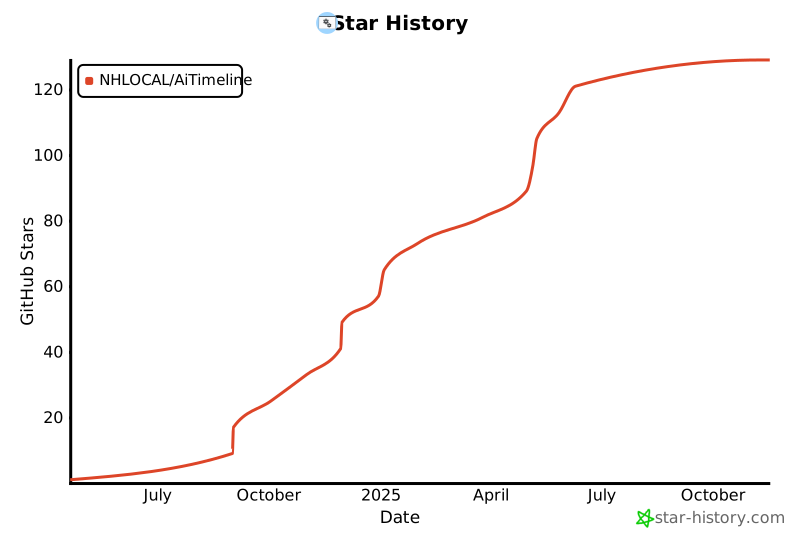
## Star History
[](https://www.star-history.com/#NHLOCAL/AiTimeline&Date)
## License
### Code License
The code in this repository is licensed under the MIT License. See the [LICENSE](LICENSE) file for details.
### Content License
The content of the website, including the timeline data, is licensed under the [Creative Commons Attribution 4.0 International License](http://creativecommons.org/licenses/by/4.0/).
This means you are free to share and adapt the content for any purpose, even commercially, as long as you give appropriate credit to the original source.
### How to Attribute
If you use or reference the data from this timeline, please use one of the following standard citation formats.
**APA Style:**
```
NHLOCAL. (2025). *AI Timeline*. Retrieved from https://nhlocal.github.io/AiTimeline/
```
**BibTeX Entry:**
```bibtex
@misc{nhlocal_ai_timeline,
author = {NHLOCAL},
title = {AI Timeline},
year = {2025},
howpublished = {\url{https://nhlocal.github.io/AiTimeline/}},
}
```