https://github.com/nickrunning/wechat-selkies
基于Selkies的Linux网页版微信/QQ,支持本地中文输入法,支持AMD64和ARM64。
https://github.com/nickrunning/wechat-selkies
docker qq vnc web wechat
Last synced: 5 months ago
JSON representation
基于Selkies的Linux网页版微信/QQ,支持本地中文输入法,支持AMD64和ARM64。
- Host: GitHub
- URL: https://github.com/nickrunning/wechat-selkies
- Owner: nickrunning
- License: mit
- Created: 2025-10-12T10:03:40.000Z (9 months ago)
- Default Branch: master
- Last Pushed: 2025-11-09T13:00:22.000Z (9 months ago)
- Last Synced: 2025-11-09T15:03:51.266Z (9 months ago)
- Topics: docker, qq, vnc, web, wechat
- Language: Python
- Homepage: https://hub.docker.com/r/nickrunning/wechat-selkies
- Size: 104 KB
- Stars: 1,521
- Watchers: 7
- Forks: 124
- Open Issues: 9
-
Metadata Files:
- Readme: README.md
- License: LICENSE
Awesome Lists containing this project
README
# WeChat Selkies
[](https://github.com/nickrunning/wechat-selkies/stargazers)
[](https://github.com/nickrunning/wechat-selkies/network/members)
[](https://github.com/nickrunning/wechat-selkies/issues)
[](https://github.com/nickrunning/wechat-selkies/blob/master/LICENSE)
[](https://hub.docker.com/r/nickrunning/wechat-selkies)
[](https://hub.docker.com/r/nickrunning/wechat-selkies)
[](https://github.com/nickrunning/wechat-selkies/releases)
[](https://github.com/nickrunning/wechat-selkies/actions)
[](https://github.com/nickrunning/wechat-selkies/commits)
中文 | [English](README_en.md)
基于 Docker 的微信/QQ Linux 客户端,使用 Selkies WebRTC 技术提供浏览器访问支持。
## 项目简介
本项目将官方微信/QQ Linux 客户端封装在 Docker 容器中,通过 Selkies 技术实现在浏览器中直接使用微信/QQ,无需在本地安装微信/QQ 客户端。适用于服务器部署、远程办公等场景。
## 升级注意事项
> 如果升级后部分功能缺失,请先清空本地挂载目录下的openbox目录(如`./config/.config/openbox`)。
## 功能特性
- 🌐 **浏览器访问**:通过 Web 浏览器直接使用微信,无需本地安装
- 🐳 **Docker化部署**:简单的容器化部署,环境隔离
- 🔒 **数据持久化**:支持配置和聊天记录持久化存储
- 🎨 **中文支持**:完整的中文字体和本地化支持,支持本地中文输入法
- 🖼️ **图片复制**:支持通过侧边栏面板开启图片复制
- 📁 **文件传输**:支持通过侧边栏面板进行文件传输
- 🖥️ **AMD64和ARM64架构支持**:兼容主流CPU架构
- 🔧 **硬件加速**:可选的 GPU 硬件加速支持
- 🪟 **窗口切换器**:左上角增加切换悬浮窗,方便切换到后台窗口,为后续添加其它功能做基础
- 🤖 **自动启动**:可配置自动启动微信和QQ客户端(可选)
- 📋 **桌面快捷方式集成**:自动扫描 `~/Desktop/` 下的 `.desktop` 文件并添加到右键菜单,方便启动第三方应用(如通过 proot-apps 安装的应用)
## 截图展示


## 快速开始
### 环境要求
- Docker
- Docker Compose
- 支持WebRTC的现代浏览器(Chrome、Firefox、Safari等)
### 快速部署
1. **直接使用已构建的镜像进行快速部署**
GitHub Container Registry镜像:
```bash
docker run -it -p 3001:3001 -v ./config:/config --device /dev/dri:/dev/dri ghcr.io/nickrunning/wechat-selkies:latest
```
Docker Hub镜像:
```bash
docker run -it -p 3001:3001 -v ./config:/config --device /dev/dri:/dev/dri nickrunning/wechat-selkies:latest
```
2. **访问微信**
在浏览器中访问:`https://localhost:3001` 或 `https://<服务器IP>:3001`
> **注意:** 映射3000端口用于HTTP访问,3001端口用于HTTPS访问,建议使用HTTPS。
### docker-compose 部署
1. **创建项目目录并进入**
```bash
mkdir wechat-selkies
cd wechat-selkies
```
2. **创建 docker-compose.yml 文件**
```yaml
services:
wechat-selkies:
image: nickrunning/wechat-selkies:latest # or ghcr.io/nickrunning/wechat-selkies:latest
container_name: wechat-selkies
ports:
- "3000:3000" # http port
- "3001:3001" # https port
restart: unless-stopped
volumes:
- ./config:/config
devices:
- /dev/dri:/dev/dri # optional, for hardware acceleration
environment:
- PUID=1000 # user ID, set according to your system
- PGID=100 # group ID, set according to your system
- TZ=Asia/Shanghai # timezone, set according to your timezone
- LC_ALL=zh_CN.UTF-8 # locale, set according to your needs
- AUTO_START_WECHAT=true # default is true
- AUTO_START_QQ=false # default is false
# - CUSTOM_USER= # recommended to set a custom user name
# - PASSWORD= # recommended to set a password for selkies web ui
shm_size: "1gb" # recommended, will improve performance
```
3. **启动服务**
```bash
docker-compose up -d
```
### 源码部署
1. **克隆项目**
```bash
git clone https://github.com/nickrunning/wechat-selkies.git
cd wechat-selkies
```
2. **启动服务**
```bash
docker-compose up -d
```
3. **访问微信**
在浏览器中访问:`https://localhost:3001` 或 `https://<服务器IP>:3001`
### 配置说明
更多自定义配置请参考 [Selkies Base Images from LinuxServer](https://github.com/linuxserver/docker-baseimage-selkies)。
#### Docker Hub 推送配置
本项目支持同时推送到 GitHub Container Registry 和 Docker Hub。如需启用 Docker Hub 推送功能,请在仓库下添加Environment Secrets和Environment Variables:
**Environment Secrets:**
* DOCKERHUB_USERNAME: 你的 Docker Hub 用户名
* DOCKERHUB_TOKEN: 你的 Docker Hub Access Token
**Environment Variables:**
* ENABLE_DOCKERHUB: 设置为 `true` 来启用 Docker Hub 推送
#### 环境变量配置
在 `docker-compose.yml` 中可以配置以下环境变量:
| 变量名 | 默认值 | 说明 |
|--------|--------|------|
| `TITLE` | `WeChat Selkies` | Web UI 标题 |
| `PUID` | `1000` | 用户 ID |
| `PGID` | `100` | 组 ID |
| `TZ` | `Asia/Shanghai` | 时区设置 |
| `LC_ALL` | `zh_CN.UTF-8` | 语言环境 |
| `CUSTOM_USER` | - | 自定义用户名(推荐设置) |
| `PASSWORD` | - | Web UI 访问密码(推荐设置) |
| `AUTO_START_WECHAT` | `true` | 是否自动启动微信客户端 |
| `AUTO_START_QQ` | `false` | 是否自动启动 QQ 客户端 |
#### 端口配置
- `3001`: Web UI 访问端口
#### 数据卷挂载
- `./config:/config`: 微信配置和数据持久化目录
> **注意:** 如果升级后右键菜单缺少 `WeChat` 相关选项,请先清空本地挂载目录下的openbox目录(如`./config/.config/openbox`)。
## 安装第三方应用(如 Telegram)
本项目支持通过 [proot-apps](https://github.com/linuxserver/proot-apps) 安装第三方 Linux 应用。以 Telegram 为例:
1. 在浏览器中打开容器桌面
2. 点击左侧 **侧边栏** → **应用程序**(Applications)
3. 在应用列表中找到 **Telegram**
4. 点击 **安装**(Install)按钮,等待安装完成
安装完成后,应用快捷方式会自动出现在 `~/Desktop/` 目录下,**右键菜单会自动刷新**,无需重启容器即可从菜单中启动该应用。
> **提示:** 如需卸载应用,同样通过侧边栏 → 应用程序,选中对应应用后点击 **卸载**(Uninstall)即可,右键菜单会自动更新。
## 高级配置
### 硬件加速
如果您的系统支持 GPU 硬件加速,Docker Compose 配置中已包含相关设备映射:
```yaml
devices:
- /dev/dri:/dev/dri
```
## 目录结构
```
wechat-selkies/
├── docker-compose.yml # Docker Compose 配置文件
├── Dockerfile # Docker 镜像构建文件
├── LICENSE # License
├── README.md # 项目说明文档
├── config/ # 配置和数据持久化目录
└── root/ # 容器初始化文件
├── defaults/
│ └── autostart # 自动启动配置
└── wechat.png # 微信图标
```
## 故障排除
### 常见问题
1. **无法访问 Web UI**
- 检查端口 3001 是否被占用
- 确认 Docker 容器正常运行:`docker ps`
### 日志查看
查看容器运行日志:
```bash
docker-compose logs -f wechat-selkies
```
## 技术架构
- **基础镜像**:`ghcr.io/linuxserver/baseimage-selkies:ubuntunoble`
- **微信客户端**:官方微信 Linux 版本
- **Web 技术**:Selkies WebRTC
- **容器化**:Docker + Docker Compose
## 贡献指南
欢迎提交 Issue 和 Pull Request!
1. Fork 本项目
2. 创建特性分支:`git checkout -b feature/your-feature`
3. 提交更改:`git commit -am 'Add some feature'`
4. 推送分支:`git push origin feature/your-feature`
5. 提交 Pull Request
## 许可证
本项目采用 **MIT License** 开源协议。详见 [LICENSE](LICENSE) 文件。
### 📜 许可证说明
- **项目许可证**: MIT License - 宽松的开源许可证
- **依赖项说明**: 本项目使用 [LinuxServer.io baseimage-selkies](https://github.com/linuxserver/docker-baseimage-selkies) 作为基础镜像
- **许可证兼容性**: 由于本项目仅使用基础镜像而未修改其源码,根据容器化软件的许可证实践,可以采用MIT许可证
- **源码开放**: 完整项目源代码在 GitHub 上公开:https://github.com/nickrunning/wechat-selkies
## 免责声明与版权声明
### 🚨 重要声明
**本项目与腾讯公司无任何关联,属于独立的第三方开源项目。**
### 📋 版权声明
- **微信®** 是 **腾讯公司** 的注册商标和版权作品
- 本项目中使用的微信相关图标、logo 等视觉元素的版权归腾讯公司所有
- 本项目仅为技术展示和学习目的,不用于商业用途
- **如有版权争议,将立即移除相关内容**
### ⚖️ 法律合规
- 本项目严格遵守相关法律法规和用户协议
- 用户使用本项目时应遵守当地法律法规
- 本项目不对用户的使用行为承担法律责任
- **如腾讯公司认为存在侵权行为,请联系我们立即处理**
### 🎯 使用条款
- 本项目仅供学习、研究和个人使用
- 禁止用于任何商业目的或盈利活动
- 用户应自行承担使用风险和法律责任
- 请遵守微信用户协议和相关服务条款
## 相关链接
- [微信官方网站](https://weixin.qq.com/)
- [Selkies WebRTC](https://github.com/selkies-project)
- [LinuxServer.io](https://github.com/linuxserver)
- [xiaoheiCat/docker-wechat-sogou-pinyin](https://github.com/xiaoheiCat/docker-wechat-sogou-pinyin)
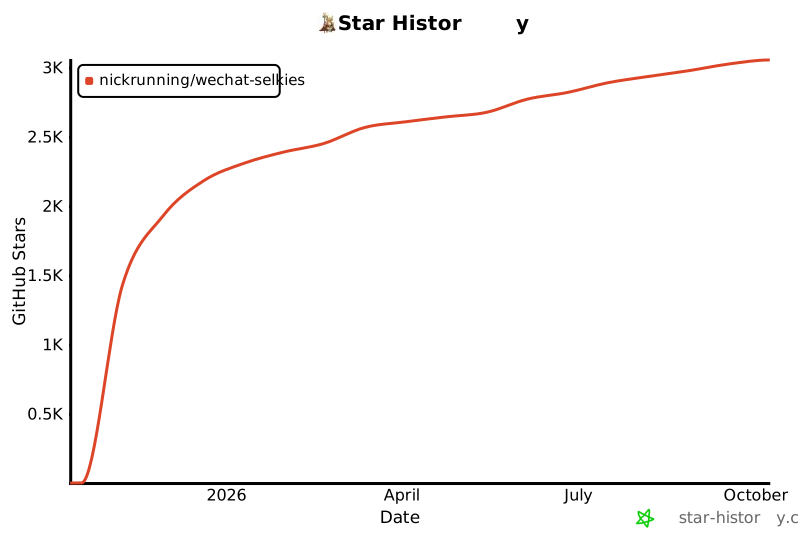
## Star History
[](https://www.star-history.com/#nickrunning/wechat-selkies&Date)