https://github.com/nickware-group/facefull-bridge
Facefull bridge С++ library. The easiest way to use Facefull for native desktop applications
https://github.com/nickware-group/facefull-bridge
desktop-app gui native
Last synced: 10 days ago
JSON representation
Facefull bridge С++ library. The easiest way to use Facefull for native desktop applications
- Host: GitHub
- URL: https://github.com/nickware-group/facefull-bridge
- Owner: nickware-group
- License: mit
- Created: 2025-01-06T18:52:26.000Z (over 1 year ago)
- Default Branch: master
- Last Pushed: 2026-03-23T08:06:50.000Z (3 months ago)
- Last Synced: 2026-05-23T00:27:51.791Z (about 1 month ago)
- Topics: desktop-app, gui, native
- Language: C++
- Homepage: https://nickware.group/dev/facefull/
- Size: 238 KB
- Stars: 3
- Watchers: 2
- Forks: 0
- Open Issues: 0
-
Metadata Files:
- Readme: README.md
- License: LICENSE.md
Awesome Lists containing this project
README

Facefull bridge library
1.2.0
Facefull bridge is a communication system which connects application native backend (C++/Java/etc...) and Facefull user interface (runs through webview component).
This library allows you to use Facefull to create a user interface for native desktop applications using the webview component. In native mode you can use built-in event system to communicate with your native desktop application C++ backend.
This library contains Facefull bridge interface and bridge implementation for wxWidgets (webview/webkit), Qt5 (webkit) and Electron frameworks.
You can use predefined implementations or create your own.
Available bridge modes:
- `Native mode`. `Facefull UI` <---> `WebView component` <---> `native code` in one native app.
- `Electron mode`. `Facefull UI` <---> `Electron app` <---> `native app`. In this mode, Facefull frontend communicates with Electron backend and native C++ app. The native application runs an HTTP server and provides communication between the native C++ code and Facefull frontend via the bridge system.
- `Web mode`. `Facefull UI` <---> `browser` <---> `native app / server`. In this mode, the backend application runs an HTTP server and provides communication between the native C++ code and Facefull frontend via the bridge system.
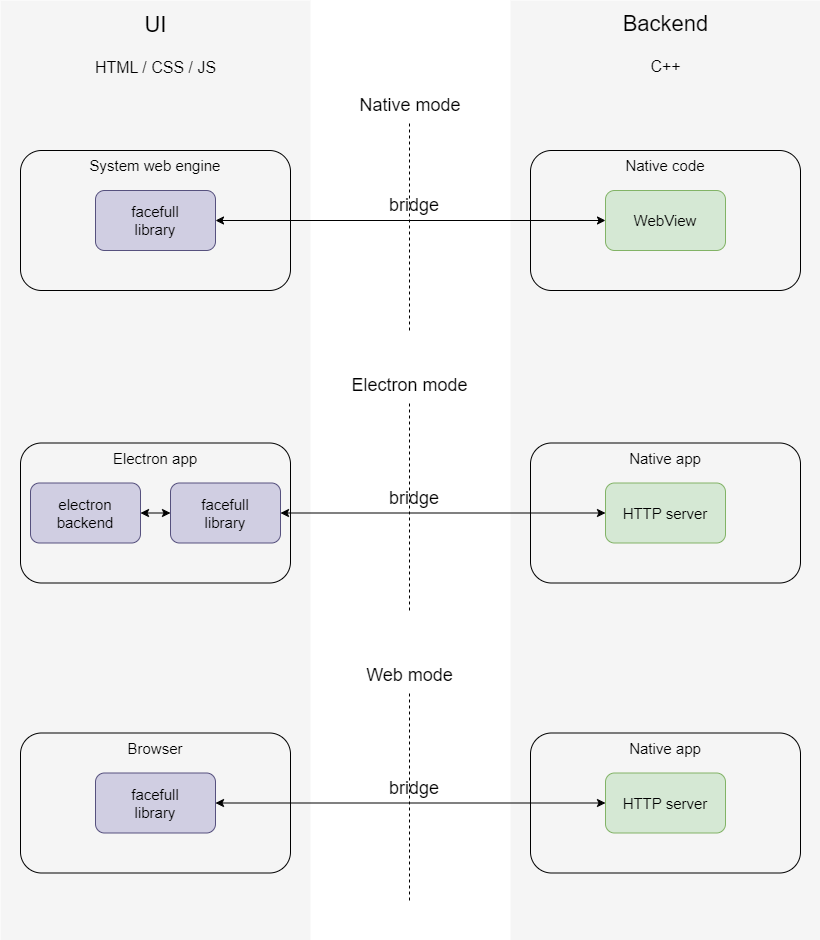
[facefull official page](https://nickware.group/products/facefull)
----------------------------------------------------------------
### LICENCE
Facefull bridge library is distributed under the MIT Licence.
----------------------------------------------------------------
### USAGE EXAMPLES
#### 1. [Bridge for wxWidgets](examples/wxwidgets)
Supported OS:
- Windows (uses [Microsoft Edge WebView2 Runtime](https://developer.microsoft.com/en-us/microsoft-edge/webview2?form=MA13LH&cs=578062562))
- Linux (uses WebKit)
#### 2. [Bridge for Qt5](examples/qt5webkit)
Supported OS:
- Linux (uses WebKit)
#### 3. [Bridge for web](examples/web_bridge)
Supported OS:
- Windows
- Linux
- MacOS
#### 4. [Bridge for electron](examples/electron)
Supported OS:
- Windows
- Linux
- MacOS
----------------------------------------------------------------
### HOW TO BUILD
All files will be in dist directory.
#### Windows
Just run build.cmd script.
#### Linux / MacOS
Just run build.sh script.