https://github.com/nigrosimone/ng-as
Angular pipe and directive for type casting template variables.
https://github.com/nigrosimone/ng-as
angular angular2
Last synced: about 1 year ago
JSON representation
Angular pipe and directive for type casting template variables.
- Host: GitHub
- URL: https://github.com/nigrosimone/ng-as
- Owner: nigrosimone
- License: mit
- Created: 2021-12-14T18:08:57.000Z (over 4 years ago)
- Default Branch: main
- Last Pushed: 2024-09-22T12:58:07.000Z (almost 2 years ago)
- Last Synced: 2024-11-18T05:18:32.128Z (over 1 year ago)
- Topics: angular, angular2
- Language: TypeScript
- Homepage: https://www.npmjs.com/package/ng-as
- Size: 4.75 MB
- Stars: 9
- Watchers: 3
- Forks: 3
- Open Issues: 0
-
Metadata Files:
- Readme: README.md
- Funding: .github/FUNDING.yml
- License: LICENSE
Awesome Lists containing this project
- awesome-angular - ng-as - Angular pipe and directive for type casting template variables. (Third Party Components / Mixed Utilities)
- fucking-awesome-angular - ng-as - Angular pipe and directive for type casting template variables. (Third Party Components / Mixed Utilities)
README
# NgAs [](https://app.travis-ci.com/nigrosimone/ng-as) [](https://coveralls.io/github/nigrosimone/ng-as?branch=main) [](https://www.npmjs.com/package/ng-as)
Angular pipe and directive for type casting template variables.
## Description
Sometime there is a need to cast variable into component template as some type.
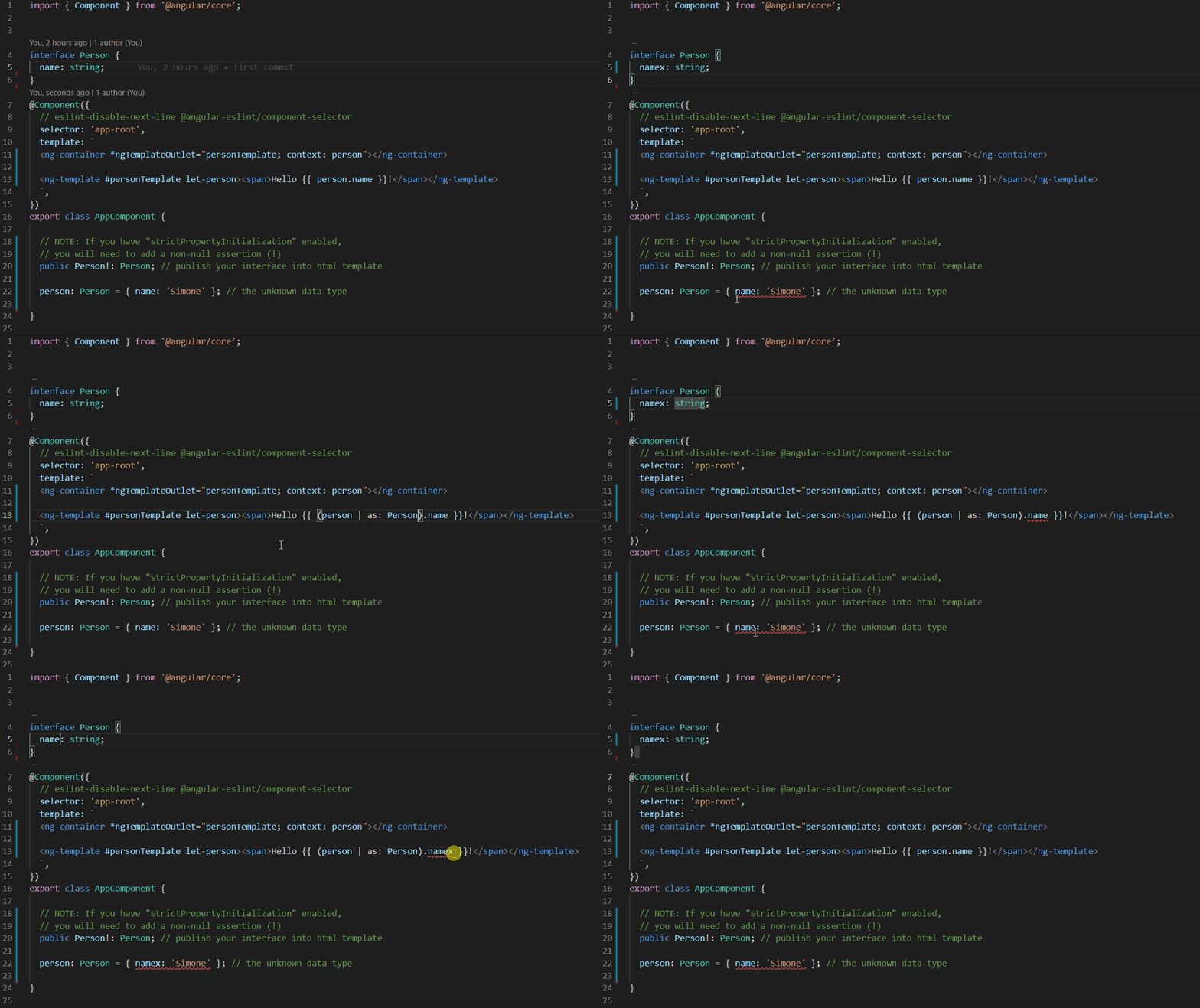
This library has pipe and directive for type casting template variables and improve IDE suggestion and refactoring.
See the [stackblitz demo](https://stackblitz.com/edit/demo-ng-as?file=src%2Fapp%2Fapp.component.ts).
## Get Started
*Step 1*: install `ng-as`
```bash
npm i ng-as
```
*Step 2*: usage
type casting template variables with directive eg.:
```ts
import { Component } from '@angular/core';
import { NgAsDirective } from 'ng-as';
// your interface, but also work with any typescript type (class, type, etc.)
interface Person {
name: string;
}
@Component({
selector: 'app-root',
imports: [NgAsDirective],
template: `
Hello {{ person.name }}!
`,
})
export class AppComponent {
// NOTE: If you have "strictPropertyInitialization" enabled,
// you will need to add a non-null assertion (!)
public Person!: Person; // publish your interface into html template
person: Person = { name: 'Simone' }; // the data
}
```
type casting template variables with pipe eg.:
```ts
import { Component } from '@angular/core';
import { NgAsPipe } from 'ng-as';
// your interface, but also work with any typescript type (class, type, etc.)
interface Person {
name: string;
}
@Component({
selector: 'app-root',
imports: [NgAsPipe],
template: `
Hello {{ (person | as: Person).name }}!
`,
})
export class AppComponent {
// NOTE: If you have "strictPropertyInitialization" enabled,
// you will need to add a non-null assertion (!)
public Person!: Person; // publish your interface into html template
person: Person = { name: 'Simone' }; // the data
}
```
### That's all!
## Example: MatTable
`matCellDef` cannot infer the type of its parent's input. But with `ng-as` you can strong-type its template variable.
```ts
import { Component } from '@angular/core';
import {MatTableModule} from '@angular/material/table';
import { NgAsPipe } from 'ng-as';
export interface PeriodicElement {
name: string;
position: number;
weight: number;
symbol: string;
}
const ELEMENT_DATA: PeriodicElement[] = [
{position: 1, name: 'Hydrogen', weight: 1.0079, symbol: 'H'},
{position: 2, name: 'Helium', weight: 4.0026, symbol: 'He'},
{position: 3, name: 'Lithium', weight: 6.941, symbol: 'Li'},
{position: 4, name: 'Beryllium', weight: 9.0122, symbol: 'Be'},
{position: 5, name: 'Boron', weight: 10.811, symbol: 'B'},
{position: 6, name: 'Carbon', weight: 12.0107, symbol: 'C'},
{position: 7, name: 'Nitrogen', weight: 14.0067, symbol: 'N'},
{position: 8, name: 'Oxygen', weight: 15.9994, symbol: 'O'},
{position: 9, name: 'Fluorine', weight: 18.9984, symbol: 'F'},
{position: 10, name: 'Neon', weight: 20.1797, symbol: 'Ne'},
];
@Component({
selector: 'table-basic-example',
imports: [NgAsPipe, MatTableModule],
template: `
No.
{{(element | as: PeriodicElement).position}}
Name
{{(element | as: PeriodicElement).name}}
Weight
{{(element | as: PeriodicElement).weight}}
Symbol
{{(element | as: PeriodicElement).symbol}}
`,
})
export class TableBasicExample {
PeriodicElement!: PeriodicElement;
displayedColumns: string[] = ['position', 'name', 'weight', 'symbol'];
dataSource = ELEMENT_DATA;
}
```
## Support
This is an open-source project. Star this [repository](https://github.com/nigrosimone/ng-as), if you like it, or even [donate](https://www.paypal.com/paypalme/snwp). Thank you so much!
## My other libraries
I have published some other Angular libraries, take a look:
- [NgSimpleState: Simple state management in Angular with only Services and RxJS](https://www.npmjs.com/package/ng-simple-state)
- [NgHttpCaching: Cache for HTTP requests in Angular application](https://www.npmjs.com/package/ng-http-caching)
- [NgGenericPipe: Generic pipe for Angular application for use a component method into component template.](https://www.npmjs.com/package/ng-generic-pipe)
- [NgLet: Structural directive for sharing data as local variable into html component template](https://www.npmjs.com/package/ng-let)
- [NgForTrackByProperty: Angular global trackBy property directive with strict type checking](https://www.npmjs.com/package/ng-for-track-by-property)