https://github.com/nikhil25803/count-reps
A customizable computer vision application to count different exercise reps with database support to track data.
https://github.com/nikhil25803/count-reps
computer-vision mediapipe opencv python3
Last synced: 3 months ago
JSON representation
A customizable computer vision application to count different exercise reps with database support to track data.
- Host: GitHub
- URL: https://github.com/nikhil25803/count-reps
- Owner: nikhil25803
- License: mit
- Created: 2023-01-24T18:20:43.000Z (over 3 years ago)
- Default Branch: main
- Last Pushed: 2023-01-24T19:36:50.000Z (over 3 years ago)
- Last Synced: 2025-06-14T00:03:50.603Z (about 1 year ago)
- Topics: computer-vision, mediapipe, opencv, python3
- Language: Python
- Homepage:
- Size: 9.77 KB
- Stars: 2
- Watchers: 1
- Forks: 0
- Open Issues: 0
-
Metadata Files:
- Readme: README.md
- License: LICENSE
Awesome Lists containing this project
README
## Count Reps
A customizable computer vision application that helps you track and count the reps during the exercises like sit-ups, push-ups, dumble presses, and other exercises. With the support of a database, you can even keep a track of your data.
## Tech stack
  
## Project Setup
+ Clone the repository
```bash
https://github.com/nikhil25803/count-reps.git
```
+ Create and activate a virtual environment
```bash
python -m venv env
```
```bash
env\scripts\activate
```
+ Install the dependencies
```
pip install -r requirements.txt
```
## Folder Structure
```
count-reps
│
└───📂database
│ │ database.py
│ │ functions.py
│ │ models.py
│ │
📄.gitignore
📄LICENCE
📄main.py
📄README.md
📄pose_detection.py
📄helpers.py
📄requirements.txt
```
By default, the application is programmed to count the number of knee bends, useful in ortho exercise.
## Run the program
```bash
python main.py
```
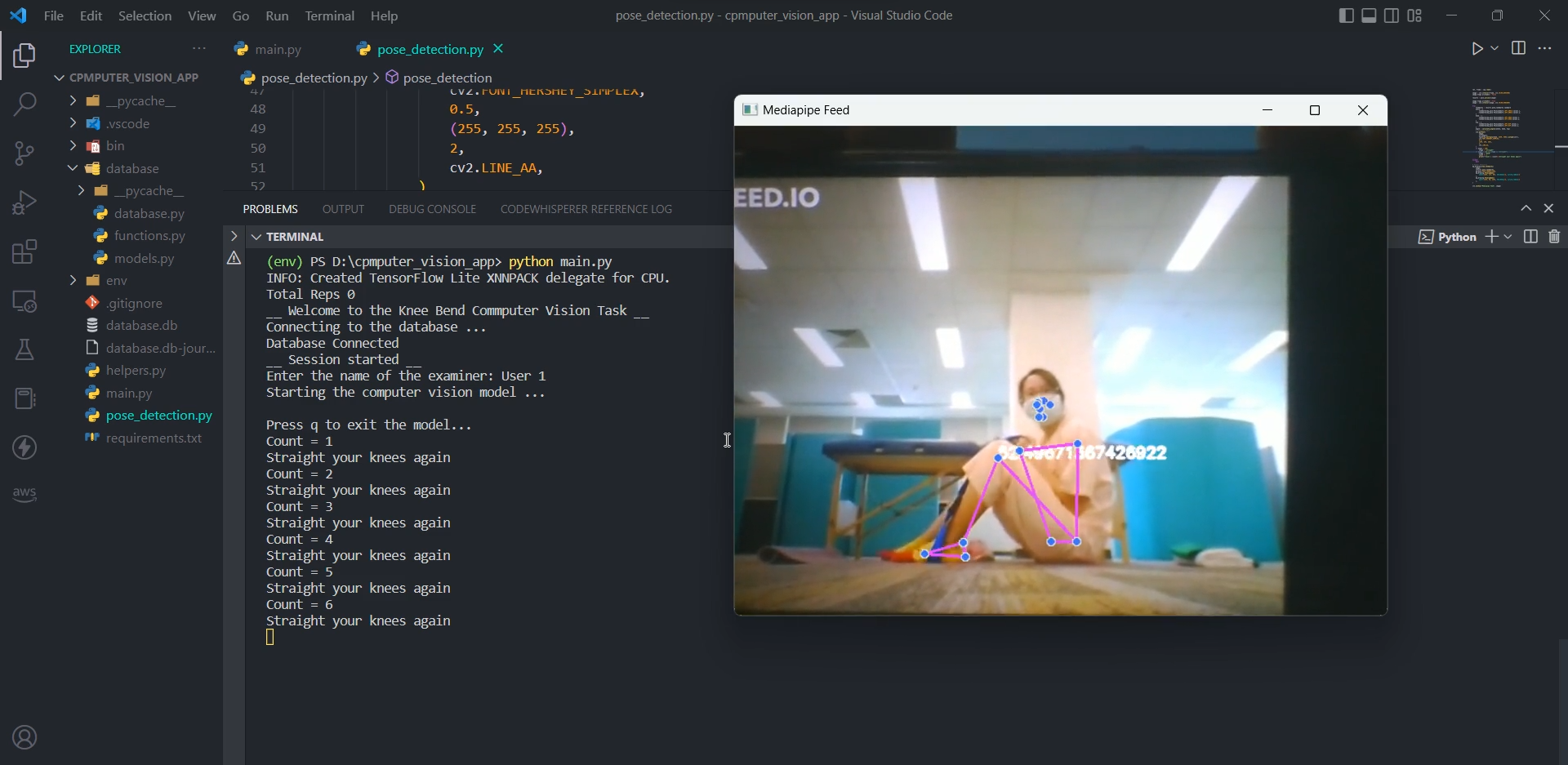
A window will appear at first as a test, close that for now by pressing `q`, and then the database will automatically get connected (you'll notice, a `database db` file is now created in the root directory of the project) which is responsible for storing a user's data. It will keep counting your reps and will store them in the database once it quits.
Example ...
-----
## Want to customize it?
Here's how you can do it ... 👀
This is an image of the landmark model in `MediaPipe` Pose predicts the location of **33** pose landmarks
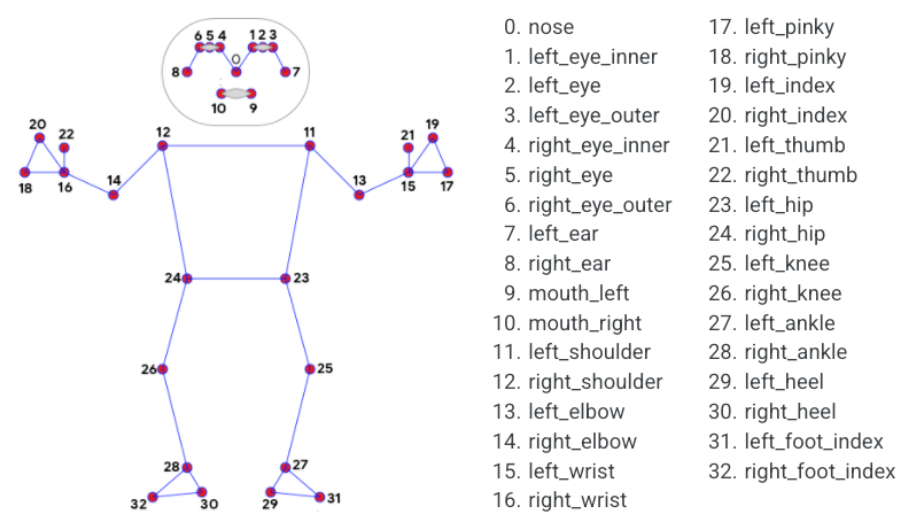
In the `/pose_detection.py`, change the `landmarks` accordingly from the picture above
```python
landmarks = results.pose_landmarks.landmark
ankle = [
landmarks[mp_pose.PoseLandmark.LEFT_ANKLE.value].x,
landmarks[mp_pose.PoseLandmark.LEFT_ANKLE.value].y,
]
knee = [
landmarks[mp_pose.PoseLandmark.LEFT_KNEE.value].x,
landmarks[mp_pose.PoseLandmark.LEFT_KNEE.value].y,
]
hip = [
landmarks[mp_pose.PoseLandmark.LEFT_HIP.value].x,
landmarks[mp_pose.PoseLandmark.LEFT_HIP.value].y,
]
```
For example, you want to count the number of biceps reps, then change it to **11**, **13** and **15** that is `LEFT_SHOULDER`, `LEFT_ELBOW`, and `LEFT_WRIST` respectively.
The angle will be calculated corresponding to the one which is defined in the center by the formula
```python
# /helpers.py
def calculate_angles(a, b, c):
a = np.array(a)
b = np.array(b)
c = np.array(c)
radians = np.arctan2(c[1] - b[1], c[0] - b[0]) - np.arctan2(
a[1] - b[1], a[0] - b[0]
)
angle = np.abs(radians * 180.0 / np.pi)
if angle > 180.0:
angle = 360 - angle
return angle
```
In the same `/pose_detection.py`, you can define the angle beyond which you want to trigger the counter
```python
if angle > 140:
stage = "straight"
if angle < 140 and stage == "straight":
stage = "bend"
count += 1
```
And that's it, the model is now customized as per your requirements 🍻