https://github.com/niklas-heer/pocketcasts-stats
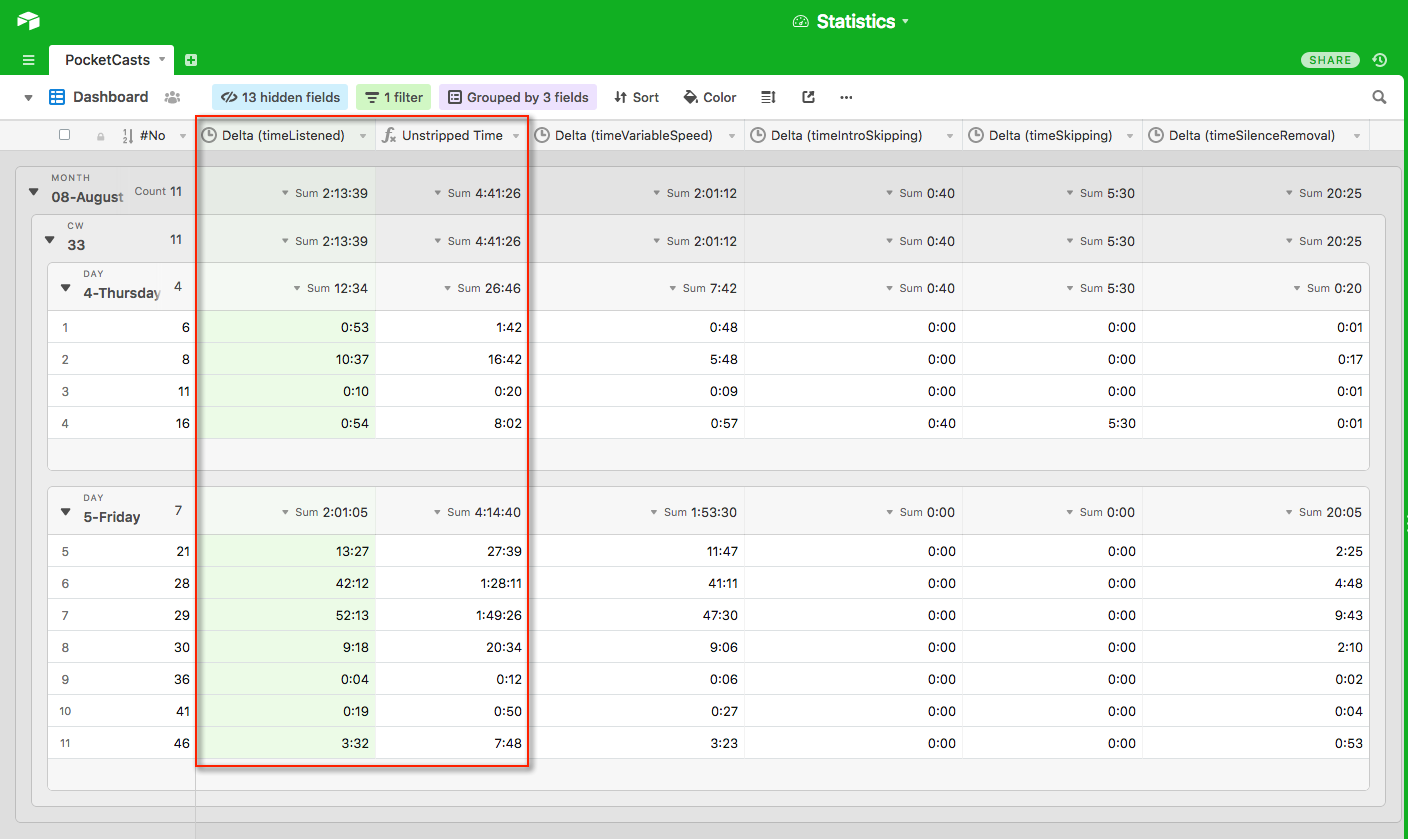
This project let's you fetch your Pocket Casts statistics and put them into Airtable with about 80 lines of code.
https://github.com/niklas-heer/pocketcasts-stats
airtable docker gitlab-ci pocketcasts python
Last synced: about 1 year ago
JSON representation
This project let's you fetch your Pocket Casts statistics and put them into Airtable with about 80 lines of code.
- Host: GitHub
- URL: https://github.com/niklas-heer/pocketcasts-stats
- Owner: niklas-heer
- License: mit
- Created: 2018-08-17T14:14:10.000Z (almost 8 years ago)
- Default Branch: master
- Last Pushed: 2025-05-11T13:54:07.000Z (about 1 year ago)
- Last Synced: 2025-05-11T14:42:14.375Z (about 1 year ago)
- Topics: airtable, docker, gitlab-ci, pocketcasts, python
- Language: Python
- Homepage:
- Size: 232 KB
- Stars: 20
- Watchers: 3
- Forks: 5
- Open Issues: 2
-
Metadata Files:
- Readme: README.md
- License: LICENSE
Awesome Lists containing this project
README
Pocket Casts statistics


This project lets you fetch your Pocket Casts statistics and put them into Airtable with [about 80 lines](#lines-of-code) of code. :tada:
## Configuration
### Airtable
For the tool to work you'll need a [free Airtable account](https://airtable.com/invite/r/V2q23fXk). If you don't have one - [make one](https://airtable.com/invite/r/V2q23fXk).
1. Go to this example base:
2. Click on `Copy base` in the top right corner
3. Once copied delete the records
4. Click on your profile picture in the top right corner
5. Select `Account`
6. On the page click on `Generate API key` on the right side under API
- Save the key and use it later for the `AIRTABLE_API_KEY` key
7. Go to this page and select your copied base:
8. Select `AUTHENTICATION` on the left side
9. On the right side there should be a dark area with text looking like this:
- `$ curl https://api.airtable.com/v0/appr9hgXPZbBPqV4n/PocketCasts?api_key=YOUR_API_KEY`
- Save the part between the alphanumeric string for later use (here it would be `appr9hgXPZbBPqV4n`)
- The saved string will be used as `AIRTABLE_BASE_ID`
10. Follow the next steps
### Gitlab
For this to work you'll need a free Gitlab.com account. If you don't have one - make one.
1. Make a new project on [Gitlab.com](https://gitlab.com).
2. Import this repository as the base for your project.
3. Setup all environment variables in the project.
- Go to `Settings` > `CI / CD` (on the left)
- Insert variables under `Variables` (click expand, also see `Environment variables`)
4. Setup the Pipeline Scheduler
- Go to `CI / CD` > `Schedules` (on the left)
- Click the green button on the right `New schedule`
- Give it a description (eg. "Get new stats every 2h")
- Select `Custom ( Cron syntax )` under `Interval Pattern`
- Insert the following into the field: `0 */2 * * *` (runs every 2 hours)
- Make sure under `Target Branch` you selected your `master` branch
- Make sure the checkbox `Active` is checked
- Click the `Save pipeline schedule`
5. Profit! :)
### Environment variables
- `POCKETCASTS_EMAIL` - the email address of your PocketCasts login
- `POCKETCASTS_PASSWORT` - the password to login to PocketCasts
- `AIRTABLE_BASE_ID` - the ID of the Airtable base which is used to store the data
- `AIRTABLE_API_KEY` - your account API key to access Airtable
- `AIRTABLE_POCKETCASTS_TABLE` - the table to store the PocketCasts information in
**IMPORTANT**: You cannot use special characters like `.!$/\|` symbols in the environment variables!
## Local testing
1. Make a copy of the `.env_example` file and name it `.env`
2. Put in your credentials as mentioned in **Environment variables**
3. Test the app via docker with: `make`
4. Profit! :)
## Contribution
Please make sure you run [`black`](https://github.com/ambv/black) on your code before you commit it!
## Lines of code
This project uses about 80 lines of code according to [`cloc`](https://github.com/AlDanial/cloc):
➜ cloc app.py .gitlab-ci.yml
2 text files.
2 unique files.
0 files ignored.
github.com/AlDanial/cloc v 1.80 T=0.01 s (157.1 files/s, 12570.7 lines/s)
-------------------------------------------------------------------------------
Language files blank comment code
-------------------------------------------------------------------------------
Python 1 28 43 70
YAML 1 4 0 15
-------------------------------------------------------------------------------
SUM: 2 32 43 85
-------------------------------------------------------------------------------
## Attribution
- [Pocket Casts](https://www.pocketcasts.com/) for being an awesome podcast player!
- [airtable-python-wrapper](https://github.com/gtalarico/airtable-python-wrapper) as an awesome library to connect to Airtable
- [furgoose/Pocket-Casts](https://github.com/furgoose/Pocket-Casts) as a good reference how to query the PocketCasts "API"
- [Airtable](https://airtable.com/invite/r/V2q23fXk) for being just an awesome tool!
- [Gitlab](https://gitlab.com) and `GitlabCI` for being an all in one solution
- Gitlab Scheduler for Pipelines because without it you would need a server.
- [gitmoji](https://gitmoji.carloscuesta.me/) for better understandable commits through emojis. :tada:
- [pylama](https://github.com/klen/pylama) for checking the code quality.
- [pytest](https://github.com/pytest-dev/pytest) for being an awesome testing framework.
- [pytest-cov](https://github.com/pytest-dev/pytest-cov) for generating coverage reports.
- [black](https://github.com/ambv/black) as an awesome code formatter for Python.
- [Travis CI](https://travis-ci.org/niklas-heer/pocketcasts-stats) for being a nice tool for CIs on Github. 👷
- [codecov](https://codecov.io) for showing the code coverage and help improve it.
- [pyup](https://pyup.io/) for helping to keep this project secure.
- [codacy](https://app.codacy.com) for helping improving the code quality.
[ ~ Dependencies scanned by PyUp.io ~ ]