https://github.com/niklauslee/web-clock
A clock device reading time from web.
https://github.com/niklauslee/web-clock
clock kaluma raspberry-pi-pico web
Last synced: 3 months ago
JSON representation
A clock device reading time from web.
- Host: GitHub
- URL: https://github.com/niklauslee/web-clock
- Owner: niklauslee
- License: mit
- Created: 2022-04-18T03:19:51.000Z (about 4 years ago)
- Default Branch: main
- Last Pushed: 2022-04-18T03:36:08.000Z (about 4 years ago)
- Last Synced: 2025-03-27T13:38:47.054Z (about 1 year ago)
- Topics: clock, kaluma, raspberry-pi-pico, web
- Language: JavaScript
- Homepage:
- Size: 329 KB
- Stars: 5
- Watchers: 2
- Forks: 0
- Open Issues: 0
-
Metadata Files:
- Readme: README.md
- License: LICENSE
Awesome Lists containing this project
README
# Overview
A clock device reading time from web. It shows current date and time on OLED display. It periodically requests current time and date to a time server. I use World Time API (http://worldtimeapi.org/) as a time server. I cannot guarantee how this is reliable and correct, but it is easy to get current date and time as a JSON format.
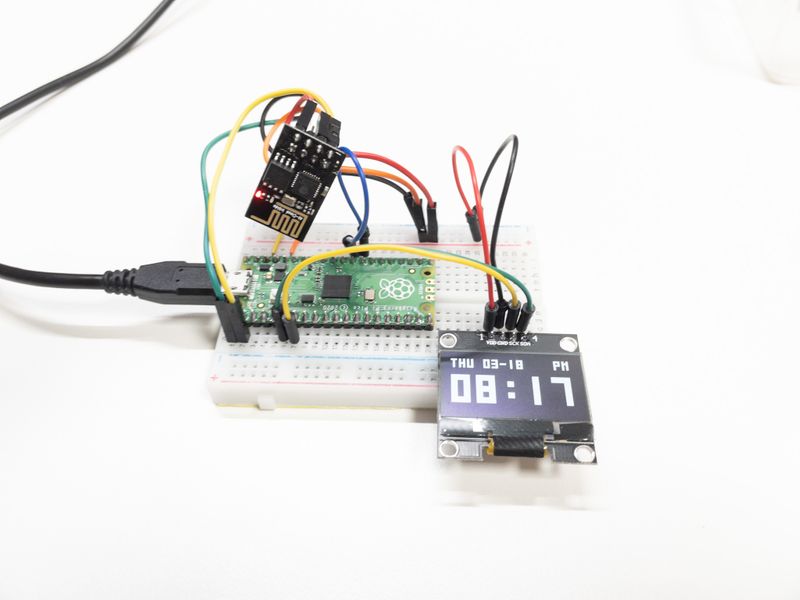
# Components
| Part | Quantity | Note |
| ------------------------------- | -------- | ------------------------- |
| Raspberry Pi Pico | 1 | |
| 1.3" OLED Display (SSD1306 I2C) | 1 | Purchased from Aliexpress |
| Wi-Fi module (ESP-01 module) | 1 | |
| Breadboard | 1 | |
# Wiring
| Raspberry Pi Pico | ESP8266 | SSD1306 |
| ----------------- | ---------- | --------- |
| 3V3 | VCC, CH_PD | VCC (VDD) |
| GND | GND | GND |
| GP0 (UART0 TX) | RXD | |
| GP1 (UART0 RX) | TXD | |
| GP4 (I2C0 SDA) | | SDA |
| GP5 (I2C0 SCL) | | SCL (SCK) |

# Setup
To run this project, you need to store `WIFI_SSID`, `WIFI_PASSWORD` keys in storage via Terminal as below.
```js
> storage.setItem('WIFI_SSID', 'MyHome'); // WiFi SSID
> storage.setItem('WIFI_PASSWORD', '********'); // Wi-Fi Password
```