https://github.com/nikolaiprogramist/differ
This library that finds the difference between two files. This utility can work with such data formats as: JSON, YAML, YML. You can also see the comparison result in different output formats, for example: Stylish, Plain, JSON.
https://github.com/nikolaiprogramist/differ
differ json library php8 terminal-utility yaml yml
Last synced: about 1 year ago
JSON representation
This library that finds the difference between two files. This utility can work with such data formats as: JSON, YAML, YML. You can also see the comparison result in different output formats, for example: Stylish, Plain, JSON.
- Host: GitHub
- URL: https://github.com/nikolaiprogramist/differ
- Owner: NikolaiProgramist
- Created: 2024-10-14T09:25:13.000Z (over 1 year ago)
- Default Branch: main
- Last Pushed: 2025-05-01T09:20:58.000Z (about 1 year ago)
- Last Synced: 2025-07-04T08:04:02.885Z (about 1 year ago)
- Topics: differ, json, library, php8, terminal-utility, yaml, yml
- Language: PHP
- Homepage:
- Size: 94.7 KB
- Stars: 13
- Watchers: 1
- Forks: 0
- Open Issues: 0
-
Metadata Files:
- Readme: README.md
Awesome Lists containing this project
README
# Differ
[](https://github.com/NikolaiProgramist/php-project-48/actions/workflows/tests-check.yml) [](https://codeclimate.com/github/NikolaiProgramist/php-project-48/maintainability) [](https://codeclimate.com/github/NikolaiProgramist/php-project-48/test_coverage)
## About
This project is a library/utility that finds the difference between two files.
The library can work with data formats such as: `JSON`, `YAML`, `YML`.
You can also see the result of the comparison in the terminal in different output formats,
for example: `stylish`, `plain`, `json`. The default format is `stylish`.
If the files do not exist, the library will inform you.
## Prerequisites
+ Linux, MacOS, WSL
+ PHP >=8.3
+ Composer
+ Make
+ Git
## Libraries
+ php-cli-tools
+ docopt
+ functional-php
+ yaml
## Install project
Downloading the utility and installing dependencies:
```bash
git clone https://github.com/NikolaiProgramist/Differ.git
cd php-project-48
make install
```
Give the binary file execution rights:
```bash
sudo chmod +x bin/gendiff
```
## Run
To use the utility, run the binary file and specify the output format (`stylish` by default).
Also pass the paths to the two files you need:
```bash
bin/gendiff --format=stylish file1.json file2.json
```
You can also choose the second output format `plain`:
```bash
bin/gendiff --format=plain file1.json file2.json
```
Instead of the flag `--format`, you can use the short version `-f`.
## Examples:
[](https://asciinema.org/a/703225)
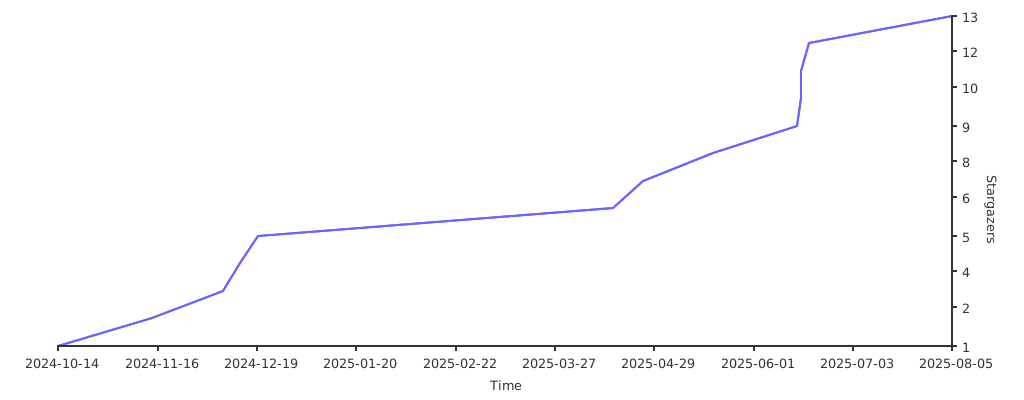
## Stargazers over time
[](https://starchart.cc/NikolaiProgramist/php-project-48)