https://github.com/nimbalyst/nimbalyst
Nimbalyst - Public releases, issue tracking, and documentation
https://github.com/nimbalyst/nimbalyst
Last synced: 3 months ago
JSON representation
Nimbalyst - Public releases, issue tracking, and documentation
- Host: GitHub
- URL: https://github.com/nimbalyst/nimbalyst
- Owner: Nimbalyst
- Created: 2025-10-30T21:28:59.000Z (9 months ago)
- Default Branch: main
- Last Pushed: 2026-03-28T20:39:57.000Z (4 months ago)
- Last Synced: 2026-03-28T22:28:28.954Z (4 months ago)
- Homepage: https://nimbalyst.com/
- Size: 751 KB
- Stars: 96
- Watchers: 3
- Forks: 7
- Open Issues: 13
-
Metadata Files:
- Readme: README.md
Awesome Lists containing this project
- awesome-cli-coding-agents - Nimbalyst - source visual workspace for building with Codex, Claude Code, and more; manage your agents, edit the work visually, and track tasks. MIT. (Harnesses & orchestration / Session managers & parallel runners)
- awesome-claude-code - Nimbalyst - A visual workspace for building with Claude Code (and Codex) where you and the agent co-edit *visually* — markdown, mockups, mermaid, Excalidraw, CSV, and data models — approving the agent's changes as red/green WYSIWYG diffs, with session/task kanban, worktrees, an extension SDK, and a native iOS companion app. A distinctive higher-bandwidth take on agent collaboration, open source with transparent, opt-out telemetry. (Alternative Clients)
- awesome-agent-orchestrators - nimbalyst - The open-source visual workspace for building with Codex, Claude Code. Parallel sessions, git worktrees, kanban, visual editing. (Parallel Agent Runners)
README
# Nimbalyst is the visual workspace for building with Codex and Claude Code
[Nimbalyst](https://nimbalyst.com) is a free, local, interactive visual editor & session manager where builders maximize speed, bandwidth, and context with Codex and Claude Code by collaborating visually on files, sessions, and tasks:
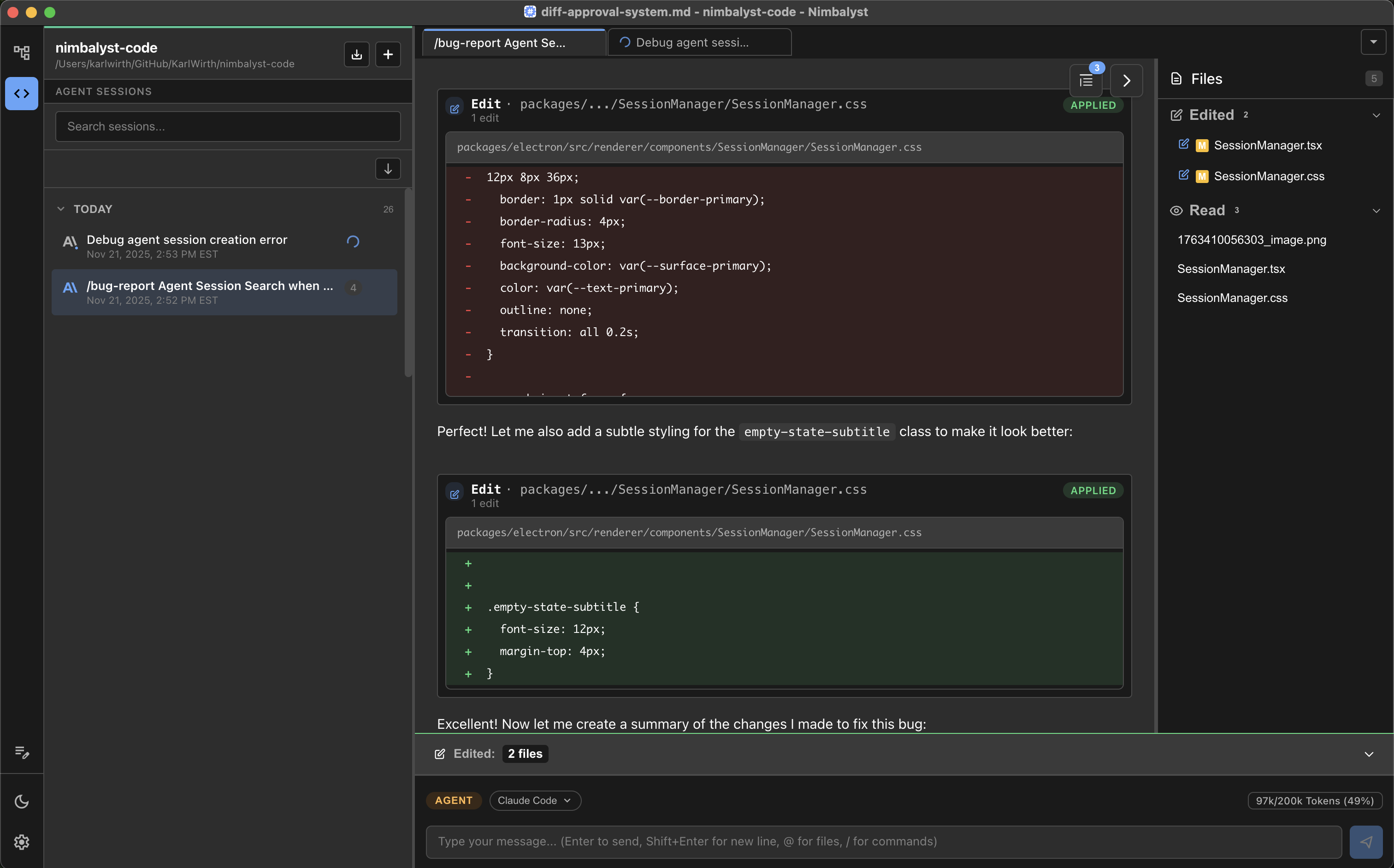
- Iterate visually with Codex and Claude Code in your markdown, mockups, diagrams, csv, Excalidraw, data models, and code. Approve the coding agent's changes in red/green WYSIWYG, edit, annotate, iterate visually.
- Manage multiple sessions in parallel and in kanban. Search, resume, link sessions to files and files to sessions. For developers we include git management, AI commit, workstreams, worktrees, and terminal.
- Manage tasks. Keep track of your plans, bugs, todos, etc.. Have the agent edit tasks and items, add them, move them, and execute them. Human see and edit this as well.
- Mobile app. Start, manage, and respond to your Codex and Claude Code sessions while on the go.


## Features
- Files Mode: Visual Editor with Codex and Claude Code
- Edit markdown in a local, WYSIWIG, agentic editor powered by Codex and Claude Code. Review AI changes as red/green diffs.
- Iterate with coding agents on html mockups. Annotate, edit, embed, & use to code.
- Use coding agents to build excalidraw drawings and Mermaid diagrams. Visually edit yourself. Ask AI to edit them.
- View CSV file, work with coding agents in the CSV file, track changes.
- Build your data model with AI based on your code and docs. Use it to write better code.
- Work in a Monaco code editor, see changes, approve them
- Agents Mode: Manage coding agents' work across parallel sessions in a UI
- Link sessions to files and files to sessions
- Open files in your sessions. Group files touched by a session
- Run parallel sessions
- Search and resume sessions
- Manage in a Kanban board
- Task Mode: Keep track of your plans, bugs, todos etc..
- Have agent edit tasks, add them, move them, and execute them
- Human view and edit them too
- For developers
- Manage git state
- Use AI to git commit
- Use embedded ghostty terminal
- Leverage workstrees
- Mobile app
- Session dashboard: see which agents need you and which are still working
- Reply to questions via text or voice, agents resume immediately
- Visual diff review: swipe through changes, tap to approve
- Queue next tasks: keep the pipeline full, don't let agents sit idle
- Push notifications: agents tell you when they need you
- Open storage of content and status in markdown, workflow in / commands, and plain files on disk or in git
## ScreenShots

## Download
Download the latest version for your platform:
| Platform | Download | Requirements |
| --- | --- | --- |
| macOS Apple Silicon | [Download .dmg](https://github.com/Nimbalyst/nimbalyst/releases/latest/download/Nimbalyst-macOS-arm64.dmg) | macOS Apple Silicon 10.15+ |
| macOS Intel| [Download .dmg](https://github.com/Nimbalyst/nimbalyst/releases/latest/download/Nimbalyst-macOS-x64.dmg) | macOS Apple Silicon 10.15+ |
| Windows | [Download .exe](https://github.com/Nimbalyst/nimbalyst/releases/latest/download/Nimbalyst-Windows.exe) | Windows 10+ |
| Linux | [Download AppImage ](https://github.com/Nimbalyst/nimbalyst/releases/latest/download/Nimbalyst-Linux.AppImage) | Linux |
## Getting Started
1. **Create a new (or open existing) document** - Click "New" or press `Cmd/Ctrl+N`
2. **Write in markdown** - Write/edit in the WYSIWYG editor
3. **Use AI assistant** - Ask AI to research, edit the document, work across your files
4. **Accept/Reject AI changes** - Step through suggested AI edits, accept/reject
5. **Work in Agent Manager** - Switch to the agent manager view and run multiple agent sessions in parallel
6. **Search/Resume sessions** - Search and resume sessions, manage your work
## Auto-Updates
Nimbalyst automatically checks for updates and notifies you when a new version is available. You can also manually check via Help → Check for Updates.
## Bug Reports & Feature Requests
Found a bug or have a feature request? Please [create an issue](https://github.com/nimbalyst/nimbalyst/issues/new/choose).
## Community
- [Documentation](https://docs.nimbalyst.com/) - Watch videos and read documentation
- [Discord](https://discord.gg/FgD9S2MCYB) - Join the discussion on Discord
- [Website](https://nimbalyst.com) - Learn more about Nimbalyst on our website
## License
Nimbalyst is proprietary software. All rights reserved. © 2026 Nimbalyst.
## Acknowledgments
Built with:
- [Electron](https://electronjs.org/)
- [Lexical](https://lexical.dev/) by Meta
- [React](https://reactjs.org/)
***
**Note**: This is the public releases repository.