https://github.com/ninjaprox/nvbnbcollectionview
A Airbnb-inspired collection view
https://github.com/ninjaprox/nvbnbcollectionview
Last synced: over 1 year ago
JSON representation
A Airbnb-inspired collection view
- Host: GitHub
- URL: https://github.com/ninjaprox/nvbnbcollectionview
- Owner: ninjaprox
- License: mit
- Created: 2015-08-05T03:09:11.000Z (almost 11 years ago)
- Default Branch: master
- Last Pushed: 2016-01-31T17:44:20.000Z (over 10 years ago)
- Last Synced: 2024-03-15T05:44:56.601Z (over 2 years ago)
- Language: Objective-C
- Homepage:
- Size: 9.38 MB
- Stars: 251
- Watchers: 10
- Forks: 30
- Open Issues: 2
-
Metadata Files:
- Readme: README.md
- Changelog: CHANGELOG.md
- License: LICENSE
Awesome Lists containing this project
README
NVBnbCollectionView
===================
[](https://travis-ci.org/ninjaprox/NVBnbCollectionView)
# Introduction
NVBnbCollectionView is an Airbnb-inspired collection view.
# Demo
## Portrait
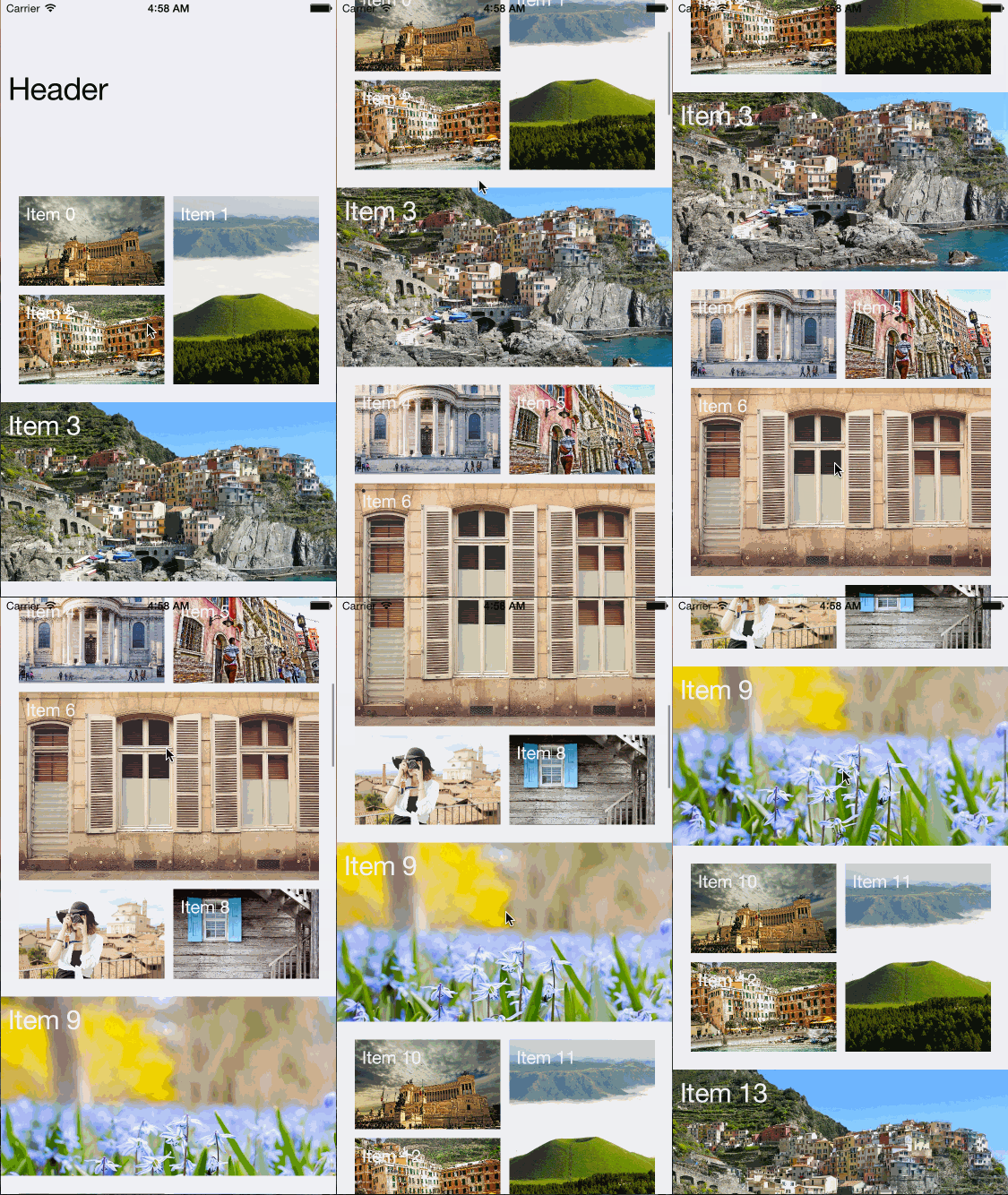
## Landscape
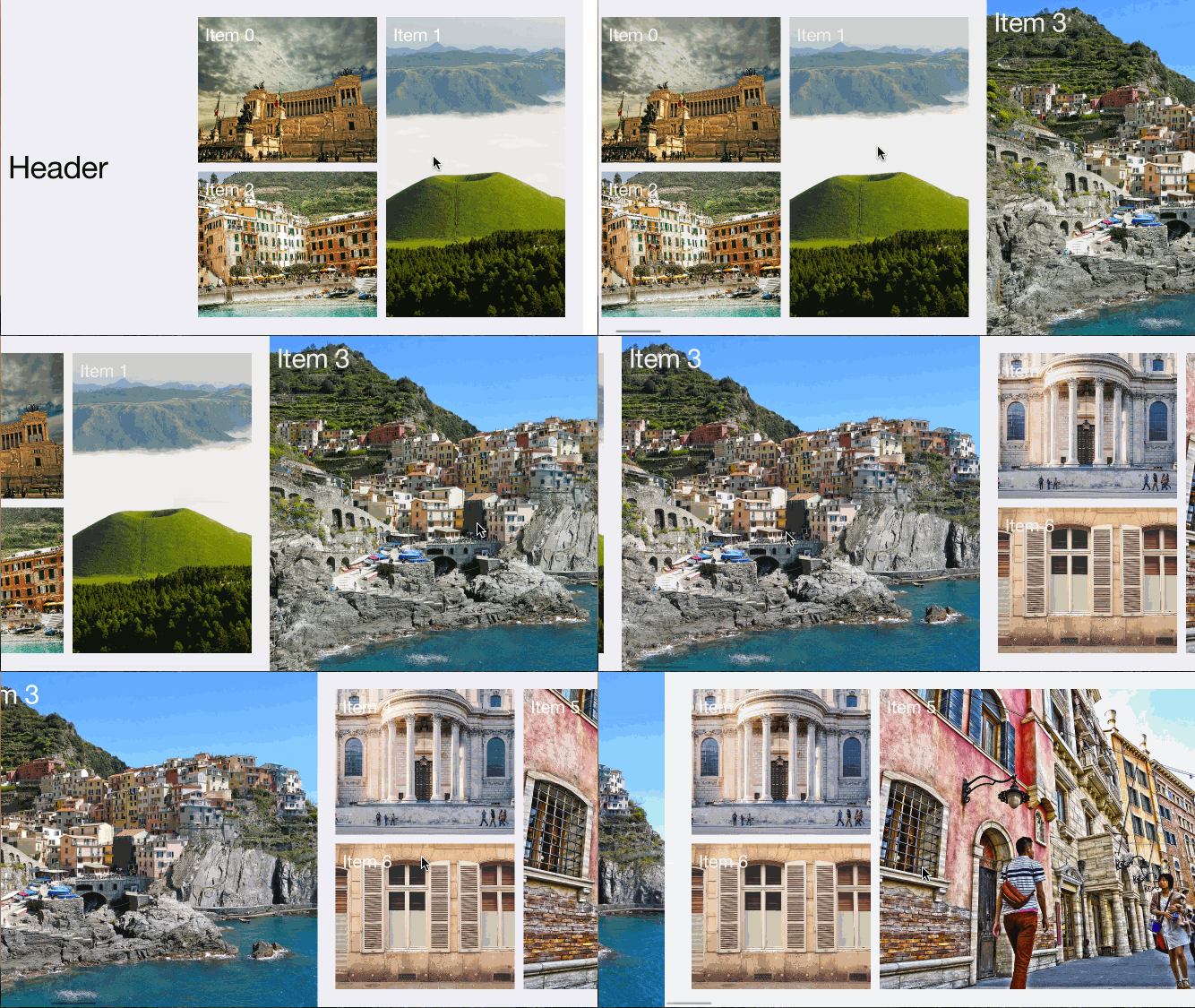
For first-hand experience, just open the project and run it.
# Installation
## Cocoapods
Install Cocoapods if need be
```bash
$ gem install cocoapods
```
Add NVActivityIndicatorView in your `Podfile`
```bash
pod 'NVBnbCollectionView'
```
Then, run the following command
```bash
$ pod install
```
## Manual
Copy NVBnbCollectionView folder to your project. That's it.
# Layout
To keep it simple in first version, I use fixed layout as in Airbnb app.
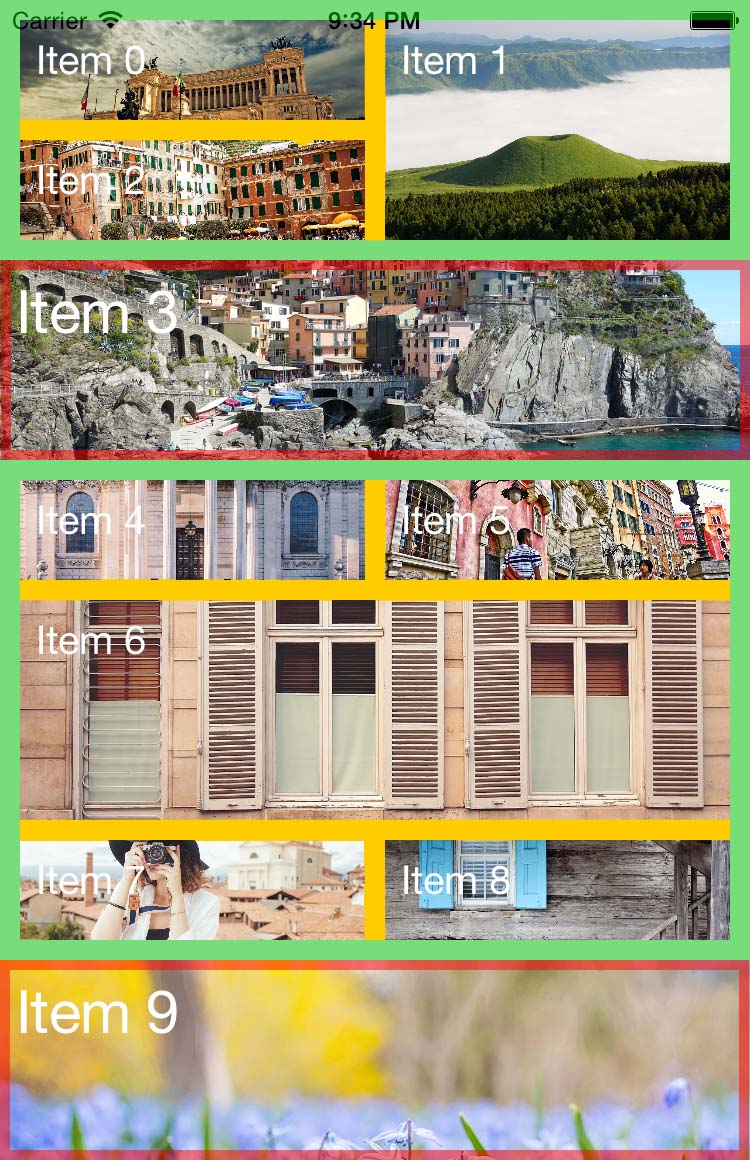
Cells with red border are parallax cell. Others are grid cell.
Green regions are grid padding `gridPadding`.
Orange regions are cell spacing `gridCellSpacing`.
## Size
In portrait, height of grid cell and parallax cell are specified in `gridCellSize` and `parallaxCellSize` respectively in layout, width will be calculated base on `gridPadding` and collection view width.
The same is applied in landspace and for other (i.e. header, more loader and spacing between grid cells).
# Usage
There is not much difference between `NVBnbCollectionView` and `UICollectionView`, so just use it as you normally do with `UICollectionView`.
## Storyboard
With storyboard, change class of collection view to `NVBnbCollectionView` and layout to `NVBnbCollectionViewLayout`.
All properties of layout are inspectable so you can change sizes in layout directly in storyboard. However, `IBInspectable` requires Xcode 6 and above.
## Code
If you create collection view from code, the following example can help:
```objective-c
NVBnbCollectionViewLayout *layout = [[NVBnbCollectionViewLayout alloc] init];
NVBnbCollectionView *collectionView = [[NVBnbCollectionView alloc] initWithFrame:CGRectMake(0, 0, 500, 500) collectionViewLayout:layout];
layout.gridCellSize = CGSizeMake(150, 150);
layout.parallaxCellSize = CGSizeMake(300, 300);
// Set other properties of layout if need be
```
Again, what you can do with `UICollectionView`, do the same with `NVBnbCollectionView`.
## Data source
Collection view needs data source to provide information about cells, your class must conform `NVBnbCollectionViewDatasource` and 3 required methods:
* `NVBnbCollectionView` needs to know how many items will be displayed:
```objective-c
- (NSInteger)numberOfItemsInBnbCollectionView:(NVBnbCollectionView *)collectionView;
```
* How a grid cell looks like:
```objective-c
- (UICollectionViewCell *)bnbCollectionView:(NVBnbCollectionView *)collectionView cellForItemAtIndexPath:(NSIndexPath *)indexPath;
```
* How a parallax cell looks like:
```objective-c
- (NVBnbCollectionViewParallaxCell *)bnbCollectionView:(NVBnbCollectionView *)collectionView parallaxCellForItemAtIndexPath:(NSIndexPath *)indexPath;
```
In addition, if collection view has header and load more ability, it should know how the header, more loader look like.
* How header looks like:
```objective-c
- (UICollectionReusableView *)bnbCollectionView:(NVBnbCollectionView *)collectionView headerAtIndexPath:(NSIndexPath *)indexPath;
```
* How more loader looks like:
```objective-c
- (UIView *)moreLoaderInBnbCollectionView:(NVBnbCollectionView *)collectionView;
```
## Delegate
`NVBnbCollectionViewDelegate` is subclass of `UICollectionViewDelegate` so it inherits all abilities from its parent, plus one method to notify controller whenever the collection view needs more data.
```objective-c
- (void)loadMoreInBnbCollectionView:(NVBnbCollectionView *)collectionView;
```
## Parallax cell
`NVBnbCollectionViewParallaxCell` is subclass of `UICollectionViewCell` with built-in parallax effect image view. Therefore, you class should be subclass of `NVBNbCollectionViewParallaxCell` to have this ability.
To set image used parallax effect, use `parallaxImage` property. Example:
```objective-c
NVBnbCollectionViewParallaxCell *parallaxCell = [collectionView dequeueReusableCellWithReuseIdentifier: forIndexPath:indexPath];
cell.parallaxImage = [UIImage imageNamed:];
```
You can also set `maxParallaxOffset` in `NVBnbCollectionViewLayout` to adjust how much the parallax image will be shifted.
## Header
To add header, set `headerSize` in layout greater than 0.
Register header to collection view using kind `NVBnbCollectionElementKindHeader`
```objective-c
[collectionView registerNib: forSupplementaryViewOfKind:NVBnbCollectionElementKindHeader withReuseIdentifier:];
[collectionView registerClass: forSupplementaryViewOfKind:NVBnbCollectionElementKindHeader withReuseIdentifier:];
```
Header must be subclass of `UICollectionReusableView`.
If collection view has header, you have to implement `bnbCollectionView:headerAtIndexPath:` in data source. Otherwise, this will cause error.
```objective-c
- (UICollectionReusableView *)bnbCollectionView:(NVBnbCollectionView *)collectionView headerAtIndexPath:(NSIndexPath *)indexPath {
UICollectionReusableView *header = [collectionView dequeueReusableSupplementaryViewOfKind: NVBnbCollectionElementKindHeader withReuseIdentifier: forIndexPath:indexPath];
return header;
}
```
If collection view doesn't have header, you can omit `bnbCollectionView:headerAtIndexPath:` or just return `nil`.
## More loader
`NVBnbCollectionView` itself has load more ability. There is a more loader section below collection view to indicate the collection view waiting for more data. Size of this section is specified in `moreLoaderSize` in `NVBnbCollectionViewLayout`.
You can change the activity indicator view in more loader section by providing your custom one in `moreLoaderInBnbCollectionView:collectionView:`. By default, `UIActivityIndicatorView` will be used. However, if you would like something else nicer and ready to use, check [NVActivityIndicatorView](https://github.com/ninjaprox/NVActivityIndicatorView).
Once collection view hits its bottom, it will delegate to `loadMoreInBnbCollectionView:collectionView`. In this way, controller has chance to load more data. While doing this, collection view will not delegate any more until `loadingMore` is set to `false`. For example:
```objective-c
- (void)loadMoreInBnbCollectionView:(NVBnbCollectionView *)collectionView {
[self loadMore];
}
- (void)loadMore {
// Your async call to fetch more data
// Once done, let collection view knows it should delegate again the next time hitting its bottom
collectionView.loadingMore = false;
}
```
You can opt-out this ability by setting `enableLoadMore` in `NVBnbCollectionView`.
# Documentation
This README literraly describes enough information you need to use `NVBnbCollectionView`.
For more details: [CocoaDocs](http://cocoadocs.org/docsets/NVBnbCollectionView/1.0.0/)
# References
To create parallax effect, I read the following posts and borrowed a hunk of code. Read them if you want to know what happends behind the screen, not too complicated.
* [Parallax Scrolling as a Category on UICollectionView](http://www.kurutepe.com/2015/02/parallax-scrolling-as-a-category-on-uicollectionview/)
* [Parallax Scrolling](http://oleb.net/blog/2014/05/parallax-scrolling-collectionview/)
# License
The MIT License (MIT)
Copyright (c) 2015 Nguyen Vinh [@ninjaprox](http://twitter.com/ninjaprox)