https://github.com/ninofiliu/esgrep
Syntactically-aware grep for JavaScript and TypeScript
https://github.com/ninofiliu/esgrep
ast cli grep javascript js regex ts typescript
Last synced: about 1 year ago
JSON representation
Syntactically-aware grep for JavaScript and TypeScript
- Host: GitHub
- URL: https://github.com/ninofiliu/esgrep
- Owner: ninofiliu
- License: gpl-3.0
- Created: 2022-05-08T21:50:02.000Z (about 4 years ago)
- Default Branch: main
- Last Pushed: 2023-12-29T17:02:57.000Z (over 2 years ago)
- Last Synced: 2024-04-29T23:00:27.741Z (about 2 years ago)
- Topics: ast, cli, grep, javascript, js, regex, ts, typescript
- Language: TypeScript
- Homepage: https://npmjs.com/package/esgrep
- Size: 396 KB
- Stars: 12
- Watchers: 3
- Forks: 0
- Open Issues: 1
-
Metadata Files:
- Readme: README.md
- License: LICENSE
Awesome Lists containing this project
README
# ESGrep
Syntactically-aware grep for JavaScript and TypeScript
- [Usage as a CLI](#usage-as-a-cli)
- [Usage as a library](#usage-as-a-library)
- [Options](#options)
- [ES Expressions](#es-expressions)
- [About](#about)
## Usage as a CLI
Install it with `npm install --global esgrep` or the equivalent using pnpm/yarn/etc, then use it as `esgrep [OPTION...] PATTERN [FILE...]`. If `FILE` is not precised, reads from stdin.
The CLI is basically a wrapper around [`find`](#findpattern-haystack-options) and accepts the same [options](#options) and a few more that handle help print and output format. This means that these are logically equivalent:
Reading from stdin:
```sh
echo 'const x: number = 10' | esgrep 'const x = ES_ANY'
```
```ts
find("const x: number = 10", "const x = ES_ANY");
```
Reading from files:
```sh
esgrep 'fetch(ES_ANY, { method: "POST" })' api.js lib.ts
```
```ts
find('fetch(ES_ANY, { method: "POST" })', readFileSomehow("api.js"));
find('fetch(ES_ANY, { method: "POST" })', readFileSomehow("lib.ts"));
```
Passing arguments:
```sh
esgrep --statement -- '(() => {})()' file.js
```
```ts
find("(() => {})()", readFileSomehow("file.js"), { statement: true });
```
> **Note**
>
> When you pass `esgrep --foo bar baz`, `esgrep` has no way to know whether `bar` is the value of `--foo` (current behavior) or if it is a positional argument just like `baz` and `--foo` is a flag option.
>
> You can tell `esgrep` to explicitly start parsing positional arguments by using `--`:
>
> ```sh
> esgrep --foo bar baz
> # Parsed options: { foo: 'bar' }
> # Parsed positional arguments: ['baz']
> esgrep --foo -- bar baz
> # Parsed options: { foo: true }
> # parsed positional arguments: ['bar', 'baz']
> ```
## Usage as a library
Install it with `npm install esgrep` or the equivalent using pnpm/yarn/etc, then import it:
```ts
import { find, findStrings } from "esgrep";
// or
const { find, findStrings } = require("esgrep");
```
For now, the lib only targets Node but it's in the roadmap to target Deno and the Web.
Types should be included in the build so refer to them for the exact types of arguments and returned values. This doc focuses on esgrep scenari rather than spec details.
### `find(pattern, haystack, options?)`
`pattern` and `haystack` are `string`s that represent javascript or typescript code which will be matched based on their [AST](https://en.wikipedia.org/wiki/Abstract_syntax_tree) (and not string representation).
`options` is detailed in [options](#options).
`find` is a [`Generator`](https://developer.mozilla.org/en-US/docs/Web/JavaScript/Reference/Global_Objects/Generator) that yields [estree](https://github.com/estree/estree) nodes.
```ts
import { find } from "esgrep";
const pattern = "const x = 10";
const haystack = "const x = /* a number */ 10; const y = 20;";
const matches = find(pattern, haystack);
for (const match of matches) {
console.log(match);
// {
// type: 'VariableDeclaration',
// declarations: [ ... ],
// kind: 'const',
// range: [ 0, 28 ],
// loc: { start: { line: 1, column: 0 }, end: { line: 1, column: 28 } }
// }
}
```
If you're not comfortable with generators or don't want to use the perf and streaming capabilities they can provide, you can just spread it out into a plain array:
```ts
console.log([...matches]);
// [ { type: 'VariableDeclaration', ... }]
```
### `findStrings(pattern, haystack, options?)`
Basically the same as `find` but iterates over matched strings rather that matched nodes.
```ts
import { findStrings } from "esgrep";
const pattern = "const x = 10";
const haystack = "const x = /* a number */ 10; const y = 20;";
console.log([...findStrings(pattern, haystack)]);
// [ 'const x = /* a number */ 10;' ]
```
## Options
### `-h, --help` (CLI only)
Prints the synopsis and lists CLI options.
```console
user@host$ esgrep -h
```
### `-f, --format {pretty,oneline,jsonl}` (CLI only)
Defines the output format of the search
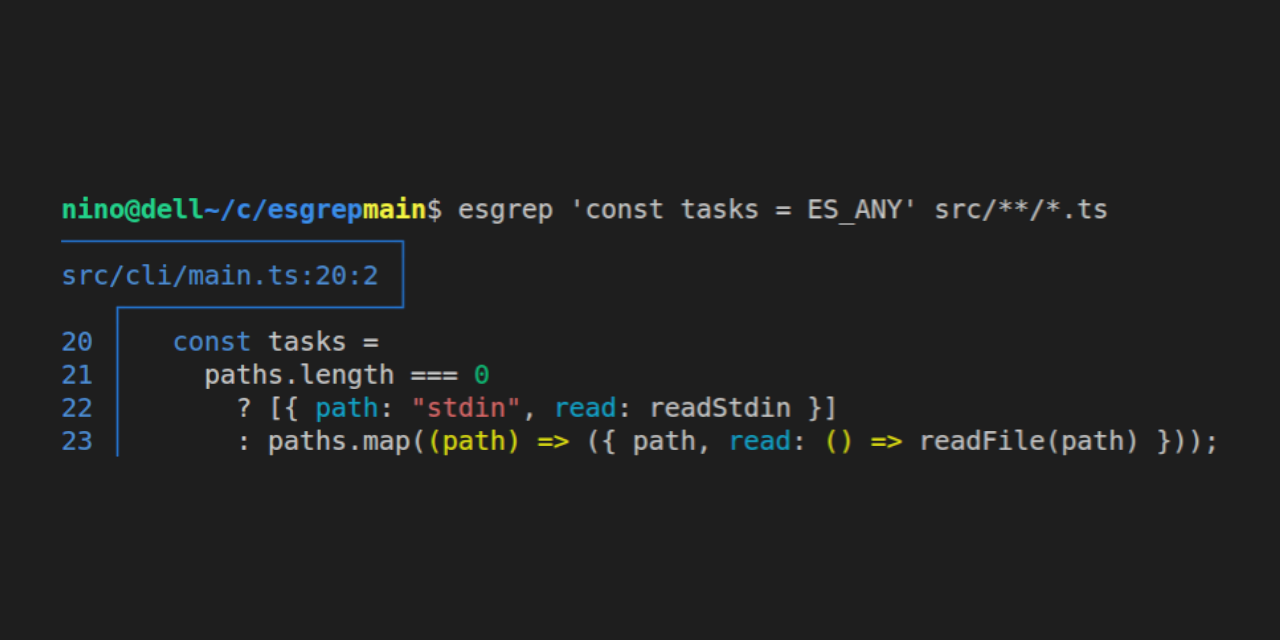
`pretty` (default): easy to read output
```console
user@host$ esgrep 'const tasks = ES_ANY' src/cli/main.ts
─────────────────────┐
src/cli/main.ts:20:2 │
┌─────────────────┘
20 │ const tasks =
21 │ paths.length === 0
22 │ ? [{ path: "stdin", read: readStdin }]
23 │ : paths.map((path) => ({ path, read: () => readFile(path) }));
```
`oneline`: streams out lines of the shape `$path:$line$column:$match_in_one_line`
```console
user@host$ esgrep --format oneline 'const tasks = ES_ANY' src/cli/main.ts
src/cli/main.ts:18:2:const tasks = paths.length === 0 ? [{ path: "stdin", read: readStdin }] : paths.map((path) => ({ path, read: () => readFile(path) }));
```
`jsonl`: streams out lines of the shape `{ path: string, match: Node }` where `Node` is an ESTree node
```console
user@host$ esgrep user users.ts
{"path":"users.ts","match":{"type":"Identifier","name":"user","range":[148,152],"loc":{"start":{"line":4,"column":24},"end":{"line":4,"column":28}}}}
```
`count`: do not show matches, only show the number of matches per file. column-separated
```console
user@host$ esgrep user ./src/**/*.{ts,js}
./src/api.js:10
./src/users.js:4
./src/types.ts:0
```
> **Note**
>
> It is by design that ESGrep doesn't exactly match Grep output options, either because some option didn't make sense anymore, was not useful, or could be achieved by a little bit of bash-fu
>
> - `grep --count ...`: `esgrep --format count ...`
> - `grep --files-without-match ...`: `esgrep --format count ... | grep ':0$' | cut -d ':' -f 1`
> - `grep --files-with-matches ...`: `esgrep --format count ... | grep -v ':0$' | cut -d ':' -f 1`
> - `grep --with-filename ...`: always on
> - `grep --no-filename ...`: always off
> - `grep --line-number ...`: always on
> - `grep --invert-match ...`: not useful
> - `grep --only-matching ...`: not useful
### `-t, --ts`
Include type annotations in the comparison
```ts
import { findStrings } from "esgrep";
const withTS = "const x: number = 10";
const withoutTS = "const x = 10";
console.log([...findStrings(withoutTS, withTS)]);
// [ 'const x: number = 10' ]
console.log([...findStrings(withoutTS, withTS, { ts: true })]);
// []
```
### `-r, --raw`
Differentiate between strings in single quotes, double quotes, and template literals
```ts
import { findStrings } from "esgrep";
const haystack = `
const single = 'hello';
const double = "hello";
const template = \`hello\`
`;
console.log([...findStrings('"hello"', haystack)]);
// [ "'hello'", '"hello"', '`hello`' ]
console.log([...findStrings('"hello"', haystack, { raw: true })]);
// [ "'hello'" ]
```
### `-s, --statement`
If the pattern is an expression statement, lookup the statement itself, and not the expression statement.
```ts
import { findStrings } from "esgrep";
const pattern = "10";
const haystack = "const x = 10";
console.log([...findStrings(pattern, haystack)]);
// [ '10' ]
console.log([...findStrings(pattern, haystack, { statement: true })]);
// []
```
> **Note**
> The first search matches the `10` in `const x = 10` because it looks up all _expressions_ of `10`. In plain English, it looks up all the occurrences of "just" the number 10. That is the most intuitive and default behavior.
>
> The second search does not match the `10` in `const x = 10` because it looks up all _statements_ of consisting of only the _expression_ `10`. In plain English, statements are anything that makes the exact same sense when adding a `;` at the end.
>
> The difference is subtle and it usually takes people not familiar with the concept a few articles to have a good grasp on _statements_ vs _expressions_. Why not start with [this one](https://2ality.com/2012/09/expressions-vs-statements.html)?
## ES Expressions
Additionally to its options, patterns are allowed to be flexible thanks to ES expressions - special expressions that allow for something else than perfect matches.
### `ES_ANY`
Matches anything
```ts
import { findStrings } from "esgrep";
console.log([...findStrings("ES_ANY", "fn('foo', 'bar')")]);
// [
// "fn('foo', 'bar')", // matches the expression
// "fn('foo', 'bar')", // matches the statement (string is the same, not the node)
// "fn",
// "'foo'",
// "'bar'"
// ];
console.log([...findStrings("x = ES_ANY", "x = 10; x = 'hello'")]);
// [
// "x = 10",
// "x = 'hello'"
// ];
```
### `ES_NOT`
Matches anything but the first argument
```ts
import { findStrings } from "esgrep";
const pattern = "const x = ES_NOT(10)";
const haystack = "const x = 20";
console.log([...findStrings(pattern, haystack)]);
// [ 'const x = 20' ]
```
### `ES_EVERY`
Matches if all expressions passed as argument match
```ts
import { findStrings } from "esgrep";
const pattern = `const x = ES_EVERY(
'hello',
"hello",
ES_ANY
)`;
const haystack = "const x = 'hello'";
console.log([...findStrings(pattern, haystack)]);
// [ "const x = 'hello'" ]
```
### `ES_SOME`
Matches if at least one expression passed as argument matches
```ts
import { findStrings } from "esgrep";
const pattern = `const x = ES_SOME(
"hello",
"goodbye"
)`;
const haystack = "const x = 'hello'";
console.log([...findStrings(pattern, haystack)]);
// [ "const x = 'hello'" ]
```
## About
Want to report a bug? Don't understant the doc? Suggest an improvement? Open an issue!
Contributions are welcomed, the code is still small, clean, and all in TS, so it should be readable and extendable without additional guidance. For big changes, consider opening an issue before opening a PR.
Coded w/ ♡ by [Nino Filiu](https://ninofiliu.com)