https://github.com/niryorobotics/niryo_one_ros
Niryo One ROS stack
https://github.com/niryorobotics/niryo_one_ros
Last synced: about 1 year ago
JSON representation
Niryo One ROS stack
- Host: GitHub
- URL: https://github.com/niryorobotics/niryo_one_ros
- Owner: NiryoRobotics
- License: gpl-3.0
- Created: 2017-11-23T10:11:15.000Z (over 8 years ago)
- Default Branch: master
- Last Pushed: 2022-12-07T17:35:41.000Z (over 3 years ago)
- Last Synced: 2025-03-30T01:10:06.601Z (over 1 year ago)
- Language: Python
- Size: 20.2 MB
- Stars: 241
- Watchers: 30
- Forks: 161
- Open Issues: 25
-
Metadata Files:
- Readme: README.md
- License: LICENSE
Awesome Lists containing this project
README
# Niryo One ROS stack
Licensed under GPLv3 (see [LICENSE file](https://github.com/NiryoRobotics/niryo_one_ros/blob/master/LICENSE))
(Niryo One : [https://niryo.com](https://niryo.com/?utm_source=github))
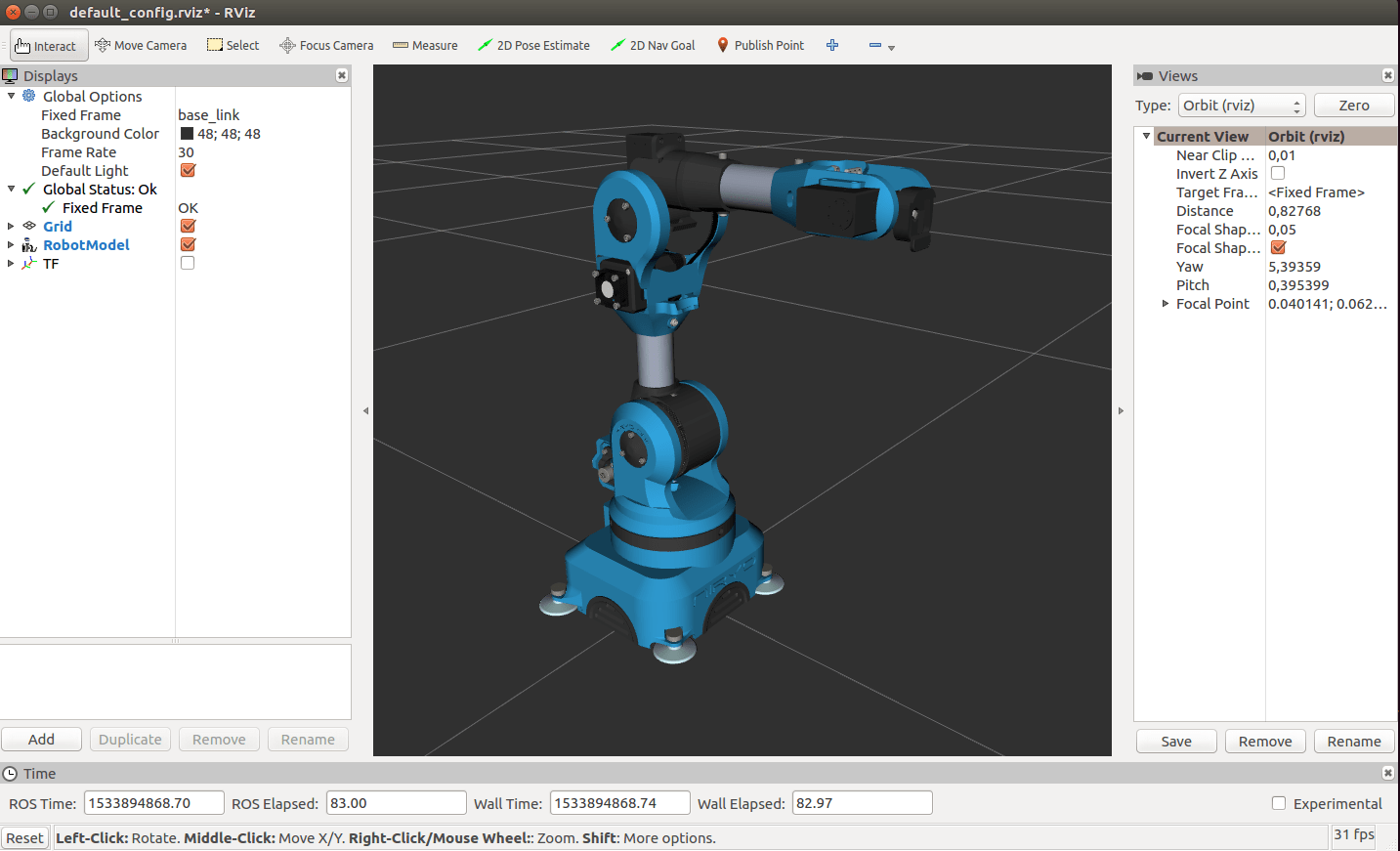
This repository contains all ROS packages used on Niryo One (Raspberry Pi 3B - Xubuntu for ARM).
## How to use Niryo One with a graphical interface ?
You can [download Niryo One Studio](https://niryo.com/download/?utm_source=github) (Linux, Windows and MacOS compatible).
## How to install Niryo One ROS packages on your computer (x86) - Simulation Mode
Requirements :
* Ubuntu 16.04
* ROS kinetic (other versions are not supported)
First install ROS kinetic "Desktop-Full" (tutorial [here](http://wiki.ros.org/kinetic/Installation/Ubuntu)).
You'll need to install some additional ROS packages :
```
sudo apt-get install ros-kinetic-robot-state-publisher ros-kinetic-moveit ros-kinetic-rosbridge-suite ros-kinetic-joy ros-kinetic-ros-control ros-kinetic-ros-controllers ros-kinetic-tf2-web-republisher
```
You'll also need to install an additional Python module :
```
sudo -H pip install jsonpickle
```
Create a catkin workspace and clone Niryo One ROS stack :
```
mkdir -p ~/catkin_ws/src
cd ~/catkin_ws/src
git clone https://github.com/NiryoRobotics/niryo_one_ros.git .
```
Build the packages :
```
cd ~/catkin_ws
catkin_make
```
Don't forget to use those commands before you try to launch anything (you can add them in your .bashrc) :
```
source /opt/ros/kinetic/setup.bash
source ~/catkin_ws/devel/setup.bash
```
You can now launch Rviz with Niryo One (only display mode with some cursors to move the joints):
```
roslaunch niryo_one_description display.launch
```
You can also launch the complete Niryo One ROS Stack instead, which you can control from Niryo One Studio.
```
roslaunch niryo_one_bringup desktop_rviz_simulation.launch
```
The main differences between this launch file and the launch file executed on Raspberry Pi 3B (rpi\_setup.launch) is that the hardware functionalities are disabled, and you get a 3D simulation view with Rviz.
Note that Niryo One ROS packages have been developed with **ROS kinetic, on Ubuntu 16.04**. Other ROS versions and OS distributions are not supported.
---
(Optional) After you install ROS packages and execute catkin_make you still have some installation steps if you want to use Blockly ("Niryo Blocks" on Niryo One Studio).
Make sure that you have a recent nodejs version (not the default installed one)
```
curl -sL https://deb.nodesource.com/setup_8.x | sudo -E bash -
sudo apt-get install -y nodejs
```
Install node modules in the blockly_code_generator directory (where you can find package.json) and create an executable.
```
cd ~/catkin_ws/src/niryo_one_user_interface/blockly_code_generator
npm install
sudo npm link
```
That's it, you have now all the Niryo One functionalities ready to be used.
## Niryo One ROS Stack overview
Here's a global overview of the Niryo One ROS Stack :
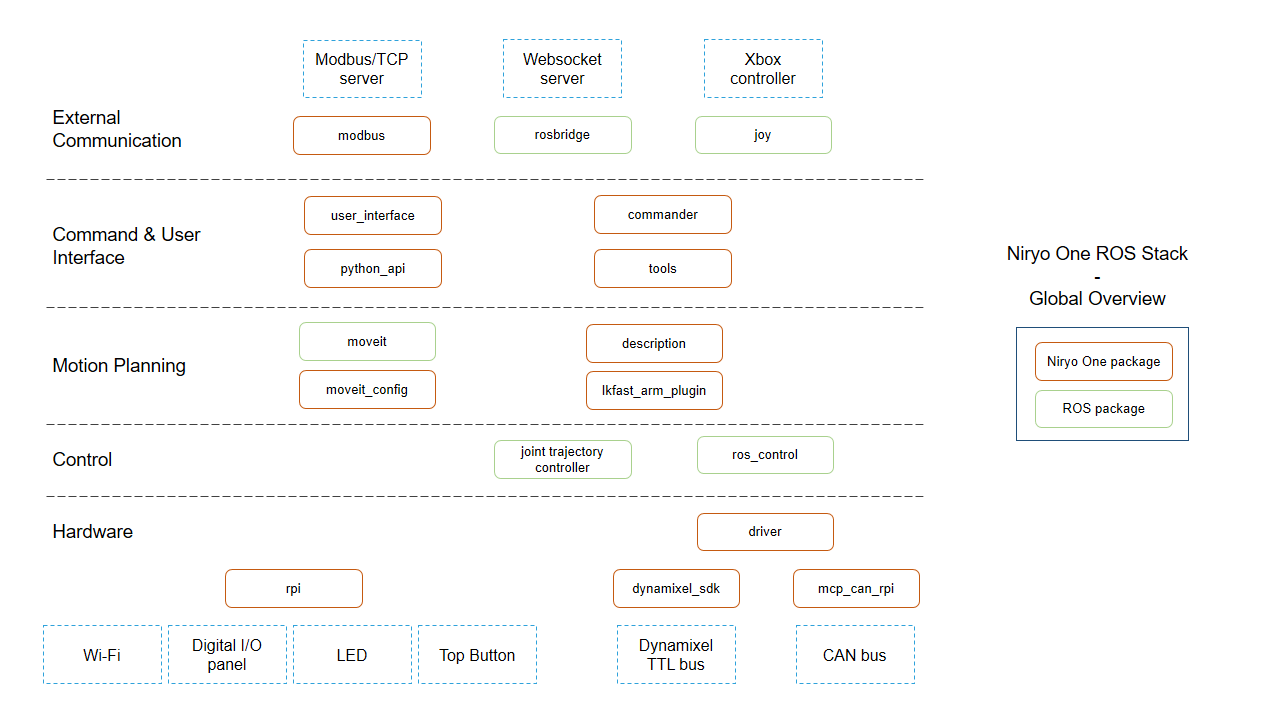
**You can find more specific and detailed info in each package's README.**
## Developer Documentation
* [Get started with the Niryo One Stack](https://niryo.com/docs/niryo-one/developer-tutorials/get-started-with-the-niryo-one-ros-stack/). This will help you understand the architecture and where to start as a developer.
* [C++ example to move the robot](https://github.com/smaassen/niryo_one_tester) by Steve Maassen
* [Python API](https://github.com/NiryoRobotics/niryo_one_ros/tree/master/niryo_one_python_api)
* [Remotely control Niryo One (ROS multi-machines)](https://niryo.com/docs/niryo-one/developer-tutorials/remotely-control-niryo-one-ros-multi-machines/)
## Any question ?
If you have a question and you don't find the answer here or on our [documentation](https://niryo.com/docs/niryo-one/), please [send us a message](https://niryo.com/contact/).
Thank you !