https://github.com/nitiwari-dev/android-percent-layout-sample
Note: Its build using ConstraintLayout. The sample is an alternative for nested layouts. Build to remove nested structure and create a flat xml layout, which eventually improves performance
https://github.com/nitiwari-dev/android-percent-layout-sample
android android-application android-percent-layout android-ui constraint-layout constraint-programming constraintheight demo example-code layout-height-percent layout-width-percent library percent percentframelayout relativelayout support xml
Last synced: 10 months ago
JSON representation
Note: Its build using ConstraintLayout. The sample is an alternative for nested layouts. Build to remove nested structure and create a flat xml layout, which eventually improves performance
- Host: GitHub
- URL: https://github.com/nitiwari-dev/android-percent-layout-sample
- Owner: nitiwari-dev
- Created: 2015-08-30T13:07:53.000Z (almost 11 years ago)
- Default Branch: master
- Last Pushed: 2020-08-03T15:59:22.000Z (about 6 years ago)
- Last Synced: 2025-03-28T08:22:40.460Z (over 1 year ago)
- Topics: android, android-application, android-percent-layout, android-ui, constraint-layout, constraint-programming, constraintheight, demo, example-code, layout-height-percent, layout-width-percent, library, percent, percentframelayout, relativelayout, support, xml
- Language: Kotlin
- Homepage: http://www.coderconsole.com/2015/08/android-percent-support-lib-sample.html
- Size: 123 KB
- Stars: 33
- Watchers: 2
- Forks: 4
- Open Issues: 0
-
Metadata Files:
- Readme: README.md
Awesome Lists containing this project
README
[](https://www.android.com)
[](https://android-arsenal.com/api?level=14)
[](https://www.apache.org/licenses/LICENSE-2.0.html)
# Update
Below example in created using `ConstraintLayout` since percent support library is deprecated from API level 26.0.0.
# Integration and Example
This sample uses `ConstraintLayout` to build xml UI. Helps to avoid the overhead of Nested layouts and thereby improving performance.
Really awesome!!!
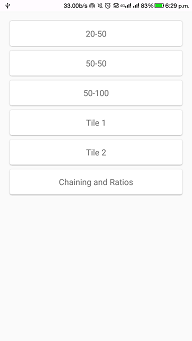

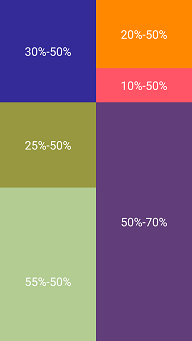

Steps:
1. Add below into build.gradle
` compile 'com.android.support.constraint:constraint-layout:1.1.0-beta3'`
2. Add `layout_constraintHeight_percent` and `layout_constraintWidth_percent` to specify the percentage range.
3. Finally add `layout_constraintWidth_default="percent"` and `layout_constraintHeight_default="percent"`. Thats it !!!.
```xml
```
Bingo we are done !!!
## Licence
Copyright (C) 2020 Nitesh Tiwari.
Licensed under the Apache License, Version 2.0 (the "License");
you may not use this file except in compliance with the License.
You may obtain a copy of the License at
http://www.apache.org/licenses/LICENSE-2.0
Unless required by applicable law or agreed to in writing, software
distributed under the License is distributed on an "AS IS" BASIS,
WITHOUT WARRANTIES OR CONDITIONS OF ANY KIND, either express or implied.
See the License for the specific language governing permissions and
limitations under the License.