https://github.com/nivisi/notification_builder
🦻 A widget that builds using notifications dispatched via the build context.
https://github.com/nivisi/notification_builder
build buildcontext context dart flutter library notification package plugin ui widget
Last synced: 3 months ago
JSON representation
🦻 A widget that builds using notifications dispatched via the build context.
- Host: GitHub
- URL: https://github.com/nivisi/notification_builder
- Owner: nivisi
- License: mit
- Created: 2022-10-17T04:48:35.000Z (over 3 years ago)
- Default Branch: develop
- Last Pushed: 2022-10-19T05:08:44.000Z (over 3 years ago)
- Last Synced: 2025-02-05T13:51:24.677Z (over 1 year ago)
- Topics: build, buildcontext, context, dart, flutter, library, notification, package, plugin, ui, widget
- Language: Dart
- Homepage: https://pub.dev/packages/notification_builder
- Size: 73.2 KB
- Stars: 1
- Watchers: 1
- Forks: 0
- Open Issues: 1
-
Metadata Files:
- Readme: README.md
- License: LICENSE
Awesome Lists containing this project
README
# notification_builder [![pub version][pub-version-img]][pub-version-url]
🦻 A widget that builds using notifications dispatched via the build context.
### Table of contents
- [About](#about)
- [The problem](#the-problem)
- [The solution](#the-solution)
- [Result](#result)
- [If you don't want certain notification to trigger rebuilds...](#if-you-dont-want-certain-notification-to-trigger-rebuilds)
- [Getting started](#getting-started)
- [pub](#pub)
- [Import](#import)
## About
Notifications — is a tool Flutter uses to pass the data higher in the widget tree hierarchy. Somewhere in depth of your widget tree you can fire a notification and it will go up, like a bubble. And on top, you can catch it using a `NotificationBuilder` to build your UI.
### The problem
Imagine the following widget tree:
```dart
MyWidget(
color: // I want this to be changed once the button below is clicked!
child: const SomeChild(
child: AnotherChild(
// More and more widgets...
child: ChildWithTheButton(),
),
),
);
class ChildWithTheButton extends StatelessWidget {
@override
Widget build(BuildContext context) {
return TextButton(
title: 'Change colour',
onPressed: // Here! I want the colour to be changed on this button pressed!
);
}
}
```
You could either pass something like a `ChangeNotifier`, or pass a callback function to set the state, or even use an `InheritedWidget`. Another option is to use a `NotificationListener`.
### The solution
---
> 💡 [Click here](https://github.com/nivisi/notification_builder/blob/develop/src/example/lib/main.dart) to check out the full example.
---
Define your notification:
```dart
class ColorNotification extends Notification {
const ColorNotification(this.color);
final Color color;
}
```
Use a NotificationBuilder to catch notifications:
```dart
// MyWidget
NotificationBuilder(
builder: (context, notification, child) {
// Note: the notification parameter will be null at the very first build.
// Use a fallback value like this.
final color = notification?.color ?? Colors.white;
return AnimatedContainer(
duration: const Duration(milliseconds: 200),
curve: Curves.fastOutSlowIn,
decoration: BoxDecoration(color: color),
child: child,
);
},
child: const SomeChild(...),
),
```
Fire notifications from the widget tree below the builder:
```dart
onPressed: () {
ColorNotification(color).dispatch(context);
},
```
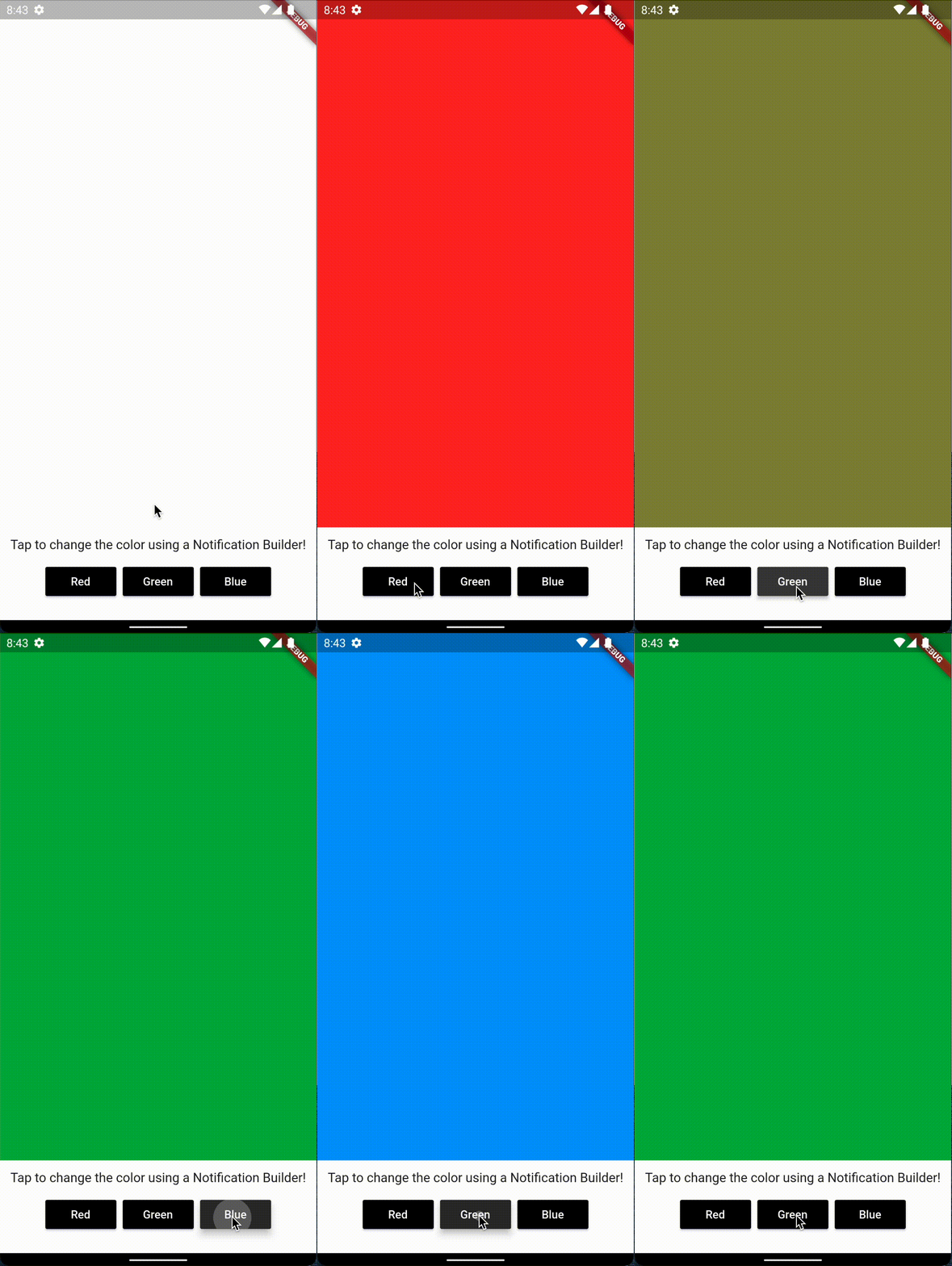
### Result
### If you don't want certain notification to trigger rebuilds...
Then you can use the `buildWhen` parameter!
```dart
buildWhen: (notification) {
// Now if the passed notification will have a red color it will be ignored!
return notification.color != Colors.red;
}
```
## Getting started
### pub
Add the package to `pubspec.yaml`:
```
dependencies:
notification_builder:
```
### Import
Add the dependency to your file:
```dart
import 'package:notification_builder/notification_builder.dart';
```
[pub-version-img]: https://img.shields.io/badge/pub-v0.0.1-0175c2?logo=flutter
[pub-version-url]: https://pub.dev/packages/notification_builder