https://github.com/nju33/pocket-pocket
📖 Unofficial pocket app for searching and accessing
https://github.com/nju33/pocket-pocket
application electron mac pocket unofficial
Last synced: about 2 months ago
JSON representation
📖 Unofficial pocket app for searching and accessing
- Host: GitHub
- URL: https://github.com/nju33/pocket-pocket
- Owner: nju33
- License: mit
- Created: 2017-03-08T11:05:41.000Z (over 9 years ago)
- Default Branch: master
- Last Pushed: 2017-03-11T15:04:18.000Z (over 9 years ago)
- Last Synced: 2025-03-16T12:30:33.910Z (over 1 year ago)
- Topics: application, electron, mac, pocket, unofficial
- Language: JavaScript
- Homepage:
- Size: 1.29 MB
- Stars: 2
- Watchers: 1
- Forks: 1
- Open Issues: 1
-
Metadata Files:
- Readme: README.md
- License: LICENSE.md
Awesome Lists containing this project
README
 Pocket Pocket
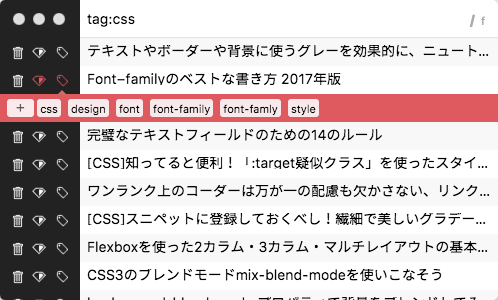
📖 Unofficial pocket app for searching and accessing.
## Usage
### Get the consumer_key
Access [Pocket: Developer API](https://getpocket.com/developer/apps/) and register the application.

Please fill in all forms and press Create button.

Copy the consumer key of the application you just made.

### Open Pocket Pocket
First you will be asked for the consumer key so paste it. (This is the first time, or only when `~/.pocket-pocket.js` is missing or wrong. `~/.pocket-pocket.js` is the configuration file and the contents are JSON of this feeling (`{consumer_key: ...}`).)


Then, you should probably go to the certification page.
Log in with your Pocket account.

You are now ready 💯
### Shortcut
- `CommandOrControl+Alt+P`: You can open, restore and focus the Window
## Download
From the [release page](https://github.com/nju33/pocket-pocket/releases/latest)
## Build Setup
``` bash
# install dependencies
npm install
# serve with hot reload at localhost:9080
npm run dev
# build electron app for production
npm run build
# run webpack in production
npm run pack
```
More information can be found [here](https://simulatedgreg.gitbooks.io/electron-vue/content/docs/npm_scripts.html).
---
This project was generated from [electron-vue](https://github.com/SimulatedGREG/electron-vue) using [vue-cli](https://github.com/vuejs/vue-cli). Documentation about this project can be found [here](https://simulatedgreg.gitbooks.io/electron-vue/content/index.html).
## License
Copyright (c) 2017 nju33 nju33.ki@gmail.com