https://github.com/nju33/tirashi-observer-bot
A Line bot by GAS: this allows you to observe words that you want to from given flyers.
https://github.com/nju33/tirashi-observer-bot
gitpod-workspace
Last synced: over 1 year ago
JSON representation
A Line bot by GAS: this allows you to observe words that you want to from given flyers.
- Host: GitHub
- URL: https://github.com/nju33/tirashi-observer-bot
- Owner: nju33
- Created: 2022-06-16T02:16:28.000Z (about 4 years ago)
- Default Branch: main
- Last Pushed: 2023-03-06T09:29:50.000Z (over 3 years ago)
- Last Synced: 2024-11-22T12:13:25.988Z (over 1 year ago)
- Topics: gitpod-workspace
- Language: TypeScript
- Homepage:
- Size: 1.05 MB
- Stars: 0
- Watchers: 0
- Forks: 0
- Open Issues: 0
-
Metadata Files:
- Readme: README.md
Awesome Lists containing this project
README
# Tirashi Observer Bot
[](https://github.com/nju33/tirashi-observer-bot/actions/workflows/test.yml)
Tirashi Observer Bot is a Line bot by GAS: this allows you to observe words that you want to from given flyers.
## Youtube Video for introducing
[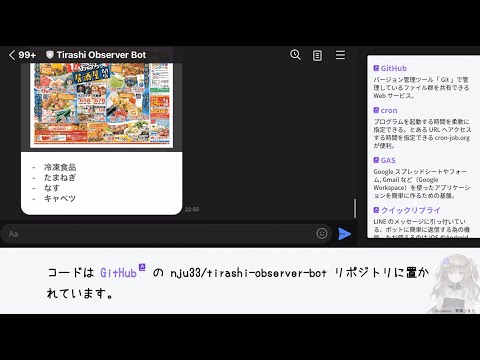](http://www.youtube.com/watch?v=RuEmiDFWPGQ)
## Dependencies
1. [cron-job.org](https://console.cron-job.org/)
2. [Line](https://developers.line.biz/ja/)
3. [Google Apps Script](https://www.google.com/script/start/)
```mermaid
sequenceDiagram
participant Cron as cron-job.org
participant GAS as Google Apps Script
participant Line
actor you
participant S as Supermarket
loop Everyday around 8 a.m.
Cron -) GAS: Fire `doGet`
opt Flyers contains some registerd words
GAS -) Line: Send a message about
whether the flyer contains words that you want
Line -) you: Inform
you -) S: Shipping
end
end
```
## Usecases
1. You can register a word to want to observe.
2. You can list registered words.
3. You can toggle the state of a registered word.
4. You can delete a registered word.
5. You can receive a message when encountering registered words on tirashis.
## Directory Structure
This project is using `yarn@berry` as a package manager; also, the workspace feature is being used.
```bash
. # Workspace root package
├── appsscript.json
├── package.json # The config for the workspace root package
├── projects
│ └── tirashi-observer-bot # A workspace
│ ├── package.json # The config for the workspace package
│ ├── .clasp.json # Contains `rootDir` as `../..`
│ ├── .claspignore
│ └── src # Place the main code to do `doGet` etc
│ └── script.ts
├── _properties.ts # To initialize properties
└── README.md
```
This project doesn't actually have such as `.clasp.json`. That's because It doesn't exist that way to hide secret values.
As a solution to this, actually in my local, mounting `/projects/tirashi-observer-bot/` with my cloud storage. Then all of the files below here are synced with one from the cloud storage. (In short, such as `.clasp.json` exists on the cloud storage)
## Preparing For Workspace
```bash
yarn
```
## Preparing For GAS
1. Install GAS
```bash
npm install --location=global @google/clasp
```
2. Setup GAS to be able to use `clasp run`.
Please refer to [here](https://github.com/google/clasp/blob/master/docs/run.md#run)
3. Create a `.clasp.json` on the `projects/tirashi-observer-bot/` directory, and edit it to be like this:
```json
{
"scriptId": "",
"projectId": "",
"rootDir": "../..",
"fileExtension": "ts",
"filePushOrder": [
"../../projects/tirashi-observer-bot/src/constants.ts",
"../../projects/tirashi-observer-bot/src/error.ts",
"../../_user-function.ts",
"../../_properties.ts",
"../../_sheets.ts",
"../../appsscript.json",
"../../projects/tirashi-observer-bot/src/domains/document.ts",
"../../projects/tirashi-observer-bot/src/domains/drive.ts",
"../../projects/tirashi-observer-bot/src/domains/fetch.ts",
"../../projects/tirashi-observer-bot/src/domains/folder-id-where-flyer-downloads.ts",
"../../projects/tirashi-observer-bot/src/domains/chat.ts",
"../../projects/tirashi-observer-bot/src/domains/token.ts",
"../../projects/tirashi-observer-bot/src/domains/tirashi-url.ts",
"../../projects/tirashi-observer-bot/src/domains/line.ts",
"../../projects/tirashi-observer-bot/src/domains/regexp.ts",
"../../projects/tirashi-observer-bot/src/domains/list-line-message.ts",
"../../projects/tirashi-observer-bot/src/domains/script-properties.ts",
"../../projects/tirashi-observer-bot/src/domains/to-sheet-value.ts",
"../../projects/tirashi-observer-bot/src/domains/words-each-users.ts",
"../../projects/tirashi-observer-bot/src/domains/user.ts",
"../../projects/tirashi-observer-bot/src/domains/word.ts",
"../../projects/tirashi-observer-bot/src/domains/repository.ts",
"../../projects/tirashi-observer-bot/src/line.ts",
"../../projects/tirashi-observer-bot/src/services/line-fetch.ts",
"../../projects/tirashi-observer-bot/src/services/line-message.ts",
"../../projects/tirashi-observer-bot/src/services/chat-action-reply-message.ts",
"../../projects/tirashi-observer-bot/src/services/words-matched-message.ts",
"../../projects/tirashi-observer-bot/src/presentation/line-message.ts",
"../../projects/tirashi-observer-bot/src/presentation/list-line-message.ts",
"../../projects/tirashi-observer-bot/src/presentation/chat-action-reply-message.ts",
"../../projects/tirashi-observer-bot/src/presentation/words-matched-message.ts",
"../../projects/tirashi-observer-bot/src/infrastructure/document.ts",
"../../projects/tirashi-observer-bot/src/infrastructure/drive.ts",
"../../projects/tirashi-observer-bot/src/infrastructure/fetch.ts",
"../../projects/tirashi-observer-bot/src/infrastructure/line-fetch.ts",
"../../projects/tirashi-observer-bot/src/infrastructure/script-properties.ts",
"../../projects/tirashi-observer-bot/src/infrastructure/user-sheet.ts",
"../../projects/tirashi-observer-bot/src/infrastructure/word-sheet.ts",
"../../projects/tirashi-observer-bot/src/usecases/chat.ts",
"../../projects/tirashi-observer-bot/src/usecases/delete-registered-word.ts",
"../../projects/tirashi-observer-bot/src/usecases/activate-registered-word.ts",
"../../projects/tirashi-observer-bot/src/usecases/examine-flyers-by-words.ts",
"../../projects/tirashi-observer-bot/src/usecases/inactivate-registered-word.ts",
"../../projects/tirashi-observer-bot/src/usecases/list-registered-words.ts",
"../../projects/tirashi-observer-bot/src/usecases/register-word.ts"
]
}
```
4. Also, register the number of the same project from the settings page of the script editor. (You can open the script editor by `clasp open`)

5. Setup the script properties.
1. Set `TIRASHI_URL` and `LINE_TOKEN`. For that like propose, like the below command is executed.
```bash
yarn tob:$ _initScriptProperties \
--params '{"TIRASHI_URL": "url1,url2,...", "LINE_TOKEN": "..."}'
# ^ If you want to search words from multiple flyers,
# you can specify a value separated by `,`.
```
2. If you want to change where flyers are downloaded tempolary (for any destructive issues), you can similarly set the `TEMPORARY_DIRECTORY_TO_DOWNLOAD_FLYER`.
### Note about TIRASHI_URL
When Line gets a flyer image, its content is returned from the cache after the second time; therefore, changing the URL every time is needed.
To take the measure of this, Firebase’s hosting feature is used in the like below:
1. Open `firebase.json`
2. Add `hosting.redirects` in the below.
```json
{
"hosting": {
"...": "...",
"redirects": [
{
"source": "/cleaned-image-url/**",
"destination": "https://example.com?key=aqwsedrftgyhujikolp",
"type": 301
}
]
}
}
```
3. `firebase deploy`
4. Done. Now, you can access to `https://example.com?key=aqwsedrftgyhujikolp` via `/cleaned-image-url/123456789`
#### Note
You don't include the last directory (`123456789` as mentioned above) in the TIRASHI_URL.
- 👍 `/cleaned-image-url`
- 👎 `/cleaned-image-url/123456789`
## Code notes
### About Export and Import
This project has a lot of code like the one below.
```ts
const A: typeof _A = typeof _A === 'undefined' ? exports.A : _A
// As a side note, the above is registered as a snippet to use typing `constimported` in a `.ts` file.
```
Mainly, that reason is for coexistence in standard code on GAS and tests.
First about `typeof _A === 'undefined'`. This comfirms to `_A` is defined. That's because pushed codes by clasp are to comment out all of `import` lines. In short, the `_A` imported is always undefined on GAS, and GAS throws an error when we immediately try to access it. So, comfirming defined it before accesing.
On the other hand, all of `import` lines are fine when running tests (by jest). In short, the `_A` imported is properly defined and able to use it.
Next about `exports.A`. All of `export ...` lines of uploaded codes, which is writing by Typescript, by clasp transpile into `exports. = …` or ` …`. In each files, redefining of the `` is needed; so, this project is using `exports. = …`.
If GAS throws an error around here, the matter is a typo of the code or incorrect orders of pushing files. In the letter case, we could fix this to set correct orders to the ["filePushOrder" of the clasp config](https://github.com/google/clasp#project-settings-file-claspjson).
## Hosting
This project makes very small use of the hosting feature of Firebase. It is for using icons in a Line message.
Its preparation is the following.
```bash
# Install Firebase
npm install --location=global firebase-tools
# Login to Firebase, and set FIREBASE_TOKEN for using firebase-cli features.
firebase login:cli
# ... prints the token
export FIREBASE_TOKEN=
# Deploy
firebase deploy
```
`/public/` directory is the root of the hosting.
### Icons
Icons are placed on the `/public/tinified/`; also, all of the icons (png) were minified by https://tinypng.com/.
## Run Scripts
### tob:
Run a script that is defined on the `tirashi-observer-bot` workspace.
#### push
Push local codes to the remote project.
#### deployments
Can list deployments of the remote project.
#### deploy
Create a new deployment by the state at the time.
#### update
Update the newest deployment by the state at the time.
### tob:$
Run codes on the remote project from local.
## Test
This project depends on [Jest](https://jestjs.io/)](https://jestjs.io/) testing framework.
### Setup
1. `mv .jest/setup-process-env.js.sample .jest/setup-process-env.js`
2. Open it, then put `LINE_TOKEN`
3. Run `yarn build`. If you are a VSCode user, It’s also ok that run VSCode's build task(by `cmd+shift+b`)
Some test cases have `.skip`. This prevents sending an actual request to another.
If testing them, remove it first before you run `yarn test`; also, you reattach `.skip` to one when finished before `git push`.