https://github.com/njurquet/zigzag
Computer Vision bot for the ZigZag mobile game developped by Ketchapp
https://github.com/njurquet/zigzag
computer-vision opencv python
Last synced: 3 months ago
JSON representation
Computer Vision bot for the ZigZag mobile game developped by Ketchapp
- Host: GitHub
- URL: https://github.com/njurquet/zigzag
- Owner: NJurquet
- License: mit
- Created: 2024-12-02T20:36:22.000Z (over 1 year ago)
- Default Branch: main
- Last Pushed: 2025-01-04T02:06:55.000Z (over 1 year ago)
- Last Synced: 2025-04-09T00:07:18.058Z (over 1 year ago)
- Topics: computer-vision, opencv, python
- Language: Python
- Homepage: https://youtu.be/rpwYOtp9QeU
- Size: 447 KB
- Stars: 1
- Watchers: 1
- Forks: 0
- Open Issues: 0
-
Metadata Files:
- Readme: README.md
- License: LICENSE
Awesome Lists containing this project
README
ZigZag
## Introduction
### Game
**ZigZag** is a popular mobile game with over 50M downloads on the _Google Play Store_.
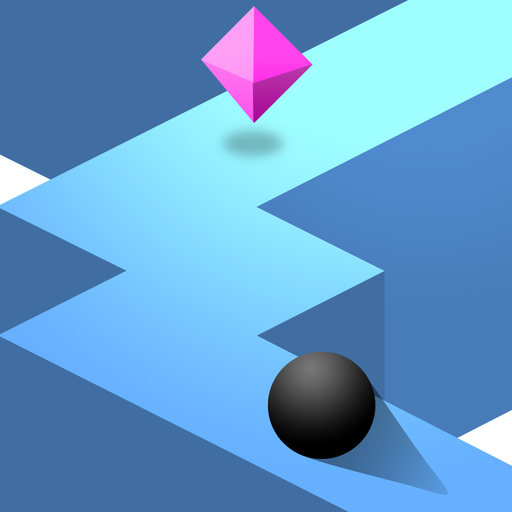
The game is simple: players control a ball moving along an isometric zigzag path and changing its direction by tapping on the screen.
Each tap causes the ball to move diagonally to the left or right.
The primary objective is to stay on the path as long as possible without falling off the edges while collecting diamonds found along the way.
The game incorporates a scoring system where each direction change increases the score by 1 point.
When collecting a diamond, the score will increase by 2.
Diamonds can also be used to unlock various ball skins, adding a customization element to the game.
The game has 5 _Google Play Games_ achievements:
- Get a score of 50 points! (Uncommon)
- Get a score of 125 points! (Uncommon)
- Get a score of 250 points! (Rare)
- Get a score of 1000 points! (Ultra Rare)
- Play 1000 rounds of ZigZag! (Rare)
### Project
This project aims to create an autonomous bot to play the game on behalf of the player using `Python` image processing.
`OpenCV` and `NumPy` are used for every image processing task.
Since ZigZag is a mobile game, it is run on a computer using an Android emulator such as _Bluestacks_ or _LDPlayer_.
The bot is designed to detect the ball and path edges in real time and simulating screen taps when the ball approaches an edge.
The ultimate goal is to enable the bot to consistently achieve all game score milestones and maximize the high score potential to eventually reach the actual limit of 100k points.
> [!NOTE]
> The bot is only working on **Windows** at the moment, and has been tested on **Visual Studio Code** (even though it should work on any IDE) and **Bluestacks 5** Android emulator.
> [!NOTE]
> A view of AI usage whithin the project can be found in the [AI.md](AI.md) file.
## Depedencies
This project uses depedencies that require `Python 3.10` or above.
| **Name** | **Version Used** |
|----------------|:----------------:|
| Python | 3.12.4 |
| opencv-python | 4.10.0.84 |
| numpy | 2.1.3 |
| pywin32 | 308 |
| PyAutoGUI | 0.9.54 |
## Installation
> [!WARNING]
> **MacOS** is not supported at the moment.
1. Clone the repository and navigate to the project root folder `ZigZag`:
```bash
git clone https://github.com/NJurquet/ZigZag.git
```
2. Install the required dependencies:
```bash
pip install -r requirements.txt
```
3. Install an Android emulator on your computer.
[Bluestacks 5](https://www.bluestacks.com/) or [LDPlayer](https://www.ldplayer.net/) are recommended.
4. Go to the Google Play Store, sign in with your Google account and download **ZigZag**.
5. In the emulator settings, remove eventual ads.
Minimize the right sidebar to remove a maximum of distractions.
6. Open the game and test a few games to make sure the game is running correctly (the emulator can be put in airplane mode for less ads, but it should not affect the bot).
7. Change the `src/config.py` file to configure the project as needed.
Make sure to set the `WINDOW_NAME` constant to your game window name, and `VISION_EN` to either `True` or `False` depending on if you want to enable or disable the image processing window.
A list of all opened windows can be obtained by running:
```bash
python -m src.capture.screen_capture
```
> [!TIP]
> Set `VISION_EN` to `False` to minimize the time used for frame drawing and display.
8. Make sure you have done the following before running the bot for the best results:
- Have the game on the main screen
- Your PC is charging (for better performance)
- Any heavy other programs are closed (for better performance)
9. Run the bot:
```bash
python -m src.main
```
> [!NOTE]
> The window should automatically be resized to `WINDOW_HEIGHT` provided in the `config.py` file, and the mouse be moved to the center of the window.
## Goals
1. Process a frame image so it detects the ball and path edges.
2. Process the real-time game screen so it detects the ball and path edges.
3. Be able to simulate a click that results from the ball being close to an edge.
4. Have an average FPS of at least 30 with vision window enabled and when the PC is charging.
5. Achieve an average score of 500 points.
6. Achieve a score of 1000 points.
7. The game window should be captured no matter its initial position or size, and without causing more disturbances.
8. The bot should meet the 500 average points objective on any Windows computer, regardless of its performance or resolution.
9. The bot should be robust and give reproducible results. It should be independant to time, randomness, and other external factors.
## Strategy
1. Find the emulator window, resize it and move the mouse to its center.
2. Capture the window using DPI awareness for being able to capture DPI aware applications, and for screen scale independence.
3. Find optimal detection parameters & mask out interfering objects to keep the necessary ones.
4. Detect the player ball and draw a circle on the frame with OpenCV.
5. Detect path edges and draw the lines on the frame with OpenCV.
6. Use 2 points for edge proximity detection: horizontal front point & isometric front point. If the ball is close enough to a detected edge, it simulates a click.
7. When changing direction, vertically mirror the 2 points to only detect one side of the edges lines.
8. Also simulate a click when the white background is detected, in case edges are not detected properly.
9. All or most calculations are performed using matrix operations or Numpy arrays for processing time optimization.
10. Every position, distance or size are calculated in relative units to the screen height for window size & screen resolution independence.
## Difficulties
### Dynamic color changes
As the player progresses through one game, the theme colors transition randomly within a predefined palette.
Additionally, the ball can be customized with various skins, each having unique color patterns.
This project cannot therefore rely on color-based detection methods to identify game elements.
### Accuracy in detection
OpenCV-based image processing is prone to imperfections in detecting edges or circles.
Insufficient detection accuracy could result in the ball being lost or misidentified, or the path edge detection failing for a set of time.
Such errors may lead to the ball falling off the edges.
### Diamonds interference
Although diamonds are important to collect to reach higher scores, they are not part of the game mechanics.
These pink diamonds are isometric shapes composed of lines that could interfere with lines detection and may cause unwanted change in ball direction.
### Real-time game
Objects detection, screen processing and actions are performed in real-time using the live game window.
Without proper optimization, these operations could lead to high latency and low reaction times, resulting in delayed direction changes or missed edge detections, negatively affecting performance.
### Window capture
The game window capture may introduce disturbances or noise that can affect performance or gameplay.
If the window is not captured correctly, the bot will not be able to properly detect the ball/edges.
For example, variations in some emulator configurations such as UI elements (e.g., borders or sidebars) may cause the bot to misinterpret the game frame.
The window will not be placed at the exact same position every time, so capturing the window based on its position will not work.
### Computer independence
The bot is intended to run on computers with diverse performance, screen resolutions and scaling.
Variability in system performance may result in more delays, glitches or processing inconsistencies.
Fixed pixel-based sizes and positions will also cause failings in game elements detection or being out of the screen area.