https://github.com/nlfmt/pyqt-colorpicker
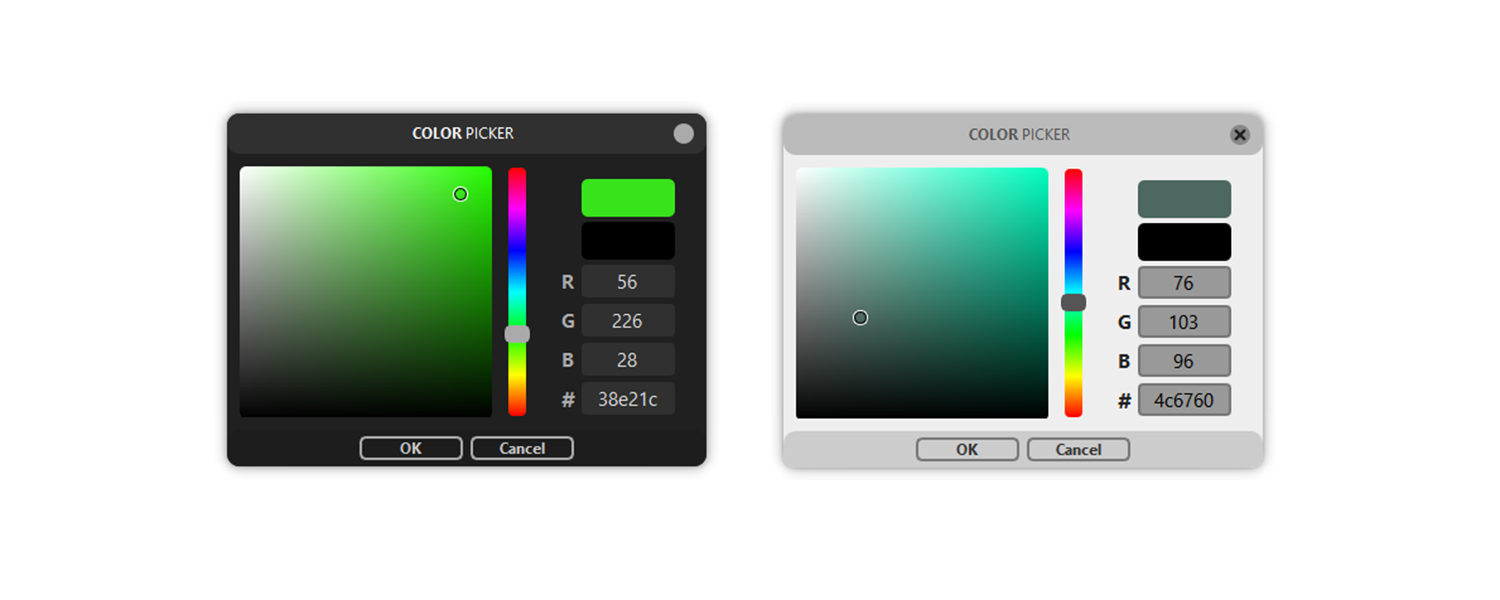
Modern visual Color Picker Dialog for Python (based on Qt's QDialog) to easily get color input from the user.
https://github.com/nlfmt/pyqt-colorpicker
color color-picker hex modern popup pyqt pyside python qt rgb visual
Last synced: over 1 year ago
JSON representation
Modern visual Color Picker Dialog for Python (based on Qt's QDialog) to easily get color input from the user.
- Host: GitHub
- URL: https://github.com/nlfmt/pyqt-colorpicker
- Owner: nlfmt
- License: mit
- Created: 2020-09-29T19:03:38.000Z (almost 6 years ago)
- Default Branch: master
- Last Pushed: 2024-10-30T14:52:32.000Z (over 1 year ago)
- Last Synced: 2025-04-03T12:07:56.998Z (over 1 year ago)
- Topics: color, color-picker, hex, modern, popup, pyqt, pyside, python, qt, rgb, visual
- Language: Python
- Homepage: https://pypi.org/project/vcolorpicker/
- Size: 61.5 KB
- Stars: 41
- Watchers: 3
- Forks: 11
- Open Issues: 4
-
Metadata Files:
- Readme: README.md
- License: LICENSE
Awesome Lists containing this project
README
# vcolorpicker
Simple visual Color Picker with a modern UI created with Qt to easily get color input from the user.
## Installation
1. Install using pip:
```
pip install vcolorpicker
```
or clone the repository yourself and run:
```
pip install .
```
## Usage
2. To ask for a color, import the `getColor` function and run it:
```python
from vcolorpicker import getColor
color = getColor()
```
## Customization
* **Showing custom last color:**
```python
old_color = (255,255,255)
picked_color = getColor(old_color)
```
* **Changing the UI Theme**
```python
from vcolorpicker import useLightTheme
useLightTheme(True)
```
* **Adding Alpha selection**
```python
from vcolorpicker import useAlpha
useAlpha(True)
```
When the ColorPicker uses Alpha, you have to pass a RGBA tuple\
as the last color, otherwise there wil be an error.
```python
old_color = (255,255,255,100)
picked_color = getColor(old_color) # => (r,g,b,a)
```
## Color Formats and Conversion
* The default format `getColor` will give you is RGB(A),\
but you can use vcolorpickers color conversion functions\
if you have a different format like HSV or HEX.
`hsv2rgb` **HSV(A)** to **RGB(A)**\
`rgb2hsv` **RGB(A)** to **HSV(A)**\
`rgb2hex` **RGB(A)** to **HEX**\
`hex2rgb` **HEX** to **RGB**\
`hex2hsv` **HEX** to **HSV**\
`hsv2hex` **HSV(A)** to **HEX**
* Example:
```python
from vcolorpicker import getColor, hsv2rgb, rgb2hsv
old_color = hsv2rgb((50,50,100,100)) # => (127,255,255,100)
picked_color = rgb2hsv(getColor(old_color))
```
* **Color Formats:**
**RGB** values range from **0** to **255**\
**HSV** values range from **0** to **100**\
**HEX** values should be in format: `"XXXXXX"` or `"xxxxxx"`\
**Alpha** values range from **0** to **100**
## Compatibility
This package is compatible with **Python 3.7+** and above.
It uses [qtpy](https://github.com/spyder-ide/qtpy) under the hood, so it should work with all Qt bindings (PyQt5, PySide2, PySide6, PyQt6).
## Previous versions
In previous versions you had to create a ColorPicker object first and then\
call it's `getColor` method. This is still supported, you just have to\
import the `ColorPicker` class.
The color conversion functions are not methods anymore, you can import them\
directly with `from vcolorpicker import hsv2rgb, rgb2hsv`.
You also had to create a `QApplication` object before being able to run the\
ColorPicker, now it automatically creates one by itself if there isn't one yet.\
If you need to get the auto-created application, you can use this:
```python
from PyQt5.QtWidgets import QApplication
app = QApplication.instance()
```
## Bugs and Improvement ideas
If you find a bug, you can open an issue or write me an email (nlfmt@gmx.de)\
and I will try to get to it as fast as possible, or you can implement it\
yourself and create a pull request.
## License
This software is licensed under the **MIT License**.\
More information is provided in the dedicated LICENSE file.