https://github.com/nobbmaestro/nvim-andromeda
Neovim port of Andromeda 👨🏼🎤
https://github.com/nobbmaestro/nvim-andromeda
color-scheme colorscheme neovim neovim-colorscheme neovim-configuration neovim-lua neovim-plugins theme themes vim
Last synced: 4 months ago
JSON representation
Neovim port of Andromeda 👨🏼🎤
- Host: GitHub
- URL: https://github.com/nobbmaestro/nvim-andromeda
- Owner: nobbmaestro
- Created: 2023-05-16T22:38:33.000Z (about 3 years ago)
- Default Branch: master
- Last Pushed: 2025-01-07T22:23:00.000Z (over 1 year ago)
- Last Synced: 2025-01-07T22:32:50.595Z (over 1 year ago)
- Topics: color-scheme, colorscheme, neovim, neovim-colorscheme, neovim-configuration, neovim-lua, neovim-plugins, theme, themes, vim
- Language: Lua
- Homepage:
- Size: 2.6 MB
- Stars: 15
- Watchers: 1
- Forks: 0
- Open Issues: 0
-
Metadata Files:
- Readme: README.md
Awesome Lists containing this project
README
Oh, are you also in pursuit of Neovim port of Andromeda Theme for VS Code? Well, look no further!

Andromeda Theme for Neovim




True Neovim adaptation of Andromeda Theme for VS Code!

## Table of Content
- [Installation](#installation)
- [Supported plugins](#supported-plugins-as-of-right-now)
- [Customization](#customization)
- [Customizing background(s)](#customizing-backgrounds)
- [Customizing accent color(s)](#customizing-accent-colors)
- [Customazing font style(s)](#customizing-font-styles)
- [Thank You](#thank-you)
## Installation
1. Install using your favourite package manager:
**Using [lazy.nvim](https://github.com/folke/lazy.nvim):**
```lua
return {
"nobbmaestro/nvim-andromeda",
dependencies = { "tjdevries/colorbuddy.nvim" },
config = function()
require("andromeda").setup({
preset = "andromeda",
})
end,
}
```
**Using [packer.nvim](https://github.com/wbthomason/packer.nvim):**
```lua
use {
"nobbmaestro/nvim-andromeda",
requires = { "tjdevries/colorbuddy.nvim", branch = "dev" }
}
```
**Using [vim-plug](https://github.com/junegunn/vim-plug):**
```vim
Plug 'tjdevries/colorbuddy.nvim', { 'branch': 'dev' }
Plug 'nobbmaestro/nvim-andromeda'
```
2. Enable the colorscheme in your lua config:
```lua
require("andromeda").setup()
```
3. Stop procrastinating and go back to coding!
## Supported plugins (as of right now)
- [flash.nvim](https://github.com/folke/flash.nvim/tree/8a8e74922a383c253b7f92e042b749150140c8d1)
- [fugitive.vim](https://github.com/tpope/vim-fugitive)
- [harpoon](https://github.com/ThePrimeagen/harpoon)
- [lazy.nvim](https://github.com/folke/lazy.nvim)
- [lualine.nvim](https://github.com/nvim-lualine/lualine.nvim)
- [mason.nvim](https://github.com/williamboman/mason.nvim)
- [rainbow-delimiters.nvim](https://github.com/HiPhish/rainbow-delimiters.nvim)
- [telescope.nvim](https://github.com/nvim-telescope/telescope.nvim)
- [vim-gitgutter](https://github.com/airblade/vim-gitgutter)
- [vim-signify](https://github.com/mhinz/vim-signify)
Note, in order to set up lualine, one has to modify lualine config accordingly:
```lua
local andromeda_lualine = require("andromeda.plugins.lualine")
require("lualine").setup({
options = {
theme = andromeda_lualine.theme,
},
sections = andromeda_lualine.sections,
inactive_sections = andromeda_lualine.inactive_sections,
})
```
## Customization
Currently supported customizations are listed below.
### Customizing background(s)
To change the background and/or highlighting, override following variables in the configuration:
```lua
require("andromeda").setup({
preset = "andromeda",
colors = {
background = "#23262e",
mono_1 = "#2f323c", -- secondary background and/or highlighting
mono_2 = "#3a3e4b", -- used for highlighting
mono_3 = "#464959", -- used for highlighting
mono_4 = "#606064",
mono_5 = "#a0a1a7", -- comments
mono_6 = "#d5ced9", -- normal text
}
})
```
For transparent background, set following flag:
```lua
require("andromeda").setup({
preset = "andromeda",
transparent_bg = true,
})
```
### Customizing accent color(s)
As of right now, I have selected the `primary` as the most dominant accent color. Whereas the usage of `secondary` color is almost non-existent. Regardless, these can be overriden, accordingly:
```lua
require("andromeda").setup({
preset = "andromeda",
colors = {
primary = "#00e8c6", -- defaults to cyan
secondary = "#ff00aa", -- defaults to pink
},
})
```
### Customizing font style(s)
In order to enable "Andromeda Italic", add following to the configuration:
```lua
require("andromeda").setup({
preset = "andromeda",
styles = {
italic = true,
}
})
```
## Thank You
- [TJ DeVries](https://twitter.com/teej_dv) for your incredible work on [colorbuddy.nvim](https://github.com/tjdevries/colorbuddy.nvim).
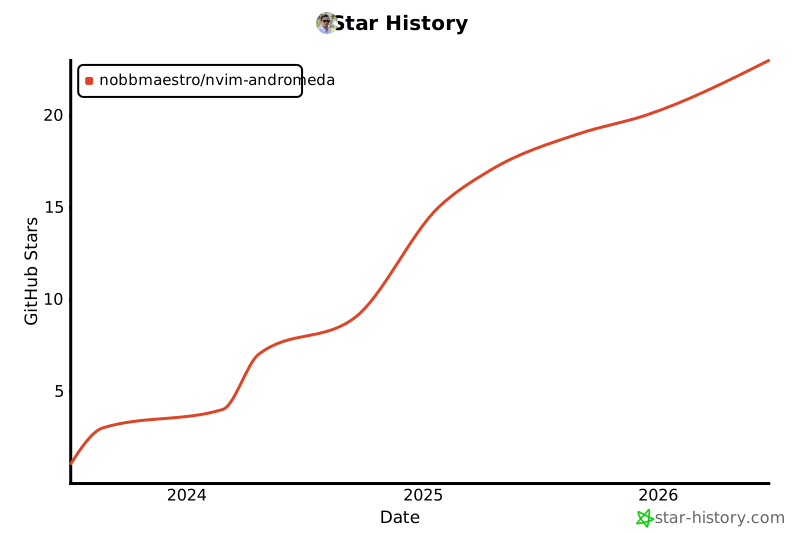
## Star History
[](https://star-history.com/#nobbmaestro/nvim-andromeda&Date)