https://github.com/noblemajo/al-sql
Abstraction_Layer-Sql is a sql abstraction layer that can be used for every sql database to perform simple querys.
https://github.com/noblemajo/al-sql
database javascript-library mariadb mysql mysqldb node node-js nodejs npm npm-library npm-package postgres postgresql sql sqlite typescript typescript-library
Last synced: 4 months ago
JSON representation
Abstraction_Layer-Sql is a sql abstraction layer that can be used for every sql database to perform simple querys.
- Host: GitHub
- URL: https://github.com/noblemajo/al-sql
- Owner: NobleMajo
- License: mit
- Created: 2021-12-03T17:48:59.000Z (over 4 years ago)
- Default Branch: main
- Last Pushed: 2026-02-18T12:47:34.000Z (5 months ago)
- Last Synced: 2026-02-18T16:56:39.643Z (5 months ago)
- Topics: database, javascript-library, mariadb, mysql, mysqldb, node, node-js, nodejs, npm, npm-library, npm-package, postgres, postgresql, sql, sqlite, typescript, typescript-library
- Language: TypeScript
- Homepage:
- Size: 442 KB
- Stars: 39
- Watchers: 2
- Forks: 3
- Open Issues: 0
-
Metadata Files:
- Readme: README.md
- Contributing: CONTRIBUTING.md
- License: LICENSE
Awesome Lists containing this project
README
# al-sql



"al-sql" is a Abstraction_Layer for sql databases to perform simple sql querys.
You create or use a sql dialect interface and a sql connection interface for your sql database.
With this you can create a SqlClient instance which provides full controll over a database and its table structure.
There is already a working postgres abstraction implementation that you can use for a postgres databases or as base to create a own abstraction implementation (see [here](#getting-started-postgres)).
---
- [al-sql](#al-sql)
- [Getting started (postgres)](#getting-started-postgres)
- [1. Install package](#1-install-package)
- [2. Client cnnnections](#2-client-cnnnections)
- [3. Table definition](#3-table-definition)
- [4. Implement control functions](#4-implement-control-functions)
- [6. Use the table](#6-use-the-table)
- [Debugging help](#debugging-help)
- [Layer Implementation](#layer-implementation)
- [AbstractSqlDialect](#abstractsqldialect)
- [AbstractSqlConnection](#abstractsqlconnection)
- [Postgres connection via 'pg'](#postgres-connection-via-pg)
- [NPM Scripts](#npm-scripts)
- [use](#use)
- [base scripts](#base-scripts)
- [watch mode](#watch-mode)
- [Contributing](#contributing)
- [License](#license)
- [Disclaimer](#disclaimer)
# Getting started (postgres)
## 1. Install package
```sh
npm i al-sql
```
## 2. Client cnnnections
Don't worry, much of it is or can be copied and pasted or distributed across multiple files.
Implement the base client connection:
```ts
import { SqlClient } from "al-sql"
import { PostgresConnection } from "al-sql/dist/pg"
export const client = new SqlClient(
new PostgresConnection(
env.POSTGRES_HOST,
env.POSTGRES_PORT,
env.POSTGRES_USER,
env.POSTGRES_PASSWORD,
env.POSTGRES_DB,
)
)
```
## 3. Table definition
Define your tables in the database, this tables can be created via al-sql:
```ts
// user table example:
export const accountTable = client.getTable(
"account",
[{ // column example:
name: "id",
type: "SERIAL",
primaryKey: true,
nullable: false,
},{
name: "name",
type: "VARCHAR",
unique: true,
nullable: false,
size: 32,
},{
name: "email",
type: "VARCHAR",
unique: true,
nullable: false,
size: 128,
},]
)
// friendship example:
export const friendshipTable = client.getTable(
"friendship",
[{ // column example:
name: "id",
type: "SERIAL",
primaryKey: true,
nullable: false,
},{
name: "sender_id",
type: "INT",
nullable: false,
},{
name: "receiver_id",
type: "INT",
nullable: false,
},{
name: "accepted",
type: "BOOL",
nullable: false,
default: false,
},],
[{ // foreign keys example:
columnName: "sender_id",
foreignColumnName: "id",
foreignTableName: "account",
},{
columnName: "receiver_id",
foreignColumnName: "id",
foreignTableName: "account",
},]
)
```
## 4. Implement control functions
This way database entities feel like local objects with control functions.
This is just a example, there are better implementations depends on the codebase and coding style:
```ts
export async function getAccountByName(
name: string
): Promise {
const result = await accountTable.selectOne(
["id"], // SELECT "id" FROM "account" LIMIT 1
{ // WHERE name = $1 ("name" is a prepared statement)
name: name,
}
)
if (!result || typeof result.id != "number") {
throw new Error("User with name '" + name + "' not exists!")
}
return result.id
}
export async function getAccountByEmail(
email: string
): Promise {
const result = await accountTable.selectOne(
["id"], // SELECT "id" from "account" LIMIT 1
{ // WHERE email = $1 ("email" is a prepared statement)
email: email,
}
)
if (!result || typeof result.id != "number") {
throw new Error("User with email '" + email + "' not exists!")
}
return result.id
}
export async function createAccount(
name: string,
email: string
): Promise {
const result = await accountTable.insert(
{ // INSERT INTO "account" (name, email) VALUES ($1, $2)
name: name,
email: email,
},
["id"] // RETURNING "ID"
)
if (!result || typeof result.id != "number") {
throw new Error("User with email '" + email + "' not exists!")
}
return result.id
}
export async function requestFriendship(
senderId: number,
receiverId: number
): Promise {
await removeFriendship(senderId, receiverId)
// INSERT INTO "friendship" (sender_id, receiver_id) VALUES ($1, $2)
await friendshipTable.insert({
sender_id: senderId,
receiver_id: receiverId,
})
}
export async function acceptFriendship(
senderId: number,
receiverId: number
): Promise {
await friendshipTable.update(
{ // UPDATE SET accepted = $1
accepted: true,
},{ // WHERE sender_id = $1 AND receiver_id = $2
sender_id: senderId,
receiver_id: receiverId,
},
)
}
export async function getFriends(
user: number
): Promise {
const result = await Promise.all([
friendshipTable.select(
[ // SELECT "friendship".sender_id from "friendship"
["friendship", "sender_id"],
],
{ // WHERE receiver_id = $1
receiver_id: user,
},
),
friendshipTable.select(
[ // SELECT "friendship".receiver_id from "friendship"
["friendship", "receiver_id"],
],
{ // WHERE sender_id = $1
sender_id: user,
}
)
])
// merge results together
const friends: number[] = []
result[0].forEach((f) => friends.push(f.sender_id as number))
result[1].forEach((f) => friends.push(f.receiver_id as number))
return friends
}
export async function removeFriendship(
user1: number,
user2: number
): Promise {
await Promise.all([
friendshipTable.delete(
{ // DELETE FROM "friendship" WHERE sender_id = $1 AND receiver_id = $2
sender_id: user1,
receiver_id: user2
}
),
friendshipTable.delete(
{ // DELETE FROM "friendship" WHERE sender_id = $1 AND receiver_id = $2
sender_id: user2,
receiver_id: user1
}
)
])
}
```
## 6. Use the table
After defining the tables in code use "createTable()" on the client to create the tables if not exist:
```ts
await client.createTables()
```
You can use the "dropAllTables()" function to drop all (defined) tables.
This is handy for debug and tests:
```ts
// drops all tables (cascaded) in reversed order
await client.dropAllTables()
// creates all tables in normal order
await client.createAllTables()
```
From here on your can use the tables or control function to manipulate the database data.
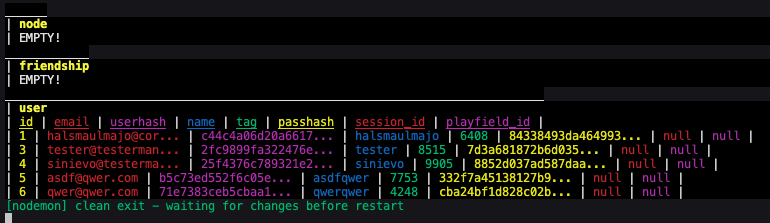
# Debugging help
Example:
showResult(object, ...options) / showTable(table, ...options)
# Layer Implementation
If you want to create a own abstraction layer implementation you need to implement this two interfaces:
- AbstractSqlDialect
- AbstractSqlConnection
## AbstractSqlDialect
First you implement the sql querys for your sql dialect.
You can checkout the postgres implementation for help:
```ts
export interface AbstractSqlDialect {
getDialectName(): string
getTablesQuery(
client: SqlClient
): ExecutableSqlQuery
createTableQuery(
table: SqlTable
): ExecutableSqlQuery
dropTableQuery(
table: SqlTable
): ExecutableSqlQuery
insertQuery(
table: SqlTable,
set: SqlSetValueMap,
returning?: SqlResultColumnSelector | undefined,
): ExecutableSqlQuery
updateQuery(
table: SqlTable,
set: SqlSetValueMap,
where?: SqlWhereSelector,
returning?: SqlResultColumnSelector | undefined,
): ExecutableSqlQuery
selectQuery(
table: SqlTable,
select?: SqlResultColumnSelector,
where?: SqlJoinWhereSelector,
join?: number | undefined,
...joins: SqlJoin[]
): ExecutableSqlQuery
deleteQuery(
table: SqlTable,
where?: SqlWhereSelector,
returning?: SqlResultColumnSelector | undefined,
): ExecutableSqlQuery
}
```
## AbstractSqlConnection
Now you can implement the needed sql connection based on the sql driver/library.
If two sql databases share the same sql dialect but need a other connection driver/library you can reuse the AbstractSqlDialect and just implement a other AbstractSqlConnection for that driver/library.
```ts
export interface AbstractSqlConnection {
getDialect(): AbstractSqlDialect // HERE YOU RETURN YOUR SQL DIALECT IMPLEMENTATION
execute(query: ExecutableSqlQuery): Promise
isConnected(): Promise
connect(): Promise
close(): Promise
}
```
## Postgres connection via 'pg'
The postgres connection implementation looks like this:
```ts
export class PostgresConnection implements AbstractSqlConnection {
public readonly client: Client
public readonly dialect: PostgresSqlDialect
public connected: boolean = false
constructor(
public readonly host: string,
public readonly port: number,
public readonly username: string,
public readonly password: string,
public readonly database: string
) {
this.client = new Client({ // <- "Client" is a export of the "pg"-package (postgres-client)
host: host,
port: port,
user: username,
password: password,
database: database
})
this.dialect = new PostgresSqlDialect()
}
getDialect(): AbstractSqlDialect {
return this.dialect
}
async execute(query: ExecutableSqlQuery): Promise {
try{
return this.client.query(
query[0],
query.slice(1)
)
}catch(err: Error | any){
await this.client.end().catch(() => {})
this.connected = false
throw err
}
}
async isConnected(): Promise {
return this.connected
}
async connect(): Promise {
await this.client.connect()
this.connected = true
}
async close(): Promise {
await this.client.end()
this.connected = false
}
}
```
# NPM Scripts
The npm scripts are made for linux.
But your welcome to test them on macos and windows and create feedback.
## use
You can run npm scripts in the project folder like this:
```sh
npm run
```
Here is an example:
```sh
npm run test
```
## base scripts
You can find all npm scripts in the `package.json` file.
This is a list of the most important npm scripts:
- test // test the app
- build // build the app
- exec // run the app
- start // build and run the app
## watch mode
Like this example you can run all npm scripts in watch mode:
```sh
npm run start:watch
```
# Contributing
Contributions to this project are welcome!
Interested users can refer to the guidelines provided in the [CONTRIBUTING.md](CONTRIBUTING.md) file to contribute to the project and help improve its functionality and features.
# License
This project is licensed under the [MIT license](LICENSE), providing users with flexibility and freedom to use and modify the software according to their needs.
# Disclaimer
This project is provided without warranties.
Users are advised to review the accompanying license for more information on the terms of use and limitations of liability.