https://github.com/noctalia-dev/noctalia
A sleek and minimal desktop shell thoughtfully crafted for Wayland.
https://github.com/noctalia-dev/noctalia
dotfiles hyprland linux niri noctalia quickshell rice
Last synced: about 2 months ago
JSON representation
A sleek and minimal desktop shell thoughtfully crafted for Wayland.
- Host: GitHub
- URL: https://github.com/noctalia-dev/noctalia
- Owner: noctalia-dev
- License: mit
- Created: 2025-07-11T10:50:50.000Z (about 1 year ago)
- Default Branch: main
- Last Pushed: 2026-06-19T12:44:54.000Z (about 2 months ago)
- Last Synced: 2026-06-19T14:27:29.740Z (about 2 months ago)
- Topics: dotfiles, hyprland, linux, niri, noctalia, quickshell, rice
- Language: C++
- Homepage: https://docs.noctalia.dev
- Size: 86.3 MB
- Stars: 7,897
- Watchers: 26
- Forks: 558
- Open Issues: 54
-
Metadata Files:
- Readme: README.md
- Contributing: CONTRIBUTING.md
- License: LICENSE
Awesome Lists containing this project
- my-awesome-github-stars - noctalia-dev/noctalia - A sleek, customizable desktop shell crafted for Wayland. (C++)
README
Noctalia
===
Noctalia is a native Wayland desktop shell for people who want a polished, configurable Linux desktop without stitching
together a separate bar, launcher, notification daemon, lock screen, wallpaper tool, and settings UI.
It provides the shell layer around your compositor: bars, widgets, dock, launcher, control center, notifications,
wallpaper, lock screen, session actions, clipboard history, OSDs, tray integration, and desktop widgets. The project is
built directly on Wayland and OpenGL ES with no Qt or GTK dependency, so the UI, rendering, configuration, and IPC model
are designed as one cohesive shell instead of a collection of unrelated panels and scripts.
> [!IMPORTANT]
> Noctalia v5 is in early/alpha development. Expect breaking configuration and behavior changes while the project is still taking shape.




## Why Noctalia?
Most Wayland setups leave the desktop shell to a stack of small tools: one bar, another launcher, another notification
daemon, a lock screen, a wallpaper daemon, scripts for session actions, and separate config formats for each piece. That
can be flexible, but it also makes a complete desktop feel fragile and hard to keep visually consistent.
Noctalia solves that by providing one configurable shell layer that owns the common desktop surfaces and services while
still fitting into compositor-driven Wayland workflows. It is meant for users who want the control of a custom desktop
environment with fewer moving parts and a consistent UI.
## What It Includes
- Multi-monitor bars with configurable widgets, taskbar, workspaces, system tray, media, network, battery, brightness,
weather, clipboard, and custom script-backed widgets.
- Dock, launcher, control center, notification toasts/history, wallpaper picker, OSD overlays, lock screen, session
panel, and desktop widgets.
- TOML configuration with hot reload, GUI-managed overrides, theme/palette support, template application, and IPC for
runtime control.
- Direct Wayland integration for layer-shell, session lock, idle behavior, clipboard, foreign toplevels, workspaces,
fractional scaling, and compositor-specific workspace backends where needed.
## Wayland Compositor Support
Noctalia supports Wayland compositors that provide the layer-shell protocols it needs for shell surfaces. Workspace
integration works through compositor-native backends where needed, or through `ext-workspace-v1` on compositors that
implement it.
Current compositor integrations include Niri, Hyprland, Sway, Scroll, Mango, Labwc, Triad, dwl, and other compatible
Wayland compositors. Other compositors may run Noctalia but can have reduced workspace, window, output, or
session-action integration depending on the protocols and IPC they expose.
## Scope
Noctalia is a desktop shell, not a full desktop environment. It provides the visual and service layer around your
Wayland compositor: bars, panels, launcher, notifications, dock, lock screen, idle behavior, OSDs, theming, wallpapers,
desktop widgets, and multi-monitor shell surfaces.
Window management, tiling, file management, removable-drive mounting, and screen mirroring/casting belong to the
compositor, dedicated desktop applications, or system services. Display/login greeter support lives in the separate
[Noctalia Greeter](https://github.com/noctalia-dev/noctalia-greeter) project. Noctalia may integrate with those pieces
when useful, but it does not replace them.
A v5 plugin system is planned and under active development. Features that are useful to some users but not essential to
the core shell are intended to live there once that system is available: extra bar widgets, launcher providers, desktop
widgets, compositor-specific extras, hardware-specific controls, and third-party service integrations.
## Dependencies
### Arch
```sh
sudo pacman -S meson gcc just \
wayland wayland-protocols \
libglvnd freetype2 fontconfig \
cairo pango harfbuzz \
libxkbcommon glib2 \
sdbus-cpp libpipewire polkit \
pam curl libwebp librsvg \
libqalculate libxml2 \
jemalloc
```
### Fedora
```sh
sudo dnf install meson gcc-c++ just \
wayland-devel wayland-protocols-devel \
libEGL-devel mesa-libGLES-devel \
freetype-devel fontconfig-devel \
cairo-devel pango-devel harfbuzz-devel \
libxkbcommon-devel glib2-devel \
sdbus-cpp-devel pipewire-devel \
pam-devel polkit-devel libcurl-devel libwebp-devel librsvg2-devel \
libqalculate-devel libxml2-devel \
jemalloc-devel
```
### Debian / Ubuntu
```sh
sudo apt install meson g++ just \
libwayland-dev wayland-protocols \
libegl-dev libgles-dev \
libfreetype-dev libfontconfig-dev \
libcairo2-dev libpango1.0-dev libharfbuzz-dev \
libxkbcommon-dev libglib2.0-dev \
libsdbus-c++-dev libpipewire-0.3-dev \
libpam0g-dev libpolkit-agent-1-dev libpolkit-gobject-1-dev \
libcurl4-openssl-dev libwebp-dev librsvg2-dev \
libqalculate-dev libxml2-dev \
libjemalloc-dev
```
### AerynOS
```sh
sudo moss it meson build-essential \
wayland-devel wayland-protocols-devel \
mesa-libegl-devel mesa-libgl-devel \
freetype-devel fontconfig-devel \
cairo-devel pango-devel harfbuzz-devel \
libxkbcommon-devel glib2-devel \
sdbus-cpp-devel pipewire-devel \
linux-pam-devel polkit-devel \
curl-devel libwebp-devel librsvg-devel \
libqalculate-devel libxml2-devel \
extra-cmake-modules jemalloc-devel
```
### VoidLinux
```sh
sudo xbps-install meson ninja pkg-config git \
wayland-devel wayland-protocols libepoxy-devel \
MesaLib-devel libglvnd-devel cairo-devel \
pango-devel fontconfig-devel freetype-devel \
harfbuzz-devel libxkbcommon-devel pipewire-devel \
libcurl-devel pam-devel libwebp-devel \
basu-devel sdbus-c++-devel \
polkit-devel librsvg-devel libqalculate-devel libxml2-devel jemalloc-devel
```
Vendored dependencies, with no system package needed: `Wuffs`, `tomlplusplus`,
`nlohmann/json`, `Luau`, `dr_wav`, `fzy`, `stb_image_resize2`, and Material Color Utilities.
System packages required beyond the Wayland/GL stack: `libwebp` handles WebP decoding and thumbnail encoding. Wuffs
handles the other supported raster image formats. `libqalculate` powers the launcher calculator (arithmetic, unit and
currency conversion).
Polkit agent support requires development files that provide the `polkit-agent-1` and `polkit-gobject-1` pkg-config
modules. Some distros ship these in the runtime `polkit` package, while split-package distros use names such as
`polkit-devel`, `polkit-dev`, or `libpolkit-agent-1-dev` / `libpolkit-gobject-1-dev`.
`jemalloc` is recommended but optional. It reduces memory fragmentation in long-running sessions, and on glibc systems
it is used automatically when detected. Use Meson's `-Djemalloc=enabled` or `-Djemalloc=disabled` option to require or
disable it explicitly.
Sanitizer runtime packages are only needed for ASan/UBSan builds configured with `just configure asan`.
The sources are built as C++23, which requires GCC 13+ or Clang 16+. Current rolling and recent stable distros (Arch,
Fedora 38+, Debian 13, Ubuntu 24.04+) ship a new enough compiler by default. On Debian 12 "bookworm" install `g++-13`
and point Meson at it (e.g. `CXX=g++-13 just configure`).
## Building and installing
Requires [just](https://github.com/casey/just) and [meson](https://mesonbuild.com/).
#### Release build
```sh
# Optimized release build in build-release/
just configure release
just build release
# Install the selected build mode. This does not build or reconfigure.
sudo just install release
```
Pass a prefix to `configure` to install somewhere other than `/usr/local`:
```sh
just configure release "$HOME/.local"
just build release
just install release
```
To remove files installed from a build directory, run `just uninstall release`. The `install` and `uninstall` recipes
require an explicit build mode so debug builds are not installed by accident.
#### Debug build
```sh
# Debug build in build-debug/ for local development and troubleshooting.
just configure
just build
# Test your local debug build with
just run
```
Unit tests are built automatically for debug builds and skipped for release builds. Build and run them with
`just test` (use `just test release` to force them on for a release build). Override the default with the meson
`-Dtests=enabled|disabled|auto` option.
Meson installs the binary and shipped assets using the normal prefix layout:
```text
/usr/local/bin/noctalia
/usr/local/share/noctalia/assets/...
```
Noctalia needs the shipped `assets/` tree at runtime. Copying only the `noctalia` binary is not enough.
Portable bundle layouts are also supported:
```text
bundle/
noctalia
assets/
```
```text
bundle/
bin/noctalia
share/noctalia/assets/
```
See [CONTRIBUTING.md](CONTRIBUTING.md#runtime-assets) for the full runtime asset lookup order.
## Configuration
A ready-to-use starting config with all defaults is at [example.toml](example.toml). The full configuration reference
lives in the [documentation site](https://docs.noctalia.dev/v5/).
## Contributing
Developer notes, architecture overview, code style, project layout, and debugging commands live in
[CONTRIBUTING.md](CONTRIBUTING.md).
Bug reports, fixes, documentation updates, themes, and configuration examples are welcome. For general help and design
discussion, join the community on [Discord](https://discord.noctalia.dev).
## Credits
Thank you to the [contributors](https://github.com/noctalia-dev/noctalia-shell/graphs/contributors) and community
members who test Noctalia, report issues, share configurations, and help shape the project.
## Donations
Donations are appreciated but completely optional.


## License
MIT License. See [LICENSE](LICENSE) for details.
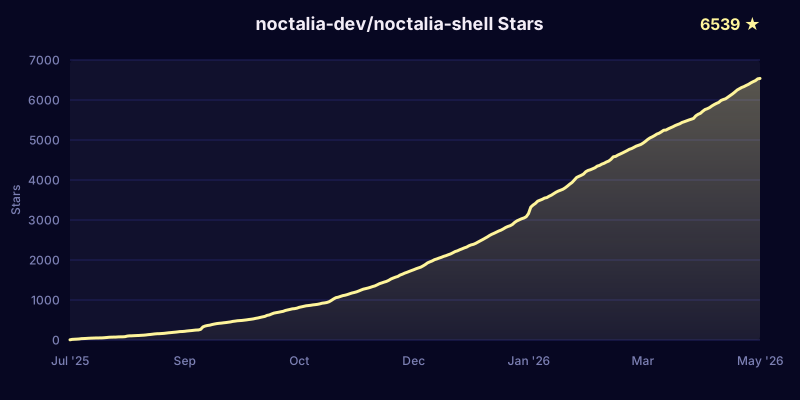
## Star History