https://github.com/nomekuma/jarvis
Jarvis acts like a personal assistant that you can communicate and give different commands.
https://github.com/nomekuma/jarvis
assistant french-english jarvis python python-library speech speech-recognition speech-to-text
Last synced: about 1 year ago
JSON representation
Jarvis acts like a personal assistant that you can communicate and give different commands.
- Host: GitHub
- URL: https://github.com/nomekuma/jarvis
- Owner: Nomekuma
- License: other
- Created: 2023-03-17T13:42:48.000Z (over 3 years ago)
- Default Branch: master
- Last Pushed: 2023-07-16T17:16:59.000Z (about 3 years ago)
- Last Synced: 2024-12-31T04:21:45.486Z (over 1 year ago)
- Topics: assistant, french-english, jarvis, python, python-library, speech, speech-recognition, speech-to-text
- Language: Python
- Homepage:
- Size: 6.9 MB
- Stars: 2
- Watchers: 1
- Forks: 0
- Open Issues: 0
-
Metadata Files:
- Readme: README.md
- License: LICENSE.md
Awesome Lists containing this project
README
# Jarvis
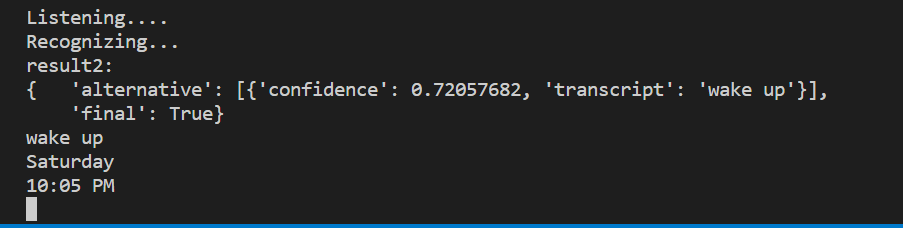
Jarvis is a personal assistant that allows you to communicate and issue various commands.

## Running the Code
To run the code, follow these steps:
1. Navigate to the `jarvis-main` directory:
```
cd jarvis-main
```
2. Run the following command to execute the code:
```
py JARVIS.py
```
**OR**
```
python JARVIS.py
```
*Note: Consider using a virtual environment*
- To create a virtual environment, use the following command:
```
python -m venv .venv
```
- To activate the virtual environment, use this command:
```
.\.venv\Scripts\activate
```
- To deactivate the virtual environment, use this command:
```
deactivate
```
## Installation
To install the required dependencies, run the following command:
```
pip install -r requirements.txt
```
*Note: Make sure to check the path before installing the requirements.*
### If Requirement is Not Found
If you encounter an error stating that the requirement is not found, double-check the path as follows:
```
{Your_path}\Jarvis-jarvis\jarvis-main>
^
|
[Make sure it is outside the jarvis-main directory]
```
If it is within the jarvis-main path, run the following command to navigate outside:
```
cd ..
```
## Table of Contents
Here are some commands you can ask Jarvis:
| Command | Result |
| :---: | :---: |
| wake up | Wake Jarvis up |
| play a song | Play a song |
| what is your age | Receive a funny response from Jarvis |
| time | Get the current time |
| hi/hello/heya/salut | Receive a response from Jarvis |
| joke | Fetch a joke from a library |
| date/today | Get the current day |
| silence {your response} | Make Jarvis silent for a specific time |
| what is meant by {your response} | Search {your response} on Wikipedia |
| Open GitHub | Open this GitHub page |
| open calculator/open paint/open discord/open note | Open one of these apps |
| close calculator/close paint/close discord/close note | Close one of these apps |
| where am i | Get your location |
| Command prompt | Open the Command prompt |
| take a screenshot | Take a screenshot |
| Volume up/down | Adjust the volume |
| ip address | Get your IP address |
| Weather | Get the weather |
| News | Get the news |
| Internet speed | Check your Internet speed |
| bye bye Jarvis | Receive a response from Jarvis |
| Shut down/restart/condition/sleep | Perform one of these actions |
*Note: For some of these commands to work, add your own pathway.*
## Contribution
- Tushil
- [Khavind](https://github.com/Hemlesh18)
- [Shabneez](https://github.com/Shab20)
- [Martine](https://github.com/martine18)
## License
MIT
© **TEAM KTSM**
