https://github.com/noorientationprogramming/code-orb
Realtime Debugging for Microcontrollers – with Logging, Task View, and Command Execution.
https://github.com/noorientationprogramming/code-orb
arduino codeorb debugger embedded esp32 microcontroller raspberrypi stm32
Last synced: 3 months ago
JSON representation
Realtime Debugging for Microcontrollers – with Logging, Task View, and Command Execution.
- Host: GitHub
- URL: https://github.com/noorientationprogramming/code-orb
- Owner: NoOrientationProgramming
- License: gpl-3.0
- Created: 2025-03-31T15:34:21.000Z (about 1 year ago)
- Default Branch: main
- Last Pushed: 2025-04-08T23:22:54.000Z (about 1 year ago)
- Last Synced: 2025-04-08T23:25:33.842Z (about 1 year ago)
- Topics: arduino, codeorb, debugger, embedded, esp32, microcontroller, raspberrypi, stm32
- Language: C++
- Homepage:
- Size: 1.79 MB
- Stars: 0
- Watchers: 1
- Forks: 0
- Open Issues: 0
-
Metadata Files:
- Readme: README.md
- License: LICENSE
Awesome Lists containing this project
README
[](https://en.wikipedia.org/wiki/GNU_General_Public_License#Version_3)
[](https://github.com/NoOrientationProgramming/code-orb/releases)





[](https://discord.gg/FBVKJTaY)
[](https://twitch.tv/Naegolus)
## The Microcontroller Debugger
When working with small targets, simple log outputs are often the only feedback available.
With [CodeOrb](https://github.com/NoOrientationProgramming/code-orb#codeorb-start) on the PC and the
[SystemCore](https://github.com/NoOrientationProgramming/SystemCore#processing-start) on the target,
we have two additional channels: a task viewer and a command interface.
The task viewer provides a detailed insight into the entire system, whereas the command interface gives full control over the microcontroller.
CodeOrb is essentially a multiplexer service running on the PC that transmits and receives these three channels of information via UART from and to the microcontroller.
The channels can then be viewed on the PC or over the network using a Telnet client such as PuTTY.
## Features
- Full control over target
- Crystal-clear insight into the system
- Through three dedicated channels
- Process Tree
- Log
- Command Interface
- Interactive
- Automatic
## How To Use
### Topology
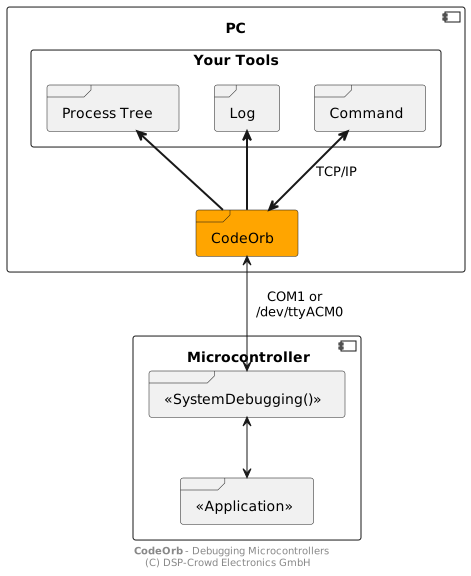
This repository provides `CodeOrb` the microcontroller debugger highlighted in orange. Check out the [example for STM32](https://github.com/NoOrientationProgramming/hello-world-stm32) as well!
### Integrate the SystemCore into the target
TODO: Separate README file
Meanwhile: Check out the [example for STM32](https://github.com/NoOrientationProgramming/hello-world-stm32)
### Start CodeOrb on the PC
On Windows
```
.\CodeOrb.exe -d COM1
```
On UNIX systems
```
./codeorb -d /dev/ttyACM0
```
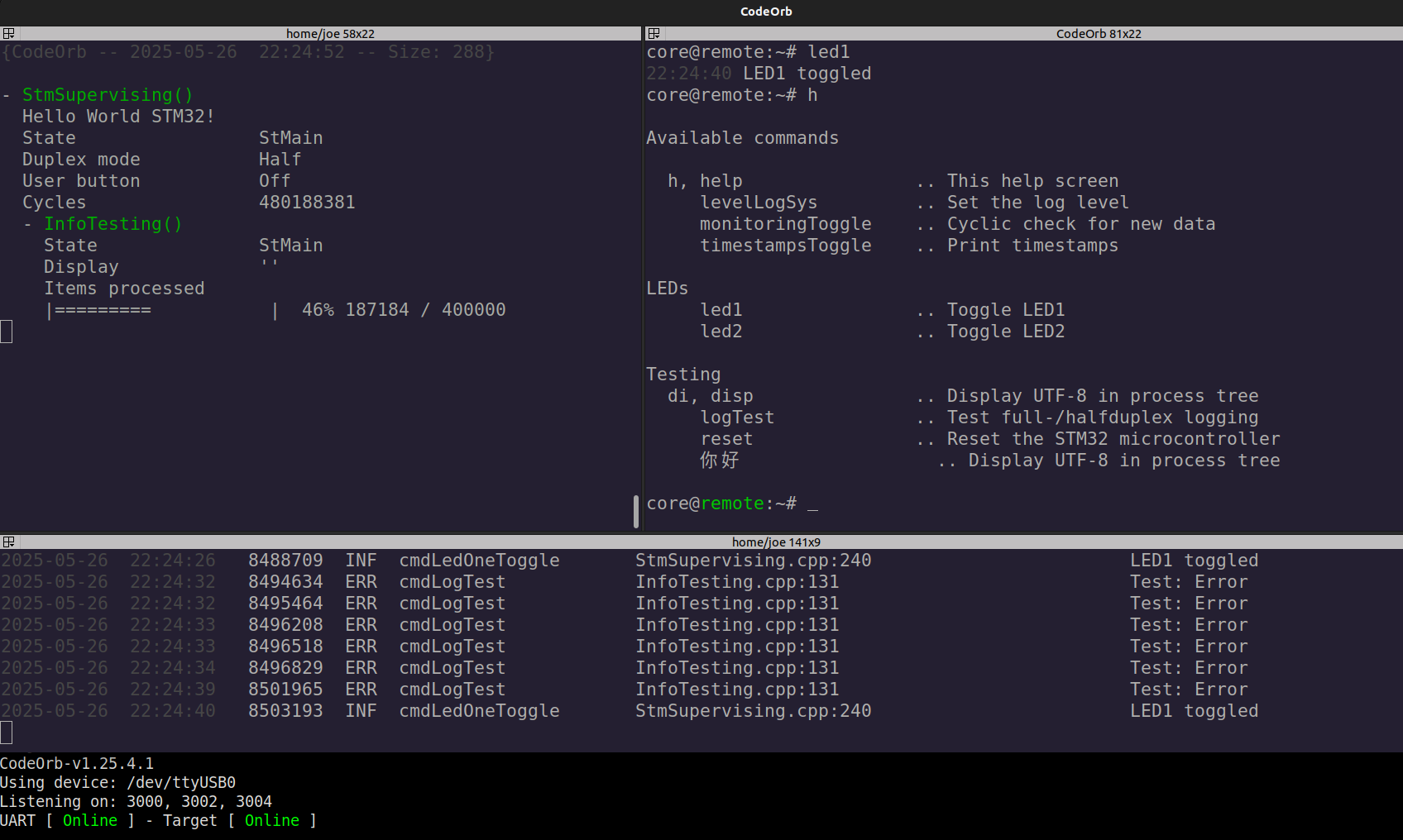
The output should look like this

### User Interface
As soon as the multiplexing service CodeOrb has been started you can connect to the channels via Telnet. You can use IPv4 or IPv6
For the **Process Tree**
```
telnet :: 3000
```
For the **Log**
```
telnet :: 3002
```
For the **Interactive Command Interface**
```
telnet :: 3004
```
For the **Automatic Command Interface**
```
echo "toggle" | nc :: 3006
external Twitch jobs enabled
```
## How To Build
### Requirements
You will need [meson](https://mesonbuild.com/) and [ninja](https://ninja-build.org/) for the build.
Check the instructions for your OS on how to install these tools.
### Steps
Clone repo
```
git clone https://github.com/NoOrientationProgramming/code-orb.git --recursive
```
Enter the directory
```
cd code-orb
```
Setup build directory
```
meson setup build-native
```
Build the application
```
ninja -C build-native
```