https://github.com/norm/instagram-backup
Fetch a copy of your photos and metadata from Instagram
https://github.com/norm/instagram-backup
Last synced: about 1 year ago
JSON representation
Fetch a copy of your photos and metadata from Instagram
- Host: GitHub
- URL: https://github.com/norm/instagram-backup
- Owner: norm
- Created: 2015-07-12T14:49:54.000Z (almost 11 years ago)
- Default Branch: master
- Last Pushed: 2016-07-24T07:44:17.000Z (almost 10 years ago)
- Last Synced: 2025-03-23T20:04:50.062Z (over 1 year ago)
- Language: Python
- Size: 53.7 KB
- Stars: 13
- Watchers: 2
- Forks: 2
- Open Issues: 3
-
Metadata Files:
- Readme: README.markdown
Awesome Lists containing this project
README
instagram-backup
================
Download a local copy of all of your instagram photos including their metadata
(such as description, likes, comments, etc).
## Instructions
0. *Setup python requirements.*
This is written in python, and requires a couple of libraries to be
installed before it will work.
If you are familiar with python programming, set up a virtualenv and
install the requirements.
If you don't know python, this command should be enough on OS X and Linux
computers:
```
sudo pip install -r requirements.txt
```
1. *Create an application.*
You need to create a new client application within Instagram using your
account. Go to [Manage Clients][mc] within the developer dashboard and
click *Register a New Client*.
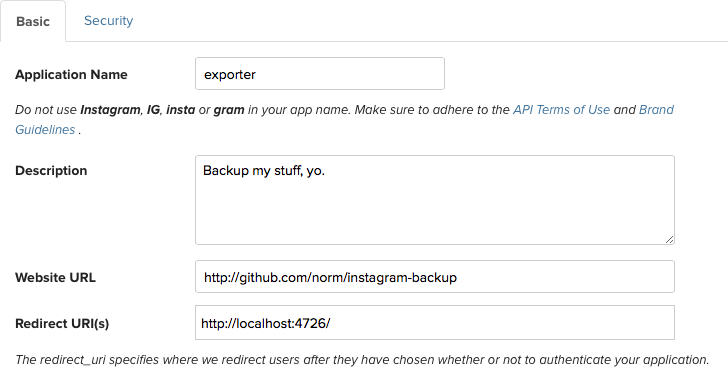
Enter anything you like for the name, description and website URL.
The *Redirect URL* should be `http://localhost:4726/`.
Once created, the information of your application will contain two
strings, labelled *Client ID* and *Client Secret*, like so (this image is
just for illustration, the keys shown won't work):
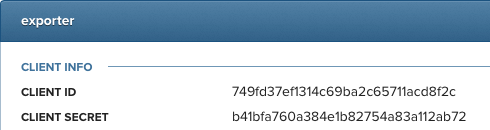
Copy and paste them into your terminal, like so:
```
export INSTAGRAM_CLIENT_ID=
export INSTAGRAM_SECRET=
```
[mc]:https://instagram.com/developer/clients/manage/
2. *Get a client authentication token.*
You then need to get an authentication token, which allows the backup
script to behave *as you* on Instagram. Run the following command in
your terminal
```
python get_token.py
```
then open your browser to . Click the link
to get your token — this will take you to Instagram to authorise,
then present you with two more values to export to your Terminal.
Stop the previous command in your Terminal by pressing Control and C at
the same time. Then copy and paste the values from the browser.
3. *Backup your photos.*
Run the following script in your Terminal:
```
python backup.py
```
This will create a directory called `backup` and fetch all of your
Instagram photos.