https://github.com/notepadqq/notepadqq
A simple, general-purpose editor for Linux
https://github.com/notepadqq/notepadqq
development editor linux notepadqq text-editor
Last synced: 9 days ago
JSON representation
A simple, general-purpose editor for Linux
- Host: GitHub
- URL: https://github.com/notepadqq/notepadqq
- Owner: notepadqq
- License: gpl-3.0
- Created: 2012-02-24T14:39:25.000Z (over 14 years ago)
- Default Branch: master
- Last Pushed: 2023-05-27T10:12:18.000Z (about 3 years ago)
- Last Synced: 2024-11-03T17:38:40.048Z (over 1 year ago)
- Topics: development, editor, linux, notepadqq, text-editor
- Language: JavaScript
- Homepage: https://notepadqq.com
- Size: 9.04 MB
- Stars: 2,103
- Watchers: 85
- Forks: 299
- Open Issues: 317
-
Metadata Files:
- Readme: README.md
- Contributing: CONTRIBUTING.md
- License: COPYING
- Code of conduct: CODE_OF_CONDUCT.md
Awesome Lists containing this project
- fucking-Awesome-Linux-Software -  Notepadqq [](https://github.com/notepadqq/notepadqq/actions/workflows/build-test.yml) [](https://snapcraft.io/notepadqq)
Notepadqq [](https://github.com/notepadqq/notepadqq/actions/workflows/build-test.yml) [](https://snapcraft.io/notepadqq)
> [!WARNING]
> This project is not actively maintained anymore. New maintainers are welcome.
>
> It has been reported that with the most recent OS/Qt versions, the program can crash unexpectedly. Use this at your own risk.
>
> -- Daniele
### Links
* [What is it?](#what-is-it)
* [Build it yourself](#build-it-yourself)
* [Download it](#distribution-packages)
#### What is it?
Notepadqq is a text editor designed by developers, for developers.
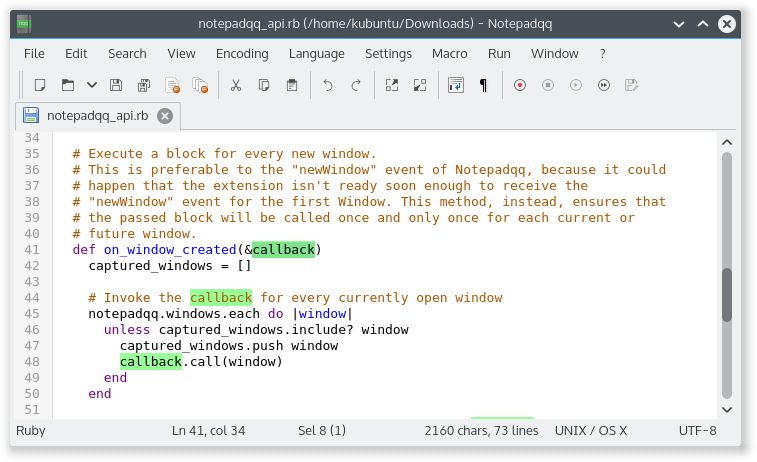
Please visit our [Wiki](https://github.com/notepadqq/notepadqq/wiki) for more screenshots and details.
Build it yourself
-----
| Build dependencies | Dependencies |
|-----------------------|-------------------|
| Qt 6.4 or higher | Qt 6.4 or higher |
| qt6-webengine5-dev | qt6-webengine5 |
| qt6-websockets-dev | qt6-websockets |
| qt6-svg-dev | qt6-svg |
| qt6-tools-dev-tools | coreutils |
| libuchardet-dev | libuchardet |
| pkg-config | |
#### Get the source
$ git clone --recursive https://github.com/notepadqq/notepadqq.git
$ cd notepadqq
#### Build
notepadqq$ cmake --preset release
notepadqq$ cmake --build --preset release
To build with debug symbols, use the `dev` preset instead:
notepadqq$ cmake --preset dev
notepadqq$ cmake --build --preset dev
If you encounter errors make sure to have the necessary libraries installed. For Ubuntu you can do that using apt-get:
sudo apt-get install qt6-tools-dev qt6-tools-dev-tools qt6-webengine-dev qt6-websockets-dev libqt6svg6 libqt6svg6-dev libuchardet-dev pkg-config
For CentOS:
sudo dnf install -y qt6-qtbase-devel qt6-qttools-devel qt6-qtwebengine-devel qt6-qtwebsockets-devel qt6-qtsvg-devel qt6-qtwebchannel-devel uchardet pkgconfig
Building for **macOS**? Check [here](https://github.com/notepadqq/notepadqq/wiki/Compiling-Notepadqq-on-macOS).
#### Run tests
notepadqq$ ctest --preset release
#### Install
You can run notepadqq from its build output folder. If however you want to install it, first build it
by following the above steps, then run:
notepadqq$ sudo cmake --install build/release
#### Qt
If the newest version of Qt isn't available on your distribution, you can use the [online installer](http://www.qt.io/download-open-source) to get the latest libraries and install them into your home directory (`$HOME/Qt`). Notepadqq will automatically use them.
Distribution Packages
---------------------
#### Ubuntu, Debian, and others:
sudo apt install notepadqq
#### Snap
To install the latest stable version:
sudo snap install notepadqq
You don't have the `snap` command? Follow the instructions at https://docs.snapcraft.io/core/install and then install Notepadqq as shown above.
You can follow the unstable development releases from the "edge" channel.
#### Arch Linux (community-maintained)
Notepadqq is available from Arch's [community repositories](https://www.archlinux.org/packages/community/x86_64/notepadqq/). To install using pacman:
sudo pacman -S notepadqq
Alternatively it can be found in the AUR:
* Development (git version): [notepadqq-git](https://aur.archlinux.org/packages/notepadqq-git/)
#### OpenSUSE (community-maintained)
Notepadqq is avilable in OpenSUSE's main repository:
sudo zypper in notepadqq
#### Solus (community-maintained)
Notepadqq is available in the `shannon` (stable) repository:
sudo eopkg it notepadqq
#### Others
Use a package for a compatible distribution, or build from [source](https://github.com/notepadqq/notepadqq.git).
If you want to submit a package: https://github.com/notepadqq/notepadqq-packaging