https://github.com/notmugil/notan
old niri dots for r/unixporn
https://github.com/notmugil/notan
dotfiles niri
Last synced: 9 months ago
JSON representation
old niri dots for r/unixporn
- Host: GitHub
- URL: https://github.com/notmugil/notan
- Owner: NotMugil
- License: gpl-3.0
- Archived: true
- Created: 2024-06-17T05:33:30.000Z (about 2 years ago)
- Default Branch: main
- Last Pushed: 2025-04-19T12:28:52.000Z (about 1 year ago)
- Last Synced: 2025-07-05T00:05:49.626Z (12 months ago)
- Topics: dotfiles, niri
- Language: Lua
- Homepage: https://www.reddit.com/r/unixporn/comments/1djfrms/niri_light_and_dark_wip
- Size: 405 KB
- Stars: 5
- Watchers: 1
- Forks: 2
- Open Issues: 0
-
Metadata Files:
- Readme: README.md
- License: LICENSE
- Code of conduct: CODE_OF_CONDUCT.md
- Security: SECURITY.md
Awesome Lists containing this project
README
# Details
## Features
## Information
- **Operating System** • [Arch Linux](https://archlinux.org)
- **Desktop Environment** • [Niri](https://github.com/YaLTeR/niri)
- **Terminal** • [kitty](https://github.com/kovidgoyal/kitty)
- **Shell** • zsh
- **Aur Helper** • [yay](https://github.com/Jguer/yay)
- **Panel** • [waybar](https://github.com/Alexays/Waybar)
- **Launcher** • [anyrun](https://github.com/anyrun-org/anyrun)
- **File Manager** • [thunar](https://wiki.archlinux.org/title/thunar)/[yazi](https://github.com/sxyazi/yazi)
- **Notification Daemon** • [swaync](https://github.com/ErikReider/SwayNotificationCenter)
- **Wallpaper Daemon** • [swww](https://github.com/LGFae/swww)
- **Colorscheme** • [Tokyo Night Theme](https://github.com/catppuccin/catppuccin)
# Usage
> [!NOTE]
> Assuming that your AUR helper is [yay.](https://github.com/Jguer/yay)
> To install yay on your arch based system, follow the instructions mentioned [here.](https://github.com/Jguer/yay?tab=readme-ov-file#installation)
## 📦 Required dependencies
Install these dependencies manually (Arch)
```shell
pacman -Sy niri wofi kitty wireplumber yazi zathura zathura-pdf-mupdf cava wl-clipboard \
waybar swayidle swaylock swaync qt5-wayland qt6-wayland playerctl mpv nm-connection-editor \
rofi-wayland grim slurp thunar pipewire pipewire-alsa pipewire-audio nushell \
pipewire-jack pipewire-pulse nwg-look noto-fonts-cjk noto-fonts-emoji \
noto-fonts networkmanager gtk-engine-murrine blueberry bluez bluez-utils
```
```shell
yay -S anyrun-git wlogout swaylock-effects swayosd-git swww amberol sway-audio-idle-inhibit-git catppuccin-gtk-theme-mocha orchis-theme
```
## 🧙♂️ Setup Config
> [!WARNING]
> This method requires you to remove your previous configurations. Make sure to backup your previous configs if needed.
### Default Method
Clone the repository and Copy all files from the repo to your config folder.
```bash
git clone --depth=1 https://github.com/NotMugil/niri-dots.git
cd niri-dots
cp -r .config/* ~/.config/
mkdir -p ~/.scripts
cp -r .scripts/* ~/.scripts/
# This step can be skipped if you are not using zsh shell
cp -r .zshenv ~/
```
All the commands listed in a single line to copy easily.
```
git clone --depth=1 https://github.com/NotMugil/niri-dots.git && cd niri-dots && cp -r .config/* ~/.config/ && mkdir -p ~/.scripts && cp -r .scripts/* ~/.scripts/
```
### Symlink Method
```bash
cd ~
git clone --depth=1 https://github.com/NotMugil/niri-dots.git
```
```
ln -sf ~/niri-dots/.config/anyrun/ ~/.config/ && ln -sf ~/niri-dots/.config/gtk-3.0/ ~/.config/ && ln -sf ~/niri-dots/.config/kitty/ ~/.config/ && ln -sf ~/niri-dots/.config/niri/ ~/.config/ && ln -sf ~/niri-dots/.config/rofi/ ~/.config/ && ln -sf ~/niri-dots/.config/swaylock/ ~/.config/ && ln -sf ~/niri-dots/.config/swaync/ ~/.config/ && ln -sf ~/niri-dots/.config/waybar/ ~/.config/ && ln -sf ~/niri-dots/.config/wofi/ ~/.config/ && ln -sf ~/niri-dots/.config/zsh/ ~/.config/ && ln -sf ~/niri-dots/.scripts/ ~/ && ln -sf ~/niri-dots/.zshenv ~/
```
## ✨ Theming Other Applications
instructions
### Spotify (Spicetify)
Install spicetify. (AUR: `spicetify-cli`)
Copy `niri-dots/.themes/spicetify/text` to `~/.config/spicetify/Themes/` (or wherever your spicetify themes are stored)
Then:
```bash
spicetify config current_theme Dribbblish
spicetify config color_scheme catppuccin-latte
spicetify apply
```
### Visual Studio Code
Install [Tokyo Night](https://vscodethemes.com/e/enkia.tokyo-night/tokyo-night) theme from `enkia`
### Discord (Better Discord)
install from AUR: `betterdiscordctl`
Copy `niri-dots/.themes/tokyo-night.theme.css` to `~/snap/discord/145/.config/BetterDiscord/`
### GTK Theme
> Install `nwg-look` to manage gtk-theme, font and icon themes.
```shell
yay -S tokyonight-gtk-theme-git
```
Otherwise:
Edit the following files:
- `~/.config/gtk-3.0/settings.ini`
- `~/.gtkrc-2.0`
to:
```conf
[Settings]
gtk-application-prefer-dark-theme=1
gtk-theme-name = Tokyonight-Dark
```
and you might have to run:
```bash
gsettings set org.gnome.desktop.interface color-scheme prefer-dark
```
---
# Progress
## 💻 Development
### Known Issues
- [ ] some issue #1
- [ ] some issue #2
### Tasks
- [ ] Prepare Pull_Request_Template.md
- [ ] Prepare Contrubuting.md
# ⌨️ Keybinds
> [!NOTE]
> All keybinds can be found in the `~/.config/niri/config.kdl` in binds.
| Keybind | Functionality |
|----------------------------------|---------------------------------------------------------------------------------|
| Mod+RETURN | Spawns the terminal emulator `kitty`. |
| Mod+D | Spawns an application launcher `anyrun`. |
| Mod+E | Spawns the file manager `thunar`. |
| Super+Alt+L | Spawns the screen locker `swaylock`. |
| Mod+Q | Closes the focused window. |
| Mod+Left | Focuses on the column to the left. |
| Mod+Right | Focuses on the column to the right. |
| Mod+Ctrl+Left | Moves the column to the left. |
| Mod+Ctrl+Right | Moves the column to the right. |
| Mod+Home | Focuses on the first column. |
| Mod+End | Focuses on the last column. |
| Mod+Shift+Left | Focuses on the monitor to the left. |
| Mod+Shift+Right | Focuses on the monitor to the right. |
| Mod+Page_Down | Focuses on the workspace below. |
| Mod+Page_Up | Focuses on the workspace above. |
| Mod+1 - Mod+9 | Focuses on specific workspace. |
| Mod+Ctrl+1 - Mod+Ctrl+9 | Moves a column to specific workspace. |
| Mod+Comma | Consumes a window into the column. |
| Mod+Period | Expels a window from the column. |
| Mod+R | Switches to the next column width preset. |
| Mod+F | Maximizes the current column. |
| Mod+C | Centers the current column. |
| Mod+Minus | Decreases column width by 10%. |
| Mod+Equal | Increases column width by 10%. |
| Print | Takes a screenshot of the entire screen. |
| Ctrl+Print | Takes a screenshot of the current screen. |
| Alt+Print | Takes a screenshot of the current window. |
| Mod+Shift+E | Quits the window manager with confirmation. |
| Mod+Shift+P | Powers off the monitors. To turn them back on, any input is required. |
| Mod+WheelScrollDown | Scrolls down through workspaces. |
| Mod+WheelScrollUp | Scrolls up through workspaces. |
| Mod+Ctrl+WheelScrollDown | Moves the column down through workspaces. |
| Mod+Ctrl+WheelScrollUp | Moves the column up through workspaces. |
| Mod+WheelScrollRight | Focuses on the column to the right. |
| Mod+WheelScrollLeft | Focuses on the column to the left. |
| Mod+Ctrl+WheelScrollRight | Moves the column to the right. |
| Mod+Ctrl+WheelScrollLeft | Moves the column to the left. |
| Mod+Shift+WheelScrollDown | Focuses on the column to the right. |
| Mod+Shift+WheelScrollUp | Focuses on the column to the left. |
| Mod+Ctrl+Shift+WheelScrollDown | Moves the column to the right. |
| Mod+Ctrl+Shift+WheelScrollUp | Moves the column to the left. |
| XF86AudioRaiseVolume | Increases audio volume. |
| XF86AudioLowerVolume | Decreases audio volume. |
| XF86AudioMute | Mutes/unmutes audio. |
| XF86AudioMicMute | Mutes/unmutes microphone. |
# Credits
##
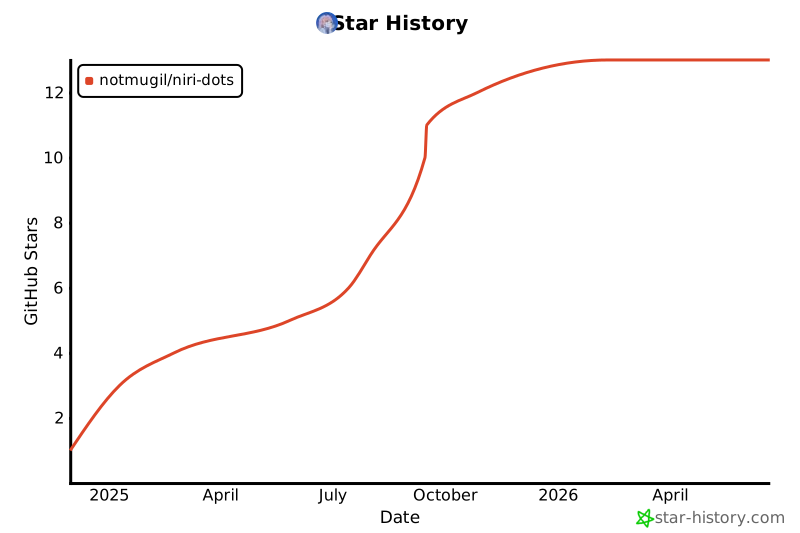
## ⭐ Star History
[](https://star-history.com/#NotMugil/niri-dots&Date)