https://github.com/noturlee/mvc-tutorial
This Github repo is designed to explain MVC Framework and how it integrates to the local database on your local machine, covering topics like Scaffolding and Methods
https://github.com/noturlee/mvc-tutorial
cshtml css html javascript model-view-controller mvc-architecture sql ssms
Last synced: 4 months ago
JSON representation
This Github repo is designed to explain MVC Framework and how it integrates to the local database on your local machine, covering topics like Scaffolding and Methods
- Host: GitHub
- URL: https://github.com/noturlee/mvc-tutorial
- Owner: noturlee
- License: unlicense
- Created: 2024-04-19T06:17:29.000Z (over 2 years ago)
- Default Branch: main
- Last Pushed: 2024-06-19T22:38:26.000Z (about 2 years ago)
- Last Synced: 2025-09-11T10:05:48.758Z (11 months ago)
- Topics: cshtml, css, html, javascript, model-view-controller, mvc-architecture, sql, ssms
- Language: CSS
- Homepage:
- Size: 22.9 MB
- Stars: 1
- Watchers: 1
- Forks: 0
- Open Issues: 0
-
Metadata Files:
- Readme: README.md
- License: LICENSE
- Security: SECURITY.md
Awesome Lists containing this project
README

# ASP.NET MVC Guide
Welcome to the ASP.NET MVC Guide. This repository aims to provide a comprehensive tutorial on how to use the Model-View-Controller (MVC) pattern in ASP.NET applications, connect to local databases, and create a project from scratch.
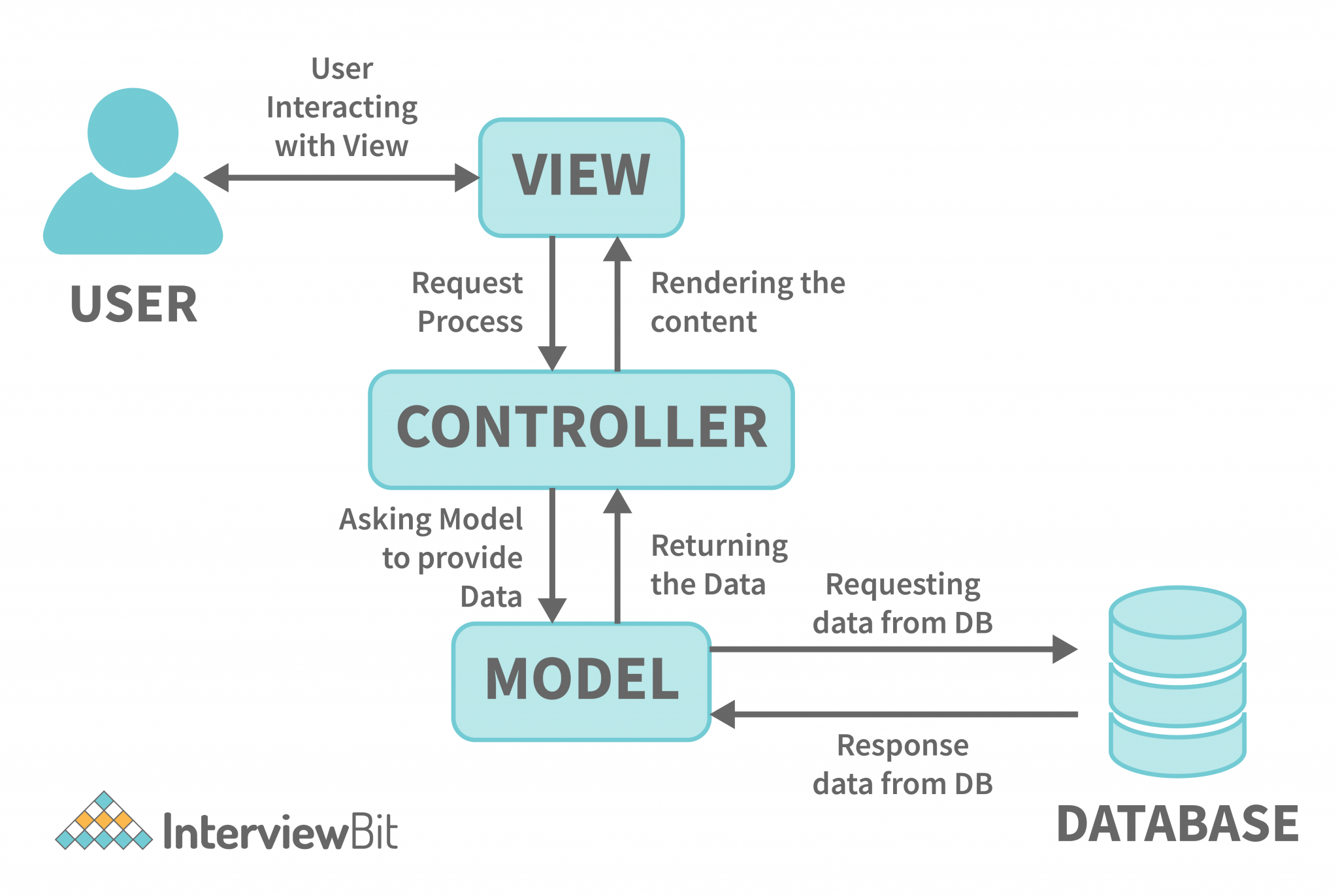
## Table of Contents
1. [Introduction to MVC](docs/01-What-is-MVC.md)
2. [About Helping Hands](#about-helping-hands)
3. [How MVC Works](docs/02-How-MVC-Works.md)
4. [Working with Local Databases](docs/03-Working-With-Local-Databases.md)
5. [Creating an ASP.NET MVC Project](docs/04-Creating-an-ASPNET-MVC-Project.md)
6. [Great Repository Example](https://github.com/noturlee/TaskTracker-MVC)
7. [How to Make a Good Repository](docs/05-How-to-Make-a-Good-Repo.md)
8. [Tools & Software](#tools--software)
9. [YouTube Demo of Helping Hands](#youtube-demo-of-helping-hands)
10. [Application Interface](#application-interface)
11. [Roadmap](#roadmap)
12. [Application Progress](#application-progress)
13. [Contributing](#contributing)
14. [License](#license)
## About Helping Hands
Helping Hands is a nonprofit organization dedicated to supporting individuals and communities through various initiatives. They organize Alcoholics Anonymous (AA) meetings, conduct drug awareness programs, and work towards uplifting the local economy. Their mission is to provide support, education, and resources to help individuals overcome challenges and improve their quality of life.
## Tools & Software
- Windows Computer or VM (Virtual Machine)
- Visual Studio 2022
- SSMS (Microsoft SQL Server Management Studio) *NO MySQL*
## YouTube Demo of Helping Hands
Click the button below to watch a tutorial video.


## Application Interface

## Roadmap
- [x] Introduction to MVC
- [x] Explanation of MVC Workflow
- [x] Working with Local Databases
- [x] Creating an ASP.NET MVC Project
- [x] Providing a Repository Example
- [x] Guidelines for Creating a Good Repository
- [ ] Adding Advanced Topics (e.g., Dependency Injection, Middleware)
- [ ] Integrating External APIs
- [ ] Adding Unit Testing Examples
- [ ] Implementing CI/CD Pipeline Setup
- [ ] Enhancing User Interface for Tutorials
## Application Progress
Here's a fake graph to visualize the progress of the project:
```
Feature | Progress
------------------------------ | ---------------------------------
Introduction to MVC | █████████████████████████ 100%
Explanation of MVC Workflow | █████████████████████████ 100%
Working with Local Databases | █████████████████████████ 100%
Creating an ASP.NET MVC Project| █████████████████████████ 100%
Providing a Repository Example | █████████████████████████ 100%
Creating a Good Repository | █████████████████████████ 100%
Advanced Topics | ████████ 40%
Integrating External APIs | ██████ 30%
Unit Testing Examples | █████ 20%
CI/CD Pipeline Setup | ████ 10%
Enhancing User Interface | ██ 10%
```
## Contributing
Contributions are what make the open source community such an amazing place to learn, inspire, and create. Any contributions you make are **greatly appreciated**.
1. Fork the Project
2. Create your Feature Branch (`git checkout -b feature/AmazingFeature`)
3. Commit your Changes (`git commit -m 'Add some AmazingFeature'`)
4. Push to the Branch (`git push origin feature/AmazingFeature`)
5. Open a Pull Request
## License
Distributed under the Uni License. See `LICENSE` for more information.