https://github.com/novichenkoanton/stringify
A set of usefull string extensions
https://github.com/novichenkoanton/stringify
cocoapods nsmutableattributedstring numberformatter string stringify swift xcode
Last synced: 11 months ago
JSON representation
A set of usefull string extensions
- Host: GitHub
- URL: https://github.com/novichenkoanton/stringify
- Owner: NovichenkoAnton
- License: mit
- Created: 2020-03-18T05:49:52.000Z (over 6 years ago)
- Default Branch: master
- Last Pushed: 2024-08-01T23:23:17.000Z (almost 2 years ago)
- Last Synced: 2025-07-20T04:07:51.600Z (about 1 year ago)
- Topics: cocoapods, nsmutableattributedstring, numberformatter, string, stringify, swift, xcode
- Language: Swift
- Homepage:
- Size: 165 KB
- Stars: 6
- Watchers: 1
- Forks: 0
- Open Issues: 6
-
Metadata Files:
- Readme: README.md
- License: LICENSE
Awesome Lists containing this project
README
# The project moved to: https://github.com/NovichenkoAnton/Extendy
# Stringify
A set of useful string extensions.
[](https://cocoapods.org/pods/Stringify)
[](https://raw.githubusercontent.com/NovichenkoAnton/Stringify/master/LICENSE)
[](https://cocoapods.org/pods/Stringify)
## Requirements
- iOS 10.0+
- Swift 5+
## Installation
### CocoaPods
Stringify is available through [CocoaPods](https://cocoapods.org). To install it, simply add the following line to your Podfile:
```ruby
pod 'Stringify', '~> 1.0'
```
### Swift Package Manager
The [Swift Package Manager](https://swift.org/package-manager/) is a tool for automating the distribution of Swift code and is integrated into the `swift` compiler.
Once you have your Swift package set up, adding Stringify as a dependency is as easy as adding it to the `dependencies` value of your `Package.swift`.
```swift
dependencies: [
.package(url: "https://github.com/NovichenkoAnton/Stringify.git", .upToNextMajor(from: "1.0.0"))
]
```
## Usage
### String
1. Apply masks for the string in specific range. The range compatible with `CountableRange`, `ClosedRange`, `PartialRangeFrom`, `PartialRangeThrough`, `PartialRangeUpTo`.
```swift
let cardNumber = "1234567890123456"
let masked = cardNumber.maskSubstring(in: 6...13, with: "*")
print(masked!) //"123456********56"
```
2. Convert `String` to `Double`. If `String` is not compatible with `Double` the function will return 0.00.
``` swift
let amount = "100,12"
print(amount.toDouble()) //100.12
let anotherAmount = "1 200,10"
print(anotherAmount.toDouble()) //1200.1
```
3. You can apply specific format for strings
```swift
let sum = "1234"
let formattedSum = sum.st.applyFormat(.sum)
print(formattedSum) //"1 234,00"
```
Supported formats
```swift
enum Format {
case sum(minFractionDigits: Int = 2, maxFractionDigits: Int = 2)
case creditCard
case iban
case custom(formatter: NumberFormatter)
}
```
4. Validate a number of credit card by Luhn algorithm.
5. Validate the string with specific pattern
```swift
"https://www.google.com".validate(with: .website) //true
```
6. Simple date formatter (from one format to another)
```swift
let dateTime = "2019-11-22 13:33"
let resultTime = dateTime.st.convertDate(from: "yyyy-MM-dd HH:mm", to: "h:mm") //"1:33"
```
7. Get query items from `String` that corresponds to `URL` type. Works for URLs with cyrillic domain names.
```swift
let stringURL = "https://test.com?foo=1&bar=abc"
let queryItems = stringURL.queryItems()! //["foo": "1", "bar": "abc"]
```
### NSMutableAttributedString
1. You can append two attributed strings with `+`
```swift
let part1 = "123"
let part2 = "456"
myLabel.attributedText = part1.attributed + part2.attributed
```
2. Apply attributes for mutable string
```swift
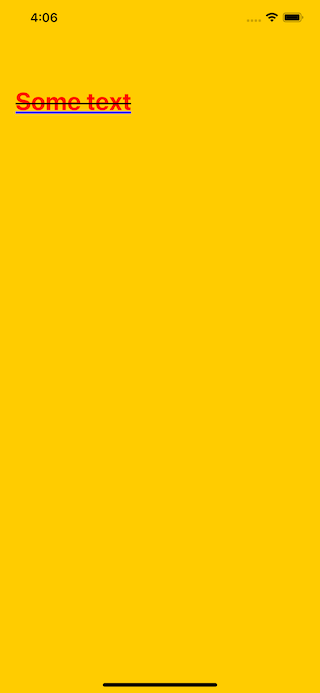
let string = "Some text"
label.attributedText = string.attributed.applyAttributes([
.color(color: .red),
.font(font: .systemFont(ofSize: 32, weight: .bold)),
.crossed(width: 1, color: .black),
.underline(style: .single, color: .blue)
])
```
3. Apply styles for string
```swift
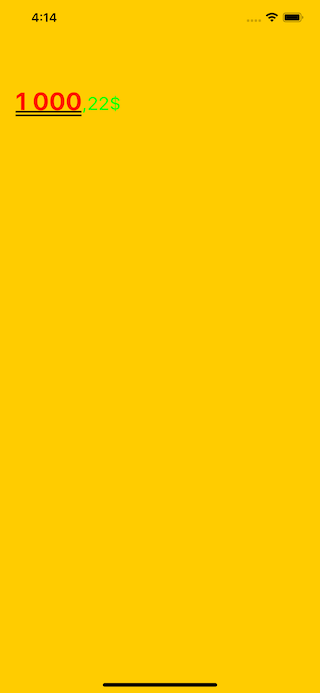
let sum = "1000,22"
label.attributedText = sum.attributed.applyStyle(.sum(integerAttrs: [
.color(color: UIColor.red),
.font(font: UIFont.systemFont(ofSize: 32, weight: .bold)),
.underline(style: .double, color: .black)
], fractionAttrs: [
.color(color: UIColor.green),
.font(font: UIFont.systemFont(ofSize: 24, weight: .medium)),
], currencyMark: "$"))
```