https://github.com/noxer/gops
Powerline shell like prompt in Go
https://github.com/noxer/gops
bash go golang gops hacktoberfest powerline prompt shell zsh
Last synced: 5 months ago
JSON representation
Powerline shell like prompt in Go
- Host: GitHub
- URL: https://github.com/noxer/gops
- Owner: noxer
- License: gpl-3.0
- Created: 2018-11-29T20:15:50.000Z (over 7 years ago)
- Default Branch: master
- Last Pushed: 2023-02-27T12:13:13.000Z (over 3 years ago)
- Last Synced: 2025-08-14T11:16:41.006Z (10 months ago)
- Topics: bash, go, golang, gops, hacktoberfest, powerline, prompt, shell, zsh
- Language: Go
- Homepage:
- Size: 137 KB
- Stars: 9
- Watchers: 1
- Forks: 2
- Open Issues: 0
-
Metadata Files:
- Readme: README.md
- License: LICENSE
Awesome Lists containing this project
- awesome-zsh-plugins - gops - Fast powerline-like prompt. Includes `git` status, current directory, root status decorations. (Themes / ZSH on Windows)
- fucking-awesome-zsh-plugins - gops - Fast powerline-like prompt. Includes `git` status, current directory, root status decorations. (Themes / ZSH on Windows)
README
[](https://goreportcard.com/report/github.com/noxer/gops)
[](https://travis-ci.org/noxer/gops)
# GoPS
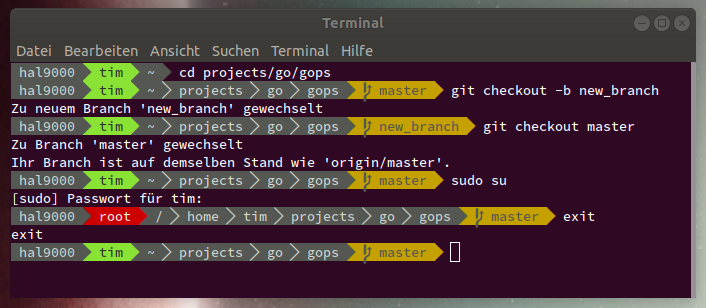
The goal of GoPS to offer a fast powerline-like prompt.
## Installation
There are two approaches of getting GoPS: Using a release or building it from source.
GoPS relies on modded fonts (namely powerline-fonts) to display some of the symbols. Make sure to install them and activate one of them in your terminal:
### Using a release
- Click on ["release"](https://github.com/noxer/gops/releases) and download the newest binary for your OS.
- Rename it to `gops`.
- Place it in a folder which is in `$PATH`.
### Building from source
Make sure the current Go version is installed. If not, refer to this guide:
Also make sure your `$GOPATH/bin` directory is in the `$PATH`.
Now you can install GoPS by running
```go
go get -u github.com/noxer/gops
```
## Setup
### bash
After the downloading and building of GoPS is complete, add it as your prompt. For Bash edit `~/.bashrc` and add the following lines
```bash
PS1='$(gops)'
PS2='$(gops -p 2)'
```
The first line activates GoPS as your default prompt, the second line for continuation prompts (when the command ends with `\` it will print a continuation prompt to the next line).
To apply the change, you need to either close your shell and open it again or source the updated `.bashrc` file as follows:
```bash
source ~/.bashrc
```
### zsh
After the downloading and building of GoPS is complete, add it as your prompt. For ZSH edit `~/.zshrc` and add the following lines
```zsh
setopt PROMPT_SUBST
PROMPT='$(gops -s zsh)'
```
The first line tells ZSH to evaluate the commands in the `$PROMPT` variable. The second line calls GoPS.
To apply the change, you need to either close your shell and open it again or source the updated `.zshrc` file as follows:
```zsh
source ~/.zshrc
```
## Currently available segments
Currently GoPS comes with a small selection of segments for your prompt, which can be found in segments/
| Segment | Displayed Information |
| ---------- | ---------- |
| git | current git branch |
| dir | path of the current dir (can be shortened) |
| host | hostname (FQDN) (can be shortened) |
| nodejs | version of the currently installed node.js |
| user | name of the current user |
| userathost | name of the current user and the hostname combined as user@host (can be shortened) |
| virtualenv | name of the currently active python viratualenv |
## FAQ
(Questions that have never been asked but I think the answers may help you)
### Where do it put my config file? How do I configure GoPS?
You don't. Right now GoPS does not support any config files or command line parameters. Instead you can edit `main.go` or the segments themselves to adapt the prompt to your needs. This helps GoPS to be as performant as possible. I recognize that this requires you to know the basics of the Go language. In the future I might offer an easier solution.
### I've successfully built and activated GoPS but it prints strange characters in the prompt. How do I fix that?
You've either not installed `powerline-fonts` or it is not configured to be used in your terminal. Make sure you've installed it from [here](https://github.com/powerline/fonts#installation) and you've activated one of the fonts. The font used for the screenshot is `Source Code Pro for Powerline`.
### I found a bug, how do I report it?
Open an issue in this repository. Make sure you include information about the used operating system and terminal.
### Does GoPS support shell XYZ?
No idea. I've tested it with `bash` in a GNOME-Terminal, and `zsh` in iTerm2. Feel free to try more combinations and let me know.
### How do I write plugins for GoPS?
That is pretty easy. There is an `example.go` file in the `segments/` folder with a skeleton for a segment. You basically add as many segments as you wish to the provided list of segments and return it. Make sure you add your custom package to import list of the `main.go` file and call your `Add` function in the `main` function. Each segment defines a foreground and background color. If two consecutive segments have the same background color, a small separator in the foreground color is added, otherwise the full separator is inserted.
## API
You can find the packages rendering the different parts here:
* Common Segments: [](https://godoc.org/github.com/noxer/gops/segments)
* Separator: [](https://godoc.org/github.com/noxer/gops/separator)
* Symbols: [](https://godoc.org/github.com/noxer/gops/symbols)