https://github.com/nsavinda/arcana-db-backup
Secure Database Backup Tool with Hybrid Encryption (AES-256 + RSA), compression, and support for S3-compatible cloud storage.
https://github.com/nsavinda/arcana-db-backup
backup database golang postgres s3-bucket
Last synced: 3 months ago
JSON representation
Secure Database Backup Tool with Hybrid Encryption (AES-256 + RSA), compression, and support for S3-compatible cloud storage.
- Host: GitHub
- URL: https://github.com/nsavinda/arcana-db-backup
- Owner: nsavinda
- License: mit
- Created: 2025-06-27T13:56:35.000Z (about 1 year ago)
- Default Branch: main
- Last Pushed: 2025-07-01T06:26:04.000Z (about 1 year ago)
- Last Synced: 2025-07-01T07:24:01.856Z (about 1 year ago)
- Topics: backup, database, golang, postgres, s3-bucket
- Language: Go
- Homepage:
- Size: 22.5 KB
- Stars: 0
- Watchers: 0
- Forks: 0
- Open Issues: 0
-
Metadata Files:
- Readme: README.md
- License: LICENSE
Awesome Lists containing this project
README
# Arcana DB Backup Tool
A modular, secure Go-based tool for **database backup, encryption, and compression** with easy restore and cloud upload options.
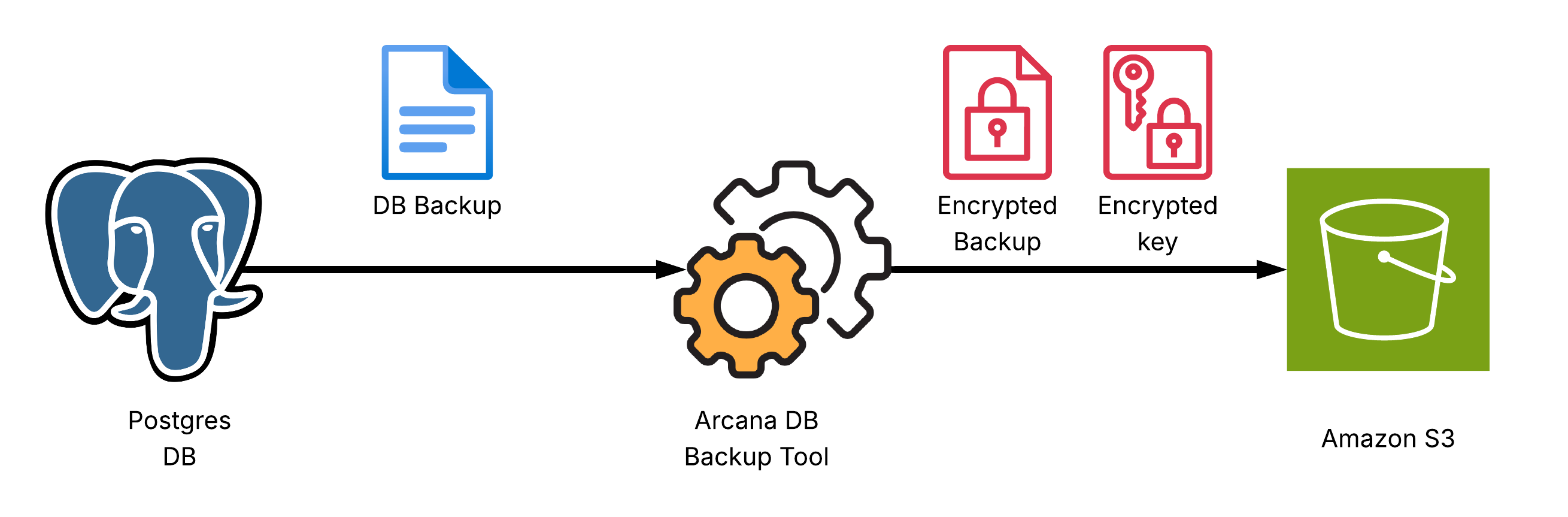
## Features
- **Database backup:** Dumps your database to a file
- **Currently supports:** PostgreSQL (via `pg_dump`)
- **Encryption:** AES-256 (symmetric) + RSA (asymmetric hybrid)
- **Compression:** gzip for efficient storage
- **Easy restore:** Decrypt and decompress backups using your RSA private key
---
## Prerequisites
- Go 1.24+
- [OpenSSL](https://www.openssl.org/) for key generation
- `pg_dump` (PostgreSQL backup utility)
- A PostgreSQL database you want to back up
---
## Getting Started
### Installation
Download the latest release from [GitHub Releases](https://github.com/nsavinda/arcana-db-backup/releases) or build it from source by following the steps below.
### 1. **Clone the repository**
```bash
git clone https://github.com/nsavinda/database-backup-tool.git
cd database-backup-tool
```
### 2. **Generate RSA Keypair**
Generate a 4096-bit RSA keypair for encryption:
```bash
make keygen
# Produces: private.pem (private key), public.pem (public key)
```
or manually using OpenSSL:
```bash
openssl genpkey -algorithm RSA -out private.pem -pkeyopt rsa_keygen_bits:4096
openssl rsa -in private.pem -pubout -out public.pem
```
**Keep your `private.pem` safe!**
Your public key (`public.pem`) is used for encryption.
---
### 3. **Configure**
Edit `/etc/arcanadbbackup/config.yaml` or create a custom config file:
```yaml
database:
host: localhost
port: 5432
user: postgres
password: postgres
dbname: postgres
backup_config:
public_key: ~/.ssh/public.pem
destination: ./backup
keep_local: false
storage:
provider: s3
bucket: my-bucket
region: us-east-1
access_key:
secret_key:
endpoint: https://nyc3.digitaloceanspaces.com # Use S3 endpoint or DigitalOcean Spaces endpoint
```
---
### 4. **Build and Run**
Build:
```bash
make build
```
Or run directly:
```bash
make run
```
This will:
* Dump your PostgreSQL database to a file
* Compress and encrypt the dump (`.sql.gz` → `.enc`)
* Encrypt the AES key (`.enc.key`)
* Output the names of the resulting files
---
### 5. **Decrypt and Restore**
To decrypt a backup:
```bash
./backup-service decrypt -i private.pem
```
This produces ``.
To restore to PostgreSQL:
```bash
psql -U youruser -d yourdb -f
```
---
## Security Notes
* Never share your private key (`private.pem`).
* Store your backups and keys in secure, access-controlled storage.
* **Backups are encrypted**—only holders of your private key can restore them.
* Rotate keys and credentials regularly.
---
## Customization
* The codebase is modular:
* `config` – loads configuration
* `database` – handles PostgreSQL backup
* `encryption` – handles hybrid encryption and compression
* `storage` – (optional) handles S3/Spaces uploads
* You can extend it to support other databases or storage providers.
---
## Author
[Nirmal Savinda](https://github.com/nsavinda)