https://github.com/nsisodiya/react-native-state-viewer
View component State in tabular format. Simple debugger tool for React Native. Can be used any kind of App (Mobile/Desktop).
https://github.com/nsisodiya/react-native-state-viewer
debugging-tool json react-native reactjs state
Last synced: 4 months ago
JSON representation
View component State in tabular format. Simple debugger tool for React Native. Can be used any kind of App (Mobile/Desktop).
- Host: GitHub
- URL: https://github.com/nsisodiya/react-native-state-viewer
- Owner: nsisodiya
- License: mit
- Created: 2017-05-30T14:34:35.000Z (about 9 years ago)
- Default Branch: master
- Last Pushed: 2017-06-01T09:07:15.000Z (about 9 years ago)
- Last Synced: 2025-04-12T05:37:08.018Z (over 1 year ago)
- Topics: debugging-tool, json, react-native, reactjs, state
- Language: JavaScript
- Homepage:
- Size: 260 KB
- Stars: 8
- Watchers: 3
- Forks: 2
- Open Issues: 0
-
Metadata Files:
- Readme: README.md
- License: LICENSE
Awesome Lists containing this project
README
# react-native-state-viewer
This is a debugger tool designed for debug react native apps. But It can be used to debug "State" of any kind app.
Yes, Any kind of app/project (desktop/mobile) etc.
# What exactly is this?
Check the following image. Image show debugging (viewing) state of a component of a react-native app.
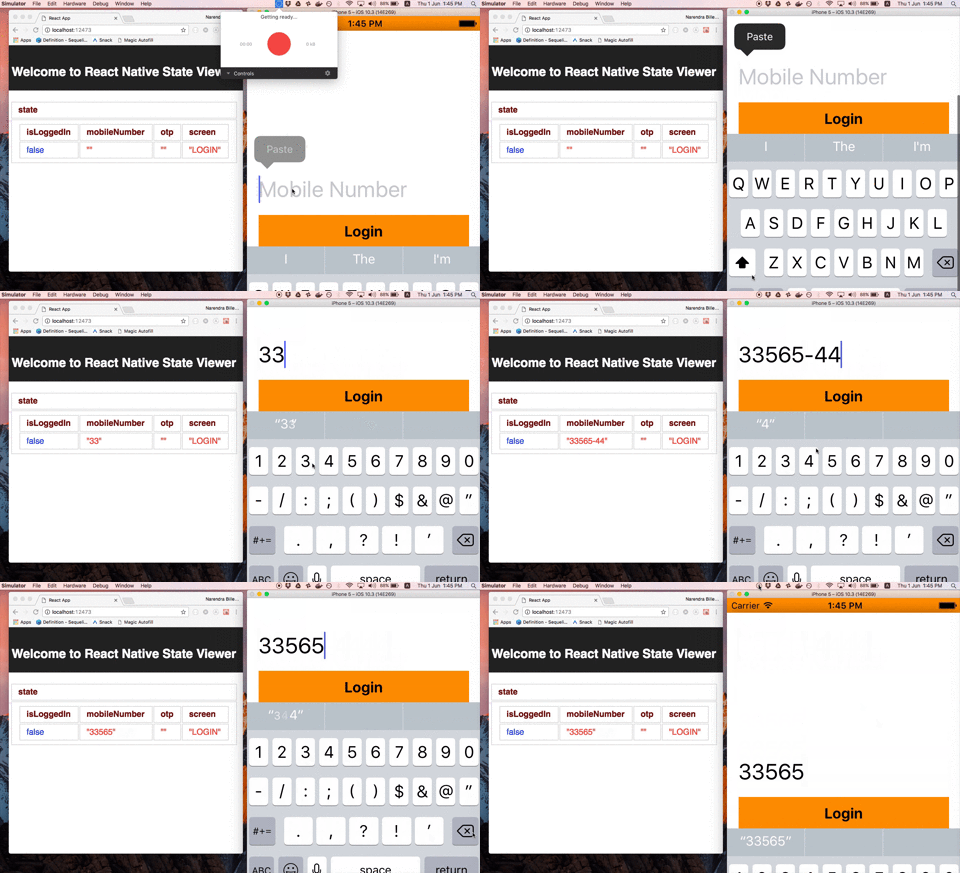
Basically, Whenever your component "re-render", It will send current "this.state" to this server. which will convert this JSON into a tabular format.
This is a sample usecase, This tool can be used in various ways.
# How to use this project
## Start State Viewer
```
git clone https://github.com/nsisodiya/react-native-state-viewer.git
cd react-native-state-viewer
yarn install
cd client
yarn install
cd ..
yarn start
```
Now open `http://localhost:12473/`
You can now send State (basically JSON) from anywhere.
## Post State from command line
Open terminal and run following command.
```
curl -H "Content-Type: application/json" -X POST -d '{"count":"30","city":"London"}' http://localhost:12473/stateUpdate
curl -H "Content-Type: application/json" -X POST -d '{"count":"40","city":"Delhi"}' http://localhost:12473/stateUpdate
```
## Post State from ReactNative App
Copy paste following code.
Create a file called postStateUpdate.js
```
export default function postStateUpdate(target, name, descriptor) {
const oldFunction = descriptor.value;
descriptor.value = function propsInjectorFunction() {
try {
fetch("http://192.168.1.3:12473/stateUpdate", {
credentials: "include",
method: "POST",
body: JSON.stringify({
state: this.state
}),
headers: {
Accept: "application/json",
"Content-Type": "application/json"
}
}).then(response => {
return response.json();
});
} catch (err) {
/*No need to do anything*/
}
return oldFunction.bind(this)(this.props);
};
return descriptor;
}
```
Now go to react component and add following decorator.
```
import React, { Component } from 'react';
import { AppRegistry, Text } from 'react-native';
import postStateUpdate from './postStateUpdate';
class HelloWorldApp extends Component {
state = {
lang: "JavaScript",
message: "Hello World",
counter: 10
};
render() {
@postStateUpdate
return (
Hello world!
);
}
}
AppRegistry.registerComponent('HelloWorldApp', () => HelloWorldApp);
```
# RoadMap
* I have created this tool in just 1 day. I wanted to debug React Native mobile app.
* Please fill bugs/improments/ideas.
* Right now, We are not sending Component Name with StateUpdate. we can modify this tool to have per component State Viewing. Rightnow, It just dump any state update on UI.
* This can also be used to measure frequency of render function and May be we can store State to have navigation between different states.
* We can also prepare a Docker image so that installation can be done without headache.
* This is just a idea. Need community support to enhance it.
# Send Pull Request