https://github.com/nstevens1040/create-cookiecollectionfromjson
Creates a CookieCollection object in PowerShell using the Json exported from the EditThisCookie browser extension.
https://github.com/nstevens1040/create-cookiecollectionfromjson
authenticated cookiecollection cookies csharp dotnet-core dotnet-framework editthiscookie http-requests httprequest json powershell-core powershell-script windows-powershell
Last synced: 4 months ago
JSON representation
Creates a CookieCollection object in PowerShell using the Json exported from the EditThisCookie browser extension.
- Host: GitHub
- URL: https://github.com/nstevens1040/create-cookiecollectionfromjson
- Owner: nstevens1040
- License: gpl-3.0
- Created: 2021-05-29T22:20:12.000Z (about 5 years ago)
- Default Branch: main
- Last Pushed: 2021-07-03T21:00:55.000Z (almost 5 years ago)
- Last Synced: 2025-03-05T07:18:23.677Z (over 1 year ago)
- Topics: authenticated, cookiecollection, cookies, csharp, dotnet-core, dotnet-framework, editthiscookie, http-requests, httprequest, json, powershell-core, powershell-script, windows-powershell
- Language: HTML
- Homepage:
- Size: 6.28 MB
- Stars: 1
- Watchers: 1
- Forks: 0
- Open Issues: 0
-
Metadata Files:
- Readme: README.md
- License: LICENSE
Awesome Lists containing this project
README
# Create-CookieCollectionFromJson
*(Tested and working on both **Windows PowerShell 5.1** as well as **PowerShell Core 7.1.3**.)*
## PowerShell Quick Start
I'm leaving this at the top of the page for convenience.
The command below will make **Create-CookieCollectionFromJson** available in your current PowerShell session.
```ps1
iex (irm "https://raw.githubusercontent.com/nstevens1040/Create-CookieCollectionFromJson/main/Create-CookieCollectionFromJson.ps1")
```
## What is Create-CookieCollectionFromJson?
It is a PowerShell script that creates a **[System.Net.CookieCollection](https://docs.microsoft.com/en-us/dotnet/api/system.net.cookiecollection?view=net-5.0)** object using the json exported from the **[EditThisCookie](https://www.editthiscookie.com)** browser extension.
## Use Case
Together with my other library **[Execute.HttpRequest](https://github.com/nstevens1040/Execute.HttpRequest)**, this script will alow you to make authenticated HTTP requests in Windows PowerShell via cookies.
Although **[Execute.HttpRequest](https://github.com/nstevens1040/Execute.HttpRequest)** is fully functional in **Windows PowerShell** it does **not** work in **PowerShell Core** (yet).
**A word of caution; please be smart while using your cookies. They are used to authenticate you.**
# Getting Started
Install the [EditThisCookie](https://www.editthiscookie.com) browser extension (currently available for **Chrome** and **Opera**).
- [Chrome](https://chrome.google.com/webstore/detail/editthiscookie/fngmhnnpilhplaeedifhccceomclgfbg)
- [Opera](https://addons.opera.com/en/extensions/details/edit-this-cookie)
Once it's installed, you can identify the extension by it's cookie icon.
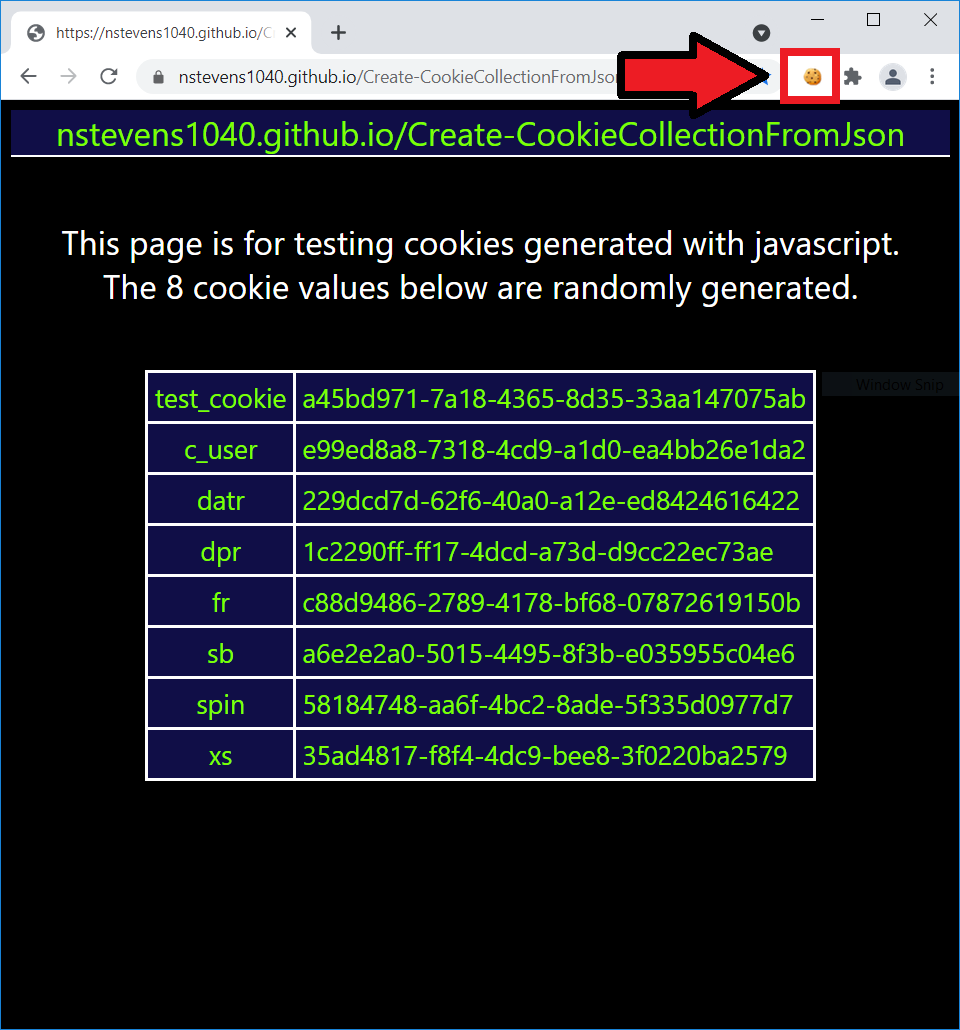
Click once on the cookie icon, then find the **export** button.
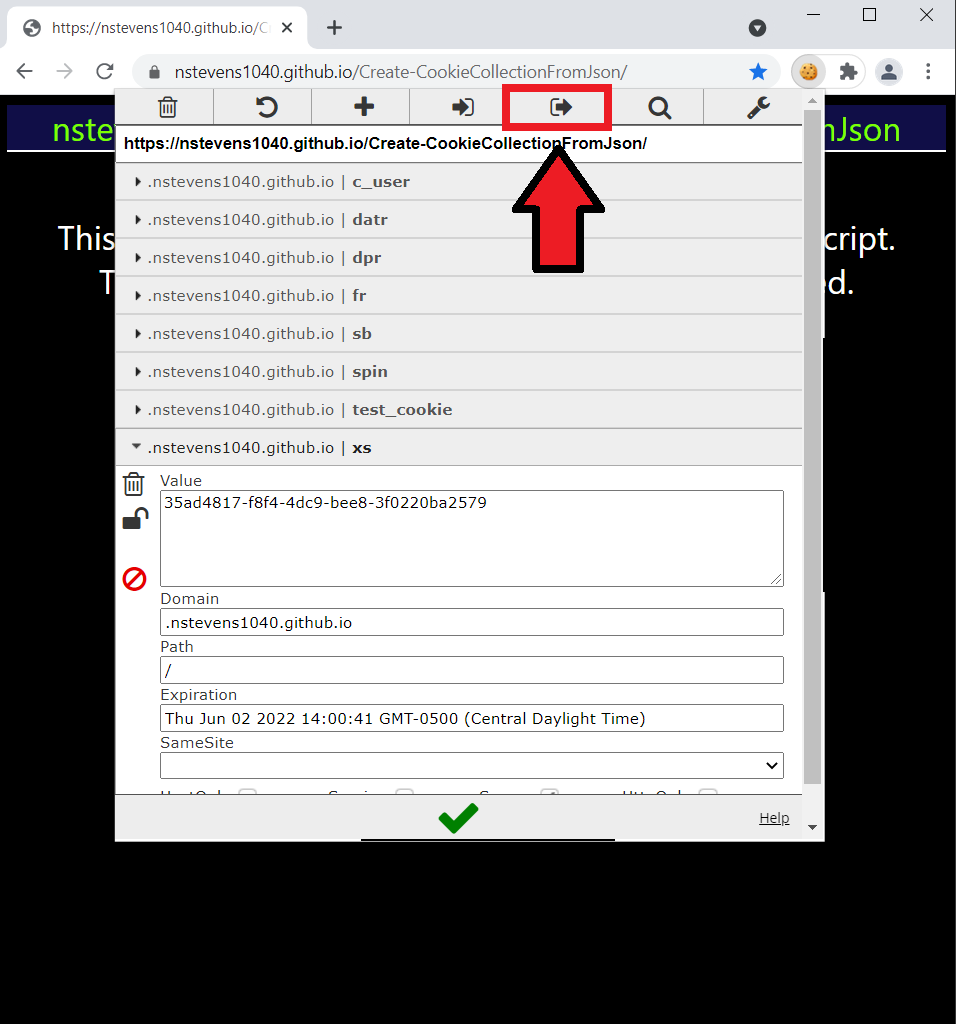
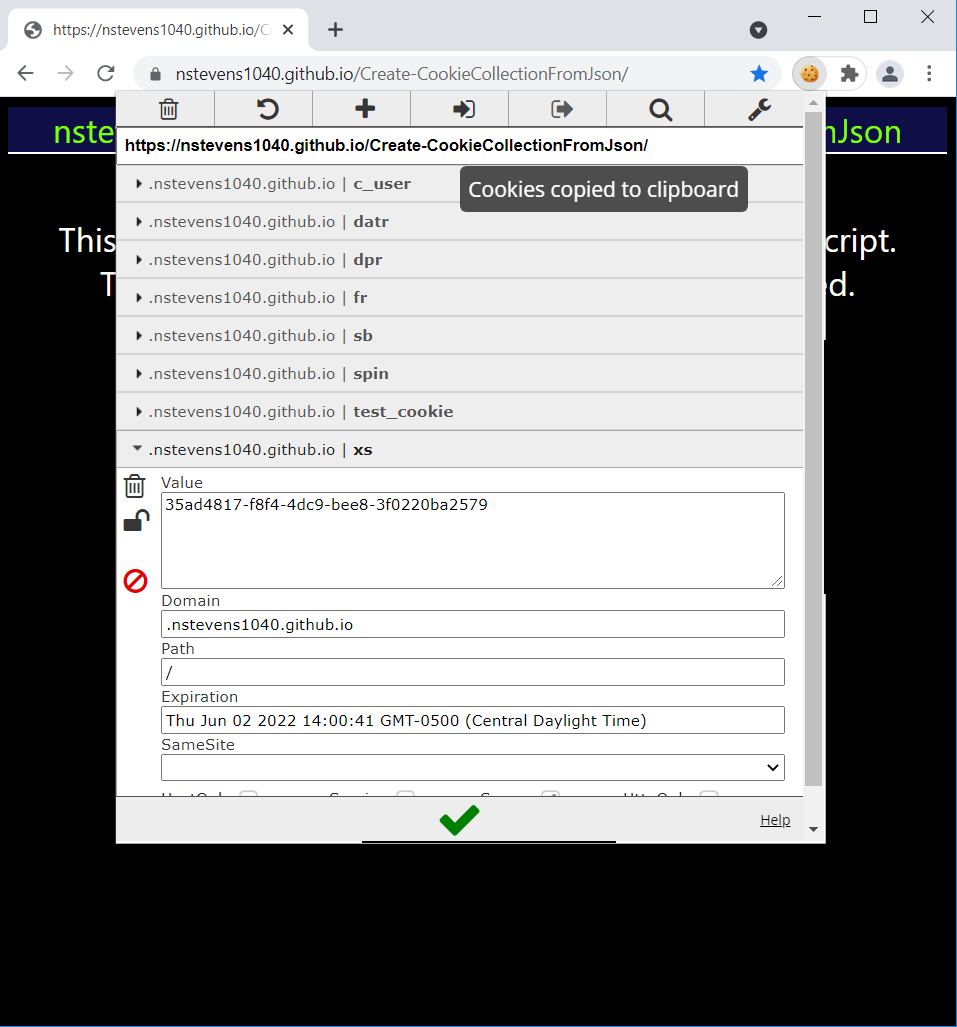
Click once on the **export** icon. The extension will let say **Cookies copied to the clipboard** in a small pop-up box.
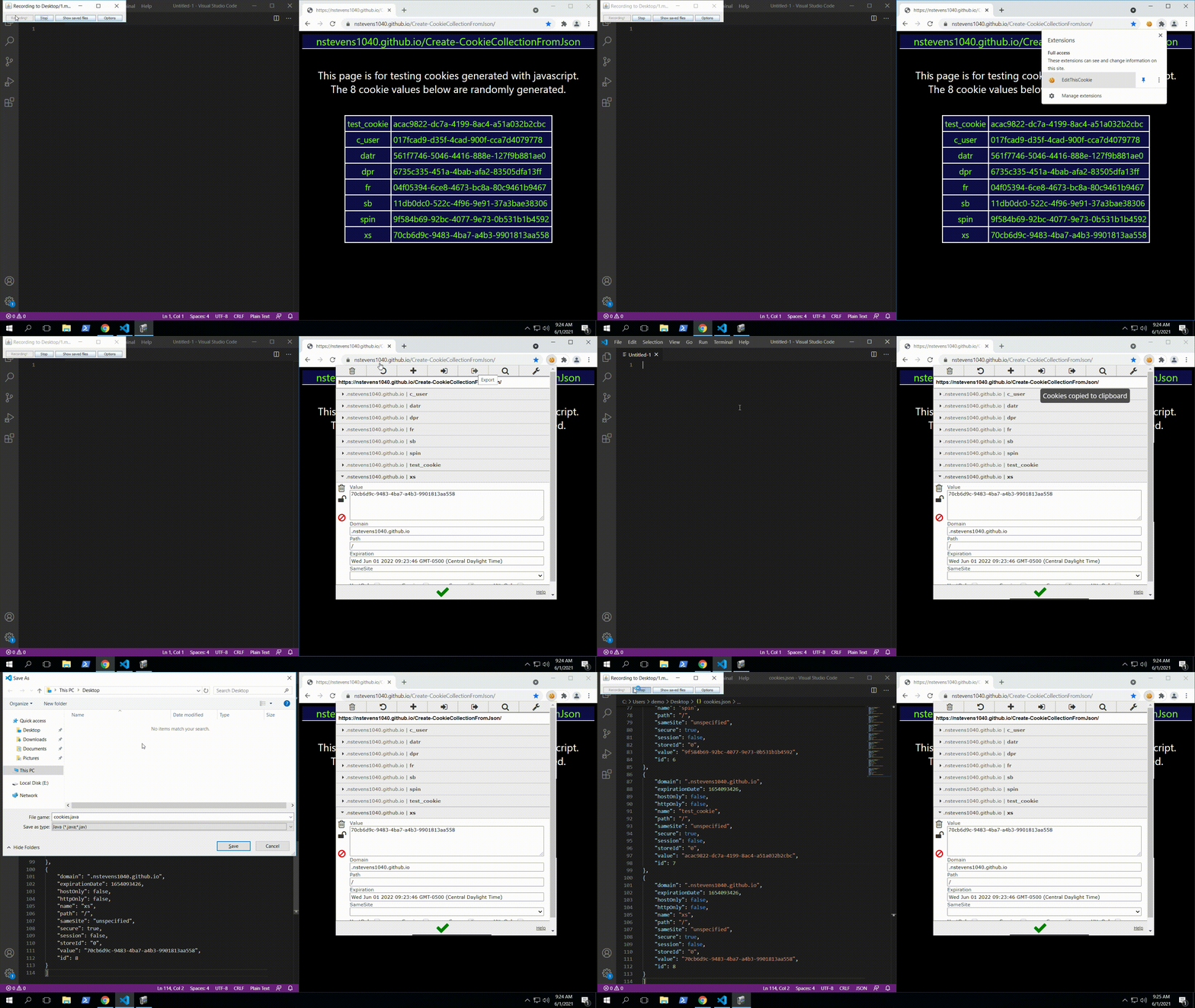
Open your favorite text editor and paste your cookies. Save the file with a **.json** file extension.
# How to use Create-CookieCollectionFromJson
## PowerShell
Now that you have your cookies in a json file, go ahead and launch **PowerShell**.
**1.** To make the script available in your current PowerShell session, run the code below.
```ps1
iex (irm "https://raw.githubusercontent.com/nstevens1040/Create-CookieCollectionFromJson/main/Create-CookieCollectionFromJson.ps1")
```
**2.** The script takes a string argument via the **-JsonFilePath** parameter.
```ps1
Create-CookieCollectionFromJson -JsonFilePath "$($ENV:USERPROFILE)\Desktop\cookies.json"
```
The script will notify you of it's success and let you know how to access the cookies.
It creates a custom c# class with a property named (*your cookie domain*)_cookies.
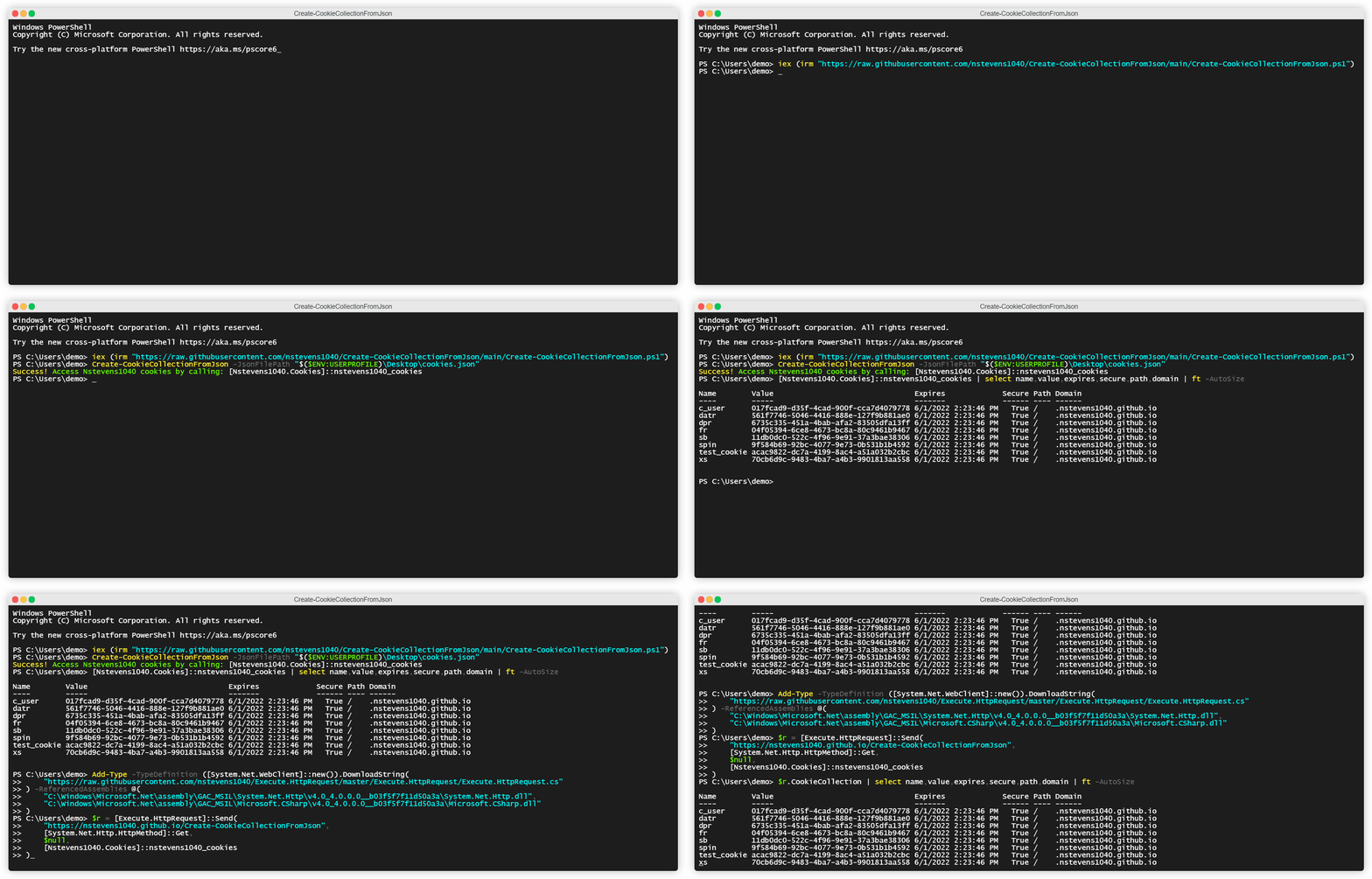
In the example above, after I create my **CookieCollection** object the script tells me that it's accessible via **[Nstevens1040.Cookies]::nstevens1040_cookies.**
To view my CookieCollection's properties, I run
```ps1
[Nstevens1040.Cookies]::nstevens1040_cookies | select name,value,expires,secure,path,domain | ft -AutoSize
```
**3.** To use the CookieCollection in an HTTP request I load my other library, **[Execute.HttpRequest](https://github.com/nstevens1040/Execute.HttpRequest)**, into **Windows PowerShell** with the command below.
*(Step 3 onward works only in Windows PowerShell and not PowerShell Core)*
```ps1
[System.Net.ServicePointManager]::SecurityProtocol = [System.Net.SecurityProtocolType]::Tls12
iex (irm "https://github.com/nstevens1040/Execute.HttpRequest/releases/download/v1.1.8/Quick-Start.ps1")
```
**4.** Send my HTTP request
```ps1
$r = [Execute.HttpRequest]::Send(
"https://nstevens1040.github.io/Create-CookieCollectionFromJson",
[System.Net.Http.HttpMethod]::Get,
$null,
[Nstevens1040.Cookies]::nstevens1040_cookies
)
```
To view the CookieCollection returned from the HTTP request
```ps1
$r.CookieCollection | select name,value,expires,secure,path,domain | ft -AutoSize
```
## CSharp
Launch **PowerShell**.
*(Tested in both Windows PowerShell and PowerShell Core)*
**1.** To make the script available in your current PowerShell session, run the code below.
```ps1
iex (irm "https://raw.githubusercontent.com/nstevens1040/Create-CookieCollectionFromJson/main/Create-CookieCollectionFromJson.ps1")
```
**2.** The script takes a string argument via the **-JsonFilePath** parameter and if you want the script to return the **C#** source use the **-ReturnCSharp** switch.
```ps1
Create-CookieCollectionFromJson -JsonFilePath "$($ENV:USERPROFILE)\Desktop\cookies.json" -ReturnCSharp
```
This will return the raw CSharp source code that you can use. Example output below
```cs
namespace Nstevens1040
{
using System.Net;
using System;
public class Cookies
{
public static CookieCollection nstevens1040_cookies = new CookieCollection(){
new Cookie(){
Domain = ".nstevens1040.github.io",
Expires = DateTime.Parse(@"1970-01-01").AddSeconds(1654093426),
HttpOnly = false,
Name = "c_user",
Path = "/",
Secure = true,
Value = "017fcad9-d35f-4cad-900f-cca7d4079778"
},
new Cookie(){
Domain = ".nstevens1040.github.io",
Expires = DateTime.Parse(@"1970-01-01").AddSeconds(1654093426),
HttpOnly = false,
Name = "datr",
Path = "/",
Secure = true,
Value = "561f7746-5046-4416-888e-127f9b881ae0"
},
new Cookie(){
Domain = ".nstevens1040.github.io",
Expires = DateTime.Parse(@"1970-01-01").AddSeconds(1654093426),
HttpOnly = false,
Name = "dpr",
Path = "/",
Secure = true,
Value = "6735c335-451a-4bab-afa2-83505dfa13ff"
},
new Cookie(){
Domain = ".nstevens1040.github.io",
Expires = DateTime.Parse(@"1970-01-01").AddSeconds(1654093426),
HttpOnly = false,
Name = "fr",
Path = "/",
Secure = true,
Value = "04f05394-6ce8-4673-bc8a-80c9461b9467"
},
new Cookie(){
Domain = ".nstevens1040.github.io",
Expires = DateTime.Parse(@"1970-01-01").AddSeconds(1654093426),
HttpOnly = false,
Name = "sb",
Path = "/",
Secure = true,
Value = "11db0dc0-522c-4f96-9e91-37a3bae38306"
},
new Cookie(){
Domain = ".nstevens1040.github.io",
Expires = DateTime.Parse(@"1970-01-01").AddSeconds(1654093426),
HttpOnly = false,
Name = "spin",
Path = "/",
Secure = true,
Value = "9f584b69-92bc-4077-9e73-0b531b1b4592"
},
new Cookie(){
Domain = ".nstevens1040.github.io",
Expires = DateTime.Parse(@"1970-01-01").AddSeconds(1654093426),
HttpOnly = false,
Name = "test_cookie",
Path = "/",
Secure = true,
Value = "acac9822-dc7a-4199-8ac4-a51a032b2cbc"
},
new Cookie(){
Domain = ".nstevens1040.github.io",
Expires = DateTime.Parse(@"1970-01-01").AddSeconds(1654093426),
HttpOnly = false,
Name = "xs",
Path = "/",
Secure = true,
Value = "70cb6d9c-9483-4ba7-a4b3-9901813aa558"
}
};
}
}
```