https://github.com/nteract/nteract
We're back! Now firing notebooks out of a t-shirt gun.
https://github.com/nteract/nteract
data-science desktop-application ipython jupyter jupyter-notebook monorepo notebook nteract react react-components repl zeromq
Last synced: 5 days ago
JSON representation
We're back! Now firing notebooks out of a t-shirt gun.
- Host: GitHub
- URL: https://github.com/nteract/nteract
- Owner: nteract
- License: bsd-3-clause
- Created: 2026-02-11T18:18:05.000Z (5 months ago)
- Default Branch: main
- Last Pushed: 2026-07-14T05:36:22.000Z (7 days ago)
- Last Synced: 2026-07-14T07:10:25.209Z (7 days ago)
- Language: TypeScript
- Homepage:
- Size: 40.4 MB
- Stars: 144
- Watchers: 4
- Forks: 9
- Open Issues: 32
-
Metadata Files:
- Readme: README.md
- Contributing: CONTRIBUTING.md
- License: LICENSE
- Agents: AGENTS.md
Awesome Lists containing this project
- best-of-jupyter - GitHub - 11% open · ⏱️ 30.12.2023): (Notebook Environments)
- awesome-jupyter-resources - GitHub - 9% open · ⏱️ 23.07.2022): (Notebook环境)
- awesome-starred - nteract/nteract - 📘 The interactive computing suite for you! ✨ (data-science)
- starred-awesome - nteract - 📘 Desktop, Jupyter Extension, libraries, and more (JavaScript)
- awesome-list - nteract
- awesome-rehype - nteract - Interactive computing suite for you. (Built on rehype)
- awesome-jupyter - nteract - Native desktop notebook frontend. <!--lint disable double-link--> (Runtimes/Frontends)
- -awesome-jupyter - nteract - Native desktop notebook frontend. (Runtimes/Frontends)
README
# nteract
nteract is a local-first notebook environment where humans, kernels, and AI agents can work against the same live document. It ships as a native desktop app with instant startup, realtime sync across windows and programmatic clients, and managed local environments.
Built on [jupyter-zmq-client](https://crates.io/crates/jupyter-zmq-client) and [jupyter-protocol](https://crates.io/crates/jupyter-protocol).
## Install
Download the latest release from [GitHub Releases](https://github.com/nteract/nteract/releases).
Linux x64 and macOS (Apple silicon or Intel) can install with one command —
the AppImage or signed .app bundle plus CLI/daemon and the per-user service
(systemd or launchd) in one step:
```bash
curl --proto '=https' --tlsv1.2 -sSf https://sh.nteract.io | bash
```
macOS users can equally drag the DMG from GitHub Releases. DEB/RPM/APT
installs are not currently supported because `runtimed` is a per-user daemon
managed by the app and CLI, not by system package-manager scripts.
For remote workstations (Outerbounds, JupyterHub) that offer compute to
hosted notebooks, use the headless one-liner — see
[Remote workstations](docs/runbooks/remote-workstation.md):
```bash
curl --proto '=https' --tlsv1.2 -sSf https://sh.nteract.io | bash -s -- --headless
```
The desktop app bundles everything — `runt` CLI and `runtimed` daemon.
The `runt` CLI and `runtimed` Python bindings ship with the app and stay up to date automatically. For nightly builds, use `runt-nightly` instead.
## What's in here
| Component | Description |
|-----------|-------------|
| `nteract` | Desktop notebook editor (Tauri + React) |
| `runtimed` | Background daemon — environment pools, notebook sync, kernel execution |
| `runt` | CLI for managing kernels, notebooks, and the daemon |
| `runtimed` (Python) | Python bindings for the daemon (ships with the app) |
## Runtime model
nteract stores notebook content in an Automerge-backed document and keeps live kernel state in an explicit runtime state document. The daemon owns kernel processes, execution queues, output capture, and the write path for execution results.
Execution requests name a synced `cell_id`; the daemon reads the cell source from the shared document, records queue and status changes in runtime state, and writes outputs through the same model. The desktop app, CLI, MCP server, and agent clients use that path, so programmatic control observes the same notebook state a human is editing.
## MCP Server
The nteract MCP server connects AI assistants to Jupyter notebooks through the daemon. Agents can run code, read and write cells, manage dependencies, and collaborate with humans in real-time — watching the notebook update live in the desktop app while the agent works.
### Install the Codex plugin
```
codex plugin marketplace add nteract/agent-plugins
```
Restart Codex, then open the plugin directory, choose the nteract marketplace, and install `nteract`.
The distribution repository also includes a `nightly` plugin entry for pre-release builds.
If Codex still does not show notebook tools after restarting, refresh the marketplace and reinstall the selected plugin:
```
codex plugin marketplace upgrade nteract-plugins
codex plugin remove nteract@nteract-plugins # or nightly@nteract-plugins
codex plugin add nteract@nteract-plugins # or nightly@nteract-plugins
codex mcp list
```
Start a new Codex session after reinstalling; running sessions do not hot-load newly installed MCP tools.
### Install the Claude Code plugin
```
/plugin marketplace add nteract/agent-plugins
/plugin install nteract@nteract
```
Pin a specific version:
```
/plugin install nteract@nteract --ref v2.3.0
```
The plugin ships the right `nteract-mcp` binary for your platform (macOS arm64/x64, Linux x64, Windows x64) — no separate install needed. `main` of `nteract/agent-plugins` always points at the latest stable release.
For pre-release builds (updated daily):
```
/plugin install nightly@nteract
```
### Install in Claude Desktop
If you use the nteract desktop app with Claude Desktop, there's a one-click install path. In the menu bar, choose **nteract → Install Extension for Claude...**
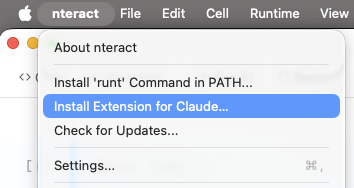
The desktop app builds a `.mcpb` bundle at runtime (manifest, icons, `nteract-mcp` binary) and hands it to Claude Desktop, which prompts you to confirm the install. Requires the nteract desktop app; Claude Desktop picks up the bundle from there.
## Usage
```bash
# Open a notebook
runt notebook path/to/notebook.ipynb
# MCP server for notebook automation
runt mcp
# Daemon management
runt daemon status
runt daemon logs -f
```
List open notebooks with kernel and environment info:
```
$ runt notebooks
╭──────────────────────────────────────┬────────┬──────────────┬────────┬───────╮
│ NOTEBOOK │ KERNEL │ ENV │ STATUS │ PEERS │
├──────────────────────────────────────┼────────┼──────────────┼────────┼───────┤
│ ~/notebooks/blobstore.ipynb │ python │ uv:inline │ idle │ 1 │
│ d4c441d3-d862-4ab0-afe6-ff9145cc2f3d │ python │ uv:prewarmed │ idle │ 1 │
╰──────────────────────────────────────┴────────┴──────────────┴────────┴───────╯
```
## Project structure
```
nteract/nteract
├── src/ # Shared UI code (React components, hooks, utilities)
│ ├── bindings/ # TypeScript types generated from Rust (ts-rs)
│ ├── components/
│ │ ├── ui/ # shadcn primitives (button, dialog, etc.)
│ │ ├── cell/ # Notebook cell components
│ │ ├── outputs/ # Output renderers (stream, error, display data)
│ │ ├── editor/ # CodeMirror editor
│ │ ├── isolated/ # Iframe security isolation (IsolatedFrame, CommBridgeManager)
│ │ └── widgets/ # ipywidgets controls
│ ├── hooks/ # Shared hooks (useSyncedSettings, useTheme)
│ ├── isolated-renderer/ # Code that runs inside isolated iframes
│ ├── lib/ # Shared utilities (cn(), dark-mode, error-boundary)
│ └── styles/ # Global stylesheets
├── apps/ # App entry points
│ ├── notebook/ # Desktop notebook Tauri app
│ ├── notebook-cloud/ # Hosted notebook worker (Cloudflare)
│ ├── elements/ # Elements design system catalog
│ ├── mcp-app/ # MCP widget dev app
│ └── renderer-test/ # Isolated renderer test harness
├── packages/ # Shared npm packages
│ ├── notebook-host/ # Notebook host shell
│ ├── runtimed/ # Node/NAPI daemon client
│ ├── runtimed-node/ # Node bindings for daemon
│ ├── sift/ # Sift visualization renderer
│ └── odometer/ # Odometer component
├── crates/ # Rust code
│ ├── runt/ # CLI binary
│ ├── runtimed/ # Background daemon
│ ├── runtimed-py/ # Python bindings for the daemon
│ ├── runtimed-wasm/ # WASM Automerge bindings for frontend
│ ├── notebook/ # Notebook Tauri app crate
│ ├── notebook-doc/ # Automerge document operations
│ ├── notebook-protocol/ # Notebook wire protocol types
│ ├── notebook-sync/ # Notebook sync layer
│ ├── kernel-launch/ # Shared kernel launching API
│ ├── kernel-env/ # Environment progress reporting
│ ├── runt-mcp/ # Rust-native MCP server
│ ├── runt-trust/ # Notebook trust extraction
│ ├── runt-workspace/ # Workspace detection utilities
│ ├── runtimed-client/ # Shared client library for daemon
│ ├── repr-llm/ # LLM-friendly text summaries of visualizations
│ ├── xtask/ # Build automation tasks
│ └── mcp-supervisor/ # nteract-dev MCP server (proxies runt mcp + dev tools)
├── python/ # Python workspace (uv)
│ ├── runtimed/ # PyPI: runtimed (Python bindings)
│ ├── nteract/ # PyPI: nteract (thin launcher for `runt mcp`)
│ ├── gremlin/ # Stress-testing agent
│ ├── prewarm/ # Environment prewarm script
│ ├── dx/ # Developer utilities
│ ├── nteract-kernel-launcher/ # Kernel launcher for hosted notebooks
│ ├── pr-reviewer/ # PR review agent
│ └── safari-timeline/ # Safari timeline parser
├── plugins/ # Agent plugin distribution
│ └── nteract/ # Codex plugin package
```
## Development
### Prerequisites
| Tool | Version | Install |
|------|---------|---------|
| Node.js | 22.13+ | https://nodejs.org |
| pnpm | 11.9+ | `corepack enable` |
| Rust | 1.94.0 | https://rustup.rs (version managed by `rust-toolchain.toml`) |
**Linux only:** Install GTK/WebKit dev libraries:
```bash
sudo apt-get install -y libgtk-3-dev libwebkit2gtk-4.1-dev libxdo-dev \
libssl-dev libayatana-appindicator3-dev librsvg2-dev
```
### Quick start
```bash
cargo xtask dev
```
### Development workflows
| Workflow | Command | Use when |
|----------|---------|----------|
| One-shot setup + dev | `cargo xtask dev` | First-time setup plus daemon + app in one command |
| Hot reload | `cargo xtask notebook` | Iterating on React UI |
| Standalone Vite | `cargo xtask vite` | Multi-window testing (Vite survives window closes) |
| Attach to Vite | `cargo xtask notebook --attach` | Connect Tauri to already-running Vite |
| Debug build | `cargo xtask build` | Full debug build (frontend + rust) |
| E2E debug build | `cargo xtask e2e build` | Debug build with built-in WebDriver server |
| Rust-only build | `cargo xtask build --rust-only` | Rebuild rust, reuse existing frontend |
| Run bundled | `cargo xtask run notebook.ipynb` | Run standalone binary |
| Lint (check) | `cargo xtask lint` | Check formatting and linting across Rust, JS/TS, Python |
| Lint (fix) | `cargo xtask lint --fix` | Auto-fix formatting and linting |
| Dev daemon | `cargo xtask dev-daemon` | Run per-worktree dev daemon |
| Artifact status | `cargo xtask artifacts status` | Check generated WASM, renderer, and MCP widget artifacts |
| Install nightly (Linux/headless) | `./scripts/install-nightly` | Build + install runtimed + runt + nteract-mcp as the local nightly. Refuses on macOS and when an app bundle is installed. |
| Release .app | `cargo xtask build-app` | Testing app bundle locally |
| Release DMG | `cargo xtask build-dmg` | Distribution (usually CI) |
| Generate icons | `cargo xtask icons [source.png]` | Generate icon variants from source image |
`cargo xtask dev` runs the first-time bootstrap (`pnpm install` + `cargo xtask build`),
starts the per-worktree dev daemon, waits for it to be ready, and then launches the
notebook app. For repeat launches, use `cargo xtask dev --skip-install --skip-build`.
### Build order
The UI must be built before Rust because `crates/notebook` embeds assets from `apps/notebook/dist/` via Tauri.
### Common commands
```bash
pnpm build # Build notebook UI
cargo test # Run Rust tests
pnpm test:run # Run JS tests
cargo xtask artifacts status # Check generated artifact readiness
cargo xtask artifacts ensure runtime # Rebuild only runtimed-wasm when needed
cargo fmt # Format Rust
vp check --fix # Lint + format JS/TS
cargo clippy --all-targets -- -D warnings # Lint Rust
```
## Library crates
The underlying Rust libraries are published to crates.io:
- [`jupyter-protocol`](https://crates.io/crates/jupyter-protocol) — Jupyter messaging protocol
- [`jupyter-zmq-client`](https://crates.io/crates/jupyter-zmq-client) - Jupyter kernel interactions over ZeroMQ
- [`nbformat`](https://crates.io/crates/nbformat) — Notebook parsing
## Contributing
See `AGENTS.md` for the subsystem map and development guidance. Key entry points:
- `crates/runtimed/AGENTS.md` — architecture, daemon, state ownership
- `apps/notebook/src/AGENTS.md` — frontend architecture
- `crates/notebook-wire/AGENTS.md` — wire protocol
- `cargo xtask help` — all build commands
## License
BSD-3-Clause