https://github.com/nukopy/latex-in-markdown-for-pandoc
LaTeX in Markdown for Pandoc
https://github.com/nukopy/latex-in-markdown-for-pandoc
latex markdown pandoc pandoc-markdown tex
Last synced: 30 days ago
JSON representation
LaTeX in Markdown for Pandoc
- Host: GitHub
- URL: https://github.com/nukopy/latex-in-markdown-for-pandoc
- Owner: nukopy
- Created: 2025-10-02T10:51:02.000Z (9 months ago)
- Default Branch: main
- Last Pushed: 2025-10-04T15:30:49.000Z (9 months ago)
- Last Synced: 2025-10-04T17:26:25.774Z (9 months ago)
- Topics: latex, markdown, pandoc, pandoc-markdown, tex
- Language: Makefile
- Homepage: https://marketplace.visualstudio.com/items?itemName=nukopy.latex-in-markdown-for-pandoc
- Size: 2.59 MB
- Stars: 0
- Watchers: 0
- Forks: 0
- Open Issues: 2
-
Metadata Files:
- Readme: README.md
- Changelog: CHANGELOG.md
Awesome Lists containing this project
README
# LaTeX in Markdown for Pandoc





Features
|
Installation
|
Quickstart
|
Usage
|
Showcase
Visual Studio Code extension that brings LaTeX syntax highlighting to Markdown documents processed with [Pandoc](https://pandoc.org/index.html).
## Features
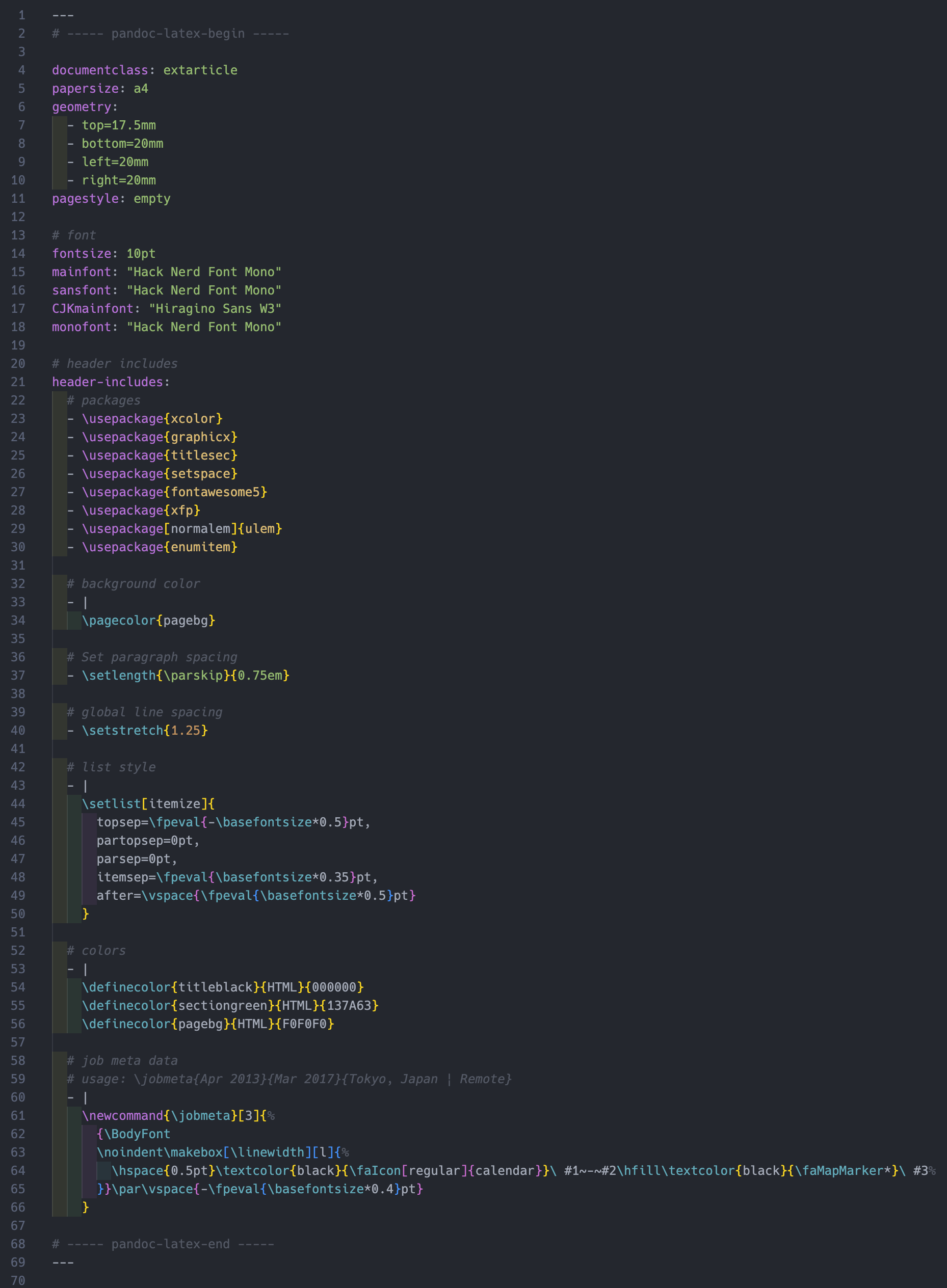
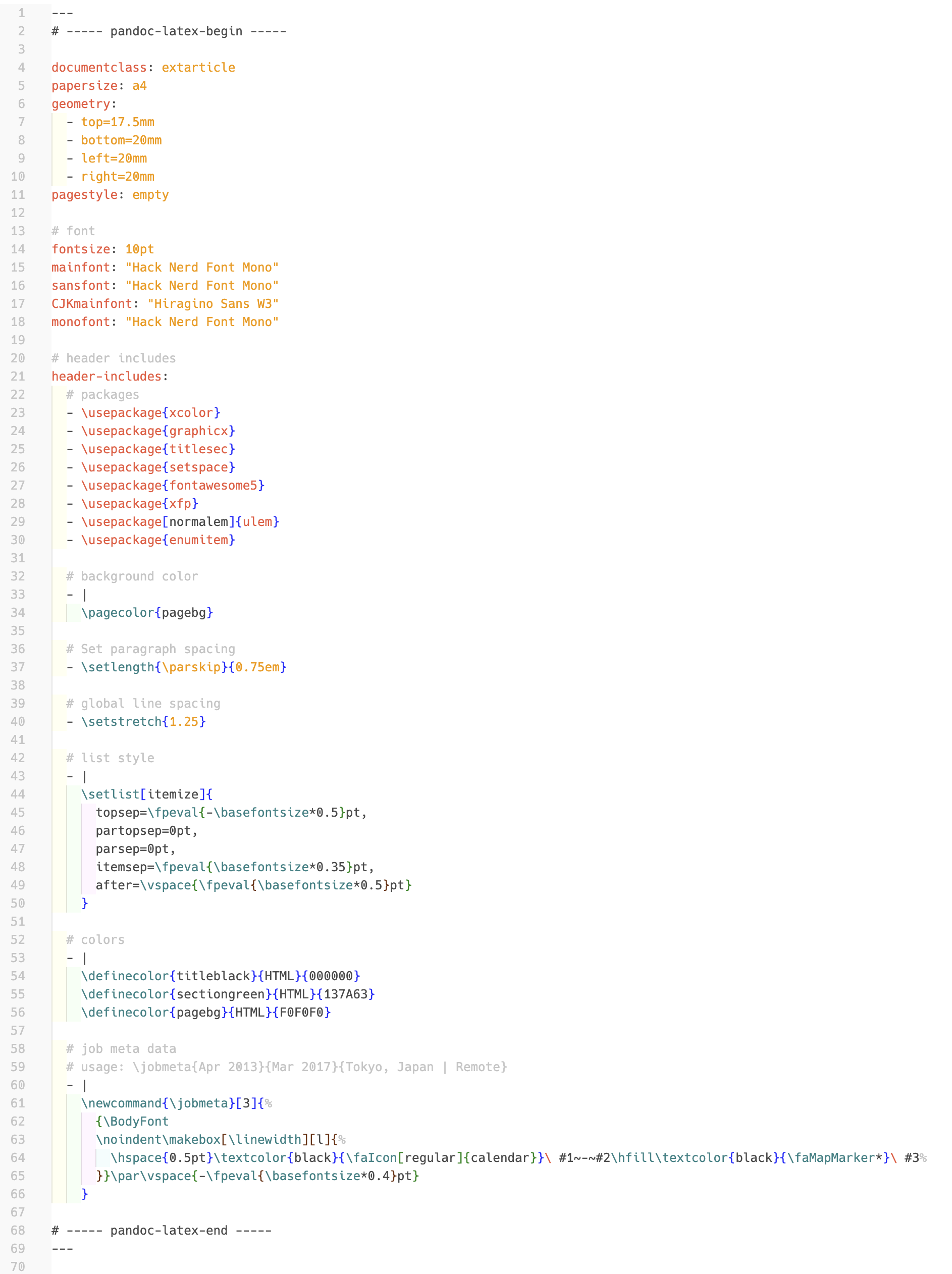
LaTeX code in the Pandoc-flavoured Markdown frontmatter is highlighted with this extension. **You can keep using your favorite theme.**
Features are as follows:
- **Highlight LaTeX code in Pandoc-flavoured Markdown**
- [x] LaTeX code in Markdown frontmatter written in YAML
- [ ] [WIP] LaTeX code in Markdown body
### Frontmatter highlight
Frontmatter highlight in dark theme ([Atom One Dark](https://vscodethemes.com/e/akamud.vscode-theme-onedark/atom-one-dark)):
Frontmatter highlight in light theme ([Bold Light (rainglow)](https://vscodethemes.com/e/daylerees.rainglow/bold-light-rainglow)):
## Installation
This extension is available for free in the [Visual Studio Code Marketplace](https://marketplace.visualstudio.com/items?itemName=nukopy.latex-in-markdown-for-pandoc).
If you're a Cursor user, you cannot install this extension from the marketplace now (planned to be supported in the future). However, you can install it from a `.vsix` file. See the section [Install locally](#install-locally) for details.
## Quickstart
1. Install this extension from the [Visual Studio Code Marketplace](https://marketplace.visualstudio.com/items?itemName=nukopy.latex-in-markdown-for-pandoc).
2. Create a new Markdown file.
3. Copy the contents of [quickstart example](./examples/showcase/quickstart/main.md) into your Markdown file.
4. LaTeX code in the Markdown frontmatter will be highlighted.
## Usage
### Frontmatter highlight
To highlight LaTeX code in the frontmatter, e.g. [Frontmatter highlight](#frontmatter-highlight), you need to add two YAML comments shown below to the frontmatter:
- `# ----- pandoc-latex-begin -----`
- `# ----- pandoc-latex-end -----`
After adding them, the range between them in frontmatter is highlighted as LaTeX code. **This is a necessary step to enable LaTeX syntax highlight in the frontmatter**. We provide [utility snippets](#utility-snippets) to easily add these comments.
If correctly set up, LaTeX code like `\usepackage{graphicx}` is highlighted. For example, your Markdown's frontmatter should look like:
```yaml
---
# ----- pandoc-latex-begin -----
# The code below is treated as normal YAML
documentclass: extarticle
papersize: a4
pagestyle: empty
geometry:
- top=17.5mm
- bottom=20mm
- left=20mm
- right=20mm
# The code below is highlighted as LaTeX code in your editor!
header-includes:
- \usepackage{xcolor}
- \usepackage{graphicx}
- \usepackage{titlesec}
- \usepackage{setspace}
# ----- pandoc-latex-end -----
--- # <- punctuation to end frontmatter
```
### Utility snippets
Use the following snippets to insert comments mentioned above quickly.
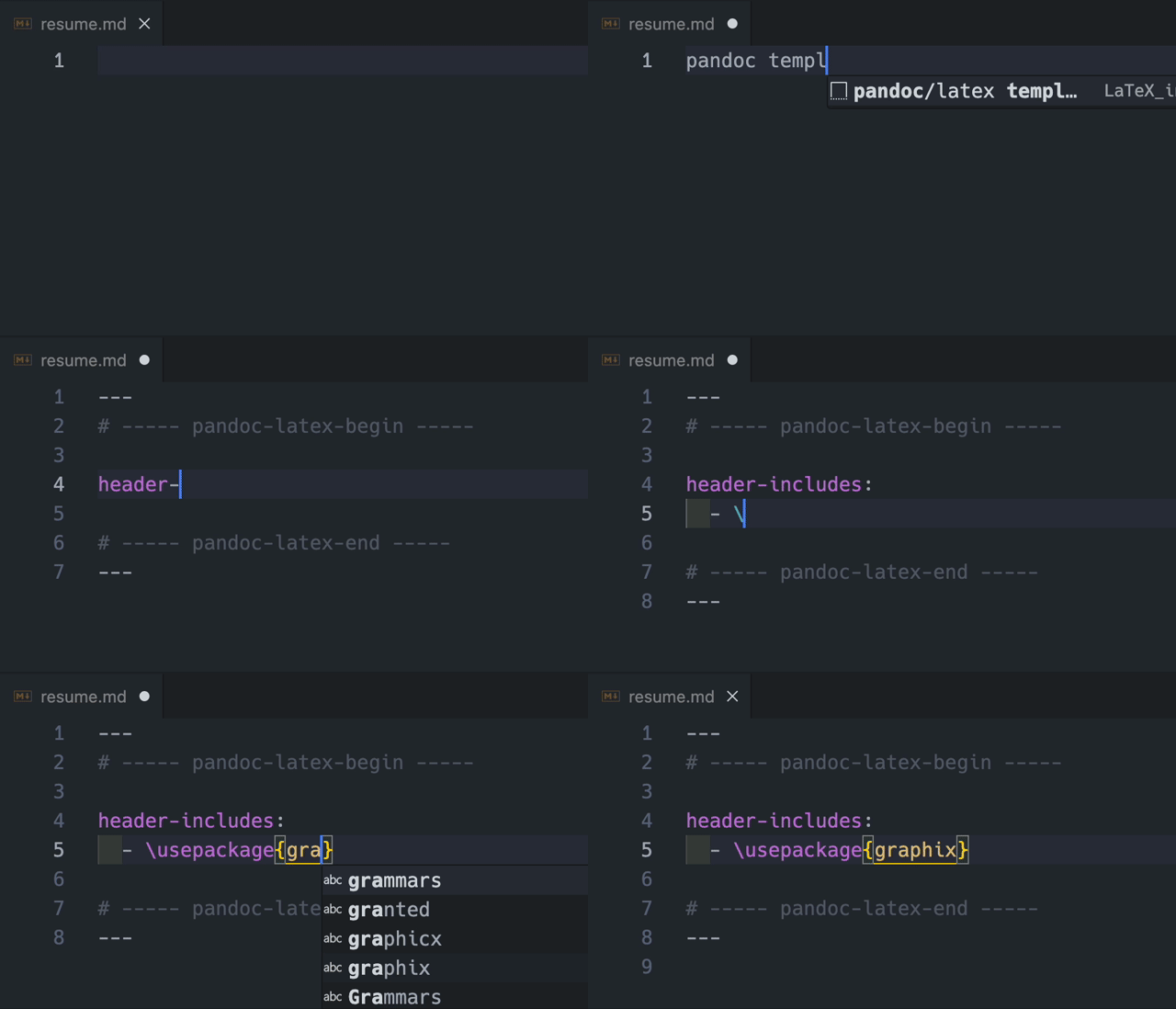
#### for new empty Markdown file
You can add frontmatter template by typing `pandoc template` like below:
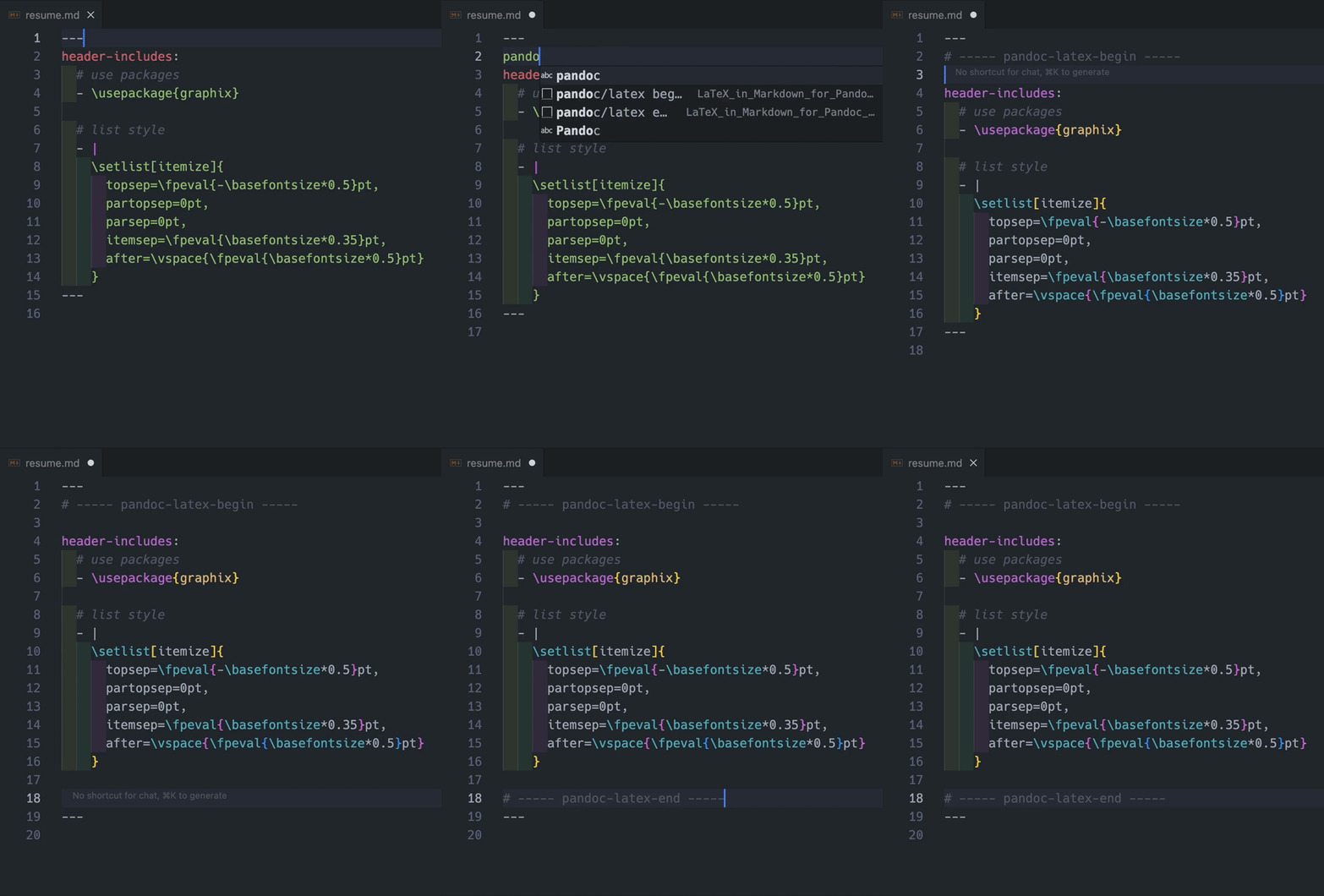
#### for existing frontmatter
You can add frontmatter comments that trigger the highlighting by typing `pandoc begin` and `pandoc end`. **You must type these inside the frontmatter block.**
> [!WARNING]
> You might think LaTeX code will still be highlighted even if you skip adding the end comment `# ----- pandoc-latex-end -----` to the frontmatter.
>
> However, this extension depends on those comments to delimit the scope it highlights, so omitting them can lead to unexpected errors. Make sure you add the `# ----- pandoc-latex-end -----` comment to the end of the frontmatter correctly.
## Showcase
In this section, we show some examples of LaTeX in Markdown for Pandoc. As an appendix, we also show how to build PDF and LaTeX files from Markdown files with Pandoc.
### Overview
Each example contains a list of files as follows:
- `main.md`: The main Markdown file
- `main.tex`: The output LaTeX file (intermediate file)
- `main.pdf`: The output PDF file (final output)
### Examples
- [Resume with single column layout](./examples/showcase/resume_single_column)
- This example shows how to write a resume with a single column layout
- [Statistics - basics of the normal distribution](./examples/showcase/statistics_normal_distribution_basic)
- This example shows how to write a statistics topic in Japanese
### Appendix: How to build examples in showcase
This appendix shows how to build PDF and LaTeX files from a Markdown file with Pandoc for the example "Resume with single column layout".
> [!NOTE]
> This section is specifically for macOS users.
>
> While it may be possible to build on other platforms, please be aware of potential differences.
#### Environment
- macOS Sonoma 14.7
- Pandoc 3.8
- [MacTeX](https://www.tug.org/mactex/) 2025.0308
- XeLaTeX 3.141592653-2.6-0.999997 (TeX Live 2025)
#### Install dependencies
Install pandoc and MacTeX:
```sh
# Install pandoc
brew install pandoc
# Install MacTeX (this takes 10-20 minutes on slow internet)
brew install --cask mactex
```
Check versions:
```sh
pandoc --version
# pandoc 3.8
xelatex --version
# XeTeX 3.141592653-2.6-0.999997 (TeX Live 2025)
```
In this example, `xelatex` is used as PDF engine.
#### Clone repository
```sh
git clone git@github.com:nukopy/latex-in-markdown-for-pandoc.git
```
#### Build PDF and LaTeX files from Pandoc-flavoured Markdown
```sh
cd latex-in-markdown-for-pandoc/examples/showcase/resume_single_column
# build PDF file
pandoc main.md --pdf-engine=xelatex -o main.pdf
file main.pdf
# build LaTeX file
pandoc main.md -s -t latex -o main.tex
file main.tex
```
Open `main.pdf` in a viewer and `main.tex` in your editor to see the result.
## Roadmap
- [x] Highlight LaTeX code in Pandoc-flavoured Markdown
- [x] LaTeX in Markdown frontmatter written in YAML
- [ ] LaTeX in Markdown body
- [ ] Extend LSP support to LaTeX code in Markdown (hover documentation and go-to-definition) or LaTeX Workshop integration.
- [ ] LaTeX in Markdown frontmatter written in YAML
- [ ] LaTeX in Markdown body
## Motivation
I built this extension while writing my resume with Pandoc.
I needed proper LaTeX syntax highlighting inside Markdown, both in YAML frontmatter and the body.
## Development
### Requirements
- Node.js v22.16.x
- Visual Studio Code v1.99.x or later
- (optional) Cursor 1.7.x or later
### Setup
```sh
git clone git@github.com:nukopy/latex-in-markdown-for-pandoc.git
cd latex-in-markdown-for-pandoc
pnpm i
```
Now, you can start developing the extension.
### Build
```sh
pnpm run vsce:build
```
If successful, the extension package `dist/latex-in-markdown-for-pandoc-.vsix` is created.
### Install locally
Execute command `Extensions: Install from VSIX...` in VS Code (or Cursor) and select the file `dist/latex-in-markdown-for-pandoc-.vsix`.
### Prepare for publishing
1. Create [Azure DevOps organization](https://learn.microsoft.com/en-us/azure/devops/organizations/accounts/create-organization?view=azure-devops)
2. Create [Personal Access Token](https://learn.microsoft.com/en-us/azure/devops/organizations/accounts/use-personal-access-tokens-to-authenticate?view=azure-devops&tabs=Windows)
- Copy the Personal Access Token for next step
3. Create a [publisher](https://code.visualstudio.com/api/working-with-extensions/publishing-extension#create-a-publisher)
ref: [Publishing Extensions | Visual Studio Code](https://code.visualstudio.com/api/working-with-extensions/publishing-extension)
### Publish to VS Code Marketplace
- Login to VS Code Marketplace
```sh
pnpm run vsce:login --
# input Personal Access Token
```
- Edit version in `package.json`
```diff json
{
- "version": "0.1.0"
+ "version": "0.1.1"
}
```
- Release
```sh
pnpm run vsce:publish
```
- Unpublish
```sh
pnpm run vsce:unpublish
```
## References
Thanks to the following references for inspiration:
- [Pandoc User's Guide — YAML metadata blocks and `header-includes`](https://pandoc.org/MANUAL.html#metadata-blocks)
- [Pandoc User's Guide — Variables](https://pandoc.org/MANUAL.html#variables)
- [Pandoc User's Guide — raw attribute extension (`{=latex}`)](https://pandoc.org/MANUAL.html#extension-raw_attribute)
- [Visual Studio Code Extension API — Syntax Highlight Guide (Injection Grammars)](https://code.visualstudio.com/api/language-extensions/syntax-highlight-guide#injection-grammars)
- [vscode-latex-basics/markdown-latex-combined.tmLanguage.json](https://github.com/jlelong/vscode-latex-basics/blob/main/syntaxes/markdown-latex-combined.tmLanguage.json)
## License
LaTeX in Markdown for Pandoc is under the MIT License: See [LICENSE](./LICENSE) file.