https://github.com/nullvariant/nullvariant-vscode-extensions
VS Code extensions monorepo - includes git-id-switcher for managing multiple Git identities
https://github.com/nullvariant/nullvariant-vscode-extensions
account-switcher git-config git-identity gpg-key i18n identity-management multi-account open-source profile-switcher ssh-key submodule visual-studio-code visual-studio-code-extension vscode vscode-extension
Last synced: 4 months ago
JSON representation
VS Code extensions monorepo - includes git-id-switcher for managing multiple Git identities
- Host: GitHub
- URL: https://github.com/nullvariant/nullvariant-vscode-extensions
- Owner: nullvariant
- License: mit
- Created: 2025-12-11T02:30:06.000Z (7 months ago)
- Default Branch: main
- Last Pushed: 2026-02-06T17:26:13.000Z (5 months ago)
- Last Synced: 2026-02-07T01:57:08.143Z (5 months ago)
- Topics: account-switcher, git-config, git-identity, gpg-key, i18n, identity-management, multi-account, open-source, profile-switcher, ssh-key, submodule, visual-studio-code, visual-studio-code-extension, vscode, vscode-extension
- Language: TypeScript
- Homepage: https://github.com/nullvariant/nullvariant-vscode-extensions
- Size: 7.2 MB
- Stars: 1
- Watchers: 0
- Forks: 0
- Open Issues: 2
-
Metadata Files:
- Readme: README.md
- Contributing: CONTRIBUTING.md
- Funding: .github/FUNDING.yml
- License: LICENSE
- Code of conduct: CODE_OF_CONDUCT.md
- Security: SECURITY.md
- Agents: AGENTS.md
Awesome Lists containing this project
README
# nullvariant-vscode-extensions
[](https://securityscorecards.dev/viewer/?uri=github.com/nullvariant/nullvariant-vscode-extensions)
[](https://www.bestpractices.dev/projects/11709)
[](https://slsa.dev/)
[](https://github.com/nullvariant/nullvariant-vscode-extensions/actions/workflows/security.yml)
[](https://github.com/nullvariant/nullvariant-vscode-extensions/actions/workflows/ci.yml)
[](https://github.com/nullvariant/nullvariant-vscode-extensions/actions/workflows/ci.yml)
[](https://codecov.io/gh/nullvariant/nullvariant-vscode-extensions)
[](https://sonarcloud.io/summary/new_code?id=nullvariant_nullvariant-vscode-extensions)
[](https://github.com/step-security/harden-runner)
VS Code extensions by [Null;Variant](https://github.com/nullvariant).
## Extensions
### Git ID Switcher

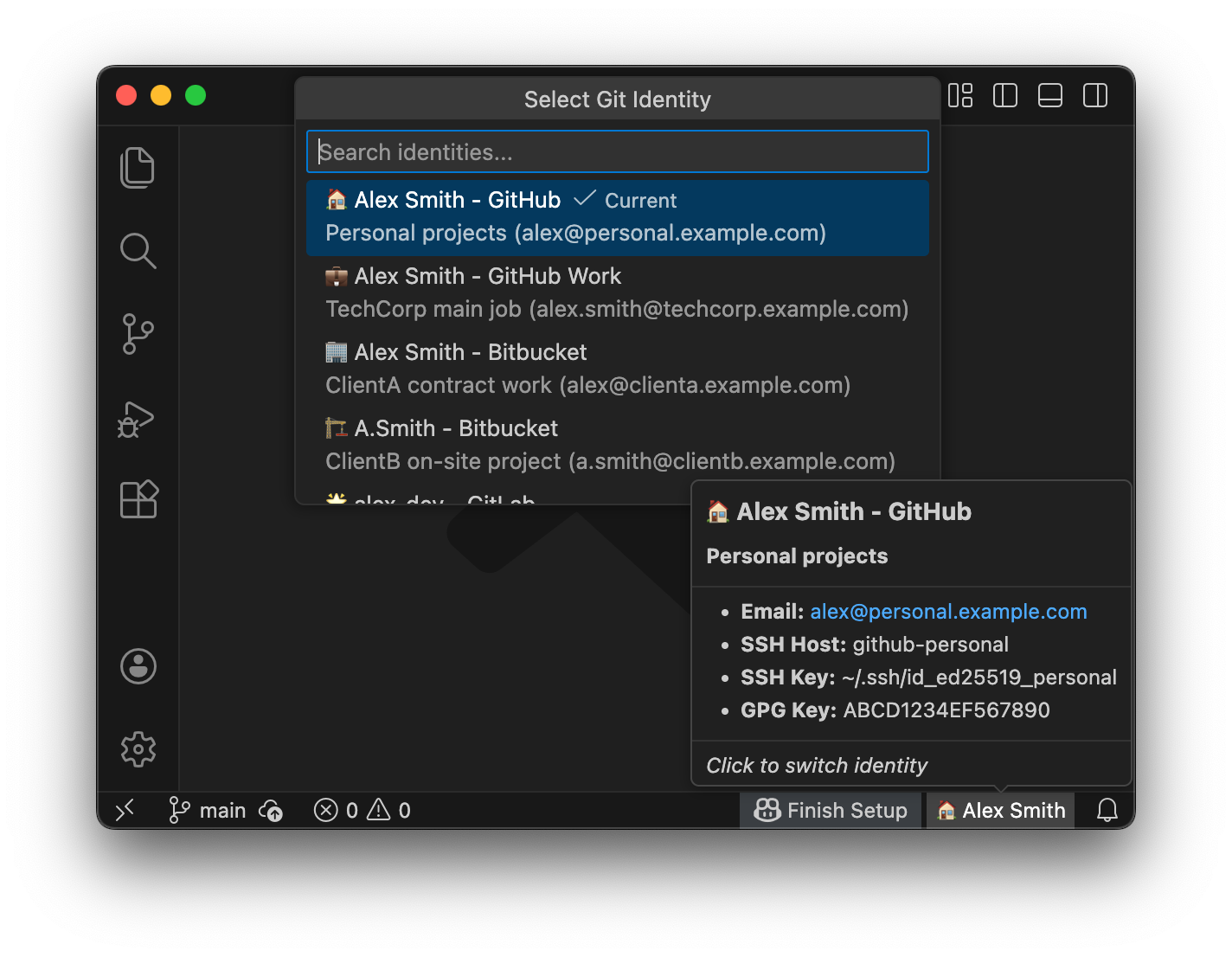
Switch between multiple Git identities with one click. Manage multiple GitHub accounts, SSH keys, GPG signing, and automatically apply identity to Git Submodules.




 🇺🇸 🇯🇵 🇨🇳 🇹🇼 🇰🇷 🇩🇪 🇫🇷 🇪🇸 🇧🇷 🇮🇹 🇷🇺 🇵🇱 🇹🇷 🇨🇿 🇭🇺 🇧🇬 🇺🇦 🌍 🌺 🐻 🐉 ✨ 🖖 🐱 🏴☠️ 🎭
📖 Documentation | 🤝 Contributing | 📦 Marketplace | 📦 Open VSX
## Quick Start for Developers
Get started in 5 steps:
```bash
# 1. Clone
git clone https://github.com/nullvariant/nullvariant-vscode-extensions.git
cd nullvariant-vscode-extensions
# 2. Install dependencies (from repository root)
npm install
# 3. Compile
npm run compile:all
# 4. Run tests
npm run test:all
# 5. Start watch mode for development
npm run watch:all
```
For linting: `npm run lint:all`
## Extension Initialization Flow
```mermaid
flowchart TD
A[Extension Activated] --> B{Workspace Trusted?}
B -->|No| C[Restricted Mode]
B -->|Yes| D[initializeState]
D --> E{Saved Identity?}
E -->|Yes| I[Apply Identity]
E -->|No| F{Detect from Git Config?}
F -->|Yes| I
F -->|No| G{Detect from SSH Agent?}
G -->|Yes| I
G -->|No| H[No Identity]
I --> J[Update Status Bar]
H --> J
J --> K[Ready]
```
## Development
### Prerequisites
- Node.js 20+
### Working on an extension
```bash
cd extensions/git-id-switcher
# Install dependencies
npm install
# Compile
npm run compile
# Watch mode
npm run watch
# Package as VSIX
npm run package
```
### Testing locally
#### Manual Testing
1. Open the extension folder in VS Code
2. Press `F5` to launch Extension Development Host
3. Test the extension in the new window
#### Unit Tests
```bash
cd extensions/git-id-switcher
npm run test
```
#### E2E Tests
E2E tests run in an actual VS Code environment using `@vscode/test-electron`:
```bash
cd extensions/git-id-switcher
npm run test:e2e
```
> **Note**: On first run, VS Code will be downloaded automatically (~100MB). Subsequent runs use the cached version.
### Git Hooks Setup
This repository uses custom git hooks for release safety. After cloning, run:
```bash
git config core.hooksPath .githooks
```
This enables the pre-push hook that prevents pushing version bumps without release tags.
## Repository Structure
```
nullvariant-vscode-extensions/
├── extensions/
│ └── git-id-switcher/
├── .github/workflows/
│ ├── ci.yml
│ └── publish.yml
├── .githooks/
│ └── pre-push
├── LICENSE
└── README.md
```
## Publishing (Maintainers Only)
> **Note**: The `main` branch is protected. All changes must go through a Pull Request.
Extensions are automatically published when a release tag is pushed:
1. Ensure all changes are merged to `main` via Pull Request
2. Create and push a release tag from the latest `main`:
```bash
git checkout main
git pull origin main
git tag git-id-switcher-v1.0.0
git push origin git-id-switcher-v1.0.0
```
The [publish workflow](.github/workflows/publish.yml) will automatically build and publish the extension to VS Code Marketplace and Open VSX.
## Supply Chain Security
Every release includes cryptographic verification artifacts:
| Artifact | Description |
| --------------------- | ----------------------------------- |
| `*.vsix` | The extension package |
| `*.vsix.intoto.jsonl` | SLSA Level 3 build provenance |
| `*.vsix.bundle` | Cosign keyless signature (Sigstore) |
| `sbom-cyclonedx.json` | CycloneDX SBOM with attestation |
### Verify VSIX signature (Cosign)
```bash
# Download the VSIX and its .bundle from the GitHub Release, then:
cosign verify-blob git-id-switcher-.vsix \
--bundle git-id-switcher-.vsix.bundle \
--certificate-identity-regexp="https://github.com/nullvariant/nullvariant-vscode-extensions/" \
--certificate-oidc-issuer="https://token.actions.githubusercontent.com"
```
### Verify SLSA provenance (GitHub CLI)
```bash
gh attestation verify git-id-switcher-.vsix \
--repo nullvariant/nullvariant-vscode-extensions
```
### Verify SBOM attestation (GitHub CLI)
```bash
gh attestation verify git-id-switcher-.vsix \
--repo nullvariant/nullvariant-vscode-extensions \
--predicate-type https://cyclonedx.org/bom
```
## Extension Fingerprint
Use this information to verify you have the authentic Git ID Switcher extension:
| Field | Value |
| ------------ | --------------------------------------------------------------------------------- |
| Publisher | `nullvariant` |
| Extension ID | `nullvariant.git-id-switcher` |
| Repository | `https://github.com/nullvariant/nullvariant-vscode-extensions` |
| Marketplace | `https://marketplace.visualstudio.com/items?itemName=nullvariant.git-id-switcher` |
| Open VSX | `https://open-vsx.org/extension/nullvariant/git-id-switcher` |
If you find an extension with a similar name from a different publisher, please report it (see [SECURITY.md](SECURITY.md#reporting-typosquatting)).
## License
MIT