https://github.com/numandev1/claude-codex
Claude and Codex Multiple Session Manager
https://github.com/numandev1/claude-codex
account-switcher anthropic chatgpt claude claude-code cli codex ink openai rate-limit rate-limiting session-manager tui usage
Last synced: about 1 month ago
JSON representation
Claude and Codex Multiple Session Manager
- Host: GitHub
- URL: https://github.com/numandev1/claude-codex
- Owner: numandev1
- Created: 2026-06-10T23:59:38.000Z (about 1 month ago)
- Default Branch: main
- Last Pushed: 2026-06-11T00:32:55.000Z (about 1 month ago)
- Last Synced: 2026-06-11T02:17:27.605Z (about 1 month ago)
- Topics: account-switcher, anthropic, chatgpt, claude, claude-code, cli, codex, ink, openai, rate-limit, rate-limiting, session-manager, tui, usage
- Language: TypeScript
- Homepage:
- Size: 270 KB
- Stars: 0
- Watchers: 0
- Forks: 0
- Open Issues: 0
-
Metadata Files:
- Readme: README.md
Awesome Lists containing this project
README

# Claude / Codex Session Manager — Switch & Borrow Accounts
**One keystroke to switch between all your Codex and Claude Code logins, see which account still has quota — and borrow a friend's Codex / Claude without ever knowing their password.**
[](https://www.npmjs.com/package/claudecodex-cli)
[](https://www.npmjs.com/package/claudecodex-cli)
[](./LICENSE)
---
Both **Codex** and **Claude Code** keep only **one** active login at a time — log into a second
account and the first is signed out. If you juggle multiple ChatGPT/Claude subscriptions (your own,
a teammate's, a friend's), you're constantly re-logging in and losing your place.
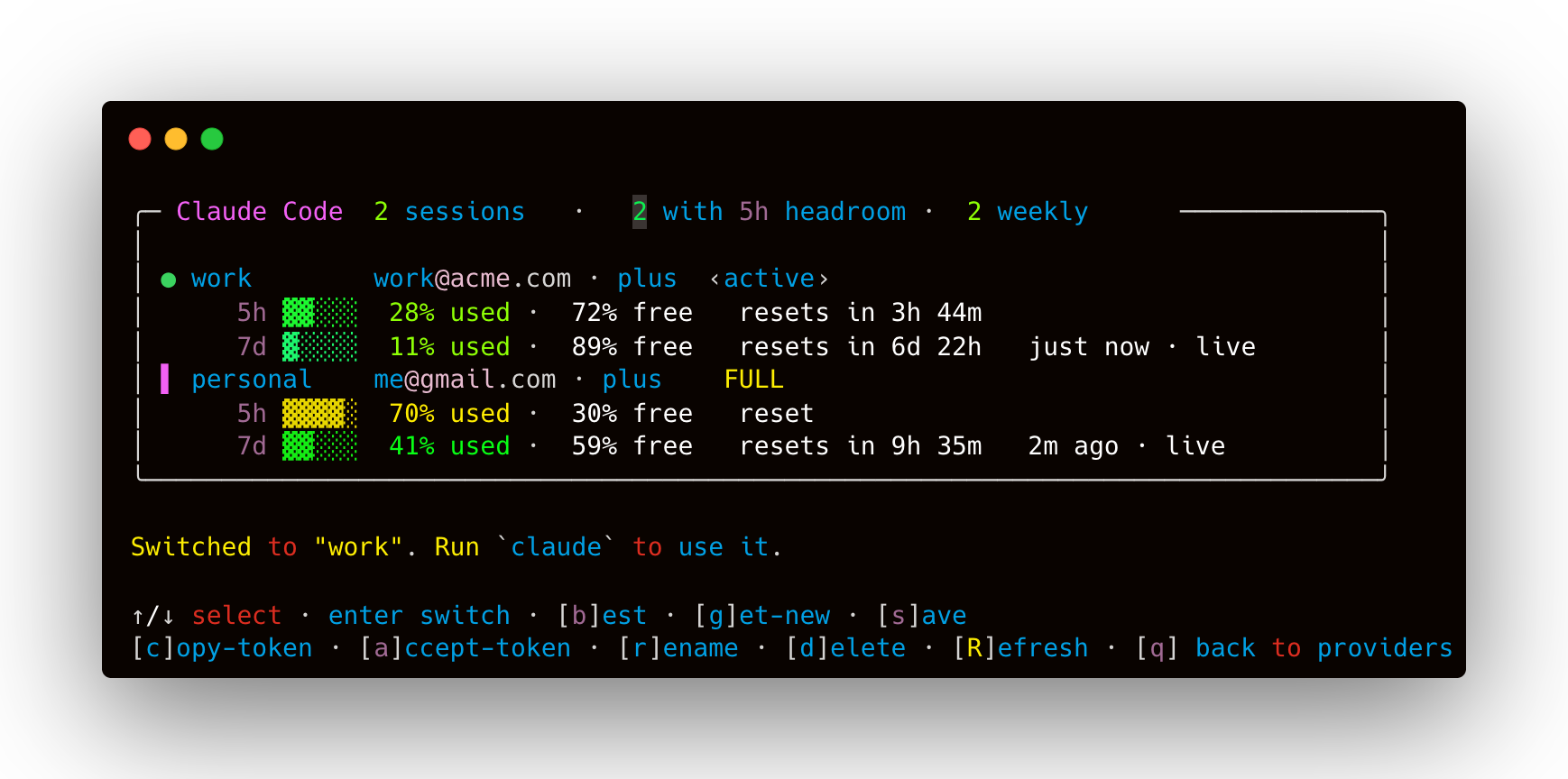
**claudecodex** saves each login as a named **session**, lets you switch between them instantly, and
shows a **live dashboard** of every account's remaining **5-hour** and **weekly** limits — read
straight from each provider's own usage API, so you see real numbers *without* switching first.
It can also [**borrow Codex / Claude from a friend**](#borrow-codex--claude-from-a-friend--without-their-password):
send them a link, they tap "Authorise" in their browser, and a scoped coding-tool token lands on your
machine — without you ever getting their password or account access.
## Install
**No install (recommended to try):**
```bash
npx claudecodex-cli
```
**Global install** — then use the short `ccx` command anywhere:
```bash
npm install -g claudecodex-cli
ccx
```
> Installed globally, `ccx` checks npm for a newer version on startup and offers to update
> (you confirm; it never updates silently). Opt out with `CLAUDECODEX_NO_UPDATE=1`.
Requires **Node ≥ 18**. macOS and Linux. (Claude support reads the macOS Keychain / Claude's
credentials file; Codex reads `~/.codex/auth.json`.)
## Quick start
```bash
ccx # pick Codex or Claude, then manage interactively
```
1. Log into an account the normal way (`codex login`, or sign in to Claude Code).
2. In `ccx`, press **s** to save it as a session (e.g. `work`).
3. Repeat for your other accounts.
4. Press **b** to jump to whichever account has the most quota — then run `codex` / `claude`.
## Commands
Interactive (run `ccx`, or `ccx codex` / `ccx claude`):
| Key | Action |
|----:|--------|
| `↑/↓` `enter` | select / switch to a session |
| `b` | switch to the **best** session (most 5h headroom, skips exhausted) |
| `g` | **get** a new session — browser sign-in for another account |
| `s` | **save** the current login as a session |
| `c` | **copy** the selected session's token to the clipboard (to share) |
| `a` | **accept** a token from the clipboard (paste a shared one in) |
| `r` | **remote link** — generate a guide page your friend opens to share their session |
| `n` `d` `R` | rename · delete · refresh live limits |
| `q` | back to provider chooser (or quit) |
Scriptable (`ccx `):
```bash
ccx codex ls # dashboard with live limits
ccx codex save work # save current login
ccx codex use work # switch active login
ccx codex best # switch to the account with most quota
ccx claude refresh # refresh every session's live limits
ccx codex get-session alice # browser login → save a new account
ccx codex share work tok.txt # write a shareable token file
ccx codex set work # save a token from the clipboard (or pass it / @file / stdin)
ccx codex rename work old # rename / delete
ccx codex delete old
ccx codex remote # generate a remote guide link for a friend
ccx claude remote # same for Claude
```
## Borrow Codex / Claude from a friend — without their password
If a friend has a ChatGPT Plus or Claude Pro subscription but doesn't use Codex / Claude Code
themselves, you can borrow their session in seconds. **You never get their password, email login,
or account access** — they simply authorise the coding tool in their own browser and a scoped
OAuth token lands on your machine. Their ChatGPT/Claude conversations, account settings, and
credentials stay completely private.
**One-time setup (you):** get a free [ngrok](https://ngrok.com) account and set your authtoken:
```bash
export NGROK_AUTHTOKEN=your_token_here # add to ~/.zshrc to make it permanent
```
**Every time:**
1. In the TUI press **`r`** (or run `ccx codex remote` / `ccx claude remote`).
A link is copied to your clipboard — send it to your friend on WhatsApp, iMessage, etc.
2. Friend opens the link on any device. They see a 3-step guide that first explains exactly
what is shared (the coding-tool access only) and what stays private (chats, account, password):
- **Step 1** — tap “Authorise Codex / Claude Code Access” and sign in on the provider's own page
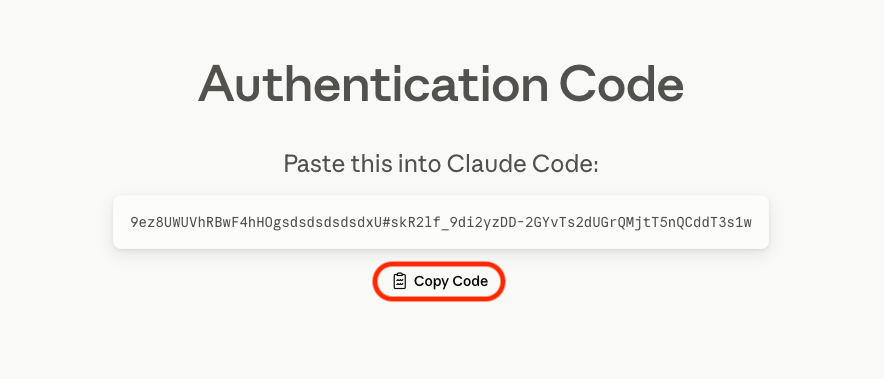
- **Step 2** — copy what the provider shows after signing in. The guide includes a screenshot
of exactly what to look for:
**Codex** — the browser lands on a `localhost:1455` error page; they copy the URL from the address bar:

**Claude** — Anthropic shows an Authentication Code page; they tap **Copy Code**:
- **Step 3** — paste it into the form on the guide page and hit Submit
3. The token lands on **your** machine automatically. The session is saved and named after their email. Friend sees “✅ All done!” and closes the page.
> ⚠️ **A token grants full access to that account.** Share only over trusted channels.
> ⚠️ **One live session per account:** the provider ends the previous session when the *same*
> account signs in again elsewhere. If a borrowed session shows “session ended,” re-run
> `get-session` or ask your friend to use `remote` again. Different accounts coexist fine.
## Borrowing a session the manual way (no ngrok)
If you'd rather not use ngrok, you can still share sessions via token blobs:
```bash
# Friend runs:
ccx codex get-session # browser login → prints a one-line token blob
# You run:
ccx codex set alice # reads from clipboard (or @file / piped stdin)
ccx codex use alice && codex
```
In the TUI: press **c** on a session to copy its token, send it to your friend, they press **a**
to paste and name it. Tokens are provider-tagged — a Codex token can't be imported into Claude.
## How it works
- **A session is a snapshot of the provider's live credentials**, stored under
`~/.claudecodex//` with `0600` permissions:
- **Codex** → `~/.codex/auth.json`
- **Claude Code** → the `Claude Code-credentials` entry (macOS Keychain)
- **Switching** restores a snapshot over the live credentials. The outgoing session is re-synced
first, so rotated refresh tokens are never lost.
- **Switching mid-session: Claude Code hot-swaps, Codex needs a restart.** A running `claude`
session picks up the new account on its own. Codex loads `auth.json` once at startup and keeps
it in memory ([openai/codex#17041](https://github.com/openai/codex/issues/17041)), so claudecodex
warns you when it detects running `codex` processes after a switch. Your conversation isn't
lost: close the running Codex, switch, then pick the chat back up under the new account with
`codex resume --last`.
- **Live limits, per account, without switching:**
- Codex → `chatgpt.com/backend-api/wham/usage` (`primary` = 5h, `secondary` = weekly)
- Claude → `api.anthropic.com/api/oauth/usage` (`five_hour` + `seven_day`)
- Expired access tokens are refreshed transparently via each provider's OAuth refresh grant.
- **`best`** drops exhausted accounts (a window ≥ 99% used, reset-aware), then picks the most
5-hour headroom, tie-broken by weekly headroom.
Nothing leaves your machine except the authenticated usage requests to each provider's own API.
## Configuration
| Env var | Effect |
|---|---|
| `CLAUDECODEX_HOME` | Where sessions are stored (default `~/.claudecodex`) |
| `CODEX_HOME` | Codex home (default `~/.codex`) |
| `CLAUDECODEX_NO_UPDATE=1` | Disable the startup update check |
## Develop
```bash
git clone && cd claudecodex
npm install
npm run dev # tsc --watch — rebuilds dist/ on every save
npm link # exposes `claudecodex` and `ccx` globally from your checkout
```
Built with [Ink](https://github.com/vadimdemedes/ink). The dashboard is a pinned, live-updating
panel (countdowns tick, rows re-sort by availability) — the same sticky-frame technique Claude
Code uses.
## License
MIT