https://github.com/numandev1/expo-library
CLI for creating reusable, modern Expo libraries using monorepo and expo init.
https://github.com/numandev1/expo-library
cli expo-library library monorepo react-native
Last synced: about 1 year ago
JSON representation
CLI for creating reusable, modern Expo libraries using monorepo and expo init.
- Host: GitHub
- URL: https://github.com/numandev1/expo-library
- Owner: numandev1
- Created: 2020-06-03T19:29:12.000Z (about 6 years ago)
- Default Branch: master
- Last Pushed: 2023-03-04T22:07:25.000Z (over 3 years ago)
- Last Synced: 2025-04-01T03:26:22.027Z (over 1 year ago)
- Topics: cli, expo-library, library, monorepo, react-native
- Language: JavaScript
- Homepage:
- Size: 3.73 MB
- Stars: 11
- Watchers: 3
- Forks: 0
- Open Issues: 13
-
Metadata Files:
- Readme: readme.md
- Contributing: CONTRIBUTING.md
Awesome Lists containing this project
README
# expo-library
> CLI for creating reusable, modern Expo libraries using [Monorepo expo-yarn-workspaces](https://github.com/expo/expo/tree/master/packages/expo-yarn-workspaces) and expo init.
[](https://www.npmjs.com/package/expo-library) [](https://travis-ci.com/transitive-bullshit/expo-library) [](https://standardjs.com)
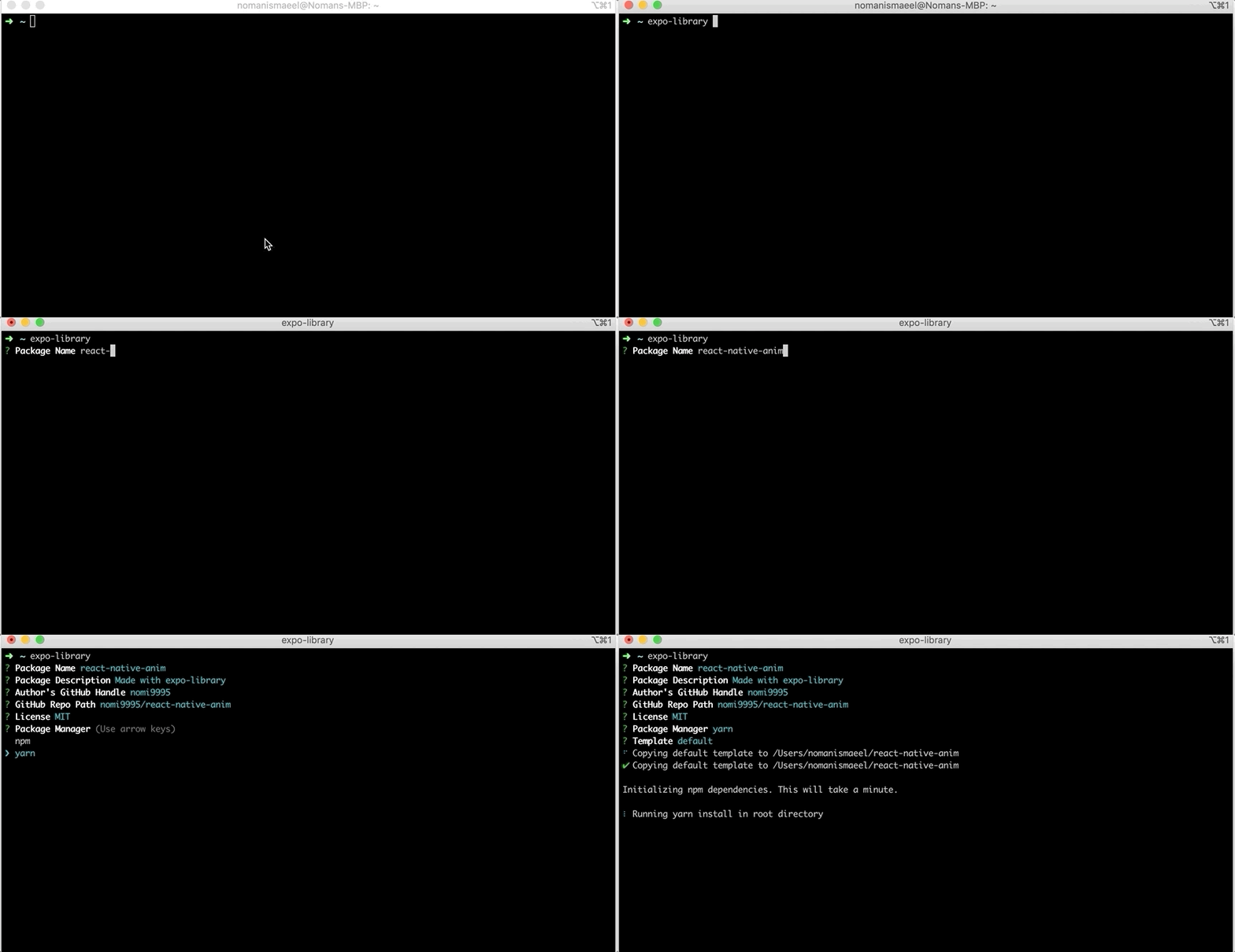
## Intro
## Install globally
This package requires `node >= 10`.
install `expo-library` by
```bash
npm install -g expo-library
```
## Creating a New Library
```bash
expo-library
```
Answer some basic prompts about your module, and then the CLI will perform the following steps:
- copy over the template
- install dependencies via yarn or npm
- link packages together for local development
- initialize local git repo
## Development
Local development is broken into two parts (ideally using two tabs).
First, go to `root` dir of newly create library and edit component in index.js/ts file.
Second, go to `example/` dir and run metro bundle by
```bash
cd example
npm start # runs your expo app bundler
```
Now, anytime you make a change to your library in `index.js` or to the example app's `example/App.js` will fresh refresh component in example.

#### Publishing to npm
```bash
npm publish
```
Make sure that any npm modules you want as peer dependencies are properly marked as `peerDependencies` in `package.json`.
## Contributing
See the [Contributing page](CONTRIBUTING.md).
## Contributors ✨
Thanks goes to these wonderful people ([emoji key](https://allcontributors.org/docs/en/emoji-key)):
## License
Copyright (c) 2020 Nomi9995. Licensed under the MIT license.
