https://github.com/numat/alicat
Python driver and command line tool for Alicat mass flow controllers.
https://github.com/numat/alicat
flow-control flow-controller python
Last synced: 6 months ago
JSON representation
Python driver and command line tool for Alicat mass flow controllers.
- Host: GitHub
- URL: https://github.com/numat/alicat
- Owner: numat
- License: gpl-2.0
- Created: 2015-03-12T01:26:57.000Z (over 11 years ago)
- Default Branch: master
- Last Pushed: 2026-01-01T09:04:56.000Z (6 months ago)
- Last Synced: 2026-01-06T05:27:36.453Z (6 months ago)
- Topics: flow-control, flow-controller, python
- Language: Python
- Homepage:
- Size: 179 KB
- Stars: 26
- Watchers: 9
- Forks: 37
- Open Issues: 10
-
Metadata Files:
- Readme: README.md
- License: LICENSE
Awesome Lists containing this project
README
alicat
======
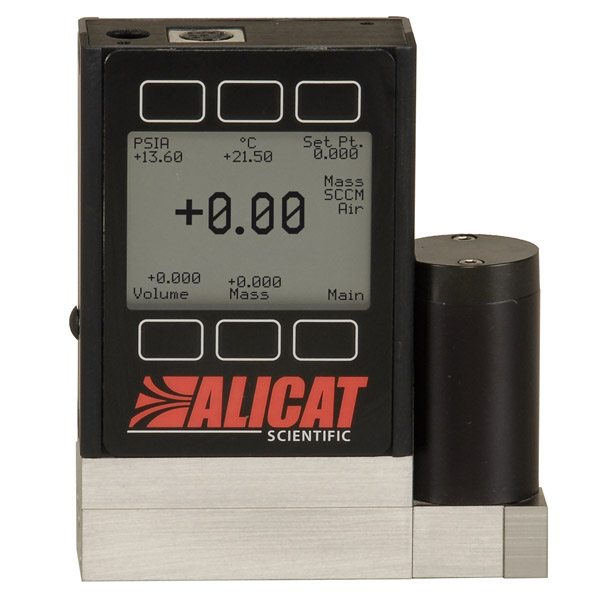
TCP/Serial driver and command line tool for
[Alicat mass flow controllers](http://www.alicat.com/products/mass-flow-meters-and-controllers/mass-flow-controllers/).
*If you are using Analyt-MTC flow controllers, go to [this repository](https://github.com/schlenzmeister/AnalytMTC/wiki) for more info.*
Example Connections
===================
| Type | Usage |
| --- | --- |
| The standard [DB9 cable](http://www.alicat.com/wpinstall/wp-content/uploads/2013/07/MD8DB9.jpg) connected directly to a computer (unix: `/dev/ttyS0`, windows: `COM1`). | Good with older computers that still have the connector. |
| The cable connected to a computer through a [USB converter](https://www.amazon.com/gp/product/B0007T27H8) (unix: `/dev/ttyUSB0`, windows: `COM1`). | Good for newer computers and maker boards such as Raspberry Pis. |
| Multiple cables connected to one port via a [splitter](https://www.amazon.com/gp/product/B007F2E188) and Alicat's addressing (`A`-`Z`). | Good when number of ports is limited. |
| Cables routed through a [TCP device server](https://www.usconverters.com/serial-rs232-ethernet-converter) (`192.168.1.100:23`).
Installation
============
```
pip install alicat
```
Usage
=====
## Command Line
For basic tasks, this driver includes a command-line interface. Read the help
for more.
```
alicat --help
```
## Python
This uses Python ≥3.5's async/await syntax to asynchronously communicate with an Alicat. For example:
```python
import asyncio
from alicat import FlowController
async def get():
async with FlowController('ip-address:port') as flow_controller:
print(await flow_controller.get())
asyncio.run(get())
```
If the flow controller is communicating on the specified port, this should
return a dictionary of the form:
```python
{
'setpoint': 0.0, # Setpoint, either mass flow rate or pressure
'control_point': 'flow', # Either 'flow' or 'pressure'
'gas': 'Air', # Can be any option in `flow_controller.gases`
'mass_flow': 0.0, # Mass flow (in units specified at time of purchase)
'pressure': 25.46, # Pressure (normally in psia)
'temperature': 23.62, # Temperature (normally in C)
'total_flow': 0.0, # Optional. If totalizer function purchased, will be included
'volumetric_flow': 0.0 # Volumetric flow (in units specified at time of purchase)
}
```
On flow controllers, you can set the flow or pressure setpoints.
```python
await flow_controller.set_flow_rate(1.0)
await flow_controller.set_pressure(20)
```
### Gas Type
You can set the gas type by name or by index. For more on setting by index, see the gas table in your Alicat's manual.
```python
await flow_controller.set_gas('N2')
await flow_controller.set_gas(8)
```
For firmware 5v and greater, you can create and set gas mixes. Mixes can contain up to five gases and are stored in gas indices 236-255.
```python
await flow_controller.create_mix(mix_no=236, name="Mix1", gases={'N2': 50, 'O2': 30, 'CO2': 20})
await flow_controller.set_gas(236)
await flow_controller.delete_mix(236)
```
### PID Parameters
For flow controllers, read and write PID loop settings for device tuning.
```python
await flow_controller.set_pid(p=4000, i=4000, d=10, loop_type='PD2I')
print(await flow_controller.get_pid())
{
'loop_type': 'PD2I',
'P': '4000',
'I': '4000',
'D': '10',
}
```
### Other Features
Additional features include override commands to increase device functionality.
```python
await flow_controller.lock() # Lock the front display.
await flow_controller.unlock() # Unlock the front display.
await flow_controller.hold() # Hold the valve in its current position.
await flow_controller.cancel_hold() # Cancel the valve hold.
await flow_controller.tare_volumetric() # Tare volumetric flow.
await flow_controller.tare_pressure() # Tare pressure.
await flow_controller.reset_totalizer() # Reset totalizer, if totalizer functionality included.
```
### Addressing
You can have multiple controllers on the same port by using Alicat's `A`-`Z` addresses
and an [RS-232 splitter](https://www.amazon.com/gp/product/B007F2E188).
```python
flow_controller_1 = FlowController(address='A')
flow_controller_2 = FlowController(address='B')
await flow_controller_1.set_flow_rate(1.0)
await flow_controller_2.set_flow_rate(0.5)
await flow_controller_1.close() # /dev/ttyUSB0 is still open!
await flow_controller_2.close()
```
### Breaking changes
`0.5.0`
- Support only `asyncio`. The last version with synchronous code was `0.4.1`.
- Rename `address`/`-a` to `unit`/`-u` to match Alicat's documentation
- Rename `-u` to `-ul` (for `--unlock`)
`0.4.1`
Remove TCP support. Use `pip install alicat==0.3.1` if needed